

A purchase request arrives by email, someone types it into Excel, asks the manager by phone, enters the order by hand after approval and passes the invoice to accounting separately. Each step is small; but with six hundred requests a month they add up to a full-time job for a team, and every manual transfer is a chance for error. Business process automation is the running of such rule-based, repetitive steps by software, with no human hands on them.
In this guide we explain what business process automation is, which problems it solves, how to decide which processes to automate first, the six-step method, examples, the tools used, how to calculate savings and payback, and how to handle exceptions and errors. Example figures are illustrative.
What Is Business Process Automation?
Business process automation is software running the steps a piece of work goes through from start to finish, according to rules. A person steps in only at the point where a decision is needed; data transfer, reminders, routing and record keeping are done automatically.
A workflow system defines the order of the steps and who steps in when. Robotic process automation, by contrast, imitates the on-screen clicks of a person using software. This article focuses on the workflow and system-integration approach, that is, building the process itself in software.
We recommend reading: Custom software development: workflow and approval systems
Which Problems Does Business Process Automation Solve?
Four problems are the most common: manual data entry, approvals that cannot be tracked, disconnected systems and durations that cannot be measured. Automation answers each of them directly.
| Problem | When run by hand | With automation |
|---|---|---|
| Manual data entry | The same data is typed into several places; errors and lost time follow | Data is entered once and flows to the relevant systems on its own |
| Untracked approval | A request waits on someone's desk or in their email | The request lands with the next approver and a waiting alert is raised |
| Disconnected systems | ERP, accounting and warehouse do not see each other | Systems work integrated and the process moves in one flow |
| Unmeasured duration | No one knows how long a request takes | The time of each step is recorded and reported |
Which Processes Should Be Automated First?
Processes that are frequent, rule-based, pass through many hands and are prone to errors are the best candidates. Instead of trying to automate everything at once, score them.
Example (illustrative):
| Process | Frequency | Duration | Error risk | Score |
|---|---|---|---|---|
| Purchase request and approval | 5 | 4 | 4 | 80 |
| Invoice entry | 5 | 3 | 5 | 75 |
| Monthly report preparation | 3 | 4 | 2 | 24 |
| Leave request | 4 | 2 | 2 | 16 |
The purchase request is first with 5 × 4 × 4 = 80 points, and invoice entry is second with 5 × 3 × 5 = 75. Although leave requests are frequent, they are short and low in error risk, so they fall to the end of the list.
How Is Business Process Automation Done? A Six-Step Method
It is done in six steps: pick the process, map its current state, simplify it, write the rules, build it and measure the result. The step most often skipped is the third: simplification.
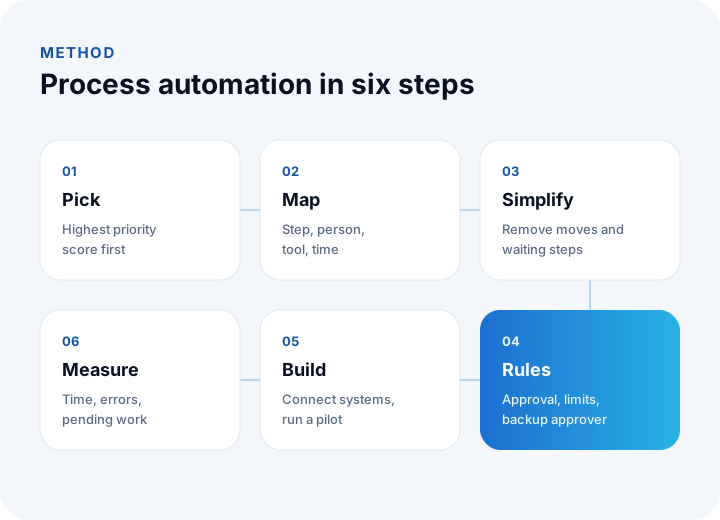
- Pick the process: Start with the process that has the highest priority score.
- Map its current state: Write down every step, who does it, in which tool and how long it takes.
- Simplify: Remove unnecessary steps, repetition and waiting points.
- Write the rules: Who approves what, under which condition? Amount limits, backup approvers and timeout rules are defined.
- Build: Set the process up in software, integrate it with the relevant systems and run a pilot with a small group.
- Measure: Compare time, errors and pending work with the figures from before automation.
How Is a Process Map Drawn?
A process map is a simple table that shows each step of a job, who does it, in which tool and how long it takes. Draw the map together with the people who actually do the work; the flow management describes and the flow on the floor are often different.
| Step | Who does it? | In which tool? | Time |
|---|---|---|---|
| Receives the request and types it into Excel | Purchasing specialist | Email, Excel | 3 min |
| Asks the manager for approval | Purchasing specialist | Phone | 2 min, waiting separate |
| Enters the order | Purchasing specialist | ERP | 4 min |
| Sends it to the supplier | Purchasing specialist | 2 min | |
| Notifies accounting | Purchasing specialist | 1 min |
In this example the table shows there is more moving and waiting than actual work: the total handling time is 12 minutes, but the wait for approval is measured in days. The first gain of automation is the removal of exactly these moving steps and waiting points.
Why Should the Process Be Simplified First?
Automating a broken process speeds up the breakage. In a purchase request example the manual flow has six steps, and some of them only move information from one place to another.
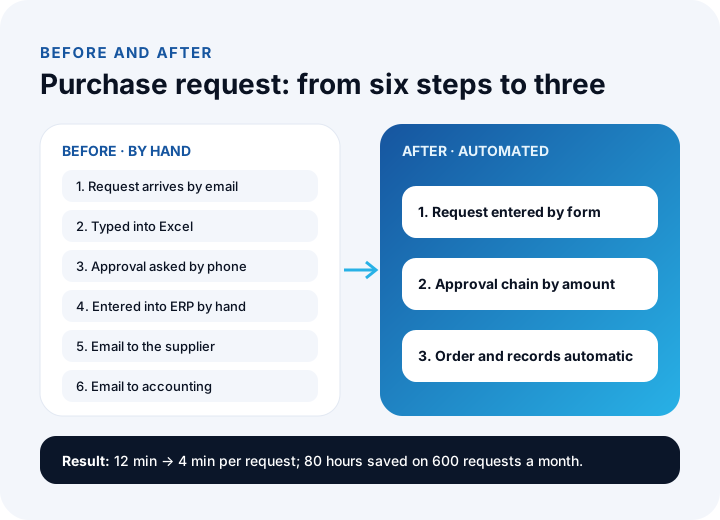
In the manual flow the request arrives by email, is typed into Excel, approval is asked by phone, the order is entered by hand, passed to the supplier and reported to accounting. In the simplified flow, the request is entered by form, lands on approval automatically, and after approval the order and accounting entry appear on their own. Because the steps that only move information disappear, time falls and the chance for error shrinks.
What Are Examples of Business Process Automation?
Automation can be applied in every department; the most common areas are purchasing, finance, sales and human resources.
| Process | Before | With automation |
|---|---|---|
| Purchase request | Approval by email, Excel and phone | Form, approval chain by amount, automatic order |
| Invoice processing | Incoming invoices are entered and matched by hand | The invoice lands in the system and matches the order and waybill |
| Order and shipping | Order entered by hand, shipment opened separately | The order triggers stock, shipping and invoice on its own |
| Collection reminders | Overdue items are tracked by hand | Automatic reminders and tasks by due date |
| Expenses and leave | Paper forms and email | Mobile form, manager approval, automatic record |
| Customer request | The request lands in a shared inbox | Routed to the right team by topic, with time tracking |
We recommend reading: What is API integration? A guide to connecting your systems
What Tools Are Used for Process Automation?
There are four approaches and they are often used together. The more unique the process is and the more systems it connects, the more custom software and integration come to the fore.
| Approach | Strength | Limit |
|---|---|---|
| Ready-made workflow tools | Simple approval and form processes are set up quickly | Struggle with complex rules and deep integration |
| Robotic process automation | Useful for old systems that have an interface but no API | Can break when the screen changes; fragile |
| Integration layer | Moves data between systems reliably | Does not provide process and approval logic by itself |
| Custom software | The process, approvals and rules fit your business exactly | Needs an investment in analysis and development |
We explained when custom software makes sense in our what is custom software guide.
How Are the Savings and Payback of Automation Calculated?
Savings are the number of transactions times the time saved per transaction times the hourly cost. Payback time is found by dividing the investment by the monthly saving.
Example (illustrative): there are 600 purchase requests a month; a manual transaction takes 12 minutes and an automated one 4 minutes, so 8 minutes are saved per request. The monthly saving is 600 × 8 ÷ 60 = 80 hours. At an hourly cost of ₺300, that is 80 × 300 = ₺24,000 a month. If the automation investment is ₺288,000, payback is 288,000 ÷ 24,000 = 12 months.
This calculation counts only time; gains such as fewer errors, faster approval and better record quality are added separately. Take the time from measurements made before automation, not from estimates.
Which Indicators Are Tracked After Automation?
The success of automation is tracked with a few indicators, and each is compared with its value before automation:
- Handling time: The average time from a request opening to its completion.
- Error rate: The share of transactions that need correction in total transactions.
- Number of pending items: The number of records waiting for approval or processing.
- Automatic completion rate: The share of transactions finished without human intervention; for example, if 540 of 600 requests complete automatically, 540 ÷ 600 = 90%.
Tracking these indicators weekly both shows that the automation holds and points to where the next improvement should be.
How Are Exceptions and Errors Managed?
No process follows the rules a hundred percent of the time; a good automation sends the exception to a person. A backup approver is defined in the approval chain, an alert goes out on timeout, and a request that breaks the rules lands in an exception queue.
- Human approval: Transactions above a certain amount or out of the ordinary are tied to a human decision.
- Exception queue: Records that cannot be processed automatically are collected in a list and assigned to an owner.
- Retries: When an external system does not answer for a while, the transaction is not lost; it waits and is retried.
- Logging: Who approved or changed what, and when, is recorded.
How Are Access, Security and Personal Data Handled in Automation?
Because automation moves data from system to system, authorization and logging matter. Each step should reach only the data it needs, approval authority should be tied to roles, and all actions should be written to an audit log. In processes that contain personal data (leave, personnel records, customer requests), KVKK (Turkey's personal data protection law) obligations should be settled with your legal advisor.
What Mistakes Are Common in Process Automation?
- Automating without simplifying: A broken flow gets faster, not better.
- Trying to do everything at once: Starting with one process by priority score and measuring is safer.
- Leaving users out of the process: If you go live before the people who live the process have seen the flow, adoption is hard.
- Forgetting the exception: If there is no route for a request that breaks the rules, the automation jams.
- Not measuring: An automation with no before and after figures leaves its benefit debatable.
We recommend reading: What Is Digital Transformation? A Maturity, Roadmap and Payback Guide for Small and Mid-Sized Businesses
We recommend reading: How to choose a CRM: criteria, scoring, cost and demo guide
We recommend reading: What is procurement software? Process, approval matrix, quote scoring and three-way matching guide
We recommend reading: What is help desk software? Ticket life cycle, priority matrix, SLA compliance and team sizing guide
We recommend reading: How to move from Excel to software: signs, cost and data migration
We recommend reading: What is shipment planning software? Routes, vehicle load and proof of delivery
We recommend reading: What is low-code? Limits, risks and cost of low-code development
Recommended reading: What is a customer portal? Self-service scope, security and payback guide
Recommended reading: What Is Role-Based Access Control (RBAC)?
Business Process Automation with İnovabil
At İnovabil we build request, approval and workflow systems as custom software around roles and permissions. We start a project with a process map and simplification, write the rules together with you, and then connect the process to your systems such as ERP, accounting, e-invoice and shipping.
We built the system that manages purchasing processes for İZBAN, the CRM and purchasing systems for Avcılar İnşaat and wholesale order intake and management for Karyak. Describe the process you want to automate in a few sentences, and we will first send you the process map and our approach in writing.
We recommend reading: Our software development process: step by step from analysis to release
Frequently Asked Questions
What is business process automation, in short?
Business process automation is the running of rule-based, repetitive work steps by software, with no human hands on them. A person steps in only at the point where a decision is needed.
Which process should be automated first?
Start with processes that are frequent, pass through many hands, are prone to errors and rule-based. Scoring frequency, duration and error risk from 1 to 5 and multiplying gives an objective priority order.
Are process automation and a workflow system the same thing?
A workflow system defines the order of steps and who steps in when, and it is the foundation of process automation. Process automation goes beyond that to cover data movement between systems and rule-based decisions.
How is the payback of process automation calculated?
Monthly saving is found by multiplying the number of transactions by the time saved and the hourly cost; the investment is divided by that saving to give the payback time. In the example calculation, a ₺288,000 investment pays back in 12 months with a saving of ₺24,000 a month.
Does automation remove errors completely?
It greatly reduces errors caused by moving data by hand, but exceptions that break the rules will always appear. A good automation puts them in an exception queue and ties them to a human decision.