

Accepting card payments is more than adding a "Pay" button to your site. The customer is sent to their bank's verification page and returns; the connection can drop on the way back, they can click twice, or the card can be charged while your order never gets created. Payment gateway integration (virtual POS integration) means designing for each of these uncertainties up front, so the payment and the order record always end in the same outcome. This guide covers the technical design of that integration.
For the payment page experience, see our checkout guide; for matching payments afterwards, see our payment reconciliation guide. Here we focus on taking the payment itself. All figures are illustrative: they are not any provider's fees, rates or an industry average. We deliberately do not mention commissions or rates.
How Do a Virtual POS, a Payment Institution and a Bank Relate?
A virtual POS is the online checkout counter for card payments. Behind it there are usually three parties, and your integration talks only to the interface the provider exposes, not to all of them.
| Party | Role | What it means for your integration |
|---|---|---|
| The customer's bank | Verifies the card, runs 3D verification, grants or declines authorization | The customer is redirected to a verification page |
| Payment provider (a bank's virtual POS or a payment institution) | Receives the transaction, talks to the banks, reports the result to you | The interface you call; your keys and test environment live here |
| You (the merchant) | Report the order and amount, verify the result, confirm the order | State machine, verification and duplicate protection are your responsibility |
Choosing a provider, contract terms, commissions and regulatory obligations are outside the scope of this article; take those to your provider and legal counsel. We cover how to build a correct integration once a provider is chosen.
Why Should Card Data Never Reach Your Server?
The card number and security code should be entered in the provider's secure area (a hosted payment page or secure input fields), and your server should see only the result and a transaction ID. This approach reduces both the risk and the compliance burden.
- Redirect or embedded secure fields: Card details go from the customer's browser straight to the provider.
- Saved cards: You store the token the provider issues, not the card.
- Logs: Card numbers and security codes are never written to any log or email.
The scope of card-data standards and compliance obligations is something to take up with your provider and a specialist in that field; we only state the general principle here. For how to store keys and secrets, see our secrets management guide.
How Do You Design the Payment State Machine?
Every payment attempt should move one way through defined states; keep a status record rather than a "paid" flag. An order is confirmed only when the payment reaches "captured".
| State | Meaning | Possible next states |
|---|---|---|
| Initiated | Attempt opened, identity generated | Awaiting verification, failed |
| Awaiting verification | Customer is on the 3D page | Authorized, failed, unknown |
| Authorized | Amount is held | Captured, voided |
| Captured | Funds taken | Refunded, partially refunded |
| Failed | Declined or not verified | New attempt (new identity) |
| Voided | Reversed before capture | Final state |
| Refunded / partially refunded | All or part of the captured amount returned | Refund the remaining amount |
There is no way back: a payment in "captured" cannot become "failed" again. If a provider notification breaks this order (for example, it arrives as failed after it was captured), the record is not changed; it goes to a review queue.
How Do 3D Verification Redirects and the Return URL Work?
In 3D verification the customer leaves your site for the bank's page, enters a code, and is redirected back to a return URL (callback) you defined. The fragile point of the flow is the return.
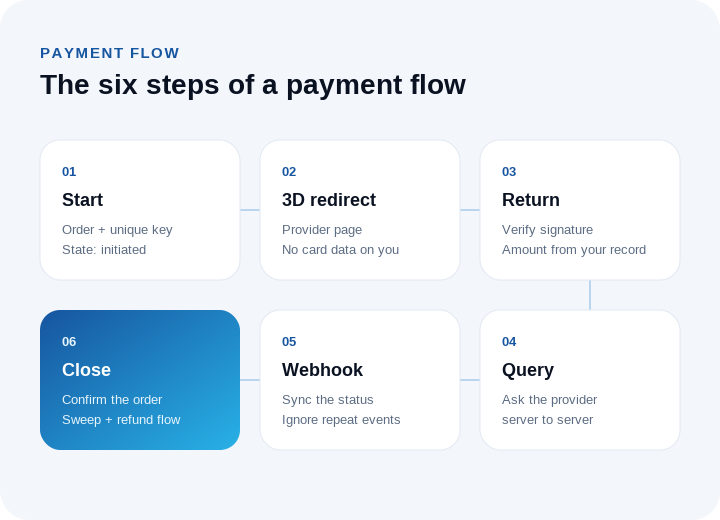
- You start the payment: the order number, amount, currency and a unique ID you generated go to the provider.
- The provider returns a verification URL and the customer is redirected there.
- The customer completes verification and the browser arrives at your return URL with data.
- Your server verifies the result (next section) and updates the state.
The return comes only through the customer's browser; if the connection drops, the tab closes or a slow network times out, it may never arrive. That is why the return cannot be the single source of truth.
Why Can't You Trust the Return Data, and How Do You Verify the Result?
Data arriving at the return URL passes through the browser, so it can be altered or forged. Verification works in three layers.
- Signature (hash) verification: The provider signs the notification fields with a secret key. You recompute the signature from the same fields and compare. Use a constant-time comparison and reject any notification whose signature does not match.
- Comparison with your own record: The amount, currency and order ID that arrive must match your stored payment attempt exactly. Never treat the amount in the return as the truth.
- Transaction query: Before confirming the order, ask the provider server-to-server, "what is the status of this transaction?" The decision follows that answer.
Keys live on the server and never in the browser; for the general layers, see our API security guide. If notifications carry a timestamp, reject anything outside a short tolerance (for example 5 minutes), so replaying an old notification has no effect.
How Do You Prevent Double Charges?
A double charge is the same cart being paid twice; it most often comes from double clicks, the back button and retries. The fix is to give every payment attempt a single duplicate-protection key (idempotency key): a second request arriving with the same key does not open a new payment, it returns the result of the first. The key is built from the order number and the attempt sequence.
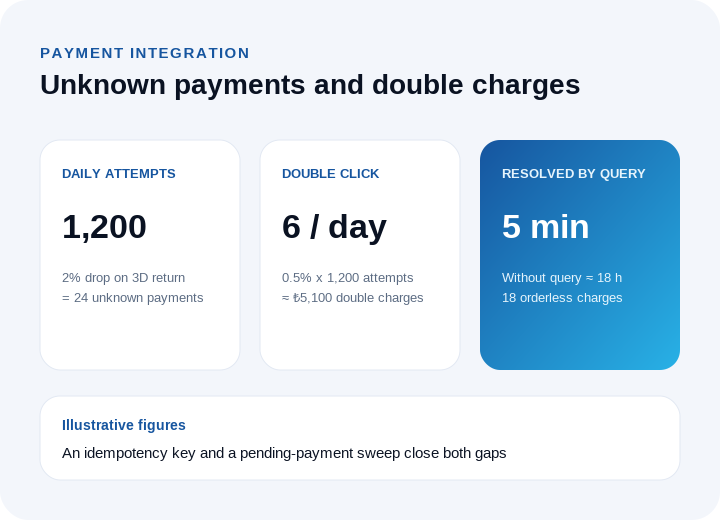
Take an illustrative store with 1,200 payment attempts a day where 0.5% of users press the button twice: 1,200 × 0.005 = 6 attempts. If an unprotected system counts those 6 as separate payments and the average cart is ₺850, the daily double-charge amount is 6 × ₺850 = ₺5,100; that is 180 double charges a month and ₺153,000 to be refunded. With the key, that number drops to zero.
- The key is stored with the order and the attempt; a request with the same key returns the existing record.
- In the interface, the button is disabled on the first click, but protection is not left to the interface alone; the real rule lives on the server.
- If the customer retries after a failed payment, a new attempt sequence and a new key are generated.
How Do You Resolve Unknown Outcomes and Pending Payments?
An unknown outcome is when the customer completed the 3D page but you never saw the result. Suppose, illustratively, 2% of 3D returns lose their connection: 1,200 × 0.02 = 24 unknown payments a day. Illustratively, in 18 of them the money was actually taken and in 6 the transaction failed.
In a system without queries, those 18 customers have paid but have no order: 18 × ₺850 = ₺15,300 a day in "paid, no order" sales piles up, is noticed the next day from the bank movement, and the customer calls support. The solution is a job that sweeps pending payments.
| Approach | Time to close an unknown payment | Result |
|---|---|---|
| Return URL only | Never closes; about 18 hours via next-day reconciliation | 18 orderless charges a day |
| Return + webhook | Usually a few seconds; stays open if the notification is lost | Remaining gaps still in the queue |
| Return + webhook + pending-payment sweep | At most 5 min plus one query round | All bound to a definite outcome by query |
The sweep runs every 5 minutes (288 runs a day) and queries only records that have been in "awaiting verification" or "authorized" for a set time; that is roughly 24 records a few times, not all 1,200 transactions. If the result is "captured", the order is confirmed; if "failed", a retry is offered. Records still unknown after the time limit go to human review.
How Do You Sync Status with Webhooks?
A webhook is the provider telling you server-to-server when a status changes, and because it does not depend on the browser it is a more reliable extra channel than the return URL. We explain the mechanism in our webhook guide; the payment-specific rules are these.
- Fast response: Receive, store, return 2xx; leave the heavy work to a queue (our message queue guide).
- Signature and amount check: The same verification as on the return; an unsigned notification is not processed.
- Duplicate protection: The same event can arrive twice; a repeat is ignored using the event ID, or the transaction ID and status pair.
- No ordering guarantee: A "refund" notification can arrive before the "captured" one; the state machine protects the order itself and sends conflicting notifications to review.
How Do Installment Options and Card Information Lookup Work?
To show installment options, providers may expose an interface that, based on the first digits of the card (the BIN), tells you which installment options apply. As the customer types the first digits, the options appear; the full card number is not sent to your server at this stage.
An installment example: a ₺1,200 cart split into 3 installments gives ₺1,200 ÷ 3 = ₺400 per installment; in an interest-free campaign the total does not change. With interest, the total comes from the provider and you store it with the order; the interest rate varies by provider and bank, so we do not state one here. The key rule: the total shown on screen must equal the total sent to the provider; if it differs, the payment should be rejected as an amount mismatch.
How Do You Build Refund, Void and Partial Refund Flows?
A void releases an amount held before capture (at the authorization stage); a refund returns all or part of an amount already captured. Which one is possible at which stage depends on the provider, so confirm it in the integration documentation.
- Every refund request also carries a duplicate-protection key; a double click cannot refund twice.
- The remaining refundable amount is always calculated: amount paid minus earlier refunds.
- Refunds open only for payments in "captured" or "partially refunded".
Example: on a ₺1,200 order a ₺400 partial refund was made; the remaining refundable amount is ₺1,200 − ₺400 = ₺800. If a ₺900 refund is then requested, the system rejects it without asking the provider; requests up to ₺800 pass. After the first refund the state is "partially refunded", and once the rest is refunded it becomes "refunded". For refund documents and tax records, consult your financial advisor (certified accountant).
How Do You Win Back a Customer After a Failed Payment?
Keeping the cart and details after a failed payment is the main way to persuade the customer to try again. Illustratively, 10% of 1,200 daily attempts, that is 120, fail: 50 are wrong or abandoned 3D verifications, 40 are insufficient limits, and 30 are bank declines or technical errors (50 + 40 + 30 = 120).
The error message should depend on the cause ("Verification was not completed, please try again", "The card limit looks insufficient, you can try another card"), the cart should be preserved, the payment method choice should be shown again, and the new attempt should open under a new key. Illustratively, with this setup recovery of failed attempts rises from 20% to 30%: 120 × 0.20 = 24 orders become 120 × 0.30 = 36 orders, 12 extra orders a day.
What Is the Test and Go-Live Checklist?
Before going live, run 24 scenarios across six headings in the test environment. The test environment uses only the test cards and test keys the provider supplies; real card data never enters it.
| Heading | Scenarios (4 each) |
|---|---|
| Successful payment | Single payment, installments, new card, saved-card token |
| Failed payment | Insufficient limit, invalid card, bank decline, failed 3D verification |
| 3D and return | Normal return, tab closed on return, notification with a broken signature, notification with a changed amount |
| Duplicate protection | Double click, back button, second request with the same key, the same webhook arriving twice |
| Refund and void | Full refund, partial refund, over-limit refund rejected, authorization void |
| Uncertainty and sweep | Lost webhook, provider timeout, pending-payment sweep, out-of-order notification |
At go-live, check that the keys were switched, that logs contain no card data, that alerts (a steadily growing pending-payment count, the webhook error rate) are on, and that you started with a low-value real transaction and tested its refund. For configuration across environments, see our environments guide.
How Do You Calculate the Payback of a Payment Integration?
Let the investment be an illustrative ₺360,000 for the integration, state machine, sweep job, testing and retry interface. Monthly gain has three items (30 days):
- Effort on orderless charges: 18 events a day × 15 min = 270 min; 135 hours a month × ₺300 = ₺40,500. After the sweep, 10% of events stay manual: 1.8 × 15 = 27 min a day, 13.5 hours a month × ₺300 = ₺4,050. Saving ₺40,500 − ₺4,050 = ₺36,450.
- Effort on double charges: 180 events a month × 10 min = 30 hours × ₺300 = ₺9,000.
- Recovered orders: 12 extra orders a day × 30 = 360 orders × ₺850 = ₺306,000 revenue; at a 25% contribution margin, ₺76,500.
The total is ₺36,450 + ₺9,000 + ₺76,500 = ₺121,950. Subtracting ₺12,000 a month for monitoring and maintenance gives a net ₺109,950. Payback: ₺360,000 ÷ ₺109,950 ≈ 3.3 months. If the gains halve (₺60,975 − ₺12,000 = ₺48,975), the period is ₺360,000 ÷ ₺48,975 ≈ 7.4 months. Plug in your own attempt volume, cart value and failure rate.
What Mistakes Are Common in Payment Integration?
- Confirming the order from the return URL: Confirming without querying the provider leaves the door open to forged or incomplete notifications.
- Reading the amount from the return: The amount always comes from your own record.
- Skipping duplicate protection: Double clicks and repeated webhooks create double operations.
- Treating an unknown state as failed: The money may have been taken; query first.
- Writing card data to logs: Not even for easier debugging.
We recommend reading: How to integrate e-commerce with ERP
We recommend reading: What is API integration?
We recommend reading: How to Prevent E-Commerce Order Fraud: Risk Scoring, Threshold Selection and Manual Review
Integration and Custom Software with İnovabil
At İnovabil our focus is building custom software from scratch for your company: custom software, ERP, CRM, e-commerce, web, mobile and integration. Our integration service covers making your systems talk to each other and to external services; for connections to external services, including payments, state management, verification and failure scenarios are written down together during requirements. You handle the payment provider, contract and commission matters with your own provider; we design the system side. We do not offer a payment service or payment product.
We have built CRM, purchasing and mobile for Avcılar İnşaat; a purchasing system for İZBAN; a prepaid cargo system for Kredili Kargo; logistics and shipment planning with wholesale order management for Karyak; and warehouse management with a complaint and support management system for Sleepy. Send a short summary of your current payment flow and the uncertainties you see; let's work out the state machine and test scenarios together.
We recommend reading: Our integration services
Frequently Asked Questions
What is payment gateway integration?
It is the technical connection that lets your site or app take card payments through the provider's interface. It covers starting the payment, the 3D verification redirect, verifying the result, refunds and status sync.
Can I confirm the order from the result at the return URL?
No. The return comes through the browser, so it can be altered or never arrive. Verify the signature and amount against your own record, and query the result from the provider server-side before confirming the order.
How do you prevent double charges?
Give every payment attempt a unique duplicate-protection key built from the order number and attempt sequence; a second request with the same key opens no new payment and returns the first one's result. For webhook notifications, also ignore repeats by event ID.
What if the payment was made but no order exists?
Set up a job that sweeps payments pending for a set time and query their status from the provider; if captured, confirm the order, and if failed, offer a retry. Send those that remain unresolved after the time limit to human review.
If card data never reaches my server, are my compliance obligations over?
Keeping card data off your server reduces the risk and scope considerably, but it does not necessarily remove every obligation. Consult your provider and a specialist in the field for the details; this article is not legal or compliance advice.