

An order lands on your online store, but stock and the customer record live in the ERP. Someone keys the order into the ERP by hand, someone else copies stock quantities back to the site at the end of the day, and every price change is made twice. At low volume that is tolerable. As order numbers grow, overselling, duplicate records and the question "why is this order not in the ERP?" become part of the daily routine. Integrating ecommerce with ERP means that orders, stock, prices, customer accounts and invoices flow between your own online store and the ERP according to clear rules, in both directions, and in a way you can monitor.
In this guide we cover which system should own which data, flow directions and sync frequency, how to prevent duplicate orders, how to limit overselling, error handling and reconciliation, the integration options, a rollout plan, and a worked cost and payback calculation. The topic is strictly the link between your own store and your ERP; marketplace channels work under different rules and have a guide of their own. All example figures are representative; recalculate them with your own data.
What Is Ecommerce ERP Integration and When Do You Need It?
Ecommerce ERP integration automatically passes the order created on the site to the ERP, and the stock, price and status information in the ERP back to the site. You need it when you key the same data in twice, when you cancel orders because of stock mismatches, or when order volume exceeds what a team can handle by hand.
Marketplace channels behave differently from your own site; for those, read our marketplace integration guide. This article is about the direct link between the store and the ERP.
We recommend reading: Our ecommerce development service
Which System Should Own Which Data?
Assign one "system of record" to each piece of data; the other system only reads or copies it. This decision shapes every other decision in the integration.
| Data | System of record | What the other system does |
|---|---|---|
| Product code, unit, VAT class | ERP | Store reads it; it does not publish a product that has not been created in the ERP |
| Product copy, images, SEO title | Store (or a product information layer) | ERP only matches by product code |
| Physical stock | ERP (warehouse) | Store reads the sellable quantity |
| List price | ERP | Store reads it and applies its own campaign discounts |
| Order | Store creates it | ERP receives, fulfils and writes the status back |
| Customer account (current account) | ERP | Store maps the customer to the account code |
| Invoice | ERP | Store shows the invoice status and link |
| Shipping tracking number | ERP or the shipping integration | Store shows it to the customer |
If any row can be edited in both systems, the trouble has already started. Managing product copy in a separate layer rather than in the ERP is possible too. For the difference between the customer side and the ERP, see our article on CRM vs ERP differences.
Which Flow Should Run in Which Direction and How Often?
The direction follows the system of record; the frequency follows how quickly the data goes stale. Stock goes stale fast, product copy slowly.
| Flow | Direction | Suggested frequency | Reason |
|---|---|---|---|
| Product card | ERP → store | On change or daily | Changes slowly |
| Stock | ERP → store | Event-based; otherwise every 5–15 min | Limits overselling |
| List price | ERP → store | On change or hourly | A wrong price is a direct loss |
| Order | Store → ERP | Event-based; at most 2 min | The warehouse is waiting |
| Customer account | Store → ERP | With the order | The order needs an account code |
| Order status, tracking no. | ERP → store | Event-based or 15 min | Reduces "where is my order?" tickets |
| Invoice | ERP → store | When the invoice is issued | The customer sees the document |
Event-based sync means the change itself triggers a message; we explained the idea in our webhook guide. Moving only what changed instead of polling everything also cuts the load. Example: 8,000 products, a run every 15 minutes, 96 runs per day. If every run transfers the full stock, 8,000 × 96 = 768,000 rows move. If 2% of products change per run, only 160 rows move: 160 × 96 = 15,360 rows, about 98% less. Finding changed records needs a reliable change timestamp, which is why a full comparison is also run once a week.
How Is an Order Passed to the ERP?
The order flow is a one-way chain from the store to the ERP, verified step by step. Each step records its own success, so if the chain breaks you know exactly where the record stopped.
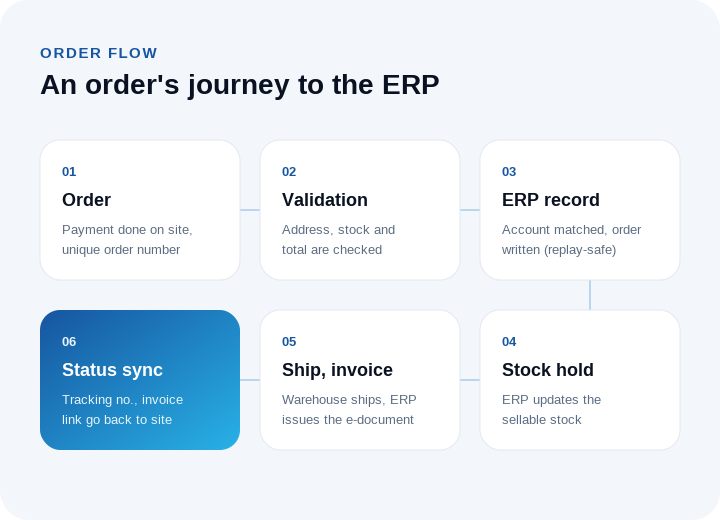
- Order: Once payment completes, the order is saved on the site with a unique order number.
- Validation: Address, product code, total and tax are checked; an incomplete record goes to a correction queue before it reaches the ERP.
- ERP record: The customer is matched to an account code and the order is written to the ERP.
- Stock hold: The ERP reserves stock for the order and updates the sellable quantity.
- Ship and invoice: The warehouse ships, and the ERP produces documents such as the invoice and delivery note.
- Status sync: The tracking number and the invoice link return to the site.
An order has a lifecycle of its own; for the cross-channel picture, see our order management system guide.
How Do You Prevent Duplicate Orders?
You prevent duplicates by designing the write to the ERP so that repeating it gives the same result; this is called replay protection. The key is the unique order number from the site.
The reason is simple: the site sends the order, the ERP writes the record, but the response times out. The site assumes it failed and retries, and the same order is written twice. Representatively, if 1% of 1,800 monthly orders time out, that is 18 retries. At an average order of ₺1,250, an unprotected system lets 18 × ₺1,250 = ₺22,500 of duplicate orders into the ERP. That is 1% of the monthly turnover of ₺2,250,000, and the warehouse tries to pick those orders twice.
The protection rule: when the ERP receives a second record with the same order number, it does not create a new order; it returns the existing one. Retrying becomes safe. You can find the same logic in our API integration guide.
How Do You Avoid Overselling During Stock Sync?
The stock the site shows must be sellable stock, not the physical stock in the ERP. Sellable stock = physical stock − reserved stock − safety stock.
Example: physical stock 120, reserved for open orders 18, safety stock 8, so the site is offered 120 − 18 − 8 = 94 units. Safety stock covers the sales that arrive during the sync delay. The floor is hourly sales rate × sync interval. At 12 units per hour at peak and a 15-minute interval, you need 12 × 15 ÷ 60 = 3 units. With event-based sync and a delay of about 1 minute, 12 × 1 ÷ 60 = 0.2, so at least 1 unit is enough.
Here is how overselling happens: 2 units are left and 3 orders arrive within 15 minutes; if the site still shows 2 from the last sync, it accepts all three and 1 unit is oversold. The safety margin prevents this, and the order should also be re-checked against real stock at the step where the ERP reserves it. In multi-warehouse businesses, which warehouse is exposed to the site is also a source decision and should be written down.
How Do You Set Up the Customer Account, Price and Invoice Flows?
The shared rule of the three flows is that the ERP is the source and the site only matches and displays. Each has its own trap.
- Customer account: If you match customers by name alone, every order opens a new account card. In the representative example, 1,800 orders come from 1,350 distinct customers; correct matching produces 1,350 account cards, careless matching 1,800. The difference is 450 cards, a 33.3% excess. Use the e-mail address or tax number as the key, and write the rule for guest checkout (for example, one retail account rather than a new card every time).
- Price: The ERP provides the list price, the site applies the campaign discount, and the order carries the final net price and discount code back to the ERP. If price updates are manual, a representative 400 changes per month × 2 minutes = 800 minutes, about 13.3 hours; and there is a risk of different prices in two systems. Agree with your financial advisor (certified accountant) how VAT-inclusive and VAT-exclusive display and rounding differences will be handled.
- Invoice: The ERP, or the integrator the ERP connects to, issues the invoice; the site only shows the invoice status and link. For cancellations, returns, corrections and legal limits, consult your financial advisor and the Revenue Administration (GİB) sources; we covered the technical flow in our e-invoice (e-Fatura) integration guide.
How Do You Manage Errors and Reconciliation?
No integration runs without errors; what matters is that errors are visible and caught by daily reconciliation. Every failed record lands in a queue with its reason and an owner; we describe queue management in detail in our integration operations guide.
Reconciliation compares the two systems by count and by amount. A representative month:
| Check | Store | ERP | Difference and meaning |
|---|---|---|---|
| Order count | 1,800 | 1,791 | 9 orders are missing in the ERP |
| Order total | ₺2,250,000 | ₺2,238,750 | ₺11,250 = 9 × ₺1,250 |
| Waiting in the error queue | — | 6 | Cause known, to be corrected |
| Unexplained | — | 3 | 9 − 6 = 3; root cause is investigated |
The match rate is 1,791 ÷ 1,800 = 99.5%; the number that matters is the unexplained gap of 3 orders (0.17%). If you leave reconciliation to month end, finding 9 orders is hard; if you do it daily, with about 60 orders a day you will see roughly 0.3 differences and find the cause the same day.
Which Integration Option Should You Choose?
There are four options and none fits every business. The decision depends on the flexibility you need and how often rules change.
| Option | Setup speed | Flexibility | What to watch |
|---|---|---|---|
| The ERP's ready-made ecommerce connector | Fast | Low | Limited for unique rules |
| Integration platform (middleware) | Medium | Medium | Platform dependency, per-transaction fees |
| Custom integration (via APIs) | Longer | High | Maintenance and monitoring are yours |
| Store designed together with the ERP | Project-based | High | Commitment to a single supplier |
A ready-made connector is quick for standard flows; it hits its limits once you add unique rules such as order validation, multi-warehouse stock or campaign pricing.
How Do You Plan the Rollout?
Do not switch the integration on all at once; split the data direction and the risk into small steps. A ten-week sample plan:
| Week | Phase | Output and gate |
|---|---|---|
| 1–2 | Source and field mapping | Table 1 and the field mapping document approved |
| 3–4 | Product, price and stock (ERP → store) | Values match 100% on 100 sample products |
| 5–6 | Order (store → ERP) | No duplicate records in test orders |
| 7 | Status and invoice write-back | Tracking no. and invoice link return to the site |
| 8–9 | Parallel run | Manual entry compared with integration results |
| 10 | Cutover and close monitoring | Daily reconciliation report, unexplained gap 0 |
Matching existing product and customer data for the first time needs cleaning and trial rounds; our data migration guide covers that step.
What Do Ecommerce ERP Integration Cost and Return?
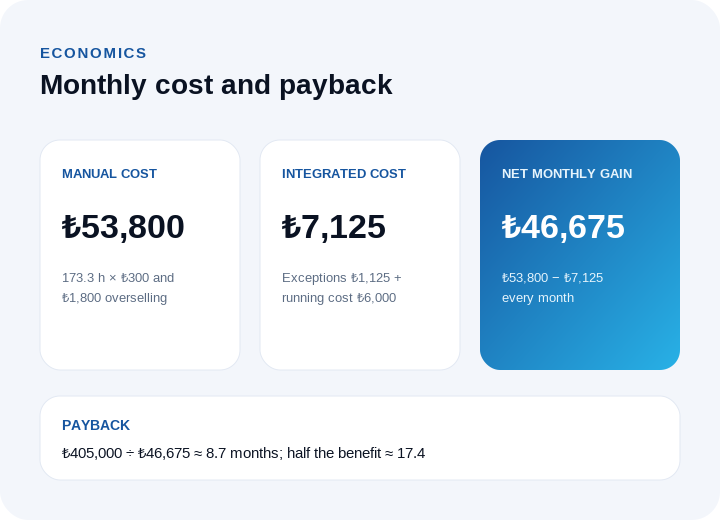
Payback is the investment divided by the monthly net benefit. The assumptions below are representative: 1,800 orders a month, an hourly cost of ₺300 and a development day of ₺9,000.
- Investment: 36 person-days × 1.25 uncertainty margin = 45 person-days × ₺9,000 = ₺405,000.
- Manual workload: order entry 1,800 × 4 min = 7,200 min = 120 h; order errors 1,800 × 2% = 36 orders × 30 min = 18 h; stock updates 1 h a day × 22 days = 22 h; price updates 13.3 h. Total 173.3 h × ₺300 = ₺52,000.
- Overselling loss: 12 cancellations a month × ₺150 = ₺1,800.
- Integrated scenario: 15 exceptions a month × 15 min = 3.75 h × ₺300 = ₺1,125; infrastructure and monitoring ₺6,000.
| Item (monthly) | Manual | Integrated |
|---|---|---|
| Labour (173.3 h and 3.75 h) | ₺52,000 | ₺1,125 |
| Overselling loss | ₺1,800 | ₺0 |
| Infrastructure and monitoring | — | ₺6,000 |
| Total | ₺53,800 | ₺7,125 |
Monthly net gain is ₺53,800 − ₺7,125 = ₺46,675; payback is ₺405,000 ÷ ₺46,675 ≈ 8.7 months. If the benefit halves (₺23,337.5), payback stretches to about 17.4 months. If 2 oversold orders remained in the integrated scenario (₺300), net gain would be ₺46,375 and payback would still be about 8.7 months. With a low order volume the labour item shrinks and payback lengthens, so run the calculation with your own volume.
What Are Common Mistakes in Ecommerce ERP Integration?
- Not naming the source: If price can be edited in two places, two different prices will exist.
- Skipping replay protection: A timeout produces duplicate orders on the first busy day.
- Exposing physical stock to the site: Stock shown without deducting reserved and safety stock means overselling.
- Leaving the error queue invisible: Silent loss shows up as a financial gap at month end.
- Matching customers by name: The number of account cards balloons and reports break.
- Switching on all at once: Without a parallel run and gated cutover, errors become visible to customers.
We recommend reading: Our integration services
We recommend reading: Payment Gateway Integration: State Machine, 3D Verification, Duplicate Charges and Payback Guide
Ecommerce and ERP Integration with İnovabil
At İnovabil our focus is building software from scratch, tailored to the company: custom software, ERP, CRM, ecommerce, web, mobile and integration. We recommend first setting out the flow between your site and the ERP in writing, together with the source table, the sync frequency and error handling; then we compare a ready-made connector with a custom integration, with costs side by side.
We have developed logistics and shipment planning with wholesale order management for Karyak; warehouse management and a complaint and support management system for Sleepy; and CRM, purchasing and mobile for Avcılar İnşaat. Send us a short summary of your current systems and order volume, and let us frame the need together. We describe how we work on our process page.
Frequently Asked Questions
What is ecommerce ERP integration?
It is the automatic, rule-based transfer of orders from the site to the ERP and of stock, price, status and invoice information from the ERP back to the site. Each piece of data has one system of record, and the other system reads or copies it.
How often should stock be synced?
Event-based if possible; otherwise every 5–15 minutes. Think of frequency together with sales speed: for a product that sells 12 units an hour, a 15-minute interval needs at least 3 units of safety stock.
What happens if the same order reaches the ERP twice?
If a retry after a timeout is unprotected, a duplicate order is created and the warehouse picks twice. The fix is for the ERP to treat a second record with the same order number as the existing order and return it instead of creating a new one.
Should you choose a ready-made connector or a custom integration?
For standard flows with few special rules, a ready-made connector is fast. If you have unique order validation, multi-warehouse stock or campaign pricing, a custom integration is more flexible. Compare both on cost and maintenance burden.
How long does the integration take to pay for itself?
In the example, with an investment of ₺405,000 and a monthly net gain of ₺46,675, it takes about 8.7 months; if the benefit halves, about 17.4 months. Recalculate with your own order volume and hourly cost.