

Your site took 500 orders in a day. The payment provider's dashboard shows one amount, your order list shows another, and the money that reaches your bank shows a third. Online payment reconciliation is the work of proving that these three records agree at the level of the order, the payment transaction and the bank movement: it finds the gap, writes down the cause and closes the item.
In this guide we cover the three-layer match, the net payout of a batch, the effect of installments and partial refunds, the chargeback process, the types of unmatched items, automatic rules, the end-of-day report and the payback calculation. The topic is not a customer balance or a term receivable; it is the journey of individual payments from the provider to the bank. Example figures are representative; they are not any provider's rate or schedule.
What Is Online Payment Reconciliation?
Online payment reconciliation is the check that an order, the provider's payment transaction and the amount credited to the bank account all describe the same money. The three records are created in different places, at different times and with different amounts, because the provider deducts a commission, subtracts refunds and groups hundreds of transactions into one payout.
If the records are never brought together, the result is silent: a customer whose payment was taken but who has no order, an order shipped before the money arrived, or an amount charged twice surfaces months later. That is why reconciliation is not a month-end closing chore but a daily control. Done daily, the gap is small, the cause is still remembered and the written request reaches the provider in time; done monthly, hundreds of items have piled up. For customer balances see our customer account tracking guide, and for collections on term sales see our B2B collections article.
How Do You Build a Three-Layer Match?
You match the order record, the provider transaction and the bank movement in sequence, and each layer has its own key.
| Layer | Source | Matching key | What it proves |
|---|---|---|---|
| 1. Order ↔ transaction | Order record and provider transaction list | Transaction ID, with order number and amount as fallback | Every order has a payment and every payment has an order |
| 2. Transaction ↔ batch | Provider payout (settlement) report | Batch number | Which payout each transaction joined and whether deductions are right |
| 3. Batch ↔ bank | Account movements | Batch reference, amount, date | The amount credited equals the expected net amount |
The most important decision is to write the transaction ID onto the order at the moment of payment. If the ID has to be guessed later, every match becomes an interpretation. We explained how to make the notification flow that delivers the payment result reliable in our webhook guide.
How Do You Calculate a Batch Payout and Its Net Amount?
The amount that reaches the bank is not the sum of single transactions but the net payout after deductions. The formula is:
net payout = gross − commission − refunds − service deductions
Service deductions cover per-transaction fees and, where they occur, chargeback deductions. Whether the commission is returned on a refunded transaction depends on your provider contract; build the formula to match the rule in your contract. A refund enters the batch of the day it is processed, not the day the order was placed, so one day's refunds may belong to earlier days' orders and the matcher must link a refund to its original transaction.
The second concept is payout delay. A transaction happens today and the money reaches the account N days later on a T+N calendar; the value of N and the weekend rule are in your provider contract, and we give no figure here. The consequence is a balance waiting at the provider: with equal daily nets it is about N × daily net. If N = 2 and the daily net is ₺429,074.70, the waiting balance is ₺858,149.40.
The third case is one bank movement containing several batches. Over a weekend, for example, two batches may merge into one Monday movement: ₺429,074.70 + ₺287,350.40 = ₺716,425.10. The matcher must be able to tie a movement to a combination of batches, not only to a single batch.
How Do Installments, Partial Refunds and Cancellations Match?
Installments, partial refunds and cancellations change the expected amount, so the matcher must know them as rules.
- Installments and the installment surcharge: If a customer pays a ₺1,200 order in three installments with a representative 3% surcharge, they pay ₺1,236. If the order is recorded at ₺1,200, the ₺36 gap is not an error but the surcharge. When the installment count and surcharge are stored as separate order fields, the gap explains itself. How the surcharge is booked is left to your financial advisor (certified accountant).
- Partial refund: If ₺300 and then ₺200 are refunded from a ₺1,200 order, the net left is ₺700. The rule: total refunds cannot exceed the amount paid. A refund above it is an audit alert.
- Cancellation: An order cancelled before payment never creates a transaction; a cancellation after payment turns into a refund. If the two are not coded separately, the "orders without payment" list swells.
For the return process itself, acceptance and stock decisions, see our returns management guide. Ask your financial advisor about the type and timing of the return document.
How Does a Chargeback Show Up in Reconciliation?
A chargeback is a customer disputing a payment through their bank; the amount is deducted from the batch and appears in reconciliation as a separate item.
The loss is not just the amount but also the chargeback fee. In the representative example, ₺1,200 amount + ₺75 fee = ₺1,275; if the product was shipped, its cost is added. Response deadlines, the evidence required and the rules vary by provider and card scheme; for details consult your provider's guide and your legal counsel.
The contribution of reconciliation is this: the moment you see the chargeback in a batch, you collect the order, delivery and communication evidence and submit it before the deadline. With manual tracking, a missed deadline is the most expensive error. For tracing suspicious transaction records, our audit log guide helps.
How Do You Classify Unmatched Items?
Classify an unmatched item by type; each type has a different cause and a different fix.
| Type | Likely cause | Fix |
|---|---|---|
| At provider, no order | Payment taken but notification lost, customer closed the page | Find the order from the basket reference or create it; otherwise refund |
| In orders, no payment | Payment declined or pending | Ask the provider for status; do not ship until paid |
| Amount difference | Installment surcharge, partial refund, currency or rounding | Code the cause; close it if within tolerance |
| Duplicate payment | Double click, back button, retry | Refund the extra transaction; prevent the repeat |
The source of a duplicate payment is usually two transactions opened for the same order. Giving each order a single unique payment key largely prevents this; we described the logic in our concurrency control guide. The matching itself must also guard against double matching: one transaction links to one order and one order to one transaction (refunds aside).
How Do You Set Automatic Matching Rules and Tolerance?
Order the rules by confidence: only the first two close an item automatically.
- Transaction ID: An exact match closes automatically if the amount agrees too.
- Order number and amount: The fallback key when the ID is missing; it also closes automatically.
- Amount and time window: It only produces a suggestion; a person approves. With two orders of the same amount, the risk of a wrong match is high.
Tolerance is for cent rounding: ±₺0.05 per item. If commission is rounded to the cent on each transaction, the batch total can drift. For example, ₺879.90 × 2.2% = ₺19.3578, so ₺19.36; the difference is only ₺0.0022. Because each item carries at most half a cent of rounding, the batch tolerance is bounded at n × ₺0.005: ₺2.505 for 501 transactions. Whether your provider rounds per item or per batch is written in its own documentation; set the rule accordingly. Every manual match is also recorded: who linked which item, and why. A manual match without a reason hides the gap instead of closing it.
How Do You Prepare an End-of-Day Reconciliation Report?
The end-of-day report puts three numbers side by side: the provider's gross, the calculated net payout and the amount seen at the bank. The report for a representative day:
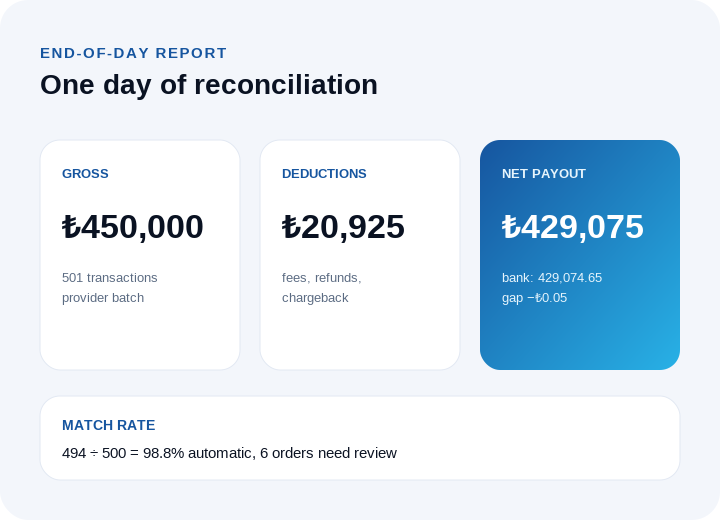
| Item | Amount |
|---|---|
| Gross (501 transactions) | ₺450,000.00 |
| Commission (2.2%) | −₺9,900.00 |
| Refunds (12) | −₺9,600.00 |
| Per-transaction fee (501 × ₺0.30) | −₺150.30 |
| Chargeback deduction (₺1,200 + ₺75) | −₺1,275.00 |
| Expected net payout | ₺429,074.70 |
| Bank movement | ₺429,074.65 |
| Gap | −₺0.05 (within tolerance, closed) |
The bank and the batch agree. The real work is on the order side: the order total is ₺448,910 and the provider gross is ₺450,000, a gap of ₺1,090. Its explanation: 3 transactions with no order ₺2,400 + 2 duplicate payments ₺1,700 + installment surcharge ₺90 − 4 orders without payment ₺3,100 = ₺1,090. The gap is fully distributed across items; the unexplained remainder is zero. The match count: 494 orders closed automatically (494 ÷ 500 = 98.8%); 6 orders (4 unpaid, 2 with an amount difference) and 5 provider transactions went to the manual list.
How Do You Age Open Items?
Track an unclosed item by its age; as it ages, its owner and alert level rise.
| Age | Items | Amount | Rule |
|---|---|---|---|
| 0–1 day | 11 | ₺7,290 | Operations owner handles |
| 2–3 days | 4 | ₺2,150 | Written request to the provider |
| 4–7 days | 2 | ₺1,480 | Notify the manager |
| Over 7 days | 1 | ₺900 | Finance lead decides |
| Total | 18 | ₺11,820 |
The open-item amount is 2.6% of the day's gross (₺11,820 ÷ ₺450,000). The age thresholds are 1, 3 and 7 days; your own limits are set by the provider's response time and chargeback calendar.
How Do You Handle Accounting Entries, Documents and Security?
On the bookkeeping side, a common pattern is to track the provider like a pending account: a sale increases the receivable from the provider, a payout decreases it and the bank increases. When the receivable falls to zero, reconciliation is finished. The chart of accounts, the booking method, the commission invoice and its VAT treatment, and the return document belong to your financial advisor (certified accountant); we covered the e-document link in our e-invoice (e-Fatura) integration guide.
On security the rule is simple: your software never sees or stores the card number; it keeps only the transaction ID and token returned by the provider. The notification signature is verified. Authority on the reconciliation screen is split as well: the person who closes an item should not be the person who starts refunds, so an error or abuse does not accumulate in one pair of hands. For the detail of card data obligations, consult your provider's guide and your legal counsel. Cash-on-delivery reconciliation with a carrier is a separate flow; it is covered briefly in our shipping integration guide.
How Do You Set Up Reconciliation? Six Steps
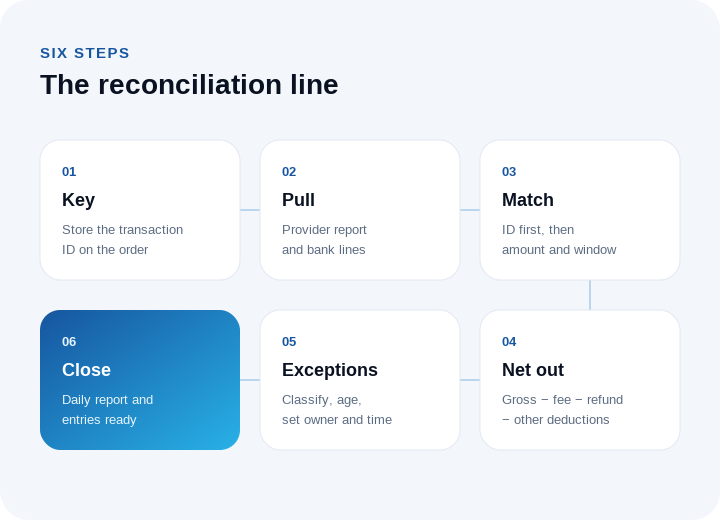
- Key: Write the transaction ID, the installment data and the surcharge onto the order at payment time.
- Pull: Fetch the provider's transaction and payout report and the bank movements at the same hour every day.
- Match: ID first, then order number and amount; leave the third rule to a person.
- Net out: Derive the expected payout with the formula and compare it with the bank within tolerance.
- Exceptions: Classify each item, assign an owner and a deadline, and age it.
- Close: Keep the end-of-day report; have the record of closed items ready for your financial advisor.
How Much Does Reconciliation Pay Back? Metrics and Payback
Track three metrics: the automatic match rate (98.8% in the example), the open-item amount (₺11,820, 2.6% of daily gross) and the average closing time. A closing-time example: if 60 items closed in 1 day, 25 in 2.5 days on average, 12 in 5.5 days and 3 in 10 days, then (60 + 62.5 + 66 + 30) ÷ 100 = 2.2 days.
Payback (representative): manual reconciliation takes 3 hours a day; with automation only 11 exceptions remain, at 6 minutes each, or 66 minutes = 1.1 hours. The gain is (3 − 1.1) × 22 days = 41.8 hours × ₺300 = ₺12,540 per month. Lost collections fall from ₺5,550 a month (two unanswered chargebacks × ₺1,275 = ₺2,550 + ₺3,000 that aged and never closed) to ₺1,200: a ₺4,350 gain. The total is ₺16,890; with ₺3,500 of running cost, the monthly net is ₺13,390. With an investment of ₺216,000, payback is 216,000 ÷ 13,390 ≈ 16.1 months. If there were no lost-collection gain at all, the net would be ₺9,040 and payback about 23.9 months. See the cash effect together with the collection calendar in our cash flow guide.
We recommend reading: How to Prevent Money and Rounding Errors in Software: Cent Differences, Decimal Types and Allocation Guide
We recommend reading: How to Improve Ecommerce Checkout: Step Conversion, Form Fields, Payment Errors and Payback Guide
We recommend reading: How to Manage the Order-to-Cash Process: Cycle Time, Perfect Order Rate and Cash Impact Guide
We recommend reading: How to Speed Up the Month-End Close: Calendar, Checklist and Automatic Reconciliation Guide
We recommend reading: How to Manage Credit Limits and Order Holds: A Credit Hold Process Guide
We recommend reading: What Is POS Integration? Connecting Tills to ERP, Stock and E-Commerce, Day Close and Payback Guide
We recommend reading: Payment Gateway Integration: State Machine, 3D Verification, Duplicate Charges and Payback Guide
We recommend reading: How to Prevent E-Commerce Order Fraud: Risk Scoring, Threshold Selection and Manual Review
Payment and Order Systems with İnovabil
At İnovabil we build bespoke software from scratch: e-commerce, ERP, CRM, integration, web and mobile. Designing the payment provider integration and the reconciliation screen next to the order, recording the transaction ID from the start, and tracking who closed an item with role-based authorization and audit logs are topics we can settle together in requirements analysis.
We built CRM, purchasing and mobile for Avcılar İnşaat; a purchasing system for İZBAN; a prepaid cargo system for Kredili Kargo; and logistics planning with wholesale order management for Karyak. Send a short summary of your payment flow and daily order volume; first let us work out together where the gaps appear in your reconciliation.
We recommend reading: Our software development process: step by step from analysis to launch
Frequently Asked Questions
What is online payment reconciliation?
It is verifying at item level that the order, the payment transaction at the provider and the amount that reached the bank agree. If a gap appears, its cause is found, classified by type and closed.
Why is the amount credited to the bank lower than the gross?
The provider deducts commission, refunds, transaction fees and chargeback deductions. Net payout = gross − commission − refunds − service deductions. In the example, ₺450,000 gross leaves ₺429,074.70 net.
What should I do if the order and the payment do not agree?
Look at the transaction ID first. If the gap is an installment surcharge, a partial refund or rounding, code the cause and close it. For an item at the provider with no order, or an order with no payment, get the status from the provider and do not ship an unpaid order.
How big is the loss in a chargeback?
The amount plus the chargeback fee; if the product was shipped, its cost is added. In the example, ₺1,200 + ₺75 = ₺1,275. Deadlines and rules vary by provider and card scheme; check your provider's guide and your legal counsel.
Can reconciliation be fully automatic?
Most of it can; 98.8% in the example. But exceptions remain and a person must decide: suggestions found by the amount window, lost notifications and chargebacks. The goal is not to reduce exceptions to zero but to close them quickly before they age.