

A new feature passed every test, but within the first hour of going live the payment page started failing: one setting in production was different. This story is about how software environments (development, test, staging, production) are managed. The code can be perfectly correct, but if the place it runs is set up wrongly, the outcome is the same.
In this guide we cover what each environment is for, why staging should resemble production, how code, configuration and secrets are kept apart, how drift between environments is counted, which way data flows, what the number of environments costs, how to calculate the waiting time of a shared environment, and the payback. The example figures are representative; they are not measurements from a real project or an industry average.
What Are Software Environments and Why Are They Separated?
Environments are separate installations of the same software that run for different purposes; the separation exists so that an experiment or a fault in one cannot harm another. Four environments are usually enough for a small team.
| Environment | Purpose | Data | Access | Who deploys? |
|---|---|---|---|---|
| Development | Writing code, quick experiments | Fake, small sample | Developers | The developer |
| Test | Automated and manual testing | Fake or a masked subset | Developers and testers | Automated pipeline |
| Staging | Final rehearsal and acceptance before release | Masked, production-like volume | Narrow group: testers, business owners | Automated pipeline, with approval |
| Production | Real users and real business | Real | Narrowest group, logged | Approved pipeline |
Every environment needs an owner, a purpose and a shutdown criterion; an orphaned environment turns into a forgotten cost and a security hole.
How Closely Should Staging Resemble Production?
As closely as possible: the same version, the same configuration schema, the same operating system and database versions, a similar data volume. A staging environment that does not resemble production only produces false confidence.
Manage similarity with a list, not a principle: write every known difference between staging and production into a "difference list" and put a reason and a risk next to each line. For example:
- Server scale: Staging is a quarter of production. Risk: load problems stay invisible. Mitigation: run load tests separately.
- Certificates and domain names: Specific to each environment. Risk: routing mistakes. Mitigation: a pre-release checklist.
The shorter the difference list, the larger the share of defects caught in staging. We covered the acceptance process in our user acceptance testing guide and test types in our software testing guide; both run in staging.
We recommend reading: Our custom software service
How Are Code, Configuration and Secrets Separated?
They are three separate layers: code is identical in every environment, configuration changes per environment, and a secret is a special kind of configuration that is never written down anywhere and is supplied only at run time. With this separation, "the same package in every environment" becomes possible.
| Layer | Example | Where it lives | Across environments |
|---|---|---|---|
| Code | Application logic, built package | Version control repository, package | Same package; not rebuilt |
| Configuration | Database address, feature flags, timeouts | Environment variable or configuration store | Specific per environment, same schema |
| Secret | Password, API key, certificate | Secret vault; never committed to the repository | Each environment has its own secret |
Two rules help. The first is to build the package once and carry that same package forward. The second is not to bake configuration into code; changing an address or a flag should not require a new release. For the basics, see our version control guide and our secure software development guide.
How Is Configuration Drift Between Environments Detected?
Drift is environments slowly diverging without anyone noticing: someone changes an urgent setting by hand in production and nobody mirrors it to staging. Detection means comparing the settings and counting the differences.
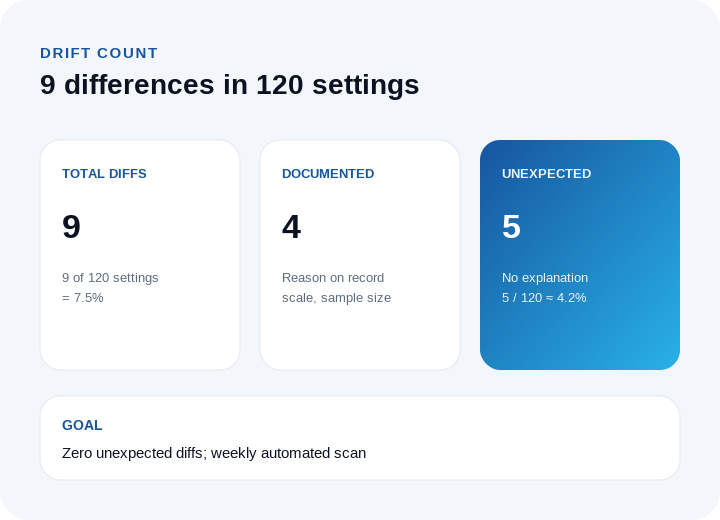
Representative example: 120 settings are compared and 9 differences turn up. The drift rate is 9 ÷ 120 = 7.5%. Four of the differences are written in the difference list with a reason (scale, sample size and the like); five have no explanation. The number that raises the alarm is the unexpected differences: 5 ÷ 120 ≈ 4.2%.
A weekly automated scan drives the unexpected count toward zero. Set two rules: every urgent manual change in production is applied to staging and to the repository the same day, and configuration changes are reviewed like code. For the habit of keeping records, see our incident management guide.
Which Way Does Data Flow Between Environments?
In one direction only: from production downward, and only in masked form. Data in a test environment is never written back to production, and a raw copy of production is never loaded into test as it is.
Realistic data is valuable but carries personal information; masking must be a mandatory step in the copy pipeline. Representative example: the production database is 400 GB (409,600 MB) and copy-plus-masking runs at 50 MB/s, so a full copy takes 409,600 ÷ 50 = 8,192 s, about 2.3 hours. If a consistent 10% subset (40 GB = 40,960 MB) is enough for staging, it takes 819 s, about 13.7 minutes.
We explained masking methods in our data masking guide. Access matters too: if 6 people can reach production and 40 can reach test, an unmasked copy enlarges the exposure surface by 40 ÷ 6 ≈ 6.7 times. For KVKK (Turkey's personal data protection law), consult your legal advisor.
How Should External Services Behave in a Test Environment?
Every environment needs its own counterpart for each external service: sandbox endpoints or fake (mock) versions of payment, email, SMS, shipping and e-document services. The aim is to never charge real money and never message a real customer during testing.
- Payment: The test environment connects only to the provider's sandbox; the live key does not exist there.
- Email and SMS: All outgoing messages land in a capture mailbox and none leave. An allow list is safer still: sending is enabled only to defined test addresses.
- Scheduled jobs: Jobs such as bulk notifications are switched off in test.
If a bulk notification is tried on an unmasked 50,000-customer copy, 50,000 real emails go out; an allow list prevents it. For connection security, see our API security guide.
How Many Environments Do You Need and What Do They Cost?
Representative cost: one environment costs ₺14,000 a month in infrastructure plus 12 hours × ₺300 = ₺3,600 of upkeep, so ₺17,600 a month per environment and ₺211,200 a year. What that spend buys is waiting time. Four teams share a single staging environment; each team holds it twice a week for 4 hours at a time.
| Measure | One staging environment | Two environments (shared by 2 teams each) |
|---|---|---|
| Weekly load | 4 teams × 2 × 4 h = 32 h | 16 h per environment |
| Utilization (40 h capacity) | 32 ÷ 40 = 80% | 16 ÷ 40 = 40% |
| Average queue wait | 0.8 ÷ 0.2 × 4 = 16 h | 0.4 ÷ 0.6 × 4 ≈ 2.7 h |
| Weekly waiting loss* | 8 × 16 × 0.5 × ₺300 = ₺19,200 | 8 × 2.67 × 0.5 × ₺300 = ₺3,200 |
*The loss assumes half of each waiting hour is truly wasted (the person switches to other work for the rest). The queue calculation uses a simple model for average wait with randomly arriving requests: with utilization ρ, wait = ρ ÷ (1 − ρ) × service time. Requests tend to cluster, so real waits can be longer. As utilization nears 100%, the wait grows without bound.
Ephemeral Environments or Permanent Ones?
Giving every feature branch a short-lived environment that is created and deleted automatically is one way to shrink the shared queue. Permanent environments (test, staging, production) stay; ephemeral ones serve review and early validation only.
Representative comparison: hourly cost is 14,000 ÷ 730 ≈ ₺19.18. With 30 changes a week, each using 3 hours of ephemeral environment, that is about 390 hours a month: 390 × ₺19.18 ≈ ₺7,480. Four extra permanent environments would cost 4 × ₺14,000 = ₺56,000 in infrastructure alone. For automated pipelines, see our CI/CD guide; for managing the bill, see our cloud cost guide.
How Are Environment Access and Secrets Managed?
Access narrows with how close an environment is to production: wide in development, narrow and logged in production. Write access to production goes to the fewest people; routine deployment runs through an approved pipeline, not by hand.
Secrets are per environment: each environment has its own passwords and keys. The arithmetic shows why. If a secret has a 6% chance of leaking in a year in one environment, and leaks are independent, then using the same secret in four environments gives at least one leak a probability of 1 − 0.94⁴ ≈ 21.9%. When the secret is specific to each environment, the production secret carries only production's 6%. This is a model calculation; the direction holds regardless.
Rotation is also planned per environment. Representative: 14 secrets, 4 rotations a year in production and 2 a year in each of the other three environments: 14 × (4 + 3 × 2) = 140 rotations; at 10 minutes each that is 1,400 minutes a year, about 23.3 hours.
Why Do "Production-Only" Bugs Happen?
Because production carries something staging does not: real data, real load, or a setting that is not an exact match. The cause table shows which difference leads to which defect and how to prevent it.
| Cause | Typical symptom | Prevention |
|---|---|---|
| Configuration difference | A feature is off in production or points to the wrong address | Weekly drift scan, settings kept in the repository |
| Version difference | A library version that staging does not have | Same package, pinned dependencies |
| Data difference | Unexpected characters or empty fields | Testing with masked, realistic data |
| Volume and load | Slow query, timeout | Query-plan checks on large data, load tests |
| External service behavior | A call that passed in the sandbox is rejected in production | First-day monitoring, contract tests |
| Network and firewall | Connection cannot be made | Connectivity check on the release list |
| Time zone and locale | Date shifts, wrong sort order | Store times in one zone, document each environment's zone |
For the load side, see our performance testing guide.
Which Version Is Running in Which Environment, and How Do You See It?
The version of every environment must be visible from one place, instantly; otherwise "we fixed that in production" cannot be verified. The simplest solution is for each environment to expose a version endpoint and a board to show them in one table.
Example view: development 2.14.0, test 2.13.2, staging 2.13.1, production 2.13.0. Rule: staging is at most one version ahead of production and is always the next production candidate. Any larger gap is another form of drift. On rollback too, the last stable version is known; for the process, see our software development life cycle guide.
How Is the Success of Environment Management Measured?
Three measures are enough: the share of defects caught in staging, the number of environment-caused production defects, and environment wait time.
- Share caught in staging: In a representative quarter (50 releases), 10 of the 16 defects that reached staging were caught there: 10 ÷ 16 = 62.5%; 6 leaked into production.
- Environment-caused defect rate: Of the 6 leaked defects, 4 came from environment differences: 4 ÷ 6 ≈ 66.7%. If 3 of those 4 are caught in staging after the improvement, the share becomes 13 ÷ 16 ≈ 81.3%.
- Environment wait time: Consider a second environment when utilization passes 80%.
How Quickly Does Environment Management Pay Back?
The investment is an extra environment and a drift scan; the return is lower waiting cost and lower production-defect cost. Representative assumptions:
- Investment: Setting up the second environment ₺96,000 (including automated provisioning), drift scanning ₺54,000: ₺150,000 in total.
- Waiting gain: ₺19,200 − ₺3,200 = ₺16,000 a week; at 52 ÷ 12 weeks a month, ₺16,000 × 4.33 ≈ ₺69,333.
- Defect gain: Environment-caused production defects drop from 4 to 1 per 50 releases; at 200 releases a year that is 4 instead of 16, or 12 fewer. At a representative ₺24,000 per incident, ₺288,000 a year, ₺24,000 a month.
- Monthly running cost: The second environment ₺17,600 plus scan upkeep ₺2,400: ₺20,000.
Monthly net benefit: ₺69,333 + ₺24,000 − ₺20,000 = ₺73,333. Payback: ₺150,000 ÷ ₺73,333 ≈ 2.0 months. If the waiting gain halves (₺34,667), net becomes ₺38,667 and payback is about 3.9 months. If the defect gain never materializes and the waiting gain halves, net is ₺14,667 and payback is about 10.2 months.
How Do You Set Up Your Environments? Six Steps
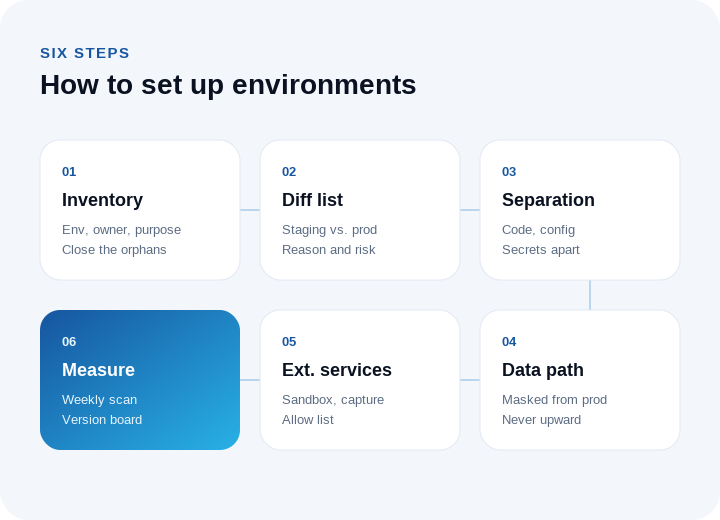
- Inventory: Write down existing environments, owners and purposes; close or hand over any that are orphaned.
- Difference list: List the known differences between staging and production with reasons.
- Separation: Separate code, configuration and secrets; one package, configuration per environment.
- Data pipeline: Build a masked copy pipeline from production; block upward flow.
- External service counterparts: Sandbox endpoints, a capture mailbox and an allow list.
- Measurement and scanning: A weekly drift scan, a version board and the three measures.
We recommend reading: What Are Feature Flags and Gradual Rollout? Percentage Buckets, Stop Criteria and Flag Debt Guide
We recommend reading: How to Set Up IT Change Management and Maintenance Windows: Risk Scoring, Approval and Rollback Guide
We recommend reading: How to Set Up a Software Bill of Materials (SBOM) and Dependency Update Management: Vulnerability Matching, Priority and Payback Guide
We recommend reading: How to Set Up Secrets Management: Inventory, Vault, Rotation, Short-Lived Credentials and Leak Response Guide
We recommend reading: SSL Certificate Management: How to Manage Domains, DNS and Certificates (Ownership, TTL, Renewal and Inventory Guide)
Environment Management with İnovabil
At İnovabil our focus is building custom software from scratch for your company: custom software, ERP, CRM, e-commerce, web, mobile and integration. Our process page lists six recorded steps (analysis, design, development, testing, release, maintenance and support); we suggest settling in writing, at the start of those steps and together with the project scope, how the environments will be set up and which environment a release passes through.
We built CRM, purchasing and mobile for Avcılar İnşaat; a purchasing system for İZBAN; logistics and shipment planning with wholesale order management for Karyak; and warehouse management plus a complaint and support management system for Sleepy. Send us a short summary of your current environment setup and we will draw up the difference list together.
We recommend reading: Our software development process: step by step from analysis to release
Frequently Asked Questions
What are software environments?
They are the development, test, staging and production environments. Code is written in development, verified in test, rehearsed one last time in staging before release, and used by real users in production. Each environment has a different purpose, data and access.
What is the difference between a staging and a test environment?
A test environment is used to find defects and changes more freely. Staging is the dress rehearsal for production: with the same version, similar configuration and similar data volume, the final pre-release check and acceptance happen there.
Is it safe to copy production data to a test environment?
Only if it is masked. A raw copy containing personal data enlarges the exposure surface and risks sending messages to real customers by mistake. Masking should be a mandatory step in the copy pipeline; for KVKK details, consult a legal advisor.
How is drift between environments measured?
By comparing the settings of the environments and counting the differences. In the example, 9 of 120 settings differ, which is 7.5%; the real alarm is unexplained, unexpected differences (5 in the example). A weekly automated scan keeps this number low.
How many environments are enough?
Four environments are usually enough for small teams. As teams multiply, utilization of a single staging environment climbs and waits grow; once utilization passes 80%, consider a second environment or ephemeral ones.