

If contracts, quote approvals, dealer applications and handover records are still printed, signed, scanned and sent back, every document spends days in transit and nobody can say with confidence which version was signed. Electronic signature integration puts that signing step inside the business application you already use, together with identity verification and an evidence record. The goal is not only speed; it is being able to show later that the document did not change and who the signature belongs to.
This guide covers the signing flow, identity verification, document integrity, multi-signer order, status feedback, storage and the payback calculation. The figures are representative; they are not a specific provider's price or an industry average. The legal validity and evidential weight of a signature must be confirmed with your legal counsel.
What Is Electronic Signature Integration?
Electronic signature integration is the connection that lets your application send a document into a signing process, invite the signers, verify their identity, receive the signed document and an evidence package when signing completes, and write the result to its own record. A signature provider usually runs the process; your application prepares the document, starts the process and processes the outcome.
This article differs from existing ones at one point: contract management covers the contract lifecycle, a document management system covers the document archive, approval workflows cover internal approval, and MFA and SSO cover sign-in identity. The subject here is the integration of the signing step that sits between those pieces.
Which Type of Electronic Signature Do You Need?
The answer depends on the document and the assurance it requires. Electronic signatures are not one type; as identity assurance grows, the process gets heavier. The table below is a conceptual classification. Terms and legal consequences vary by jurisdiction; ask your legal counsel which document can be signed with which type, whether some document types have special form requirements, and what evidential weight each type carries.
| Conceptual type | How it works | Typical use | Process load |
|---|---|---|---|
| Simple | Approval by email or link, a click | Low-risk approvals, acknowledgements | Low |
| Advanced | Unique to the signer, identity verified, changes after signing are detectable | Contracts, quotes, applications | Medium |
| Qualified | Made with a certified certificate and a secure signing device | Documents needing high assurance | High |
First fix the document type and the assurance level with legal counsel, then choose the signature type. Design the integration as a signature step that is independent of the type, so a stronger option can be added later for riskier documents.
How Does the Electronic Signature Flow Work Step by Step?
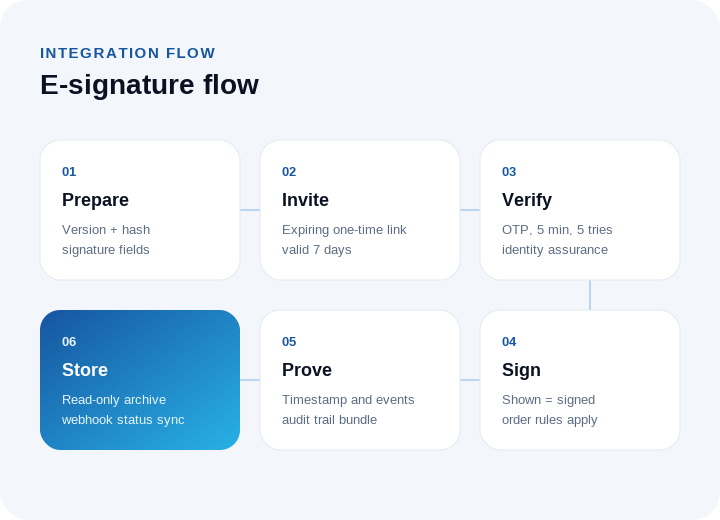
The flow has six steps, and each one leaves an event in the record. The order of those events is the answer to "who did what and when" later.
| Step | What happens | What is recorded |
|---|---|---|
| 1. Prepare | The document version is finalized, signers and their order are defined, and the document hash is computed | Document version, hash, signer list |
| 2. Invite | Each signer receives an expiring, single-use link | Send time, link expiry |
| 3. Verify | The signer proves identity with a one-time code | Verification method, attempt count |
| 4. Sign | The signer views, approves and signs; the next signer's turn begins | Signing time, signed hash |
| 5. Prove | Once all signatures are in, the signed document and evidence package are produced | Event sequence, timestamp |
| 6. Store | The signed document is stored read-only and the status is reported to your application | Archive record, status change |
How Is the Signer's Identity Verified?
To show that the person holding the link is the signer, a second check is needed; trusting email alone is weak. The most common way is a one-time code (OTP) sent to the signer's registered phone or email.
Three parameters shape the code design: digits, validity and attempt limit. A six-digit code has 1,000,000 possible values. Example rule: the code is valid for 5 minutes with at most 5 attempts. The chance of passing by random guessing is then 5 ÷ 1,000,000 = 0.0005%. Without a rate limit and an attempt limit, an attacker could try 100 times a second; in 5 minutes that is 100 × 300 = 30,000 attempts, a 30,000 ÷ 1,000,000 = 3.0% chance of success. The limit cuts the probability by 30,000 ÷ 5 = 6,000 times. For rate-limiting principles see our API security guide.
- The link identifier must be unpredictable: a random 128-bit identifier is drawn from 2128 ≈ 3.4 × 1038 values; never use sequential numbers.
- Device and network details are personal data: decide with legal counsel, under KVKK (Turkey's personal data protection law), which data goes into the evidence package and how long it is kept.
How Are Document Integrity and the Evidence Package Ensured?
A signature is made on a specific document version. To prove that, the document's hash is used: a fixed-length value computed from the content that comes out completely different if even one character changes.
- When the document version is finalized, its hash is computed and written to the process record.
- The document shown to the signer and the document signed carry the same hash; the version on screen must match the signed one exactly.
- After signing completes, the document cannot be changed; a correction means a new version and a new signing process.
- Later, the document's hash is recomputed and compared with the recorded one; a mismatch signals a change.
The evidence package (audit trail) contains the signer's identity and verification method, the times of the invitation, opening and signing events, the document hash, and a trusted timestamp for the signing time. A timestamp is an independent seal showing the document existed at a given moment; store times in a single standard (UTC). For general audit logging design, see our audit log guide.
Multi-Signer Order: Sequential or Parallel?
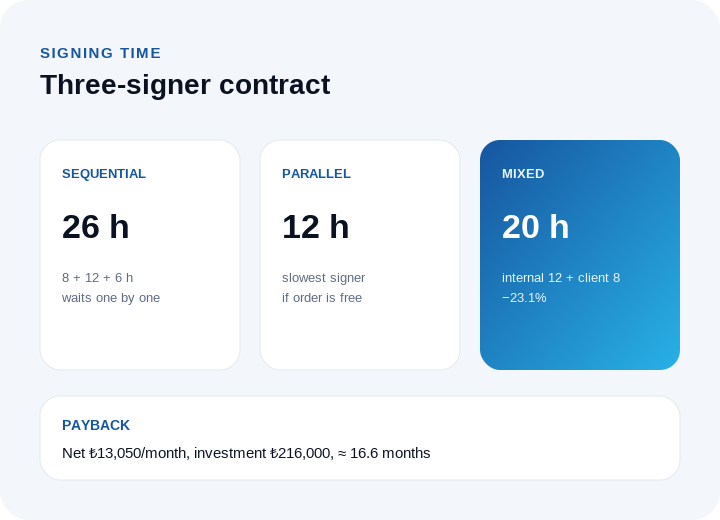
With more than one signer, three arrangements are possible. The example contract has three signers: the customer, the sales manager and finance. Representative average signing times are 8 hours for the customer, 12 for the sales manager and 6 for finance.
| Arrangement | How it works | Time calculation | Time |
|---|---|---|---|
| Sequential | One signs, then the turn passes on | 8 + 12 + 6 | 26 h |
| Parallel | Everyone receives it at once | slowest signer: max(8; 12; 6) | 12 h |
| Mixed | Internal signers in parallel, customer afterwards | max(12; 6) + 8 | 20 h |
Parallel signing cuts the time from 26 to 12 hours; the 14-hour difference is a 14 ÷ 26 = 53.8% reduction. It does not fit every contract, though: if the customer must sign last, or one signature is a condition for another, order is needed. The mixed arrangement saves 6 ÷ 26 = 23.1% with 20 hours and is the natural choice for most business contracts: internal parties first, then the counterparty. The sequential and parallel logic is the same as in our approval workflow guide.
If a signer declines, the process moves to a "declined" status and the reason is recorded; the corrected document goes out as a new process.
How Are Expiry and Reminders Set Up?
Example rule: the link is valid for 7 days; if the signer has not finished, reminders go out on day 3 and day 6, the link expires on day 7 and the process owner is notified.
In a representative measurement this raises the completion rate. For 150 contracts a month: without reminders, 72% means 150 × 0.72 = 108 contracts complete on time and 42 need follow-up. With reminders, 88% means 150 × 0.88 = 132 complete and follow-ups drop to 18. The difference is 24 contracts. If each one costs 15 minutes of phone or message chasing, 24 × 15 = 360 minutes, or 6 hours, is saved.
- Do not go silent at expiry: notify the process owner and make resending a one-click action.
How Does the Signing Status Return to Your Application?
The signing process runs outside your application, at the provider. There are two ways for your application to learn the status: ask at intervals (polling) or let the provider notify you when an event happens (webhook).
With polling every 15 minutes the average delay is 15 ÷ 2 = 7.5 minutes; with polling every 5 minutes, 2.5 minutes. With a webhook the delay falls to about 3 seconds; 7.5 minutes is 450 seconds, and 450 ÷ 3 = 150 times faster. For the mechanism itself, see our webhook guide; the points specific to e-signature are these:
- Event types: sent, viewed, signed, completed, declined, expired, cancelled. Each maps to a status change in your application.
- Duplicate protection: the same event can arrive twice; ignore the second by its event identifier.
- Daily reconciliation: webhooks can be lost; once a day compare the statuses at the provider with your own records.
- Fetch the signed document immediately: on the "completed" event, write the document and evidence package to your own archive.
How Is the Signed Document Stored and Linked to the Contract Record?
The signed document should be stored read-only, searchable and linked to its contract or application record. The volume is small: 150 contracts a month is 150 × 12 = 1,800 contracts a year; if the signed PDF and evidence package together are 1.2 MB, the yearly volume is 1,800 × 1.2 = 2,160 MB, about 2.16 GB. Over five years that is 10.8 GB; with three copies, 10.8 × 3 = 32.4 GB. The real issue is not volume but findability and access. Retention periods vary by document type; set them with your legal counsel and financial advisor (certified accountant).
- Link to the record: the signed document attaches to the contract record (party, amount, end date); renewal alerts run on the contract management side.
- Access and versions in the archive: separating the draft from the signed version, and access by document class, follow document management system logic.
How Do You Prevent Wrong Signer Details?
The most common snag in a signing process is not technical but a wrong email or phone number. With 150 contracts a month and 3 signers each, you send 150 × 3 = 450 invitations. At a 2% wrong-address rate, 450 × 0.02 = 9 invitations go to the wrong person or to nobody. If fixing each takes 20 minutes, 9 × 20 = 180 minutes (3 hours) are spent, and if each delays the contract by 2 days, 9 × 2 = 18 contract-days are lost.
The remedy is never retyping signer details: the address and phone come from the customer or dealer record through integration and are confirmed before sending. If the rate falls to 0.5%, 450 × 0.005 = 2.25 faulty invitations remain, a 75% reduction.
What Questions Should You Ask When Choosing a Signature Provider?
Look at criteria, not names. Have the questions below answered in writing and test them in a test environment.
| Criterion | Question to ask | Why it matters |
|---|---|---|
| Signature type | Which signature types does it support, and can several be used through the same integration? | No rewrite when the document type changes |
| API and test environment | Is there a documented API, a separate test environment and sample data? | Testing without real signatures in production |
| Event notification | Does it offer webhooks, and are events signed and retryable? | Status sync and security |
| Evidence package | Can we download the evidence package and signed document, and does access continue if the provider shuts down? | Dependence on the provider |
| Data location and KVKK | Where is data kept, and what are the retention and deletion periods? | Personal data responsibility (legal counsel) |
| Pricing model | Per transaction or by package; are declined and expired processes charged? | Predictability of the monthly cost |
How Is the Payback of Signature Integration Calculated?
Payback is how many months the net monthly gain takes to recover the investment. Representative values: 150 contracts a month, 25 minutes of manual work per contract in the paper flow (printing, scanning, sending, chasing) against 8 minutes with e-signature, an employee cost of ₺300 an hour, printing and courier of ₺30 per contract in the paper flow, a provider fee of ₺40 per transaction, and an integration investment of ₺216,000.
| Item | Calculation | Monthly amount |
|---|---|---|
| Manual work saved | (25 − 8) = 17 min × 150 = 2,550 min = 42.5 h × ₺300 | ₺12,750 |
| Follow-up saved | 24 fewer follow-ups × 15 min = 6 h × ₺300 | ₺1,800 |
| Printing and courier | 150 × ₺30 | ₺4,500 |
| Gross gain | 12,750 + 1,800 + 4,500 | ₺19,050 |
| Transaction fee | 150 × ₺40 | −₺6,000 |
| Net monthly gain | 19,050 − 6,000 | ₺13,050 |
Payback is 216,000 ÷ 13,050 ≈ 16.6 months. If only half of the gain materializes, gross is 9,525 and net is 9,525 − 6,000 = ₺3,525, and payback stretches to 216,000 ÷ 3,525 ≈ 61.3 months; in other words, if volume is low and manual work was already small, the investment is hard to justify. One item is not counted: because a contract takes about 1 day instead of 3, work starts 2 days earlier, which is 150 × 2 = 300 contract-days a month; its monetary value depends on your revenue model and is left out of the payback. Recompute with your own figures.
How Is Electronic Signature Integration Set Up?
Work in six steps and end each with something testable.
- Define the documents and signature type: which document is signed at which assurance level, decided in writing with legal counsel.
- Draw the flow: signers, order, expiry, reminders and decline behavior; write a testable criterion for every rule (the acceptance-criteria approach in our guide to getting custom software developed).
- Choose the provider and connect the test environment: test the invitation, code, signature, decline and expiry end to end without signing for real.
- Set up status sync: webhook, duplicate protection, daily reconciliation and moving the document into the archive.
- Connect records and access: link the document, contract record and evidence package; decide by role who may start a signing process.
- Go live with a pilot: start with one document type and measure the completion rate and the wrong-invitation rate.
We recommend reading: What is a webhook? Polling difference, signature verification and retry guide
Custom Software and Integration, Including the Signing Step, with İnovabil
At İnovabil our focus is building software from scratch, tailored to the company: custom software, ERP, CRM, e-commerce, web, mobile and integration. We do not offer an e-signature service or product; connecting external systems to the applications where you run contracts, quotes and approvals is part of our integration work, and we recommend settling the signing step in requirements analysis together with the document type, signer order and evidence expectations. Role-based access, audit records and secure hosting are among our recorded capabilities.
We built CRM, purchasing and mobile for Avcılar İnşaat; a purchasing system for İZBAN; logistics and shipment planning with wholesale order management for Karyak; and warehouse management plus a complaint and support management system for Sleepy. Send us a short summary of the documents that need signing and the systems you use, and we will put together a written flow showing where the signing step fits.
We recommend reading: Our software development process: step by step from analysis to launch
Frequently Asked Questions
What is electronic signature integration, briefly?
It is your business application sending a document into an electronic signing process, verifying signers' identity, then receiving and recording the signed document and evidence package. It removes passing paper around and makes who signed what, and when, a matter of record.
Which type of electronic signature should I use?
It depends on the document type and the assurance required. Simple, advanced and qualified are conceptual levels; which one is valid for which document depends on the law and should be settled with your legal counsel. Designing the integration as a step independent of the signature type makes later change easier.
Should multiple signers sign sequentially or in parallel?
If order does not matter, parallel is faster. In the example, sequential takes 26 hours, parallel 12 hours and mixed (internal signers in parallel, customer afterwards) 20 hours. If the counterparty must sign last or one signature is a condition for another, choose sequential or mixed.
How can you show that a signed document has not changed?
The document hash is written to the record at signing and the document cannot be changed afterwards. Recomputing the hash later and comparing it with the recorded one exposes any change. The evidence package and a trusted timestamp complete the record.
How long does electronic signature integration take to pay for itself?
It depends on volume and the manual workload. In the representative example, with 150 contracts a month, a ₺216,000 investment and a ₺13,050 net monthly gain, it is about 16.6 months; if the gain halves, about 61.3 months. Recompute with your own contract volume.