

The cloud bill for a business application often arrives as a single line at month end, and nobody knows what is inside it. The test environment keeps running over the weekend, and a server nobody uses keeps showing up on the invoice. Cloud cost management (FinOps) is the practice of making that bill visible line by line, assigning an owner to every item and systematically cutting the part that is not needed.
In this guide we cover the bill's line items, tagging and cost allocation, unit cost, right-sizing, the choice between committed use and on-demand pricing, shutting down non-production environments, storage and data egress, alerts, and a six-step setup. All amounts and unit prices are illustrative; they are not any provider's price or an industry average.
What Is Cloud Cost Management (FinOps)?
FinOps is a way of working in which engineering, finance and the business manage cloud spending together. The aim is not the lowest possible bill but tying every lira spent to a product and to business value. The cycle has three phases: visibility (what are we spending, and for whom), optimisation (reducing the excess) and operation (alerts and regular review). The person who starts a server should also see its cost; if cost stays only in a finance report, nobody changes their behaviour.
Whether to be in the cloud at all is a separate decision, which we covered in cloud vs on-premise software. This guide is for a business that has decided to stay in the cloud.
We recommend reading: Cloud vs on-premise software: three-year cost, security and decision guide
What Does a Cloud Bill Consist Of?
A cloud bill collects into six main line items, and each has a different lever. As an example, take a monthly bill of ₺240,000 for a business running a dealer portal.
| Line item | What it pays for | Illustrative monthly amount | Share | Main lever |
|---|---|---|---|---|
| Compute | Servers and processing power | ₺108,000 | 45.0% | Right-sizing, commitment, shutdown |
| Database | Managed database, backups | ₺48,000 | 20.0% | Size, number of read replicas |
| Storage | Files, logs, backups | ₺36,000 | 15.0% | Tier and lifecycle |
| Data egress | Traffic leaving the cloud | ₺24,000 | 10.0% | Caching, architectural placement |
| Managed services | Queues, cache, monitoring | ₺18,000 | 7.5% | Switching off unused services |
| Network | Load balancer, gateway | ₺6,000 | 2.5% | Removing unneeded resources |
| Total | ₺240,000 | 100.0% |
Check: 108,000 + 48,000 + 36,000 + 24,000 + 18,000 + 6,000 = ₺240,000. Compute and database together are 65% of the bill; storage and egress quietly grow if they are forgotten.
How Do You Tag Resources and Allocate Costs?
Giving every resource mandatory tags for product, environment and team is the only reliable way to allocate cost to its owner. Nobody dares to switch off a resource that has no owner.
| Tag | Example value | What it enables |
|---|---|---|
| Product | dealer-portal | Unit cost per product |
| Environment | production, test, development | Shutdown and separate budgets |
| Team | sales-applications | Who is responsible for the spend |
Say the ₺240,000 bill splits as follows: production ₺120,000, test ₺36,000, development ₺24,000 and untagged ₺60,000. The untagged cost ratio is 60,000 ÷ 240,000 = 25%. Choose a starting target below 5%, which is ₺12,000. Add a rule that blocks creating untagged resources or lists them in a weekly report. In the example, once the owner of the untagged group is found, two servers turn out to be used by nobody.
Showback shows teams their spending; chargeback writes the cost to the team's budget. If you offer software to several customers, allocation per tenant is its own topic; see what is multi-tenant architecture for the cost-per-tenant logic.
How Do You Calculate Unit Cost?
Unit cost is found by dividing the bill by a measure of the work: per order, per active dealer or per tenant. If the bill grows while unit cost falls, the business is growing efficiently.
The portal processes 30,000 orders a month and has 400 active dealers. Cloud cost per order is 240,000 ÷ 30,000 = ₺8.00; per dealer it is 240,000 ÷ 400 = ₺600. If orders grow 20% to 36,000 and the bill grows 10% to ₺264,000, cost per order is 264,000 ÷ 36,000 ≈ ₺7.33; the bill grew, but unit cost fell by 8.3%. We covered the scaling side in what is software scalability.
How Do You Right-Size and Clean Up Idle Resources?
Right-sizing means moving a resource to a smaller size that matches its real usage. First, measure average and high-percentile (p95) processor and memory use over at least two weeks.
In the example, production runs 24 servers at ₺3,000 each (24 × 3,000 = ₺72,000). Monitoring shows that two servers are not used at all and have no owner; ten servers never exceed 30% p95 processor use; twelve are the right size.
- Idle resources: 2 × ₺3,000 = ₺6,000 monthly saving; first confirm that nobody uses them, then back up and switch off.
- One size down: when the size is halved the price halves (illustrative). 10 × ₺1,500 = ₺15,000 monthly saving. Since utilisation doubles at half size, p95 goes from 30% to 60%, which should stay below a 70% limit.
Total monthly saving is 6,000 + 15,000 = ₺21,000. Sizing so tight that p95 reaches 90% produces slowness at peak hours. You cannot measure usage without monitoring; see what is software monitoring.
Committed Use or On-Demand Pricing?
With committed use you pay for a certain capacity over a set period in return for a discount on the unit price; on-demand you pay only for what you use, but the unit costs more.
Illustrative assumption: a one-year commitment gives a 30% discount; on-demand is ₺3,000 per server, committed 3,000 × 0.70 = ₺2,100. The commitment's break-even utilisation is 1 − 0.30 = 70%: it pays off only if at least 70% of the committed capacity is used continuously. In the example, ten of the twelve correctly sized servers (the always-on base load) are committed.
| Actual use (of 10 committed) | On-demand payment | Committed payment | Monthly difference |
|---|---|---|---|
| 10 servers | ₺30,000 | ₺21,000 | +₺9,000 gain |
| 8 servers | ₺24,000 | ₺21,000 | +₺3,000 gain |
| 7 servers (break-even) | ₺21,000 | ₺21,000 | ₺0 |
| 6 servers | ₺18,000 | ₺21,000 | −₺3,000 loss |
The planned gain is 10 × ₺900 = ₺9,000 a month, or ₺108,000 a year. If an architectural change drops base load to 6 servers, the annual loss is 12 × ₺3,000 = ₺36,000. So commit only after right-sizing and below the base load. Ask a legal adviser about commitment terms and exit conditions.
When Is Autoscaling Better Than Fixed Capacity?
If load swings during the day, autoscaling saves clearly more than fixed capacity; if load is steady and predictable, fixed capacity with a commitment is simpler and cheaper. A separate small example: the application tier needs 24 units for 10 peak hours a day and 10 units for the other 14.
Fixed capacity built for the peak pays 24 × 24 = 576 unit-hours. With autoscaling it is 10 × 24 + 14 × 10 = 240 + 140 = 380 unit-hours. The difference is 196 unit-hours: 196 ÷ 576 ≈ 34.0% saving. Scaling is simple for the stateless application tier; stateful parts such as the database usually stay fixed. New units take time to start, which can cause latency in a sudden spike; set a floor and a warm-up time.
Interruptible (spare) capacity is cheaper, but the provider can take it back; use it only for restartable jobs (batch reports, image processing, test runs), not for payments or the database.
How Do You Shut Down Development and Test Environments?
Switching off non-production environments outside working hours is the lowest-risk step and often the highest-return one. A week has 7 × 24 = 168 hours; if the team works 5 days × 10 hours = 50 hours, the share of real use is 50 ÷ 168 ≈ 29.8%.
In the example, compute and database cost of development and test is ₺45,000 a month (12 servers × ₺3,000 = ₺36,000 plus databases ₺9,000). Kept on for 50 hours, the payment is 45,000 × 50 ÷ 168 ≈ ₺13,393; the saving is 45,000 − 13,393 ≈ ₺31,600 a month (rounded). Automate the shutdown; manual shutdown gets forgotten. Do not use real customer data in test environments; for personal data, consult your legal adviser.
How Do You Reduce Storage and Data Egress Cost?
In storage, savings come from moving unaccessed data to a cheaper tier and deleting expired data; in egress, from serving repeatedly downloaded content from a cache.
Data lifecycle. In the example, 60 TB costs ₺36,000 a month, or ₺600 per TB (illustrative hot-tier price). Data not accessed in the last 90 days is 45 TB. Of that, 6 TB is expired temporary files and old logs that can be deleted: 6 × 600 = ₺3,600. The remaining 39 TB moves to a cold tier at ₺250 per TB: 39 × (600 − 250) = ₺13,650. Total monthly saving is 3,600 + 13,650 = ₺17,250. Cold tiers may carry retrieval fees and minimum retention periods; measure access frequency first. Retention periods may be set by regulation; confirm with your financial advisor (certified accountant) and legal adviser before deleting.
Data egress. If 20,000 GB of monthly egress costs ₺24,000, that is ₺1.20 per GB. Of that, 12,000 GB (60%) is images and static files downloaded again and again. If a cache serves 75% of it, 9,000 GB disappears: 9,000 × 1.20 = ₺10,800. If the cache service itself costs ₺2,000 a month, the net saving is ₺8,800. Keeping services in the same region often makes traffic cheaper too, and egress fees also shape the cost of changing provider later.
How Do You Set Up Budget Alerts and Anomaly Detection?
Budget alerts tell you when a deviation starts, not at month end; two kinds are set up, against the budget and against the normal pattern.
- Budget threshold: for a monthly ₺240,000 budget, thresholds at 50%, 80% and 100%, plus a forecast alert. If spending on day 10 is ₺100,000, the projected month end is 100,000 ÷ 10 × 30 = ₺300,000, or 125% of budget; the alert fires without waiting for mid-month.
- Anomaly threshold: the daily average is 240,000 ÷ 30 = ₺8,000; let 25% above (₺10,000) be the alert limit. If a forgotten load test pushes one day to ₺13,600, the deviation is (13,600 − 8,000) ÷ 8,000 = 70% and the alarm fires.
If the anomaly is caught at once the loss is ₺5,600; if nobody notices for three days it is 3 × 5,600 = ₺16,800. Give every alert an owner and a response time; an alert that reaches nobody is noise.
How Do You Balance Savings and Risk?
Every saving step carries a risk; the aim is to take the risk knowingly and with measurement.
| Step | Risk | Safeguard |
|---|---|---|
| Right-sizing | Slowness and errors at peak | p95 ≤ 70% limit, gradual change, rollback plan |
| Deleting idle resources | Breaking an unexpected dependency | Switch off and wait first, back up, then delete |
| Commitment | Paying for nothing if base load drops | Stay below base load, spread terms |
| Cold tier | Slow, paid access | Measure access frequency, move only old data |
Write speed and availability targets before the savings target; if they degrade while cost falls, it is not a saving but a deferred loss.
How Do You Calculate Total Savings and Payback?
Add up each step's monthly saving, subtract the effort cost and the review share, and then calculate the payback period. The items apply to different resources, so they do not overlap: sizing and commitment apply to production servers, shutdown to development and test environments.
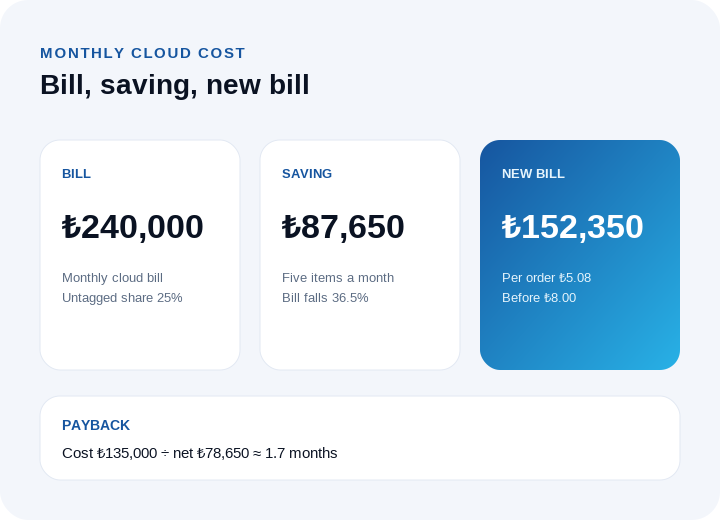
| Saving item | Monthly saving |
|---|---|
| Idle resources and right-sizing (6,000 + 15,000) | ₺21,000 |
| Commitment (10 servers × ₺900) | ₺9,000 |
| Shutting down development and test | ₺31,600 |
| Storage tier and deletion (3,600 + 13,650) | ₺17,250 |
| Egress cache (10,800 − 2,000) | ₺8,800 |
| Total | ₺87,650 |
Total: 21,000 + 9,000 + 31,600 + 17,250 + 8,800 = ₺87,650. That is 87,650 ÷ 240,000 ≈ 36.5%; the new bill is 240,000 − 87,650 = ₺152,350 and cost per order falls to 152,350 ÷ 30,000 ≈ ₺5.08 (from ₺8.00).
Say the effort is 15 person-days: 15 × ₺9,000 = ₺135,000. Regular review takes 1 person-day a month, or ₺9,000. Monthly net benefit is 87,650 − 9,000 = ₺78,650; payback is 135,000 ÷ 78,650 ≈ 1.7 months. If savings come out at half, net benefit is 43,825 − 9,000 = ₺34,825 and payback is 135,000 ÷ 34,825 ≈ 3.9 months. We discuss the project budget in how to estimate software development cost.
How Do You Set Up FinOps in Six Steps?
Six steps run from visibility to regular operation.
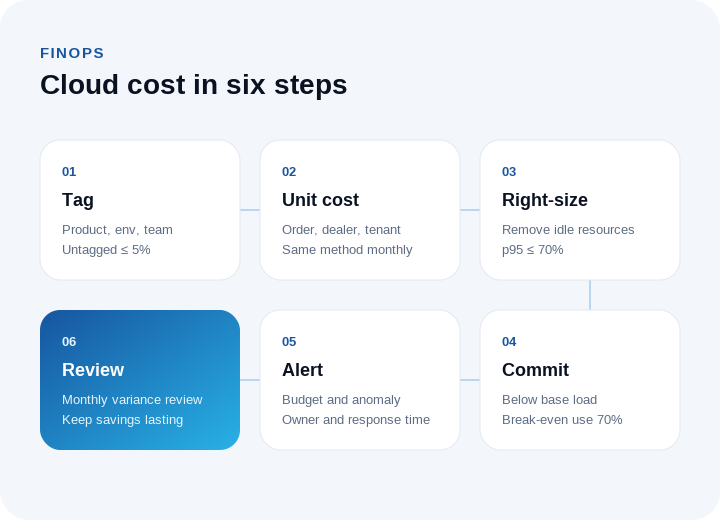
- Tag: Make tags mandatory; bring the untagged ratio below 5%.
- Work out unit cost: Calculate cost per order, dealer or tenant the same way every month.
- Remove idle and excess: Apply right-sizing, environment shutdown and storage rules.
- Tie commitments to base load: After right-sizing, below base load, in stages.
- Set alerts: Tie budget, forecast and anomaly thresholds to an owner.
- Review monthly: Check deviations, new resources and commitment use with the teams. Verify in the delivery pipeline that new environments follow the tagging and shutdown rules.
What Mistakes Are Common in Cloud Cost Management?
- Starting untagged: A resource with no owner is never switched off.
- Committing first: Buying excess capacity at a discount locks in the waste.
- One-off clean-up: Without regular review the bill drifts back within months.
- Not measuring unit cost: Looking at the total bill and mistaking growth for waste leads to wrong decisions.
If you offer your product as a software service, cloud cost directly sets the margin per customer; we cover this link in what is SaaS.
We recommend reading: How to Manage Software Inventory and Shadow IT: Discovery, Risk Score and Approval Rule Guide
We recommend reading: How to Set Up a Data Archiving and Retention Policy: Data Tiers, the Archive Rule, Legal Hold and Deletion Guide
We recommend reading: How to Set Up Centralized Log Management: Structured Logs, Retention and Cost Guide
We recommend reading: What Is Serverless Architecture? Cold Starts, Limits, Break-Even Cost and When It Fits
Custom Software and Infrastructure Decisions with İnovabil
At İnovabil our focus is bespoke software built from scratch for the company: custom software, ERP, CRM, e-commerce, web, mobile and integration. We do not claim to offer a cloud cost management (FinOps) service or product; but we believe the infrastructure and running cost of software should be clear at the start of a project. That is why, in requirements analysis, we write down user and transaction volume, the number of environments and maintenance expectations together.
We built CRM, purchasing and mobile for Avcılar İnşaat; a purchasing system for İZBAN; logistics and shipment planning with wholesale order management for Karyak; and warehouse management plus a complaint and support management system for Sleepy. Send us a short summary of the running cost of your existing or planned software, and we will write the infrastructure assumptions down together at the requirements stage.
We recommend reading: Our software development process: step by step from analysis to launch
Frequently Asked Questions
What is cloud cost management (FinOps)?
It is the work of making cloud spending visible by product, environment and team, cutting the unnecessary part and monitoring continuously. Engineering, finance and the business share responsibility.
Where should you start to cut a cloud bill?
With tagging and visibility. Measure untagged cost, then move to low-risk steps such as idle resources, environment shutdown and storage tiers; commitment comes last.
Does committed use always save money?
No. In the example, with a 30% discount the break-even use is 70%; below the committed capacity you lose money. Commit after right-sizing and below base load.
Is it safe to shut down development and test environments?
Usually yes; if only 50 of 168 weekly hours are used, the other 118 are paid for nothing. Automate the start-up and do not use real customer data in test environments.
How long does a cloud cost programme take to pay back?
In the example, ₺135,000 of work pays back in about 1.7 months at a net ₺78,650 a month, and in about 3.9 months even if savings halve. The figures are illustrative; calculate with your own bill.