

You are about to sell a software product to a hundred customers. Will you set up a separate server, application copy and database for each one, or will a single application serve them all? The first path looks simple, but every update has to be repeated a hundred times. The second is known as multi-tenant architecture: one copy of the application serves many customers (tenants), and each tenant's data is kept apart from the others.
This guide covers how it differs from single-tenant setups, the three data isolation models, the noisy neighbor problem, cost per tenant, security testing and a six-step design process. All example figures are illustrative; they are not the price of any product or cloud provider.
What Is Multi-Tenant Architecture?
Multi-tenant architecture is a design in which one software instance, usually on shared infrastructure, serves several customers at the same time, while each customer's data and settings are logically separated. The customer is called a "tenant"; think of an apartment building: the building is shared, but every flat has its own key.
A tenant can be a company, a dealer, a store or a department; deciding which is the first design choice. We explained the product model itself in our what is SaaS guide; here we go deeper into the tenant data separation that guide covers only briefly.
We recommend reading: What is SaaS? Subscription model, multi-tenant architecture and development guide
What Is the Difference Between Single-Tenant and Multi-Tenant Architecture?
In a single-tenant setup every customer has its own application installation and database; in a multi-tenant one the application is shared.
| Topic | Single-tenant (installation per customer) | Multi-tenant (shared application) |
|---|---|---|
| Infrastructure cost | Grows linearly with customers | Mostly shared; small increase per customer |
| Updates | Done separately for each installation | Reach everyone at once |
| Isolation | Natural and strong; physical separation | Logical; enforced with code, quotas and tests |
| Risk of affecting another tenant | Low | Needs quotas and monitoring (noisy neighbor) |
| Best fit | Few large customers with special requirements | Many customers with similar needs |
There is no hard line between the two; many products are hybrid. The hosting environment itself (cloud or on-premises) is a separate decision, and the cost logic in our cloud vs on-premises software article applies here too.
How Is Tenant Data Separated? Three Models
There are three common models: a shared schema with a tenant ID, a schema per tenant, and a database per tenant. Moving down the list, isolation gets stronger while cost and operational load rise.
| Model | How it works | Cost | Isolation | Management |
|---|---|---|---|---|
| Shared schema + tenant ID | All tenants in the same tables; a tenant ID on every row | Lowest | Enforced by code only | One migration, one backup; per-tenant restore is hard |
| Schema per tenant | Each tenant has its own set of tables in the same database | Medium | Stronger; can be separated by permissions | Each schema change repeated for every tenant |
| Database per tenant | Each tenant in its own database | Highest | Strongest; per-tenant backup and location | Many databases to migrate, monitor and back up |
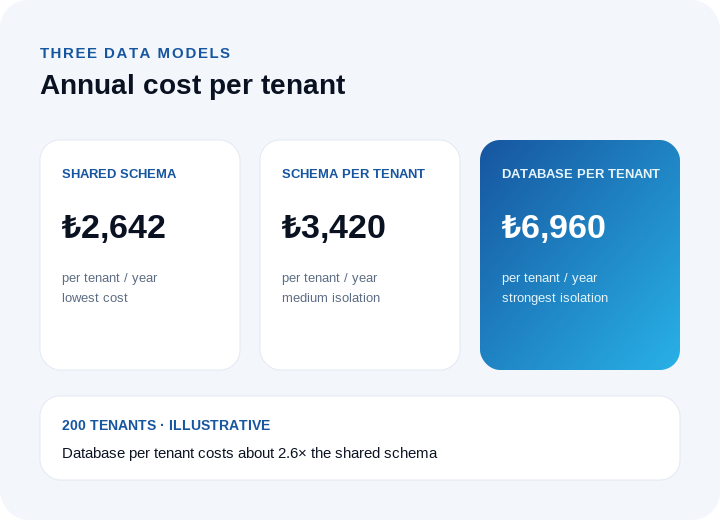
Four questions drive the choice: Do your customers require physically separate data by contract? Will tenants number in the dozens or the thousands? Is the data volume gap between tenants large? Do you need per-tenant backup, deletion or location? Confirm data residency and retention obligations with your legal counsel. For the choice of database type itself, see our how to choose a database guide.
How Is the Tenant ID Added to Every Query, and How Are Data Leaks Prevented?
In a shared schema the tenant ID must be added to every read, write and delete query; leaving that to developers' memory means accepting that someone will eventually forget.
Take an illustrative calculation. Suppose the codebase has 400 distinct queries and each has only a 0.25% chance of missing the tenant filter. The probability that at least one query lacks it is 1 − (1 − 0.0025)400 = 1 − 0.3674 ≈ 63.3%. A tiny per-query error rate becomes a near-certain leak across enough queries. If the tenant ID is enforced in one central place (the data access layer or a row-level policy in the database), the error exposure stays in one spot, about 0.25%.
- Tenant context: The signed-in user's tenant is determined at the start of the request and carried as an immutable context; it comes from the verified session, never from a client-supplied parameter.
- Central filter: The data access layer adds the tenant condition to every query itself; a query without a tenant does not run.
- Background jobs: Queue messages and scheduled tasks also run with a tenant context; this is the most commonly forgotten place.
Role management governs access inside a tenant; the boundary between tenants is a separate, higher layer. Build the role model with the principles in our role-based access control guide and put the tenant boundary on top of it. For object-level authorization on APIs, see our API security article.
What Is a Noisy Neighbor, and How Are Resource Quotas Set?
A noisy neighbor is a tenant that uses shared resources so heavily that other tenants' service quality drops. The remedy is a per-tenant quota.
Illustrative example: the shared pool handles 1,000 requests per second, and the 200 tenants' combined average load is 600 requests per second (an average of 3 each). If one tenant runs a bulk import at 800 requests per second, total demand becomes 597 + 800 = 1,397. With capacity at 1,000, the served share is 1,000 ÷ 1,397 ≈ 71.6%; other tenants are served at the same rate, so roughly 28.4% of their requests are rejected or time out. With a quota of 50 requests per second per tenant, the bursting tenant is capped at 50, total demand is 597 + 50 = 647 and everyone is served.
- Request rate quota: Requests per second per tenant; above it, requests are delayed or answered with a 429 status.
- Background job queue share: Large imports queue per tenant; one tenant cannot clog the queue.
- Per-tenant monitoring: Resource use is measured with a tenant label, so you can see who generates how much load. See our software monitoring guide for the method.
For capacity math, see our software scalability article; if quotas are not enough, moving a very large tenant to dedicated resources is the next step.
How Are Tenant-Specific Settings and Versions Managed?
Instead of opening a customer-specific code branch, use configuration and feature flags. One codebase is kept; differences are defined as data.
- Configuration: Brand color, logo, domain, language, currency, working calendar and notification templates live in the tenant record.
- Feature flag: A feature is switched on or off per tenant or per plan. The same mechanism supports gradual rollout of new features.
- Plan (package): Attach the tenant to a plan; the plan decides which flags are on.
If flags multiply, the combinations to test explode: 6 independent flags make 26 = 64 combinations; tie them to plans and keep 5 plans, and the tested configurations drop to 5.
The same discipline applies to versions. A single version goes to everyone but rolls out gradually: for example 5% of 200 tenants (10 tenants), then 25% (50), then all. If every tenant may stay on a different version, you must test 3 versions × 5 plans = 15 configurations; with one version the number is 5. For the delivery pipeline and staged releases, see our CI/CD guide.
How Do Backup, Restore and Tenant Migration Work?
Restoring one tenant's data is a very different job depending on the model. In a shared schema, to recover one tenant's deleted data you must open the whole database backup in a separate environment and extract only that tenant's rows; with a database per tenant, only that database is restored.
| Situation | Shared schema | Database per tenant |
|---|---|---|
| Data to restore | Whole database (example: 200 GB) | Only that tenant (example: 1 GB) |
| Raw transfer time (100 GB/hour) | 200 ÷ 100 = 2 hours | 1 ÷ 100 = 0.01 hours = 36 sec |
| Extra work | Extract the tenant's rows and merge them back | Verify and re-point the connection |
When writing the backup plan, think about RPO and RTO at tenant level too; our data backup guide covers the method. For the legal side of deletion and retention periods, consult your legal counsel.
Tenant migration is also a capability to design for from the start: a tenant that grows or develops special requirements should be movable from the shared structure to its own database. Illustrative example: the tenant's data is 4 GB and the copy rate is 40 GB per hour, so the initial copy takes 4 ÷ 40 = 0.1 hours = 6 minutes. Transferring the last changes and switching routing might then fit in a planned 15-minute window. Rehearse the move in a test environment and verify record counts and totals by reconciliation.
How Is Cost per Tenant Calculated?
Cost per tenant = (annual infrastructure + operations labor) ÷ number of tenants. The example below assumes 200 tenants, 24 releases a year and operations labor at ₺300 per hour; all figures are illustrative.
| Item | Shared schema | Schema per tenant | Database per tenant |
|---|---|---|---|
| Fixed infrastructure (application + database platform) | ₺480,000 | ₺540,000 | ₺120,000 |
| Variable infrastructure per tenant | ₺240 × 200 = ₺48,000 | ₺600 × 200 = ₺120,000 | ₺6,000 × 200 = ₺1,200,000 |
| Schema migrations per release (time each) | 1 migration × 3 min | 200 migrations × 1 min | 200 migrations × 3 min |
| Annual migration time (24 releases) | 1.2 hours | 80 hours | 240 hours |
| Migration labor (₺300/hour) | ₺360 | ₺24,000 | ₺72,000 |
| Annual total | ₺528,360 | ₺684,000 | ₺1,392,000 |
| Annual per tenant | ₺2,641.80 | ₺3,420 | ₺6,960 |
The database-per-tenant model costs 1,392,000 ÷ 528,360 ≈ 2.6 times the shared schema; the gap is ₺863,640 a year, ₺4,318.20 per tenant, or about ₺360 a month. That gives a practical rule: if you sell separate databases as an "isolated" plan, that plan should bring in at least about ₺360 a month more than the shared plan.
Hybrid model
Say 180 of the 200 tenants are on the shared schema and 20 large tenants have their own databases. Shared part: 480,000 + 240 × 180 = ₺523,200 plus ₺360 migration labor. Dedicated part: 6,000 × 20 = ₺120,000 plus migration labor of 24 × 20 × 3 ÷ 60 = 24 hours × ₺300 = ₺7,200. Total: ₺650,760. That is ₺122,400 (23.2%) more than all-shared and 53.3% cheaper than all-dedicated. Hosting tenants with isolation requirements separately and keeping the rest shared is often the most balanced path.
Break-even against an installation per customer
Multi-tenancy needs extra development (tenant context, quotas, configuration, tenant provisioning automation). Illustratively, take 15 person-days × ₺9,000 = ₺135,000. Let an installation per customer cost ₺18,000 a year. Three-year totals: installation per customer, 3 × 18,000 × n = 54,000n; shared structure, 135,000 + 3 × (480,000 + 240n) = 1,575,000 + 720n. Setting them equal: 54,000n = 1,575,000 + 720n ⇒ n = 1,575,000 ÷ 53,280 ≈ 29.6, so about 30 tenants. At 30 tenants the shared structure costs ₺1,596,600 and installations cost ₺1,620,000. Recalculate with your own values; for effort estimation see our software project cost guide.
How Is Security Testing Done in a Multi-Tenant System?
The key test is the cross-tenant access test: call tenant B's record ID with tenant A's valid session and confirm the response is "not found" or "unauthorized".
Illustrative matrix: trying read, update and delete on each of 40 endpoints gives 40 × 3 = 120 test cases. If each takes 0.5 seconds, the whole set finishes in 60 seconds, so running it automatically before every release is cheap. Checklist:
- Object ID attempts: Read, update and delete with another tenant's ID; using random IDs instead of guessable sequential ones reduces risk but does not replace the test.
- Background jobs and cache: A queued job or cached response must not reach the wrong tenant.
For the process, see our secure software development guide. For data protection (KVKK) obligations when personal data is processed across tenants, consult your legal counsel.
How Is a Multi-Tenant Architecture Designed? Six Steps
Design starts by defining the tenant and ends by testing isolation.
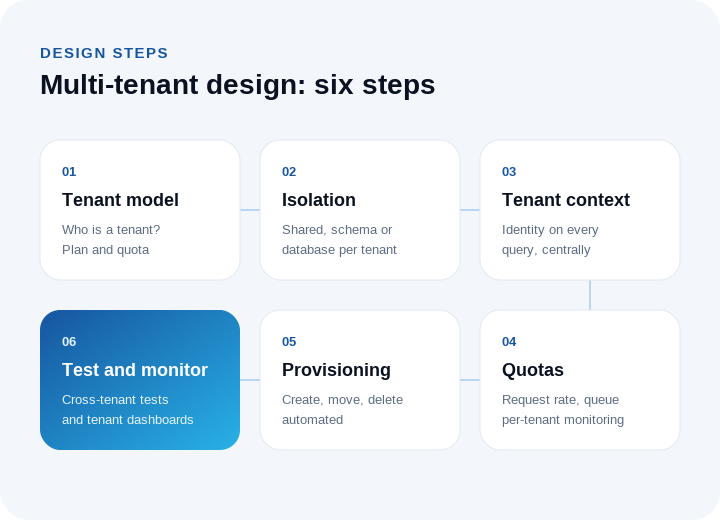
- Define the tenant: A company, a dealer, a store? Plan, quota and billing attach to it.
- Choose the isolation model: By contracts, tenant count and data volume; hybrid if needed.
- Centralize the tenant context: Including background jobs and cache.
- Set quotas: Request rate, queue share and per-tenant monitoring.
- Automate provisioning and migration: Creating, moving and deleting a tenant should be one command.
- Test and monitor: Run the cross-tenant access test in the release pipeline.
Do not confuse multi-tenancy with microservices: one is about tenants sharing an application, the other about splitting the application into parts; we drew the distinction in our microservices architecture guide. For the general frame of bespoke software, see what is custom software.
We recommend reading: What Is Multi-Company ERP? Intercompany Transactions, Eliminations and Consolidation Guide
We recommend reading: How to Manage Cloud Costs (FinOps): Tagging, Right-Sizing, Commitments and Savings Guide
We recommend reading: How to Price and Package a SaaS Product: Value Metric, Tiers, Discounts and Price Testing Guide
Designing Multi-Tenant Products with İnovabil
At İnovabil our focus is building bespoke software from scratch: custom software, ERP, CRM, e-commerce, web, mobile and integrations. Our own products NetKasam and Shopiyz are SaaS products offered by subscription, and we share what we learn from running multi-tenant products day to day with customers planning a product. This article is a general guide; the model is chosen for each product's requirements.
We built CRM, purchasing and mobile for Avcılar İnşaat; a purchasing system for İZBAN; logistics and shipment planning with wholesale order management for Karyak; and warehouse management plus a complaint and support management system for Sleepy. Tell us your target customer count and isolation expectations, and in the analysis we will compare the models in writing, with costs.
We recommend reading: Our software development process: step by step from analysis to launch
Frequently Asked Questions
What is multi-tenant architecture, and how does it work in short?
It is a structure in which one copy of an application serves many customers (tenants) at the same time. Each tenant's data and settings are kept separate; infrastructure, updates and monitoring are shared.
Are multi-tenant architecture and SaaS the same thing?
No. SaaS is a business model: software delivered by subscription over the internet. Multi-tenant architecture is a common technical approach that makes that model cheap and manageable. A SaaS product can also be delivered with a separate installation per tenant.
Which model should be chosen for tenant data?
There is no single right answer. A shared schema is cheapest for many similar small customers; large customers that require physical separation by contract need a database per tenant. Many products take a hybrid path. In the example, with 200 tenants, database per tenant costs about 2.6 times the shared schema.
Can tenants see each other's data?
Not when it is built correctly. The tenant ID must come from the session, the data access layer must add the tenant condition to every query centrally, and cross-tenant access tests must run automatically before every release.
How is the noisy neighbor problem prevented?
By setting per-tenant request rate and job queue quotas and monitoring resource use per tenant. In the example, without a quota one tenant's burst affects about 28.4% of other tenants' requests; with a quota, it affects none.