

The order table is fast in year one. By year five the same report takes minutes, the backup no longer fits the overnight window, the database server has moved up a size, and nobody can answer why 2021 orders are still sitting in the live system. A data archiving and retention policy puts three decisions into written rules: how long each kind of data stays live, when it moves to a cheaper tier, and how it is deleted or anonymized once its retention period ends. This guide covers the topic from a software design angle.
Below we cover the difference between backup, archive and export, data tiers, the arithmetic of table growth, how a retention schedule is expressed in software, the archive rule, legal hold, deletion, data that lingers in backups, integrity testing and the cost-benefit math. Every figure is illustrative. Retention and destruction periods and personal data obligations are set with your legal counsel and accountant; this article is not legal advice.
Are Backup, Archive and Export the Same Thing?
No. A backup exists to recover from disaster, an archive keeps old data retrievable but cheap, and an export copies data for another purpose.
| Topic | Backup | Archive | Export |
|---|---|---|---|
| Purpose | Recover from loss | Keep and read old data | Hand data to someone else |
| Scope | Copy of the whole system | Old records matching a rule | The requested subset |
| Relation to live data | Stays in live too | Removed from live | Stays in live too |
| Read path | Restore first | Archive query or screen | Opened as a file |
| Time logic | Short, rotating | Long, per record type | One-off |
Using backups as an archive is a common mistake: finding one order in a backup means restoring the whole copy, and an expired backup does not satisfy a retention obligation. For backup design, see our data backup guide.
We recommend reading: How to Back Up Business Data: The 3-2-1 Rule, RPO and RTO Step by Step
What Are Data Tiers? Hot, Warm and Cold Data
Data tiers place records in stores of different speed and cost according to how often they are read: frequently read data sits in fast, expensive storage and rarely read data in slow, cheap storage.
| Tier | Where it lives | Access | Unit cost (illustrative) |
|---|---|---|---|
| Hot | Live database, indexed | Milliseconds | ₺8 / GB / month |
| Warm | Monthly compressed files | Seconds | ₺2 / GB / month |
| Cold | Rarely accessed cheap store | Minutes or hours | ₺0.5 / GB / month |
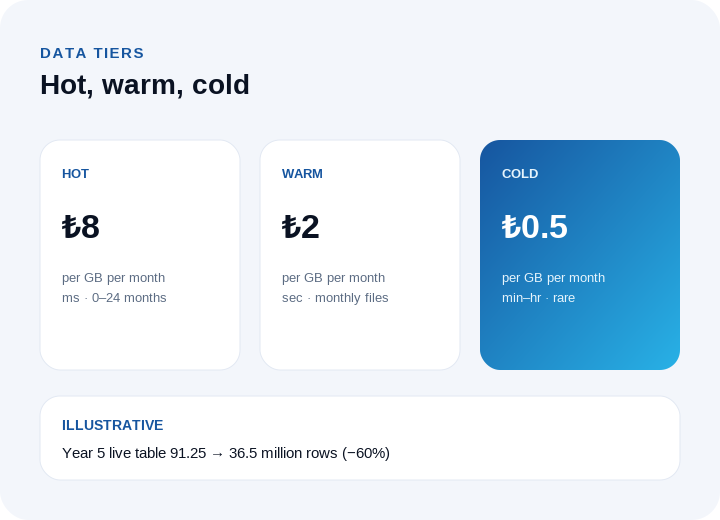
The example uses only the hot and warm tiers. A cold tier is for data that is almost never accessed but still has a retention obligation.
How Fast Does a Table Grow and Why Does It Matter?
Growth is linear, but its effects are not. Suppose a dealer order system writes 50,000 rows a day and each row takes 400 bytes: 50,000 × 400 = 20 MB a day. Yearly rows are 50,000 × 365 = 18,250,000, or 7.3 GB of raw data. If indexes take about 60 percent of the data size (illustrative), the indexed size is 7.3 × 1.6 = 11.68 GB.
| Period | Accumulated rows | Raw data | Indexed size |
|---|---|---|---|
| 1 year | 18,250,000 | 7.3 GB | 11.68 GB |
| 2 years | 36,500,000 | 14.6 GB | 23.36 GB |
| 3 years | 54,750,000 | 21.9 GB | 35.04 GB |
| 5 years, no archive | 91,250,000 | 36.5 GB | 58.4 GB |
| 5 years, last 24 months live | 36,500,000 | 14.6 GB | 23.36 GB |
In year five the live table shrinks by 60 percent (1 − 36.5 ÷ 91.25). The benefit is not the same for every query. Finding one order by index depends on B-tree depth, and with 200 keys per node both sizes need about four levels (log base 200 of 91.25 million ≈ 3.46; of 36.5 million ≈ 3.29). A report that cannot use an index reads the whole table: at 500 MB/s (illustrative) that is 73 s for 36.5 GB and 29.2 s for 14.6 GB. Backup, restore and maintenance also grow with size. For the index side, see our indexing guide.
What Comes First? Data Inventory and Classification
For every table you write down the record type, the owner, the size, the growth rate, whether it holds personal data, and which screens or reports read it. A table with no owner cannot get a rule, because nobody can answer "may this be deleted?"
The example has 48 tables, and 12 large tables carry most of the size. 40 tables have a known owner: 40 ÷ 48 = 83.3 percent; the remaining eight get owners first. Effort goes to the large tables first; archiving a small table costs more than it saves.
How Is a Retention Schedule Expressed in Software?
A retention schedule maps record types to periods and has three parts: which record, which event starts the clock, and which unit measures the period. Neither the developer nor this article decides the period values; they are settled with legal counsel and an accountant, and in code they live as configuration so that a change in regulation does not require a code change.
| Record type | Event that starts the clock | Time unit | Period set by | At the end |
|---|---|---|---|---|
| Order line | Closing date | Months | Legal counsel, accountant | Archive, then anonymize |
| Invoice record | Issue date | Years | Accountant | Archive, delete when period ends |
| Dealer contact data | Contract end | Months | Legal counsel | Delete or anonymize |
| Session log | Record creation | Days | Security owner | Delete |
Each rule carries a version number and old versions are kept; otherwise "why was this record deleted that day?" has no answer. The audit log has its own rule, covered in our audit log guide, and document retention is covered in our document management system article.
How Do You Write the Archive Rule?
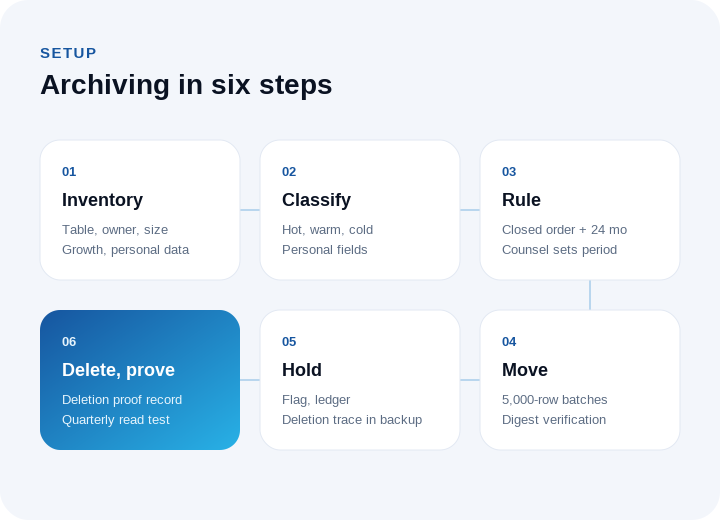
A good rule reads as one sentence and can be tested by a machine: "closed order + 24 months". The 24 months is an operational choice, not a legal period. The rule has three parts: a condition (closed and older than 24 months), a move format (monthly compressed file) and verification (no deletion from live until row counts and digests match). The move runs in small batches: in the example 5,000 rows, 1.5 s per batch.
- Daily flow: 50,000 rows, 10 batches, about 15 s.
- Initial backfill: three years of 54,750,000 rows ÷ 5,000 = 10,950 batches × 1.5 s = 16,425 s, about 4.6 hours. With a 2-hour nightly window that is three nights.
- Archive size: 54,750,000 × 400 bytes = 21.9 GB; indexes are not moved, and at 4:1 compression (illustrative) 5.475 GB remains; across 36 monthly parts that is about 152 MB per file.
An archived record is not a lost record; the read path from the archive is part of the design: the screen says "this order is archived" and offers a "fetch from archive" button. To know which monthly file to open, a small index stays in the live system: 12,500 orders a day (assuming 4 lines per order) × 1,095 days = 13,687,500 orders, at 24 bytes per entry about 328.5 MB. With the index, the month is known and reading a 152 MB file at 200 MB/s takes 0.76 s; without it, scanning the 5.475 GB archive takes 27.4 s.
What Is a Legal Hold?
A legal hold stops deletion of the relevant records, even after their retention period ends, while a lawsuit, investigation or audit is ongoing. In software it is a flag and a record: scope, reason, who opened it, opening and closing dates; the deletion job checks every candidate for "is there an active hold?"
In the example 380,000 rows expire in a month; a hold covering four dealers matches 14,800 rows: 14,800 ÷ 380,000 = 3.9 percent. The deletion removes 380,000 − 14,800 = 365,200 rows. The right to open a hold is given to a narrow role, every action is written to the audit log, and holds open for more than 90 days are reviewed in a monthly report. Legal counsel decides when a hold is needed.
Deletion or Anonymization?
Permanent deletion destroys the record; anonymization removes the fields that identify a person and keeps fields with analytical value, such as sales and stock. Legal counsel decides which is sufficient. On the software side, deletion changes historical totals and can break referential integrity; anonymization preserves totals but carries a risk of re-identification from the remaining fields. For techniques, see our data masking guide.
In both cases a deletion proof is kept: record type, rule version, row count, date and a digest of the content. The proof record contains no deleted personal data; otherwise the deletion leaves its own copy behind.
What If Deleted Data Stays in Backups?
A record deleted from live stays in backups until the backup retention period ends. "Deleted" therefore has two parts: deleted from live, and gone from backups at the latest when the backup retention period ends. In the example backups are kept for 35 days (illustrative); the period is written into the policy and confirmed with legal counsel.
The real trap is a restore: if you restore from a backup taken twenty days ago, everything deleted in that window comes back. The fix is a deletion ledger: only the business ID and date of each deleted record are kept, separate from backups and without personal data, and re-applied after every restore. You test this in the restore rehearsal.
Integrity, Restore Testing and Metrics
An archive is only an archive while it can be read. A checksum is produced for each monthly file at move time and stored elsewhere; once a year the archive is read again and compared. Across the 12 large tables the archive is 12 × 5.475 = 65.7 GB, or 65,700 MB; at 200 MB/s that is 328.5 s, about 5.5 minutes. The archive is stored encrypted, read access is tied to a separate role, and every read is logged; the archive must not become a back door less protected than the live system. See encryption and key management.
Restore testing applies to the archive too: every quarter 20 random orders are found and read from the archive, with a target of at most 5 s per record and 20 out of 20 succeeding. Metrics to watch:
- Inventory coverage: share of tables with a known owner (40 ÷ 48 = 83.3 percent; target 100 percent).
- Deletion lag: expired but not yet deleted share; 5,700 ÷ 380,000 = 1.5 percent, and apart from holds it should be close to zero.
- Move verification: number of batches whose digest does not match; target zero.
- Live table size: does it stay flat after month 24?
Cost-Benefit: Does Archiving Pay for Itself?
Take 12 large tables of the same shape. In year five without archiving the live size is 12 × 58.4 = 700.8 GB; with archiving it is 12 × 23.36 = 280.32 GB. The hot tier costs ₺8/GB/month with three copies, and backup storage holds seven times the live size at ₺1/GB/month: per GB, 8 × 3 + 7 × 1 = ₺31.
| Measure (year 5) | No archive | With archive |
|---|---|---|
| Live rows (per table) | 91,250,000 | 36,500,000 |
| Full-scan report | 73 s | 29.2 s |
| Full backup (100 MB/s) | 116.8 min | 46.7 min |
| Monthly storage | 700.8 × 31 = ₺21,724.80 | 280.32 × 31 + 65.7 × 2 = ₺8,821.32 |
The monthly storage difference is ₺12,903.48. Without archiving the size crosses a 400 GB threshold at about month 35 (400 ÷ 140.16 × 12 ≈ 34.3; the 12 tables grow 140.16 GB a year indexed) and a larger server tier is needed; the step costs ₺6,000 a month (illustrative). Development is 22 person-days × ₺9,000 = ₺198,000, and running costs are ₺1,500 a month once archiving starts.
The cumulative net month by month: no savings for the first 24 months and a net of −₺198,000; −₺176,042 at month 36, −₺42,471 at month 48, +₺142,714 at month 60; break-even at month 52. By month 60 the monthly net is 12,903.48 + 6,000 − 1,500 = ₺17,403.48. If growth halves (25,000 rows a day) the net at month 60 is still −₺132,643 and the investment does not pay back within five years. The calculation puts no money on performance or the backup window, and basing the decision on storage alone would be wrong too. See cloud cost management and data warehouses.
How Do You Set Up Archiving and Retention in Six Steps?
Build a working pipeline for the single largest table within a month, then replicate the rule.
- Take inventory: table, record type, owner, size, growth, personal data.
- Classify: hot, warm, cold; mark personal data fields.
- Get the schedule approved: settle the record type, event and time unit table with legal counsel and an accountant; put the periods into configuration.
- Build the move pipeline: small batches, digest verification, an archive read screen and the index; split the initial backfill across nights.
- Add hold and deletion: flag, deletion ledger, deletion proof, anonymization fields.
- Measure and rehearse: quarterly archive reads, an annual integrity scan, a ledger rehearsal on restore.
If data must also move to another system, apply the reconciliation method from our data migration guide.
We recommend reading: How to Set Up Centralized Log Management: Structured Logs, Retention and Cost Guide
We recommend reading: User Account Lifecycle Management: How to Handle Joiners, Movers and Leavers
We recommend reading: How to Set Up Data Governance: Roles, Critical Data Elements, Quality Rules and a 90-Day Plan
We recommend reading: How to Handle Data Subject Requests (Access, Correction, Deletion) in Software: Data Map, Verification and Proof Guide
We recommend reading: How to Decommission and Retire a Legacy System: Usage Evidence, Archive, License and Shutdown Guide
Data Lifecycle in Custom Software with İnovabil
At İnovabil our focus is building custom software from scratch for your company: custom software, ERP, CRM, e-commerce, web, mobile and integration. In the requirements analysis step we suggest writing down data volume, retention expectations and reporting needs, so that archiving and deletion rules enter the architecture from the start; we do not claim a separate archiving service. Role-based access, audit logs and secure hosting are the capabilities these rules rely on.
We built CRM, purchasing and mobile for Avcılar İnşaat; a purchasing system for İZBAN; logistics and shipment planning with wholesale order management for Karyak; and warehouse management plus a complaint and support management system for Sleepy. Send us a short summary of your data volume and retention question, and we will produce a written assessment with you during requirements.
We recommend reading: Our software development process: step by step from analysis to launch
Frequently Asked Questions
What is data archiving and how does it differ from backup?
Archiving moves old but still required records out of the live system into a cheap, readable tier. A backup exists to recover from disaster and stays alongside live data; a single record can be read from an archive, while reading from a backup requires a restore.
Who decides the retention period?
Legal counsel and an accountant. The software team applies the record type, the event that starts the clock and the time unit as configuration; it does not decide the period value, and this article gives none.
Which data should move to the archive?
Growing, rarely read records that match the rule condition, for example a closed order plus 24 months. Start with the largest tables.
What does the deletion job do under a legal hold?
It checks every candidate for an active hold and skips the covered records. In the example 14,800 of 380,000 candidates stay on hold and 365,200 are deleted.
What if deleted data remains in backups?
The backup retention period is written into the policy, and deletion is defined as gone from backups within that period at the latest. After a restore the deletion ledger is re-applied; rehearse it and confirm the periods with legal counsel.