

A development team finishes a change, yet it takes weeks to reach production: code is merged by hand, tests are run by hand, and the release night depends on one person's calendar. What is CI/CD? It is the way of working that turns this chain into an automated pipeline: CI stands for continuous integration, and CD stands for continuous delivery or continuous deployment. The goal is less about releasing fast and more about releasing small changes often and safely.
In this guide we cover the three distinct CI/CD concepts, the stages of a pipeline, why small and frequent releases reduce risk, four delivery metrics, deployment strategies, how to handle database changes and secrets, what automation costs, and a six-step setup. All example figures are illustrative; they are not an industry average or the value of any particular tool.
What Is CI/CD?
CI/CD is an approach in which building, testing, and moving a code change to a target environment follow a predefined, automated flow. Team members merge their changes into the shared code frequently, often several times a day; the pipeline runs on every merge and reports the result immediately.
This approach is not a one-off team decision; it is part of the software development process. We covered the whole process in our software development life cycle guide; here we look only at the release pipeline in depth.
We recommend reading: Our software development process: step by step from analysis to release
What Is the Difference Between Continuous Integration, Continuous Delivery, and Continuous Deployment?
They are pipelines of different lengths: integration only merges and tests the code, delivery produces a release-ready package, and deployment puts that package into production without human approval.
| Concept | What it does | Release to production | When it fits |
|---|---|---|---|
| Continuous integration | Builds and tests on every merge | Out of scope | The starting point for every team |
| Continuous delivery | Produces a release-ready package and a staging environment | A person presses the button | Work that needs approval or a release window |
| Continuous deployment | Releases any change that passes the tests, automatically | Fully automatic | When testing, monitoring, and rollback are strong |
For most businesses the right starting point is continuous integration plus continuous delivery. Moving to continuous deployment depends on how much you trust the pipeline's tests and the rollback path; it is a maturity decision, not a technical requirement.
What Stages Does a CI/CD Pipeline Have?
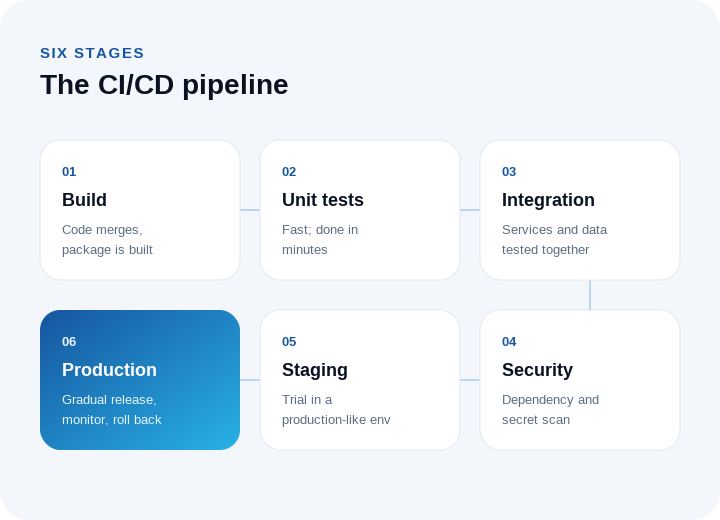
A typical pipeline has six stages; fast and cheap checks go first and slow, expensive ones go last, so that defects are caught early and cheaply.
| Stage | What is checked? | Illustrative duration |
|---|---|---|
| 1. Build | Does the code merge and does a package get produced? | 3 min |
| 2. Unit tests | Do individual functions work correctly? | 4 min |
| 3. Integration tests | Do services and the database work together? | 8 min |
| 4. Security scan | Any known flaws in dependencies, any secrets embedded in the code? | 5 min |
| 5. Staging environment | Does the core flow work in a production-like environment? | 6 min |
| 6. Production | Gradual release, monitoring, rollback if needed | 4 min |
The durations add up to 3 + 4 + 8 + 5 + 6 + 4 = 30 minutes. As a pipeline gets longer, developers move on to other work without waiting for the result and lose context; so running the slowest stage in parallel, or shrinking it, needs ongoing care. We explained how to design tests in our software testing guide; the unit and integration stages of the pipeline wire that test pyramid into automation.
Why Are Small and Frequent Releases Safer?
Because risk grows with the number of changes: a team that ships fewer changes at a time has fewer things to search through when something breaks. Let us release the same 120 changes in two different ways.
| Measure (illustrative) | 1 big release a month | 4 small releases a week |
|---|---|---|
| Changes per release | 120 | 120 ÷ 4 = 30 |
| Suspects when a bug appears | 120 | 30 |
| Halving attempts to find the faulty change | 7 (2⁷ = 128 ≥ 120) | 5 (2⁵ = 32 ≥ 30) |
| Healthy changes lost on rollback | 119 | 29 |
| Average time a change waits for release | 30 ÷ 2 = 15 days | 7 ÷ 2 = 3.5 days |
The assumption in the table is that a release contains a single faulty change. In the small release the number of suspects drops to a quarter, a rollback affects 29 healthy changes, and a developer sees real user feedback on average 3.5 days after writing the code; in the big release that wait is 15 days. Code waiting weeks for release is also a hidden source of accumulating technical debt.
We recommend reading: What is an MVP? A guide to keeping the first release small: cost and speed
What Are the Four Commonly Used Delivery Metrics?
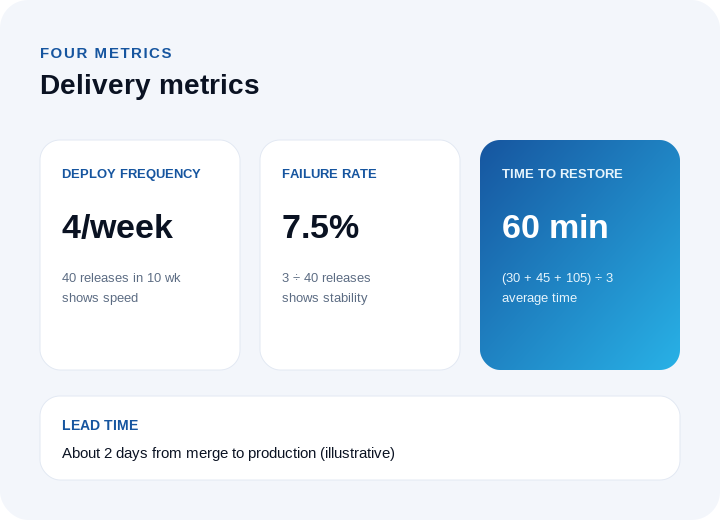
Four metrics tell you whether the pipeline works: deployment frequency, lead time for changes, change failure rate, and time to restore service. The first two measure speed and the last two measure stability; making one of them a target without the others is misleading.
| Metric | How it is calculated | Illustrative example |
|---|---|---|
| Deployment frequency | Number of releases to production ÷ period | 40 releases in 10 weeks = 4 a week |
| Lead time for changes | Time from code merge to production | 2 days on average |
| Change failure rate | Releases that caused a problem ÷ total releases | 3 ÷ 40 = 7.5% |
| Time to restore service | Time from the problem to return to normal | (30 + 45 + 105) ÷ 3 = 60 min |
In the example, the three problem releases were fixed in 30, 45, and 105 minutes; the average is 60 minutes. Use the metrics to track your own team's trend over time, not to compare teams; a measure that becomes a target gets distorted, for example when a team starts hiding failures.
What Are the Deployment Strategies?
A strategy is how a new version is opened to users. All of them serve the same purpose: shrinking the number of affected users and the rollback time when something goes wrong.
| Strategy | How it works | Strength | Cost |
|---|---|---|---|
| Blue-green | Two identical environments; traffic switches to the new one | Rollback is flipping the switch back | Infrastructure doubles |
| Canary | The new version opens first to a small slice of users | Problems are caught in the small slice | Needs monitoring and rate tracking |
| Feature flag | Code is live; the feature is off or on by configuration | Separates releasing from turning a feature on | Clutter if old flags are not cleaned up |
Canary example: 5% of 10,000 active users is 500 people. If the error rate rises in the new version, 500 users are affected instead of 10,000, which is 20 times fewer. A feature flag is especially useful in web applications, letting you ship an unfinished feature without showing it to users.
How Are Database Changes Brought into the Pipeline?
A database change is turned into a script like code, versioned, and run inside the pipeline. The hard part is that code can be rolled back while data cannot.
- Expand, migrate, contract: Renaming a field is not done in one step. First the new field is added; the application writes to both; old data is moved to the new field; reads switch to the new field; finally the old field is removed. That is at least three separate releases, but every step is reversible.
- Backward compatibility: The new data structure must also work with the previous application version; otherwise rollback becomes impossible.
- Destructive changes in a separate release: Dropping a field or table is done in its own release, after rollback has been verified as safe.
- Backup and rehearsal: Take a backup before a destructive step and test the restore; we covered the details in our data backup guide.
How Are Secrets and Keys Managed?
Passwords, keys, and access credentials are never written to the code repository; if one is written even once, it counts as leaked and is replaced. The pipeline reaches them only at run time and per environment.
- A separate secret store: Keys live outside the code in an access-controlled secret store.
- Environment-specific values: Staging and production keys differ; a staging key cannot read production data.
- Least privilege: The pipeline's account holds only the permissions needed to release.
- Masking in logs: Keys never appear in pipeline logs; the scan stage catches secrets embedded in code.
- Regular rotation: Keys are changed at set intervals and whenever someone leaves the team.
For details on key and token management, permissions, and lifetimes, see our API security guide.
How Do You Compare the Cost of Manual and Automated Releases?
Automation needs a one-off investment and ongoing upkeep; in return, the effort spent on each release and the cost of release-related incidents fall. The assumptions below are illustrative.
- Hourly cost ₺300; 6 releases a month.
- Manual release: 5 hours per release. 1 release-related incident a month, 8 hours per incident.
- Automated release: 1 hour per release (approval and monitoring). Pipeline upkeep 4 hours a month. Incidents drop to 0.25 a month.
- Pipeline setup is a one-off ₺180,000.
| Item (monthly) | Manual | Automated |
|---|---|---|
| Release effort | 6 × 5 h × ₺300 = ₺9,000 | 6 × 1 h × ₺300 = ₺1,800 |
| Pipeline upkeep | — | 4 h × ₺300 = ₺1,200 |
| Incident cost | 1 × 8 h × ₺300 = ₺2,400 | 0.25 × 8 h × ₺300 = ₺600 |
| Total | ₺11,400 | ₺3,600 |
The net monthly gain is ₺11,400 − ₺3,600 = ₺7,800. Payback is ₺180,000 ÷ ₺7,800 ≈ 23 months. The table changes as release frequency rises: at 12 releases a month, the manual cost is 12 × 5 × ₺300 + ₺2,400 = ₺20,400 and the automated cost is 12 × 1 × ₺300 + ₺1,200 + ₺600 = ₺5,400; the net gain is ₺15,000 and payback is ₺180,000 ÷ ₺15,000 = 12 months. The number of incidents is assumed to stay constant; in reality more releases mean more opportunities and more risk. For the details of investment calculations, see our software project cost guide.
What Are Common CI/CD Mistakes?
- A slow pipeline: As the pipeline grows longer, developers stop waiting for it, batch up changes, and the small-release logic breaks down.
- Flaky tests: Tests that sometimes pass and sometimes fail make the pipeline untrustworthy. Illustrative calculation: the probability that all 50 tests, each 99% reliable, pass is 0.99⁵⁰ ≈ 60.5%; the pipeline turns red without a real defect in about 4 of every 10 runs, and the team starts ignoring red.
- Long-lived branches: Code that stays on a separate branch for weeks produces conflicts and surprises at merge time.
- Skipping tests in a hurry: If there is a way around the pipeline, that way gets used most in emergencies and lets the most defects through.
- Never testing the rollback path: Rollback should not be tried for the first time during an incident.
- Not monitoring after release: If error rate and response time are not watched after the pipeline goes live, users will be the ones to report the problem.
- Automating a broken process: Vague approval steps and hidden manual work should be written down first, then automated.
We recommend reading: What is microservices architecture? The difference from a monolith, cost, and a decision guide
How Do You Set Up CI/CD in Six Steps?
Do not try to build everything at once; each step delivers value on its own and prepares the ground for the next.
- Write down and measure the current release process: How many steps, hours, and people does a release take today? Record the starting values of the four metrics.
- Set a rule for frequent merging into the shared code: Keep changes small, keep branches short-lived, review every merge.
- Automate the build and unit tests: Run them on every merge; treat a broken pipeline as a top-priority issue.
- Add integration tests, a security scan, and a staging environment: Make staging as close to production as possible; let database scripts go through the pipeline too.
- Release to production gradually and reversibly: Use a canary or feature flags; test the rollback path; keep secrets in the secret store.
- Monitor and measure: Review the four metrics monthly; improve the slowest and flakiest stage of the pipeline one at a time.
We recommend reading: What Is Code Review?
We recommend reading: What Is Version Control (Git)? Commits, Branches, Merging, Tags and Source Code Ownership Guide
We recommend reading: What Is Software Monitoring?
We recommend reading: How to Build a Software Development Team: Roles, Staffing, Cost and Capacity Guide
We recommend reading: What Is Test Automation?
We recommend reading: How to Do Incident Management and Post-Mortems: SEV Levels, On-Call, MTTR and Blameless Review Guide
We recommend reading: API Versioning and Backward Compatibility: Breaking Changes, Deprecation and Cost Guide
We recommend reading: How to Manage Cloud Costs (FinOps): Tagging, Right-Sizing, Commitments and Savings Guide
We recommend reading: What Are Feature Flags and Gradual Rollout? Percentage Buckets, Stop Criteria and Flag Debt Guide
We recommend reading: How to Manage Mobile App Versions and Forced Updates: Version Policy, Staged Rollout and Rollback Guide
We recommend reading: How to Set Up IT Change Management and Maintenance Windows: Risk Scoring, Approval and Rollback Guide
We recommend reading: How to Set Up a Software Bill of Materials (SBOM) and Dependency Update Management: Vulnerability Matching, Priority and Payback Guide
We recommend reading: What Is Static Code Analysis and Quality Gates? Complexity, Thresholds and Findings Management Guide
Release and Maintenance with İnovabil
At İnovabil our focus is building software from scratch, tailored to each company: custom software, ERP, CRM, e-commerce, web, mobile, and integration. Our recorded way of working on the process page consists of the analysis, design, development, testing, release, and maintenance and support steps. We do not offer CI/CD as a ready-made package; we suggest clarifying expectations for release frequency, rollback, and approval at the requirements stage, because the size of the pipeline depends on those expectations.
We built CRM, purchasing, and mobile for Avcılar İnşaat; a purchasing system for İZBAN; logistics and shipment planning plus wholesale order management for Karyak; and warehouse management plus a complaint and support management system for Sleepy. Send us a short summary of your project's release and maintenance expectations, and we will put together a written release and maintenance plan with you.
We recommend reading: Our custom software service
Frequently Asked Questions
What is CI/CD and what is it for, in short?
It builds, tests, and moves a code change to release through an automated pipeline. That makes releases frequent, small, and repeatable; defects are caught early and rollback gets easier.
What is the difference between continuous delivery and continuous deployment?
In continuous delivery the package is produced release-ready, but a person approves the release to production. In continuous deployment a change that passes the tests is released automatically. The second needs stronger testing and monitoring.
Does a small business need CI/CD?
If releases are frequent and manual, yes, though the scale can stay small. Even a simple pipeline that runs the build and unit tests automatically brings a real gain. If releases are rare and the application is small, a full pipeline may not be needed.
How long does it take to set up CI/CD and what does it cost?
It depends on the application's structure, the test setup, and the level of automation targeted. In the example the setup is ₺180,000, the net monthly gain is ₺7,800, and payback is about 23 months; at 12 releases a month it falls to 12 months. Recalculate with your own figures.
Does CI/CD remove the risk of defects completely?
No. It reduces the risk: because changes are smaller, the defect area narrows and rollback gets faster. The pipeline only catches defects that the written tests can catch; coverage and quality depend on the tests.