

The order tracking file is called "order_tracking_FINAL_v3_last.xlsx". It has three copies: one in sales, one in the warehouse, one in accounting. Only the person who saved it last knows which one is right, and that person is on leave. Excel did its job for years, but the team grew, the records multiplied and the spreadsheet no longer carries the work; the work is trying to carry the spreadsheet. Moving from Excel to software at this point does not mean throwing the spreadsheet away; it means moving the job the spreadsheet does into a shared, traceable system that tolerates mistakes.
In this guide we explain where Excel is enough and where it is not, the signs that show it is time to move, the monthly cost of spreadsheet work, the options, a six-step migration plan, data clean-up and migration checks, parallel running and where Excel can stay afterward. The example figures are illustrative; they are not measurements of a real business or an industry average.
When Is Excel Enough and When Is It Not?
Excel is an excellent tool for calculations, analysis, drafts and small lists done by one person. It starts to fall short in processes where several people update the same data at once, records link to each other and every change must be traceable.
| Situation | Excel is enough | Excel is not enough |
|---|---|---|
| Number of users | One or two people | Five or more at the same time |
| Data | A few hundred rows, a single list | Linked lists (orders, stock, customers) |
| History | Who changed what does not matter | The owner and time of every change are needed |
| Permissions | Everyone can see everything | View and edit limits per person are needed |
| Rules | Simple formulas | Approval flow, alerts, automatic calculation |
| Integration | Manual copy and paste is fine | Automatic links to marketplaces, e-invoice, shipping |
In short: if you calculate, use Excel; if you manage a process, use software. When a spreadsheet runs a process, the cost builds up unnoticed.
We recommend reading: Our custom software development service
Which Signs Show It Is Time to Move to Software?
Mark the eight signs below for your business. Each "yes" is a point; the total is a rough but useful measure of how urgent the move is.
- There are multiple copies: Different versions of the same file circulate in different teams.
- A formula error has happened: A broken formula or a shifted cell wrote a wrong price or wrong stock.
- Knowledge sits with one person: Only one person knows how the file works, and work stops when they are away.
- History is invisible: You cannot find who changed a cell and when.
- The file has become heavy: It takes minutes to open and save and breaks now and then.
- Manual transfer exists: You copy and paste the same data into other systems.
- Permission separation is needed: Some information should not be open to everyone but cannot be separated in the file.
- Reporting is hard: Preparing a management report takes several hours each month.
The score is not a verdict; it prepares the ground for a decision meeting. Even with a low score, three or more signs concentrated in a single critical process justify software for that process.
How Is the Monthly Cost of Working in Spreadsheets Calculated?
Excel looks free; its cost hides in working time and errors. It is enough to measure the cost in two items: repeated manual work and fixing errors.
Example (illustrative): 5 people run order tracking from a spreadsheet. Copying, merging, checking and preparing reports takes 40 minutes per person per day, and a month has 22 working days. The total time is 5 × 40 × 22 = 4,400 minutes, about 73.3 hours. At ₺300 per hour, repeated work costs 73.3 × 300 = ₺22,000 a month. In addition 6 errors occur a month and each needs 2 hours of fixing: 6 × 2 × 300 = ₺3,600. The monthly total loss is 22,000 + 3,600 = ₺25,600.
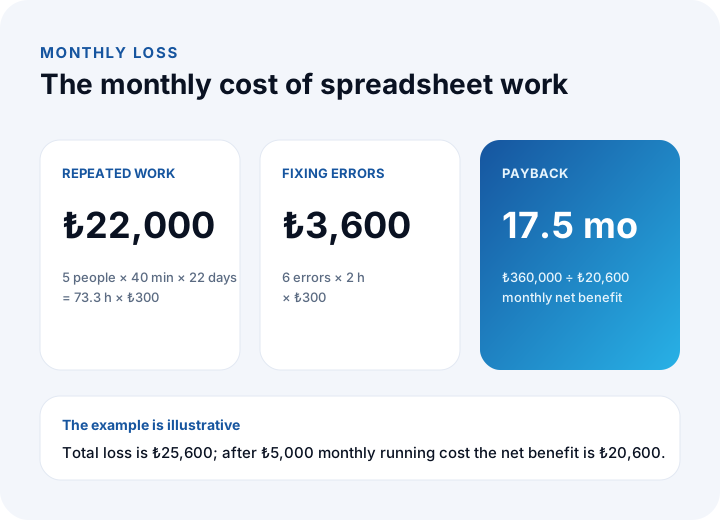
If the software's monthly running cost (hosting, maintenance) is ₺5,000, the net benefit is 25,600 − 5,000 = ₺20,600. For an investment of ₺360,000, the payback is 360,000 ÷ 20,600 ≈ 17.5 months. The unproductive time of staff, customer satisfaction and the cost of wrong decisions are not included; update the figures with measurements. We explain how to arrive at the cost step by step in our software project cost guide.
What Options Can Replace Excel?
Moving does not always mean writing software from scratch. There are four paths, chosen according to the complexity of the job.
| Option | When it fits | Limit |
|---|---|---|
| Tidying Excel | When the problem comes from disorder; with templates, validation and a single owner | The concurrency and traceability problem remains |
| Shared cloud spreadsheet | Small team, simple tracking | Weak process rules and permission separation |
| Off-the-shelf program | When the process is standard (pre-accounting, simple CRM) | Customization is hard if you have special rules |
| Custom software | When the process is specific to you and needs integration and permissions | Needs an up-front investment and analysis time |
We explain how to choose between off-the-shelf and custom in detail in our off-the-shelf vs custom software guide. The rule is simple: if your process is standard in your industry, go off-the-shelf; if your competitive edge or a different rule lives in the process, consider custom software.
What Steps Does the Move from Excel to Software Follow?
Splitting the migration into six steps instead of doing it all at once lowers the risk. Each step should end with a concrete output.
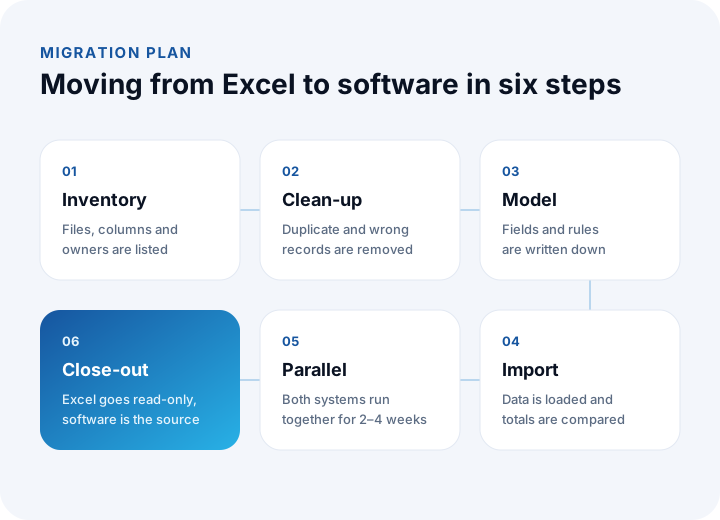
- Inventory: Which files exist, who uses them, what does each column mean, which formulas are critical? Also list the "hidden" sheets and macros nobody knows about.
- Clean-up: Duplicate, missing and inconsistent records are removed at the source. Moving unclean data to the new system just copies the problem to a new place.
- Model: Fields, rules, statuses and permissions are written down. Implicit rules in the spreadsheet (coloured cells, handwritten notes) are turned into explicit rules.
- Import: Data is loaded and the old totals are compared with the new ones.
- Parallel running: The two systems run together and results are compared every day.
- Close-out: Excel is made read-only and the software becomes the single source of truth.
The inventory and model steps are really a requirements exercise; we explain how to do it with templates in our software requirements analysis guide.
How Are Data Clean-Up and Migration Checks Done?
Data is what takes the most time in a migration. Two checks are needed: removing duplicates during clean-up and confirming after the move that the records arrived completely.
Example (illustrative): a customer list has 8,400 rows, and about 9% of them are re-entries of the same customer with spelling differences. The number of duplicates is 8,400 × 0.09 = 756; after clean-up 8,400 − 756 = 7,644 unique records remain. Matching on "name" alone is not enough; records are merged using a second field such as phone, email or tax number, and unclear pairs are reviewed by hand.
| Check | How it is done | Example |
|---|---|---|
| Record count | Clean records at the source match the count in the new system | 7,644 = 7,644 |
| Total amount | Totals such as receivables and payables are compared on both sides | Difference ₺0 |
| Sample | 50 random records are compared by eye | 50 records, 0 differences |
| Required fields | Fields that must not be empty are scanned | List of missing fields |
| Links | It is verified that an order links to a customer and a product | Unlinked records: 0 |
Do not move on to parallel running until the record count and totals match. A migration is not done once; at least one rehearsal is run in a test environment and the same script is used in the real move. Moving files with personal data into a test environment needs access control and masking; consult a legal adviser about processing personal data under the relevant regulation.
We recommend reading: How to back up business data: the 3-2-1 rule, RPO and RTO
How Are Parallel Running and User Habits Managed?
The work does not end when the technical move does; the real risk is habit. Employees have worked with spreadsheets for years and going back to the old file is the easy path.
- Limit the parallel period: Two to four weeks is enough; open-ended parallel running creates two sources of truth.
- Compare daily: Compare the totals of both systems every day and explain any difference the same day.
- Make Excel read-only: On the close-out date, lock the old file for writing and keep it only as an archive.
- Train by task: Instead of "explaining the system", train with real tasks such as "how do you open an order".
- Name a key user: One person from each team answers questions in the first weeks.
- Measure usage: Track the number of records entered and the share of active users.
The usage rate shows whether the migration has really taken hold. For example, if 18 of 25 users log in every day, usage is 18 ÷ 25 = 72%; if it falls below the target, find the cause (training gap, slow screen, missing feature) by talking to users.
Where Can Excel Stay After the Move?
Moving to software does not mean abandoning Excel. A good system lets you export your data, and Excel is again used where it is strong: one-off analysis, scenario calculation, quick drafts.
- Analysis and ad hoc reports: Data exported from the software is examined in Excel.
- Drafts and scenarios: One-off calculations such as a pricing scenario are done in a spreadsheet.
- Small personal lists: Work that is not a shared process can stay in a spreadsheet.
The dividing rule is simple: if the data affects other people's work, it lives in the system; if it is only for your own analysis, it lives in the spreadsheet. To move regular reports from manual preparation to dashboards, see our business intelligence (BI) guide.
What Are Common Mistakes in the Migration?
- Copying the spreadsheet one to one: The new system inherits Excel's disorder. Clean up the process first, then adapt it to software.
- Moving data without cleaning it: Duplicate and wrong records make the new system untrustworthy from the start.
- Forgetting hidden rules: Coloured cells, handwritten notes and personal habits are lost unless written down as rules.
- Extending the parallel period: If two sources live together for months, nobody knows which is right.
- Not involving users: If the people who will use the system do not join the analysis, adoption stays low.
- Doing everything at once: Move the process that causes the most trouble first and add the others in stages.
- Moving without a backup: Deleting old files without archiving them closes the way back.
We recommend reading: What is shipment planning software? Routes, vehicle load and proof of delivery
We recommend reading: What is low-code? Limits, risks and cost of low-code development
Recommended reading: What Is Technical Debt?
Moving from Spreadsheets to Software with İnovabil
At İnovabil we move processes that run on spreadsheets and files into software built for your business: we start with a process map and requirements analysis, design role-based permissions, audit logs and reporting from the beginning, and proceed with incremental development and acceptance testing. We recommend settling data transfer from your existing files and the migration plan together during the requirements phase.
We built a CRM, purchasing system and mobile app for Avcılar İnşaat, a purchasing system for İZBAN, logistics and order management for Karyak, a warehouse management system (WMS) and a complaint and support system for Sleepy, and dispatch planning for Bofigo. Describe in a few sentences which process you struggle with in spreadsheets; we first put the inventory and priorities in writing.
We recommend reading: Our software development process: from analysis to release
Frequently Asked Questions
When should you move from Excel to software?
When several people update the same data, copies of the file circulate, a formula error has happened, or history and permissions are needed. If six or more of the eight signs apply, preparing a migration plan makes sense.
What can replace Excel?
Depending on the complexity, a tidied Excel file, a shared cloud spreadsheet, an off-the-shelf program or custom software. If your process is standard, an off-the-shelf program fits; if you need specific rules and integration, custom software fits.
How is the cost of using Excel calculated?
The time spent on repeated manual work and on fixing errors is multiplied by the hourly cost. In the example, 5 people × 40 minutes × 22 days = 73.3 hours × ₺300 = ₺22,000 and 6 errors × 2 hours × ₺300 = ₺3,600, so the monthly loss is ₺25,600.
How is Excel data moved to software?
Duplicate and wrong records are cleaned first, then the data is imported and the record counts and totals of the old and new systems are compared. In the example, 756 duplicates are removed from 8,400 rows and 7,644 records are moved.
How long should parallel running last?
Two to four weeks is usually enough. The totals of both systems are compared every day; when the period ends Excel is made read-only and the software becomes the single source. Open-ended parallel running creates two sources of truth.