

Someone who types a product code by hand takes the same small risk on hundreds of lines a day: one wrong digit, one item in the wrong place, one stock count that has to be redone. A barcode system marks products, lots or shelf locations with a machine-readable code and passes what a scanner reads straight into your software, so nobody has to key the data in. But a barcode is not just something you print. The code scheme, the label, the scanner and the software have to be designed together.
In this guide we explain what a barcode system is, how 1D and 2D codes differ, what belongs on a label, which scanner types exist, how to address shelf locations, how receiving, picking and counting flows work, how to connect everything to your ERP, and how to calculate payback. The example figures are illustrative ("temsilî"); they are not the price of any particular device or an industry average.
What Is a Barcode System?
A barcode system has four parts: a code scheme (which thing gets which code), a label (the printed carrier), a scanner (the device that decodes it) and software (the ERP or warehouse application that turns each scan into a record). If one part is weak, the whole system is weak: a good scanner will not rescue a badly printed label, and a good label means nothing when the software has no record behind the code.
The barcode itself is only an identifier. The product name, price and stock quantity are not inside the code; they live in the software. A scan simply links the identifier to the right record. We covered the warehouse side in our warehouse management system (WMS) guide and the stock logic in our inventory tracking guide; this article focuses on the code, label and scanner layer underneath both.
We recommend reading: Our ERP software service
Why Is a Barcode More Reliable Than Manual Entry?
Because manual entry exposes every line to human error, while scanning removes most of that risk. The rates below are illustrative; measure your own error rate with a week of sample records.
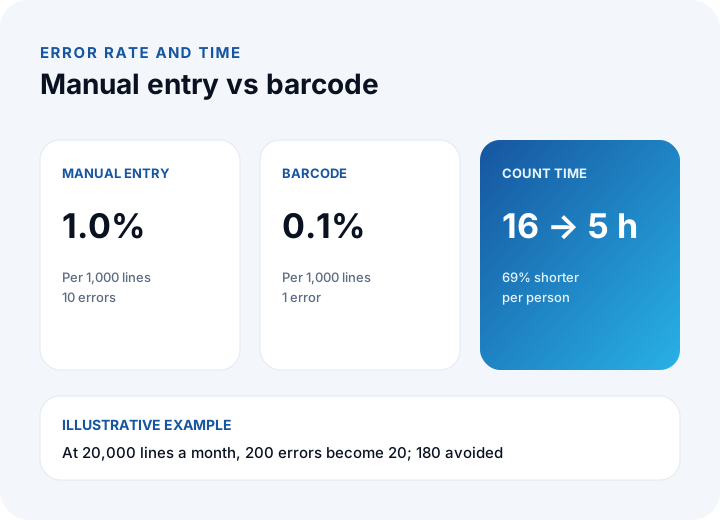
- Manual entry: 1.0% errors, which is 10 errors per 1,000 lines.
- Barcode scanning: 0.1% errors, which is 1 error per 1,000 lines.
- Monthly effect: at 20,000 lines, 20 errors instead of 200, so 180 errors are avoided.
- Counting: a count that took three people 16 hours each takes 5 hours each: (16 − 5) ÷ 16 ≈ 69% shorter.
The cost of an error matters as much as the count. A wrongly shipped item means a return, a re-shipment and sometimes a lost customer. We price these items separately in the payback calculation below.
What Is the Difference Between a 1D Barcode and a 2D Code (QR, Data Matrix)?
A 1D barcode is made of lines and carries a short identifier; a 2D code is a pattern of dots or squares that holds more data. Choose based on how much information the code must carry and where it will be printed.
| Topic | 1D barcode | 2D code (QR, Data Matrix) |
|---|---|---|
| Data carried | Short ID (product, lot, location code) | Longer data: ID, lot, expiry, link |
| Space needed | Wide and horizontal | Small and square |
| Reading | Laser or imager | Imager or camera only |
| Damage tolerance | Low; a broken bar can make it unreadable | Higher; built-in error correction |
| Typical use | Product label, shelf, carton | Small parts, lot and serial tracking, customer links |
| Ease of printing | Any label printer | Needs adequate print resolution |
As a rule, start with 1D. Move to 2D when the label is small or when you need lot, serial and expiry information in one code. For the commercial barcode on products you sell, follow the rules of the body that issues the national numbers; that is separate from internal codes, so confirm the details with that organization.
What Should Be on a Label, and How Do You Design the Codes?
Instead of cramming everything into one code, use separate codes for the product, the lot or serial, and the location, so they cannot be confused. A good code scheme has three properties: it is unique, it lasts, and its meaning lives in the software rather than being baked into the code.
| Code type | What it identifies | Example (illustrative) | Also print on the label |
|---|---|---|---|
| Product code | The product definition (which item) | PRD-000123 | Product name, unit |
| Lot / serial code | A production batch or a single unit | L2611-045 | Production or expiry date |
| Location code | A shelf, bin or zone | A-03-02-B | Aisle, rack, level, bin letter |
| Carton / pallet code | A handling unit | PLT-004812 | Content summary, shipment number |
- Uniqueness: one code must never identify two different things; do not reuse retired product codes.
- Meaningful but not brittle: do not bury information that can change, such as price or supplier, inside the code. Anything that changes stays in the software.
- Check digit: in commercial barcodes the last digit is calculated from the others and catches misreads. Example for 590123412345: the digits in odd positions (5, 0, 2, 4, 2, 4) sum to 17; the even positions (9, 1, 3, 1, 3, 5) sum to 22 and multiplied by 3 give 66; 17 + 66 = 83; the check digit is 10 − 3 = 7, so the full code is 5901234123457.
What Types of Barcode Scanners Are There, and Which Should You Choose?
The choice depends on where the work happens and how often scanning occurs. In a busy warehouse a rugged handheld terminal pays for itself; for rare, low-volume work a phone camera can be enough.
| Scanner | Strength | Limit | Suitable job |
|---|---|---|---|
| Handheld terminal (screen, rugged) | Fast, durable, software screen in hand | Higher device cost | Receiving, picking, counting |
| Simple handheld scanner (wired to a PC) | Cheap, easy to set up | Tied to the computer | Packing desk, checkout |
| Phone camera | No extra device, quick for a pilot | Slower, tiring for frequent use, poor at distance | Low-volume counts, field staff |
| Fixed scanner (conveyor, dock door) | Hands-free, continuous reading | Costly to install and tune | Sorting lines, loading doors |
Ask a few questions before choosing: from what distance will codes be read, is the lighting bright or dim, will the device be dropped, how many people work at once, and how will the scanner talk to your software (from a scanner that types like a keyboard to a terminal running its own app, the options differ). Camera-based devices read 2D codes more comfortably.
How Do You Print Labels That Scan Reliably?
An unreadable label stops the system. Most problems come from print and material, not software, so label selection is part of system design.
- High contrast: dark code on a light background; use matte labels on shiny or reflective surfaces.
- Quiet zone: leave empty space on both sides of the code; the required width is written in the symbology standard.
- Sufficient print resolution: small labels and thin bars blur on a low-resolution printer; resolution is critical for 2D codes.
- Material: pick label stock and ribbon that survive cold, damp or hot conditions, chemicals and abrasion.
- Placement: avoid curves, edges and lid seams; put labels in the same spot every time.
Track label quality with one measure: first-read success. If 1,960 of 2,000 scans read on the first try, success is 1,960 ÷ 2,000 = 98%. Where it falls below 98%, check print and material first.
How Do You Address Shelves and Storage Locations?
Tie every shelf position to a unique code so a product is not "somewhere" but at an exact address. A location code reads aisle, rack, level and bin: A-03-02-B means aisle A, rack 3, level 2, bin B.
Work out capacity in advance. Example: 4 aisles × 10 racks × 5 levels × 2 bins = 400 locations. Each one is labeled and defined in the software. Two rules make life easier: let the codes follow the physical order of the shelves so the pick path comes out naturally, and never reuse a code for another purpose. Put location labels at eye level where the scanner can reach them, and use a different color or code prefix so they are never mistaken for product labels.
What Should the Scan Flow Look Like for Receiving, Picking and Counting?
All three flows follow the same logic: a scanned code is matched to the record the software expects. If it matches, the user continues; if not, the system warns and no wrong movement is posted.
- Receiving: pick the purchase order, scan each carton's product and lot code, enter the quantity, then scan the location code when putting the goods away. Unexpected items or excess quantities trigger a warning.
- Picking: the device shows the pick list in location order; the picker scans the location first, then the product. If the wrong product is scanned, the device rejects it.
- Counting: the counter scans the location, scans and counts the items, and the system shows the difference immediately. Paper lists and later data entry disappear, which is the main reason a 16-hour count shrinks to 5 hours.
On the shipping side the same scan matches loaded cartons against the dispatch list; for the planning side see our shipment planning software guide.
How Does a Barcode System Integrate with ERP and Warehouse Software?
The value of a barcode lies in posting what is read to stock, order and accounting records immediately. Integration can be built at three levels, chosen to fit the need.
| Approach | How it works | Pro | Con |
|---|---|---|---|
| Keyboard emulation | The scanner types the code into the active field on screen | Quick setup, no software change | No checks; can type into the wrong field |
| Browser-based app | The device opens the ERP's mobile screens | Instant validation, one database | Needs a connection |
| Native app with sync | The device keeps its own records and uploads when connected | Works offline | Needs conflict handling |
Whichever you choose, the software must guarantee three things: the same scan is not processed twice (duplicate protection), a code that does not match creates no movement, and every movement is recorded with the user and time. For data flow between systems see our API integration guide, and for the broader framework our what is ERP article.
How Do You Calculate the Payback of a Barcode System?
Payback time is the initial investment divided by the monthly net benefit. The benefit has three parts: avoided error cost, time saved on data entry and time saved on counting. The assumptions below are illustrative.
- Volume: 20,000 transaction lines per month.
- Errors: 1.0% → 0.1%; 200 errors → 20, so 180 are avoided. At ₺150 per error (re-shipment, return, labor): 180 × ₺150 = ₺27,000.
- Entry time: 24 seconds saved per line: 20,000 × 24 = 480,000 s = 133.3 hours × ₺300 = ₺40,000.
- Counting: 3 people × (16 − 5) = 33 hours × ₺300 = ₺9,900.
- Running cost: labels, ribbons and device upkeep at ₺9,000 per month.
| Item | Calculation | Amount |
|---|---|---|
| Avoided error cost | 180 × ₺150 | ₺27,000 |
| Entry time saved | 133.3 h × ₺300 | ₺40,000 |
| Counting time saved | 33 h × ₺300 | ₺9,900 |
| Gross monthly benefit | 27,000 + 40,000 + 9,900 | ₺76,900 |
| Running cost | — | −₺9,000 |
| Monthly net benefit | 76,900 − 9,000 | ₺67,900 |
Investment: 6 handheld terminals × ₺15,000 = ₺90,000; 2 label printers × ₺20,000 = ₺40,000; initial labels and ribbons ₺10,000; software adaptation 25 person-days × ₺9,000 = ₺225,000; training ₺15,000. Total ₺380,000. Payback: 380,000 ÷ 67,900 ≈ 5.6 months. We show how to price the software line in your own project in our software development cost guide. Replace device prices and error cost with your own numbers.
What Are the Steps to Set Up a Barcode System?
Starting small and growing by measurement is the safest route. A six-step path works well.
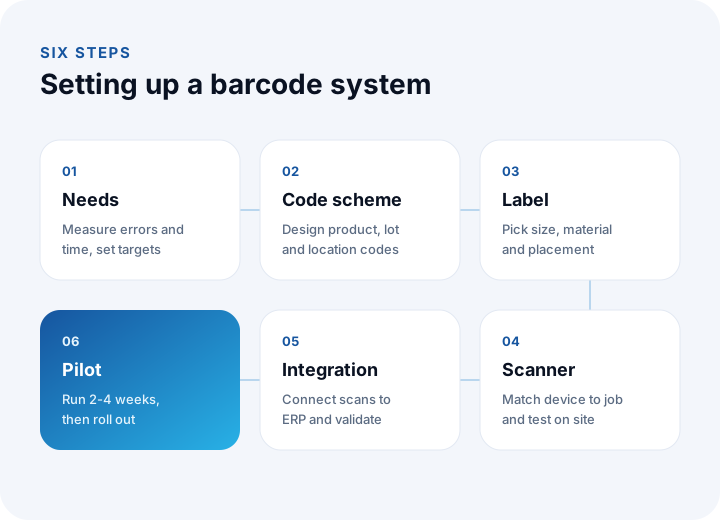
- Needs and baseline: measure where errors and lost time occur (receiving, picking, counting). Our requirements analysis guide shows how to write it down.
- Code scheme: design product, lot/serial and location codes, and settle how each maps to a record in the software.
- Label: choose size, material and placement; test a few labels in the real environment.
- Scanner: choose device types by job; buy a few of each and try them on site.
- Integration: connect the scan flows to the ERP; test duplicate protection and error messages.
- Pilot and rollout: run a 2–4 week pilot in one warehouse zone or one flow; once first-read success and error targets hold, add zones one at a time.
Make the pilot exit criteria numeric: first-read success of at least 98%, error rate below 0.1%, and a measurable cut in count time.
What Are the Most Common Barcode System Mistakes?
- Leaving labels to the end: devices are bought but label printing is unsolved, so the system stumbles from day one.
- Embedding changeable information in the code: when price or supplier changes, every label must be reprinted.
- Skipping location addressing: the product is scanned but nobody knows where it is, so search time never falls.
- No validation in the software: a keyboard-emulating scanner that types into the wrong field creates errors faster than manual entry.
- Skipping training: users who fall back to typing leave the system half-used.
- Standardizing on one scanner type: a cold store, a packing desk and the field each need a different choice.
Labels with personal data (customer name, address) and per-employee scan logs may bring KVKK (Turkey's personal data protection law) obligations; consult your legal counsel for details.
Recommended reading: How to Do Production Planning
Barcode and Warehouse Process Digitization with İnovabil
At İnovabil our focus is building software from scratch, tailored to your company: custom software, ERP, CRM, e-commerce, web, mobile and integration. We recommend writing down barcode and handheld flows, the code scheme and label requirements together during the requirements phase, and integrating scan flows into your ERP and warehouse software; choosing devices and labels is most reliable when validated by a pilot in the real working environment.
We have built a warehouse management system (WMS) and a complaint and support management system for Sleepy; logistics and shipment planning with wholesale order management for Karyak; and CRM, purchasing and mobile solutions for Avcılar İnşaat. Describe your current warehouse and counting process briefly, and let us define a measurable pilot scope together.
We recommend reading: Our software development process: step by step from analysis to launch
Frequently Asked Questions
What is a barcode system, in short?
It is a setup that marks products, lots or shelves with a machine-readable code and passes what a scanner reads into your software. It cuts manual entry, lowers errors, and speeds up receiving, picking and counting.
What do you need to set up a barcode system?
A code scheme, labels and a printer, scanners (handheld terminal, simple scanner or camera) and software that processes what is read. If the four are not designed together, the system gets stuck at its weakest link.
Should you choose a 1D barcode or a QR or Data Matrix code?
1D is enough for short product, shelf and carton IDs, and any label printer can produce it. A 2D code fits when the label is small or you need to carry more data such as lot, serial and expiry; it needs an imager or camera to read.
How long does a barcode system take to pay for itself?
It depends on volume, error cost and investment. In the example the monthly net benefit is ₺67,900 against a ₺380,000 investment, so payback is about 5.6 months. Recalculate with your own numbers.
Where should you start with a barcode system?
With a single flow, such as receiving or counting, in a 2–4 week pilot. Measure your current error rate and time first; once first-read success and error targets hold, add the other flows.