

A sales team takes an order, the warehouse checks stock in a separate spreadsheet, purchasing emails a supplier for the missing material, the production plan lives on a whiteboard, and accounting collects numbers from everyone at month end. The picture is familiar in many businesses. ERP exists to bring this scattered work into a single system.
In this guide we explain in plain language what ERP is, which modules it consists of, what it gives a business, how off-the-shelf and custom ERP differ, and how an ERP project is set up.
What Is ERP?
ERP (Enterprise Resource Planning) is a software system that brings a business's core processes, such as sales, purchasing, stock, production, shipping and finance, together in a single data structure. Information entered in one department is instantly visible in the others, and the same data is never entered twice.
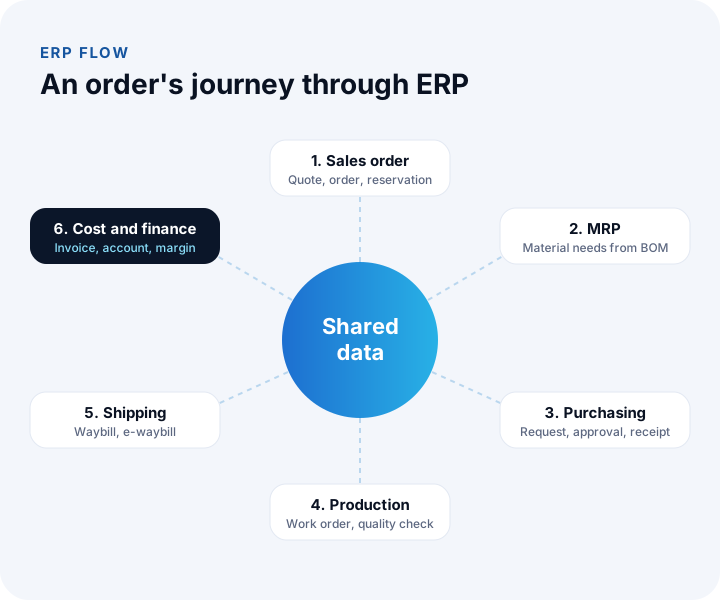
For example, when a sales order is entered, ERP works out from the bill of materials which materials the order needs, suggests purchase requests for items that are out of stock, opens a work order for production, prepares the shipment and invoice, and finally calculates the real cost of that order.
What Is ERP Used For?
The core job of ERP is to plan and monitor a company's resources (materials, people, machines, money and time) together. Managers can then decide on current, consistent data instead of estimates. What ERP gives a business can be summed up as follows:
- One source of truth: Sales, the warehouse and accounting see the same figure, and the "which spreadsheet is right?" debate ends.
- Less manual work: Steps from order to invoice are linked, and data is not re-entered again and again.
- Accurate stock: What to buy, when and how much is calculated, so both overstock and missing materials decrease.
- Real cost: The cost of every product and order, including raw materials, labor and overhead, becomes visible.
- Traceability: You can trace back which lot, supplier and work order a product came from.
- Fast reporting: Profitability, stock and cash position are visible instantly, without waiting for month end.
What Modules Does ERP Consist Of?
ERP is made of connected modules. Not every business needs all of them; you usually start with the process that hurts most and add the other modules step by step.
1. Bill of Materials (BOM)
The bill of materials defines which materials, in what quantities and through which operations a product is made. In multi-level BOMs, finished goods, semi-finished goods and raw materials are linked like a tree. Scrap rates, alternative materials and BOM versions are also kept here. The BOM is the foundation of MRP and of cost calculation.
2. Material Requirements Planning (MRP)
Starting from sales orders and forecasts, MRP calculates what to buy or produce, how much and when. It takes into account stock on hand, reservations, orders in transit and lead times, and finally generates automatic purchase request and work order suggestions.
3. Production Planning and Work Orders
This module plans what will be produced at which station and in what order, based on capacity. Work orders are opened, started and closed, and production and scrap reports are collected from the shop floor by barcode or tablet. That way, planned and actual figures can be compared.
4. Stock and Warehouse
It shows which warehouse, shelf and lot a material is in and how much there is. Transfers between warehouses, stock counts, critical stock alerts and valuation methods such as FIFO or average cost are part of this module.
5. Purchasing
It manages the process from purchase request to invoice: request, collecting quotes from suppliers, approval, order, goods receipt and order-waybill-invoice matching. Approval rules make it clear in the system who can approve up to what amount.
6. Sales and Shipping
It manages quotes, orders, stock reservation, shipping plans and waybills. Dealer, ecommerce and marketplace orders can also be passed into this module and collected in a single order pool.
7. Cost Management
It calculates the real cost of every product and order, including raw materials, labor and production overhead. You can see variances between standard and actual cost, and the effect on product cost when a raw material price changes. Profitability reports are fed from this module.
8. Quality, Finance and Maintenance
The quality control module records incoming, in-process and final inspections. The finance side manages customer/supplier accounts (current accounts), collections and payments, e-invoice (e-Fatura) and the transfer to accounting. The maintenance module tracks periodic maintenance and breakdowns of machines.
We recommend reading: Explore our ERP modules with sample screens
Who Needs ERP?
ERP is usually associated with large companies, but what really matters is not size but the complexity of your processes. If several of the following apply to you, it is time to evaluate ERP:
- You manufacture and run BOM, scrap and cost calculations in spreadsheets.
- You have more than one warehouse and stock information is inconsistent between them.
- Purchasing decisions are triggered by the news that "we ran out of stock".
- You do not know the real profitability per product or per order.
- Departments quote different figures for the same customer, product or order.
How Do the Bill of Materials and MRP Work in an ERP? A Worked Example
MRP starts from the sales plan and calculates how much of which material must be ordered, and when. Its foundation is the bill of materials: the recipe says which parts a product consists of and in what quantities.
Example (illustrative): 50 desks are to be made, and each desk's recipe has 4 legs. The gross requirement is 50 × 4 = 200 legs. There are 60 legs in the warehouse, 40 legs are on a purchase order on the way, and 20 legs are held as safety stock.
| Step | Calculation | Result |
|---|---|---|
| Gross requirement | 50 desks × 4 legs | 200 |
| Stock on hand | Quantity in the warehouse | −60 |
| Open orders on the way | Expected delivery | −40 |
| Safety stock | Minimum to be held | +20 |
| Net requirement | 200 − 60 − 40 + 20 | 120 |
If the supplier sells in boxes of 50, the order is the smallest multiple that covers 120 units: 3 boxes, or 150 units. If the lead time is 10 days, the order must be placed at least 10 days before the date the legs are needed in production. An ERP does this calculation for hundreds of items at once and produces the order suggestion itself; the team only approves it. The scrap rate in the recipe is also added to the gross requirement and flows into the costing.
We recommend reading: How to calculate product cost: a practical guide from recipe to unit cost
Off-the-Shelf ERP or Custom ERP?
Off-the-shelf ERP packages come with broad modules covering many industries; custom ERP means developing only the modules you need, with your own rules. Which one fits depends on how closely your processes match standard package patterns.
| Topic | Off-the-shelf ERP | Custom ERP |
|---|---|---|
| Modules | Broad, many may go unused | Only the modules required |
| Industry-specific processes | Limited to configuration | Built directly around your process |
| Ease of use | Screens can be crowded | Screens kept simple for your team |
| Implementation time | Can be long for large packages | Phased, module by module |
| Licensing | Per user and per module | Development fee based on scope |
We recommend reading: Off-the-shelf or custom software? A decision guide
How Is an ERP Project Set Up?
A successful ERP project starts with process, not software. The steps below give a setup order that reduces risk and makes adoption easier:
- Process and module analysis: Flows between departments are mapped, and the starting module and roadmap are defined.
- Data model design: The data structure that all modules will share is designed as a whole from the start.
- Launching the first module: The most critical process is developed, taken live and improved through real use.
- Adding the other modules: Purchasing, production, sales and finance modules are added step by step.
- Integration and reporting: Connections to accounting, e-invoice (e-Fatura) and other systems, plus management reports, are set up.
- Training and rollout: Users are trained and followed closely in the first period.
We recommend reading: Our software development process
Common Mistakes in ERP Projects
- Launching everything at once: Switching on all modules in one go increases risk; a phased transition is safer.
- Starting with dirty data: Duplicate product cards and wrong stock figures carry their problems into ERP with them.
- Bending the process to the software: Common with packaged ERP, this can end with the team not using the system.
- Leaving users out: If warehouse, production and purchasing teams do not take part in the design, the screens will not work on the floor.
- Underestimating training: A new system takes time to change habits; plan training and support for the first period.
Which Indicators Track the Success of an ERP?
After the ERP goes live, track success with a few indicators rather than with a feeling. If you also measure them before selection, you can make a "before" and "after" comparison.
| Indicator | How it is calculated | What it shows |
|---|---|---|
| Order fulfillment rate | Orders shipped on time and in full ÷ total orders | Health of planning and stock |
| Stock accuracy | Items where system matches shelf ÷ items counted | Reliability of stock data |
| Inventory turnover | Cost of goods sold ÷ average stock value | Capital tied up in stock |
| Schedule adherence | Work orders completed as planned ÷ total work orders | Consistency of production planning |
| Cost variance | Actual cost − standard cost | Recipe, scrap and price differences |
Example: if 188 of 200 orders ship on time and in full, the order fulfillment rate is 188 ÷ 200 = 94% (illustrative). Tracking this rate weekly shows early whether a problem comes from stock, production or shipping.
We recommend reading: How to choose an ERP: process mapping, module priority and payback
A Checklist for Choosing ERP
| Check | Why it matters |
|---|---|
| Are your industry-specific processes supported? | Needs such as BOM, lots and project-based costing can be critical |
| Can modules be launched in phases? | It reduces risk and the initial investment |
| Is there e-invoice (e-Fatura) and accounting integration? | It removes manual work on the finance side |
| Are mobile and barcode use possible? | Needed for the warehouse and the production floor |
| Can reports be changed to fit your needs? | It gives flexibility for management decisions |
| How will support and development continue? | ERP is a system you will use for years |
We recommend reading: What Is CRM and What Is It Used For? A Complete Guide to Sales and Customer Management
We recommend reading: What Is Custom Software? Types, Examples, Advantages and Which Businesses It Suits
We recommend reading: What Is Business Process Automation? Which Process to Automate First and How to Calculate Savings
We recommend reading: What Is Digital Transformation? A Maturity, Roadmap and Payback Guide for Small and Mid-Sized Businesses
We recommend reading: What is procurement software? Process, approval matrix, quote scoring and three-way matching guide
We recommend reading: How to move from Excel to software: signs, cost and data migration
We recommend reading: What is shipment planning software? Routes, vehicle load and proof of delivery
Recommended reading: What Is Role-Based Access Control (RBAC)?
Recommended reading: CRM vs ERP
Recommended reading: What Is a Barcode System and How Do You Set One Up?
Recommended reading: How to Do Production Planning
ERP with İnovabil
At İnovabil we shape ERP around your business: we bring the bill of materials, MRP, production planning, stock, purchasing, sales, quality, cost and finance modules live in the order you need them. The customer/supplier account, stock, cash, bank and e-invoice (e-Fatura) experience we gained with NetKasam, our cloud pre-accounting product, carries directly into our ERP projects.
Frequently Asked Questions
What is the difference between ERP and accounting software?
Accounting software focuses on financial records. ERP brings the whole operation of a company, including sales, purchasing, stock, production and shipping, into a single data structure; accounting is either a part of that structure or integrated with it.
Are MRP and ERP the same thing?
No. MRP is a module that performs material requirements planning. ERP is a broader system that includes MRP and unites sales, purchasing, stock, production and finance.
Should small businesses use ERP?
What matters is not size but the complexity of your processes. Small businesses that manufacture, work with more than one warehouse or want to know their cost per product also benefit from ERP.
How long does an ERP project take?
The duration depends on the modules and integrations to be launched. In a phased approach, the first module goes live sooner and the other modules are added as planned.
Can ERP be used on mobile?
Yes. Operations such as warehouse counts, approvals and production reporting can be done through mobile-friendly screens or separate mobile apps.