

What happens in your warehouse when an order arrives? Someone takes a list, works out from memory or from a colleague where the product sits, walks the aisles, and if they grab the wrong size or colour, the parcel comes back. At month end the system stock does not match the shelf, and nobody knows why. A warehouse management system (WMS) is software that records every movement from the moment goods enter the warehouse until they ship, knows which bin each product sits in, and tells the warehouse team what to do next, step by step. It is the tool for running a warehouse from records instead of from memory.
This guide covers what a WMS is, which processes it handles from receiving to shipping, how it differs from ERP, who needs one, which features matter, off-the-shelf versus custom development, setup steps and common mistakes. A checklist at the end measures whether your warehouse is ready.
What Is a Warehouse Management System (WMS)?
A warehouse management system is software that manages a warehouse's receiving, put-away, stock tracking, order picking, packing, shipping and counting processes; tracks the location of products at bin level; and guides warehouse staff through handheld terminals or mobile devices. In short, it is the system that manages how the work inside the warehouse gets done.
The distinguishing word here is "location". A stock program tells you there are 1,200 units of a product in your warehouse; a WMS knows that 840 of those 1,200 are in bin A-12-03, 360 are in the shipping area, which batch they came from and when they expire. Thanks to this, the person picking an order does not wander the racks; the system sends them to the right bin by the shortest route and does not let them move to the next step without scanning the barcode.
WMS is used in e-commerce warehouses, distribution centres, production sites, cold-chain warehouses and third-party logistics (3PL) companies. The need is set less by warehouse size than by the number of daily movements and the cost of an error.
We recommend reading: Our ERP software service: stock, production and shipping in one system
What Is a Warehouse Management System Used For?
A warehouse management system improves stock accuracy, lets orders be picked faster and without errors, makes efficient use of warehouse space, frees the work from personal know-how and makes every movement in the warehouse traceable.
- Accurate stock: Every receipt, issue and bin change is recorded with a barcode, so system stock and shelf stock match; count differences get smaller and their source can be found.
- Error-free orders: A wrong product, wrong size or missing quantity is caught before shipping; the cost of returns and reshipments falls.
- Faster picking: The system sequences bins for the picker along the shortest route and lets several orders be picked in a single round.
- Efficient space: Fast-moving products sit close to shipping and slow movers go to the back racks; empty bins are visible.
- End of dependence on individuals: The system, not "old Ahmet", knows where a product is; a new employee can work from their first day.
- Traceability: Batch, serial number and expiry date are tracked; if a product is recalled, you can find which orders it went to.
- Measurable performance: Indicators such as lines picked per hour, error rate and receiving time are tracked per person and per shift.
Which Warehouse Processes Does a WMS Cover?
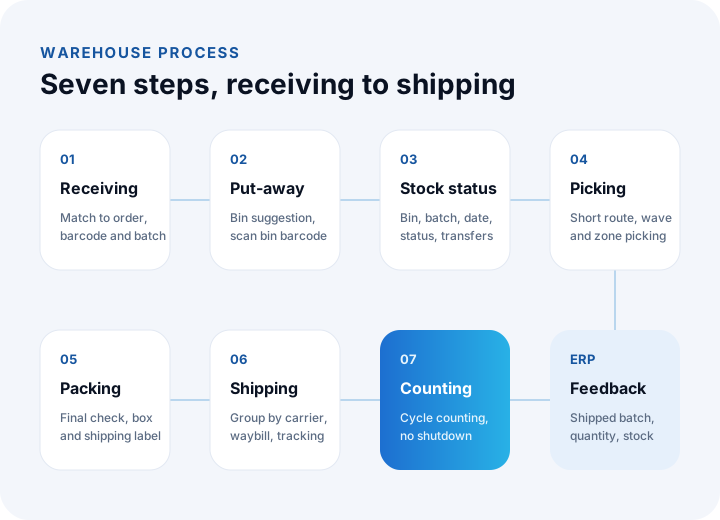
A WMS covers seven main processes from the moment goods enter the warehouse to the moment they leave: receiving, put-away and bin assignment, stock tracking, order picking, packing and checking, shipping, and counting. In each process the system assigns a task, the employee completes it by scanning a barcode, and the record is created at that moment.
Receiving
Goods arriving from a supplier or from production are accepted by comparing them with the purchase order or work order. The received quantity, damage and batch information are recorded by scanning barcodes; missing or surplus items are visible immediately. Goods that arrive without an order are either not accepted or go to approval.
Put-away and bin assignment
For the received product the system suggests a bin address based on its size, turnover speed, the location of similar products and the empty bins. The employee puts the product in the suggested bin and scans the bin barcode. This way the answer to "where is the product?" is always in the system.
Stock tracking
Each product's bin, batch, serial number, expiry date and status (sellable, blocked, damaged, in quality control) are tracked in real time. Bin changes, internal transfers and blocking actions are also recorded with barcodes.
Order picking
Orders turn into pick lists, and the system sequences bins along the shortest route. Single-order, wave (several orders in one round) or zone-based picking methods can be used. The employee scans each product's barcode; if the wrong product is scanned, the system warns them.
Packing and checking
Picked products are scanned again at the packing station and compared with the order. A carton size is suggested, the shipping label is printed and the products in the carton are linked to the carton barcode. Because the final check happens here, wrong shipments are largely prevented.
Shipping
Packages are grouped by carrier or vehicle, the delivery note is created, the carrier tracking number is written to the order and the customer is notified. Which package left on which vehicle and when is on record.
Counting
With cycle counting, done while the warehouse keeps working instead of waiting for year end, certain bins are counted every day. A bin with a difference is investigated immediately. This removes big count days and warehouse shutdowns.
What Is the Difference Between a WMS, an ERP and Inventory Tracking Software?
Inventory tracking software manages how many units there are, ERP manages how stock relates to the company's purchasing, sales, production and finance, and a WMS manages exactly where a product is in the warehouse and how the work inside the warehouse gets done. The three do not replace one another; they work together.
| Topic | Inventory tracking software | ERP | WMS |
|---|---|---|---|
| Core question | How many are there? | How does stock relate to purchasing, sales and finance? | Which bin, which batch; what should be done now? |
| Location detail | Usually at warehouse level | Warehouse and sometimes zone level | Rack and bin level |
| Guiding staff | None | Limited | Task-based, step by step on a handheld terminal |
| Picking route | None | None | Shortest route, wave and zone picking |
| Batch and serial tracking | Limited | Yes | Per bin, with expiry date |
| Counting | Periodic full count | Periodic full count | Cycle counting without closing the warehouse |
| User | Office | Office and management | Warehouse floor: receiving, picking, packing, shipping |
| Who needs it? | Small warehouses with few movements | Businesses that want to unify all processes | Warehouses with high daily movement and high error cost |
In practice the ERP holds "how much stock is there and what was ordered"; the WMS has the order picked and packed, and on shipping reports back to the ERP which batch and quantity left. Many ERPs have basic warehouse functions; when you need bin-level racking, handheld terminals and route optimization, a separate or custom WMS layer is required.
We recommend reading: What is ERP and what is it for? A guide to choosing and implementing ERP
Which Businesses Need a Warehouse Management System?
A WMS is needed by businesses that pick dozens of orders a day, manage several warehouses or thousands of product varieties, must track batches and expiry dates, or are seeing growing count differences and rising costs from wrong shipments. What decides it is not the square metres of the warehouse but the number of movements and the cost of errors.
- E-commerce and marketplace sellers: Many small orders, fast picking and an expectation of zero errors.
- Distributors and wholesalers: A wide product catalogue, carton- and pallet-based shipments, many dealer orders.
- Production facilities: Raw material and finished goods warehouses, material issue by work order, batch tracking.
- Food, pharmaceuticals and cosmetics: Expiry dates, batches and first-in-first-out (FIFO / FEFO) rules.
- Third-party logistics (3PL): Managing and reporting the stock of several customers separately in the same warehouse.
- Chain stores: Shipping from a central warehouse to stores, transfers between stores and returns management.
For a business that prepares a few orders a day, works with a single small warehouse and has few product varieties, the stock module of an ERP or a pre-accounting program may be enough. As the number of movements grows, the time spent answering "where is the product?" starts to exceed the cost of a WMS.
What Features Should a Warehouse Management System Have?
A WMS should have a bin-based rack structure, barcode and handheld terminal support, receiving and put-away suggestions, route-optimized order picking, packing checks, batch and serial tracking, cycle counting, ERP and e-commerce integration, and performance reports.
| Feature | Why it matters |
|---|---|
| Bin-based rack structure (aisle, rack, level) | The exact location of every product is known; search time drops to zero |
| Barcode and handheld terminal | Movements are recorded and verified at the moment they happen |
| Put-away suggestion | The right bin by turnover speed and free space; an efficient warehouse |
| Route-optimized picking | Less walking, more orders, fewer errors |
| Wave and zone picking | Picking many orders in one round on busy days |
| Packing check and shipping label | Wrong shipments are caught before dispatch |
| Carrier integration | Labels and tracking numbers are automatic, customers are notified |
| Batch, serial and expiry date | Traceability, recalls and FIFO / FEFO rules |
| Cycle counting | Continuously accurate stock without closing the warehouse |
| Returns management | Checking returned goods, putting them back on the shelf or blocking them |
| ERP, e-commerce and marketplace integration | Orders and stock flow from a single source; manual transfer ends |
| Performance and occupancy reports | Productivity by person, shift and area is measured |
Off-the-Shelf WMS or a Custom Warehouse Management System?
If your warehouse works with a standard rack layout and your processes fit common patterns, an off-the-shelf WMS can be a quick start; if your warehouse flow is unique, you need deep integration with your ERP and e-commerce systems, you manage the stock of several customers, or you want a simple handheld experience shaped around your floor team's habits, a custom-built WMS is the better fit.
| Topic | Off-the-shelf WMS | Custom WMS |
|---|---|---|
| Getting started | Faster | Needs analysis and development time |
| Warehouse processes | You adapt to the system's flow | The system is built around the warehouse's flow |
| Handheld experience | General purpose, often crowded screens | Simple, few-step screens shaped around the team's work |
| ERP and e-commerce integration | Easy if a ready connector exists, limited if not | Designed two-way around the systems you use |
| Custom rules | Limited to parameters | Put-away, picking and checking rules written exactly as needed |
| Cost structure | Usually a license per user or per transaction | Project fee and maintenance; the software is yours |
| Suitable when | Standard warehouse, simple processes | Unique flow, deep integration, multi-customer warehouse |
We recommend reading: Off-the-shelf or custom software? A decision guide
How Is a Warehouse Management System Set Up?
A warehouse management system is set up through these steps: analysing the current warehouse processes and error points, designing the rack and bin structure, preparing product and barcode data, building the integration with the ERP and sales channels, developing and field-testing the handheld flows, going live with an opening count, and training the team. The most critical step, and the one most often skipped, is bin assignment and the opening count.
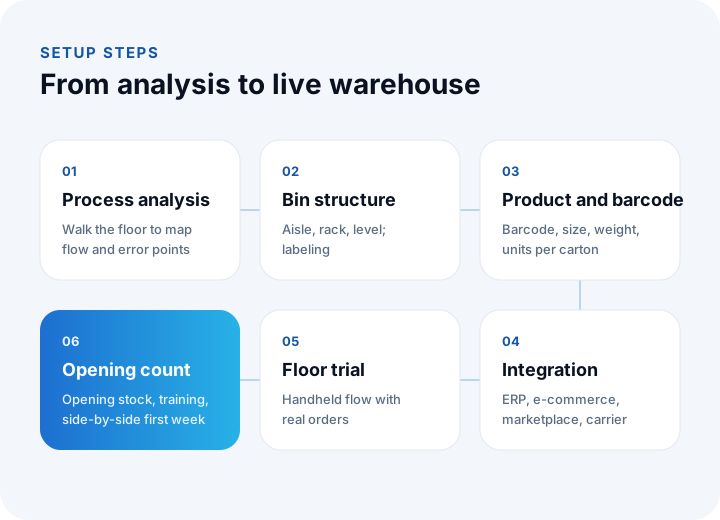
- Process analysis: How does stock arrive, where is it put, how are orders picked, where do errors occur? The current flow is mapped by walking the floor with the warehouse team.
- Bin structure design: The aisle, rack, level and position layout is defined and every bin is labelled. Zones close to shipping are reserved for fast-moving products.
- Product and barcode data: Each product's barcode, size, weight and units per carton are prepared; labels are printed for products without barcodes.
- Integration: The direction in which order, stock and shipping information flows between the ERP, the e-commerce site, marketplaces and carriers is defined and built.
- Floor trial: Handheld flows are tried in the warehouse with real products and real orders; the steps where the team gets stuck are simplified.
- Opening count and go-live: Products are placed in their bins and counted, the opening stock is loaded into the system and the warehouse starts working with the new system. In the first weeks the old and new methods are monitored side by side.
We recommend reading: What is API integration? A guide to connecting systems
What Are the Common Mistakes in WMS Projects?
The most common mistakes are going live without bin assignment, starting with products that have no barcode, designing the handheld flow from the office, postponing the ERP integration and doing the opening count incompletely.
- WMS without bins: If you go live before the racks are labelled, the WMS turns into an ordinary stock program; without location information, routes and put-away suggestions do not work.
- Products without barcodes: If products that cannot be scanned are entered by hand, the door to errors stays open. Labels must be printed for products without barcodes before go-live.
- A terminal screen designed in the office: A screen used with gloves, in the cold and at speed is not the same as one that looks good at a desk.
- Starting without integration: If orders are keyed into the WMS by hand, the workload only moves elsewhere. The connection to the ERP and sales channels must be part of the project.
- An incomplete opening count: A system that starts with the wrong opening stock loses trust from day one. Enough time must be set aside for the opening count.
- Not involving the team: If the team does not see the system as making their work easier, they go back to the old method. Training and early support are decisive.
Is Your Warehouse Ready for a WMS?
Your answers to the questions below show how ready your warehouse is for a warehouse management system and what the first step should be.
| Question | If the answer is "yes" |
|---|---|
| Do counts show differences between the system and the shelf? | Start with barcode-based movement records |
| Do only certain people know where a product is? | The bin structure is the first step |
| Do you receive complaints about wrong or missing shipments? | Picking and packing checks come first |
| Are orders transferred to the warehouse by hand from the ERP or the website? | Start with an integration analysis |
| Do you need batch or expiry date tracking? | Batch-based stock and FEFO rules |
| Do you ship to several warehouses or stores? | Transfer and shipment planning |
| Does the warehouse team fall behind on busy days? | Wave picking and route optimization |
We recommend reading: How to Choose an ERP: A Guide to Process Mapping, Module Priority, Payback and Rollout
We recommend reading: What Is Shipping Integration and How Is It Done? A Guide to Shipments, Labels and Tracking for E-commerce
We recommend reading: What is procurement software? Process, approval matrix, quote scoring and three-way matching guide
We recommend reading: What is shipment planning software? Routes, vehicle load and proof of delivery
Recommended reading: What Is a Barcode System and How Do You Set One Up?
Recommended reading: How to Do Production Planning
Warehouse Management System with İnovabil
At İnovabil we treat a warehouse management system not as a stock screen but as a system that manages the warehouse's flow on the floor. First, together with your warehouse team, we map the current process and its error points and design the bin structure; then we develop the receiving, put-away, picking, packing, shipping and counting flows with simple, few-step screens on the handheld terminal.
We connect the system two-way with the ERP, the e-commerce site, marketplaces and carriers, so orders drop into the warehouse by themselves and shipping information flows back by itself. The warehouse management system we built for Sleepy and the shipment planning systems we built for Karyak and Bofigo were set up with this approach. You can find the details of the projects on our projects page.
Tell us how many orders you prepare per day, which ERP or sales channels you use and where you make the most errors; we will prepare a warehouse management roadmap for you.
Frequently Asked Questions
What is a warehouse management system (WMS), in short?
A warehouse management system is software that manages a warehouse's receiving, put-away, stock tracking, order picking, packing, shipping and counting processes, tracks the location of products at rack-bin level and guides warehouse staff step by step with a handheld terminal.
What is the difference between a WMS and an ERP?
An ERP manages how stock relates to purchasing, sales, production and finance and answers "how much stock is there?". A WMS knows exactly which bin a product is in and manages how the work inside the warehouse gets done. The two work together; the WMS reports the shipped order back to the ERP.
Does a small warehouse need a WMS?
What matters is not the size of the warehouse but the number of daily movements and the cost of errors. For a business that prepares a few orders a day and has few product varieties, the stock module of an ERP or a pre-accounting program may be enough. If count differences, wrong shipments and the time spent on "where is the product?" are growing, it is time for a WMS.
What hardware does a WMS need?
Basically you need handheld terminals with barcode scanners or mobile devices that can read barcodes, a label printer for rack and product labels, a printer for shipping labels, and wireless network coverage in the warehouse. Depending on the warehouse, fixed scanners, scales and mobile printers can be added.
Can a warehouse management system integrate with an e-commerce site and marketplaces?
Yes. A well-designed WMS turns orders from the e-commerce site and marketplaces directly into pick lists; after shipping it sends the carrier tracking number and stock information back to the sales channels. This connection removes overselling and manual order transfer.