

Running the same 240 checks by hand before every release quietly consumes weeks of a team's time. At some point someone asks, "Could we have the computer do this?" Test automation means having tests written as code verify the expected behavior of software, and running them automatically on every change. But automation does not always pay off: automate the wrong tests and you get a slow, unreliable suite that still eats the team's time.
This guide does not cover test types or how to write test cases; we handled those in our software testing guide. Here we focus on the decision and economics of automation: what to automate, the layers and the pyramid ratio, return on investment, flaky tests, test data, the link to continuous integration, maintenance cost, three metrics and a six-step path. All example figures are illustrative; they are not measurements of any real company or industry.
What Is Test Automation?
Test automation is a program, rather than a person, verifying a specific behavior of software (for example, "the total is correct when the discount is 12%"). The test code supplies the input, compares the result with the expected one and returns pass or fail. The same test can be repeated without limit, and each repetition needs no extra effort.
Automation does not replace manual testing; it complements it. Repetitive checks with clear rules go to the machine, while exploration, usability and judgment such as "does this screen feel right?" stay manual. We described the human role on the acceptance side in our user acceptance testing guide.
Which Tests Should Be Automated?
Automate tests that run often, have a clear result, cover screens that rarely change and would be costly if they broke. A simple formula helps you score a test: score = frequency (1–5) × risk (1–5) × stability (1–3). Stability is how little the screen or rule under test changes (3 = very steady, 1 = still being designed).
| Candidate test | Frequency | Risk | Stability | Score | Decision |
|---|---|---|---|---|---|
| Login and permission check | 5 | 5 | 3 | 75 | Automate now |
| Order creation | 5 | 5 | 3 | 75 | Automate now |
| Price and discount calculation | 4 | 5 | 3 | 60 | Automate now |
| Report export | 3 | 2 | 3 | 18 | Later |
| Newly designed screen | 5 | 3 | 1 | 15 | Keep manual; revisit once it settles |
The threshold is an illustrative 50; the scores work out as 5 × 5 × 3 = 75, 4 × 5 × 3 = 60, 3 × 2 × 3 = 18 and 5 × 3 × 1 = 15. One-off tests, subjective judgments and visual taste are not good candidates for automation.
How Should Unit, Integration and End-to-End Tests Be Split?
Write many fast unit tests, fewer integration tests and only a few end-to-end tests; this is called the test pyramid. As you go up the layers, a test gets closer to a real user, but it also gets slower, more brittle and harder to diagnose when it fails.
| Layer | What it verifies | Speed | Brittleness | Illustrative share |
|---|---|---|---|---|
| Unit | A single function or rule | Milliseconds | Low | 70% |
| Integration | Modules, the database and outside services working together | Seconds | Medium | 20% |
| End-to-end | A full user flow, interface included | Tens of seconds | High | 10% |
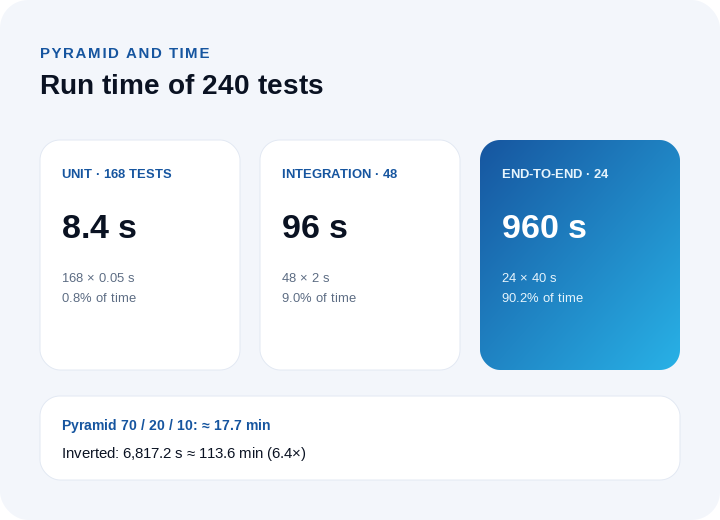
The ratio is a starting point, not a rule. The real reason is speed. Let illustrative durations be 0.05 s for a unit test, 2 s for an integration test and 40 s for an end-to-end test. Build the 240-test regression suite in two ways.
| Split | Unit / Integration / End-to-end | Calculation | Total time |
|---|---|---|---|
| Pyramid 70 / 20 / 10 | 168 / 48 / 24 | 8.4 + 96 + 960 s | 1,064.4 s ≈ 17.7 min |
| Inverted pyramid 10 / 20 / 70 | 24 / 48 / 168 | 1.2 + 96 + 6,720 s | 6,817.2 s ≈ 113.6 min |
In the pyramid, end-to-end tests are 10% of the tests but take 960 ÷ 1,064.4 ≈ 90.2% of the time. In the inverted pyramid the same suite is 6,817.2 ÷ 1,064.4 ≈ 6.4 times slower, and because it takes over an hour, nobody runs it on every change. When speed is lost, the main value of automation, fast and frequent feedback, is lost with it.
When Does the Investment in Test Automation Pay Back?
The investment pays back once enough rounds have accumulated for the gap between the cost of a manual round and the remaining cost of an automated round to cover the build. The assumptions below are illustrative; the 240-test regression suite of a dealer portal is the example.
- Manual round: 6 hours × ₺300 = ₺1,800.
- Automation investment: 30 person-days × ₺9,000 = ₺270,000.
- Effort left in an automated round: 0.5 hours reviewing results × ₺300 = ₺150.
- Saving per round: ₺1,800 − ₺150 = ₺1,650.
- Maintenance share: 10% a year × ₺270,000 = ₺27,000, or ₺2,250 a month.
Ignoring maintenance, the break-even round count is ₺270,000 ÷ ₺1,650 ≈ 163.6, so 164 rounds. With maintenance, the time depends on how many rounds you run each month: monthly net gain = rounds × ₺1,650 − ₺2,250.
| Rounds per month | Gross saving | Maintenance | Monthly net | Payback |
|---|---|---|---|---|
| 4 (weekly) | ₺6,600 | ₺2,250 | ₺4,350 | ≈ 62.1 months |
| 10 | ₺16,500 | ₺2,250 | ₺14,250 | ≈ 18.9 months |
| 20 (daily) | ₺33,000 | ₺2,250 | ₺30,750 | ≈ 8.8 months |
With weekly releases, automation loses ₺113,400 over three years: 36 × ₺4,350 − ₺270,000 = −₺113,400. When it runs daily, the same investment nets 36 × ₺30,750 − ₺270,000 = ₺837,000. Over the same period manual testing would cost ₺1,296,000 (36 months × 20 rounds × ₺1,800). The conclusion is that the return on automation depends on tests running on every change through continuous integration. You can find the general logic of cost items in our software development cost guide.
Why Are Flaky Tests Dangerous?
A flaky test sometimes passes and sometimes fails with no change in the code. The causes are usually timing, order dependence, shared data and outside services. The danger lies in how small rates compound across a suite.
Suppose each test has a 0.2% chance of being flaky. On its own a test is 99.8% reliable, which looks fine. But when 240 tests run together, the chance that all of them pass cleanly is 0.998240 ≈ 61.8%, so about 38.2% of runs end in a false red. Over 1,000 runs that is ≈ 382 false reds. If finding the cause of each takes 20 minutes: 382 × 20 ÷ 60 ≈ 127.3 hours × ₺300 ≈ ₺38,200.
| Flakiness per test | Chance the suite runs green | False reds in 1,000 runs | Investigation cost (20 min) |
|---|---|---|---|
| 0.2% | ≈ 61.8% | ≈ 382 | ≈ ₺38,200 |
| 0.02% (after fixing) | ≈ 95.3% | ≈ 47 | ≈ ₺4,700 |
Compound probability is harsh even with small numbers: 100 tests that are each 99% reliable all pass with probability 0.99100 ≈ 36.6%. The real damage is not money but trust: the team starts saying "flaky test again" and ignores a genuine failure hiding in the red. Countermeasures: quarantine a flaky test at once and keep it out of release decisions until it is fixed; wait for a condition rather than a fixed delay; make tests independent and runnable in any order; simulate outside services.
How Should Test Data Be Prepared?
Each test sets up its own data and cleans up when it finishes, so the result does not depend on what a previous test left behind. Shared data is the most common source of flakiness.
- Independence: Each test creates its own order, user and product records and does not use anyone else's.
- Small, purposeful data: Work with the least data that explains the test; large random data hides the cause.
- Fixed time: Supply a fixed date instead of "today" and "now" so date-based rules do not break at midnight.
- Do not use real customer data: Copying live personal data into a test environment is risky under KVKK (Turkey's personal data protection law); consult your legal counsel on anonymization and legal details.
- Simulated services: Test outside systems such as payment or shipping with fake responses; use the real system only in a few integration tests.
How Does Test Automation Connect to Continuous Integration?
Automated tests create value when they run automatically inside a pipeline on every change; a test that has to be triggered by hand is soon forgotten. We covered pipeline design in our CI/CD guide; the part that matters here is running the tests in layers.
- On every change: Unit tests and fast integration tests; they take a few minutes, and if red the change does not move forward.
- After merging: The full integration tests.
- Before release or overnight: The end-to-end suite; because it is slow, it runs periodically rather than on every change.
A red pipeline is everyone's first priority until it is fixed. Otherwise a "red is normal" culture settles in. Test code also needs review like any other change; we covered that practice in our code review guide.
What Does Test Automation Cost to Maintain?
Test code is code: as the application changes, the tests must be updated, and this effort is a continuing part of the investment. The illustrative example uses 10% a year; in reality the rate varies noticeably with how fast the application changes and how good the tests are.
- Interface-bound tests are expensive: When a button moves, dozens of tests can break. Verify every rule you can below the interface, at the unit or service level.
- Reduce repetition: Define shared steps such as logging in in one place so a change is made at a single point.
- Delete dead tests: A test that verifies behavior that is no longer valid only adds weight.
- Budget the maintenance share: If you do not reserve capacity for test maintenance in the sprint, it piles up and turns into technical debt.
How Is Test Automation Measured?
Three measures are enough: test coverage, run time and flakiness rate. Coverage alone is misleading, so read it together with the other two.
| Measure | Formula | Illustrative example | How to read it |
|---|---|---|---|
| Coverage | Critical flows automated ÷ all critical flows | 22 ÷ 24 ≈ 91.7% | Why are the other two flows left out? Line coverage (7,200 ÷ 10,000 = 72%) measures the lines touched, not quality |
| Run time | Total duration of the whole suite | ≈ 17.7 min (1,064.4 s) | The goal is to be short enough to run on every change |
| Flakiness rate | False-red runs ÷ all runs | 38.2% → 4.7% | Under 5% is a good first target; if it rises, trust falls |
Making line coverage the target backfires: tests that add no value get written just to push the number up. Track critical-flow coverage, time and flakiness together. Observing behavior after release is a separate job; we covered it in our software monitoring guide.
What Are the Common Mistakes in Test Automation?
- Automating everything through the interface: An inverted pyramid is slow and brittle; test rules at a lower layer.
- Ignoring flaky tests: A test that passes on rerun erodes trust until it is fixed.
- Making the coverage percentage the goal: The number rises, the value does not.
- Not budgeting maintenance: A few months later the tests are left broken, switched off, and the automation collapses.
- Not connecting tests to the pipeline: A suite triggered by hand gets forgotten.
- Automating too early: Tests written for a feature whose screen is still changing keep being rewritten.
We recommend reading: What is the software development life cycle (SDLC)?
How Is Test Automation Set Up? Six Steps
Starting small and progressing by measurement is safer than trying to automate everything at once.
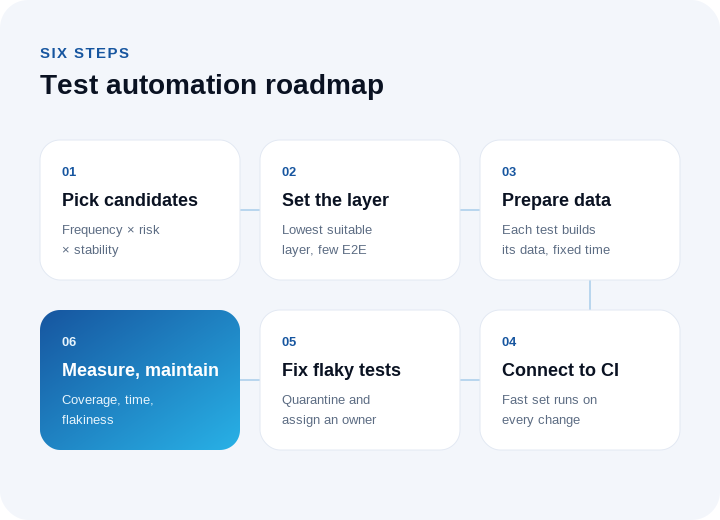
- Pick candidates: Start with the flows that score high (frequency × risk × stability).
- Set the layer: For each rule choose the lowest suitable layer; keep end-to-end tests few.
- Prepare data: Each test sets up its own data and uses a fixed time.
- Connect to the pipeline: The fast set runs on every change, the slow set periodically.
- Remove flaky tests: Set a quarantine rule; assign each flaky test an owner.
- Measure and maintain: Track coverage, time and flakiness monthly; budget the maintenance share.
We recommend reading: Our software development process: step by step from analysis to release
We recommend reading: What Is Web Accessibility (WCAG)? Four Principles, Contrast Math, Audit and Cost Guide
We recommend reading: What Is Data Masking and Anonymization? Test Data, Pseudonyms, k-Anonymity and Payback Guide
We recommend reading: What Are Feature Flags and Gradual Rollout? Percentage Buckets, Stop Criteria and Flag Debt Guide
We recommend reading: How to Do Bug Tracking and Triage in Software: Bug Records, Severity vs Priority and Backlog Guide
We recommend reading: What Is Static Code Analysis and Quality Gates? Complexity, Thresholds and Findings Management Guide
The Testing Process with İnovabil
At İnovabil our focus is building custom software from scratch for your company. Our process page includes a recorded testing step, and we suggest settling in the requirements phase, in writing and with the scoring in this guide, which flows automation will apply to. The example figures in this article are illustrative; for your project, time, maintenance share and payback are calculated with your own data during analysis.
We have built CRM, purchasing and mobile for Avcılar İnşaat; a purchasing system for İZBAN; logistics and shipment planning with wholesale order management for Karyak; and warehouse management plus a complaint and support management system for Sleepy. Send us a short summary of your release frequency and your manual checklist, and we will assess together which part is worth automating.
Frequently Asked Questions
What is test automation and what is it for?
It is the practice of having tests written as code verify the expected behavior of software and running them automatically on every change. It speeds up repetitive checks and keeps them at the same quality every release; work that needs human judgment, such as exploration and usability, stays manual.
When does test automation create value?
When the tests run often. In the example, a ₺270,000 investment pays back in about 8.8 months at 20 rounds a month and in about 62 months at 4 rounds a month. If releases are infrequent, selected manual tests may be cheaper than automation.
What is the test pyramid and what should the ratio be?
It is a split of many fast unit tests, fewer integration tests and only a few end-to-end tests. 70, 20, 10 is a common starting point. In the example, the same 240 tests run in 17.7 minutes as a pyramid and in 113.6 minutes as an inverted pyramid.
What is a flaky test and why is it a problem?
It is a test that sometimes passes and sometimes fails with no change in the code. Small rates grow when tests run together: with 240 tests that are each 0.2% flaky, about 38.2% of runs end in a false red. The team's trust in red results drops.
Where should test automation start?
With flows that run often, carry high risk and have steady screens, such as login, orders and price calculation. Score them first, write the tests at a fast layer, connect them to the pipeline and measure coverage, time and flakiness.