

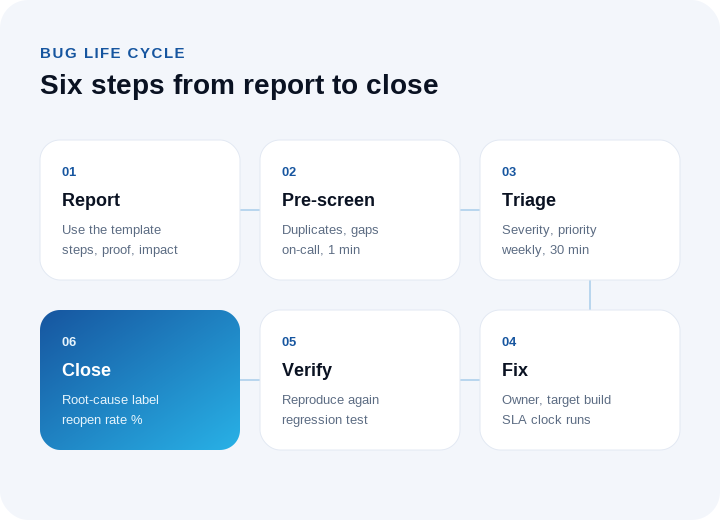
On a dealer portal, one dealer phones in that an order total looks wrong, another writes the same thing by email, and the sales team forwards "the total is broken again" from a chat app. Three messages, one bug. But if nobody knows which message is the record, how urgent it is and who owns it, the bug wanders for weeks. Bug tracking and bug triage in software tie this mess into one life cycle: the bug lands in a single record, is screened, prioritized, assigned, fixed, verified and measured.
This guide is not about writing tests or responding to a live outage; it covers the path of a bug record from birth to close, and how to manage a growing pile of open bugs. All figures are illustrative, not an industry or company benchmark.
What Is Bug Tracking and Bug Triage?
Bug tracking means every bug lives in one record, with a visible owner and status. Triage is the step where new records are screened and given a severity, a priority and an owner. Tracking is the system of record; triage is traffic control for the work that flows into it.
Bugs from email, phone, support tickets and the test team should all land in the same system. We described how to turn a customer complaint into a bug record in our help desk software guide; the bug record is the technical counterpart of that ticket, and the two should be linked. For testing itself, see our software testing guide.
What Fields Should a Good Bug Record Contain?
A good record lets a developer reproduce the bug on their own machine without asking anyone a question. The reporter fills in the fields below; severity, priority and owner are added at triage.
| Field | What goes in | Why it matters |
|---|---|---|
| Title | Symptom and place: "Order summary total wrong on a discounted line" | Makes the list searchable and catches duplicates |
| Environment and build | Live or test, build number, browser or device | A bug may depend on a build or a device |
| Preconditions and data | Which user role, which sample record | Without the same data the bug may not appear |
| Steps to reproduce | Numbered, one action per step | A bug that cannot be reproduced cannot be fixed |
| Expected and actual result | "Total should be 880; it shows 900" | Pins down what the bug actually is |
| Evidence | Screenshot, correlation ID, log line; every time or occasionally | Shortest path to the root cause |
| Impact and workaround | How many people, which job; is there a workaround | Main input to the priority decision |
Have steps written in this pattern: preconditions first, then one-action steps such as "1. Open, 2. Select, 3. Click", and finally expected versus actual result. Mask personal data in screenshots; for details, consult your legal counsel. To find log lines by correlation ID, see our centralized log management guide.
Say 60 raw records arrive in a week. 12 of them (20%) are duplicate reports of an open bug and 6 (10%) are too incomplete to reproduce; 60 − 12 − 6 = 42 records enter triage.
What Is the Difference Between Severity and Priority?
Severity is how much harm the bug does on its own; priority is the order and speed in which it will be fixed. Severity is an objective measure, priority is a business decision, and the two need not match.
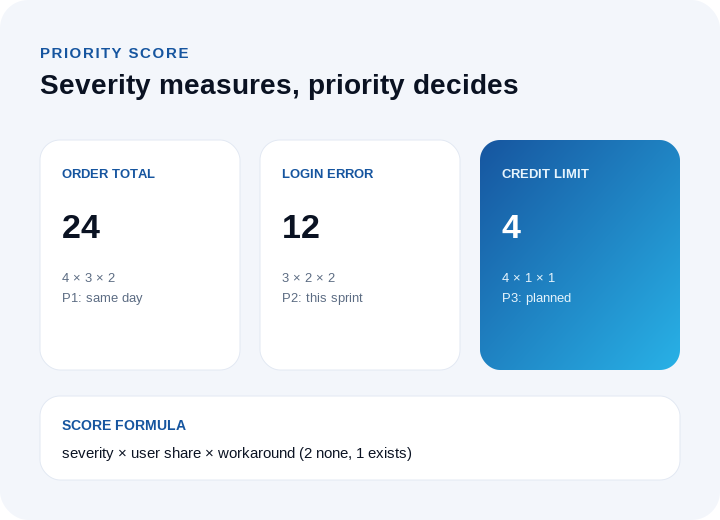
Define four severity levels: 4 critical (data loss, wrong money calculation, service down), 3 high (main flow blocked or wrong result), 2 medium (usable with a workaround), 1 low (cosmetic). Then calculate priority with a simple score combining severity, the share of affected users and whether a workaround exists:
Priority score = severity (1–4) × affected user share (1–3) × workaround: none (2) or exists (1)
An illustrative user-share scale: 3 = more than half of users, 2 = 10–50%, 1 = under 10%. Score bands: 18 and above P1, 9–17 P2, 4–8 P3, 1–3 P4. The maximum is 4 × 3 × 2 = 24.
| Bug | Severity | Users | Workaround | Score | Priority |
|---|---|---|---|---|---|
| Order total wrong | 4 | 3 | None (2) | 4 × 3 × 2 = 24 | P1 |
| Login fails in some browsers | 3 | 2 | None (2) | 3 × 2 × 2 = 12 | P2 |
| Stock page takes 8 seconds to open | 2 | 3 | Exists (1) | 2 × 3 × 1 = 6 | P3 |
| Wrong credit limit for two dealers | 4 | 1 | Exists (1) | 4 × 1 × 1 = 4 | P3 |
| Accented characters broken in export | 2 | 2 | Exists (1) | 2 × 2 × 1 = 4 | P3 |
| Logo shifted on the invoice PDF | 1 | 3 | Exists (1) | 1 × 3 × 1 = 3 | P4 |
Note that the credit limit bug has severity 4, but it affects only two dealers and can be corrected by hand, so it is P3. The score is a starting rule; a calendar constraint such as tomorrow's customer demo can raise priority, but the reason is written on the record. For the same impact-and-likelihood logic across a whole project, see our software project risk management guide.
How Do You Run a Triage Meeting?
Run triage briefly and on a fixed weekly rhythm; records that rules can settle are decided before the meeting. Each record gets one of five decisions: fix (with owner and target build), plan (take into the backlog), defer or accept the risk (with a reason), reject (works as designed, or not a bug) and need info (question to the reporter; the SLA clock pauses).
The rhythm has three layers: an on-call developer pre-screens new records (merges duplicates, returns incomplete ones, forwards P1 candidates at once); the weekly meeting handles only records that cannot be decided otherwise; once a month the backlog is reviewed.
Illustrative effort: 60 records a week at 1 minute each for the on-call person is 60 minutes. 10 disputed records reach the meeting at 3 minutes each with 4 attendees: 10 × 3 = 30 minutes, 30 × 4 = 120 person-minutes = 2 person-hours. Total effort is 1 + 2 = 3 person-hours. Had four people discussed all 60 records, it would be 60 × 3 × 4 = 720 person-minutes = 12 person-hours.
Say the 42 records split like this: 14 fix (P1 and P2), 12 plan (P3), 10 defer or accept risk (P4), 6 reject; 14 + 12 + 10 + 6 = 42. Records accepted into the backlog are 14 + 12 + 10 = 36 per week.
How Do You Calculate the Bug Backlog and Bug Age?
The backlog is the total of open records; age is the time since a record was opened. You see whether the backlog is growing from weekly inflow and closure: net change = inflow − closure.
An illustrative team: 8 people, 8 × 5 = 40 person-days a week. 15 person-days (37.5%) go to fixing bugs and the average fix effort is 0.5 person-days. Weekly closing capacity is 15 ÷ 0.5 = 30 bugs. Inflow is 36:
- Net change: 36 − 30 = +6 bugs per week.
- With 240 open now, in 12 weeks you have 240 + 6 × 12 = 312.
- Required capacity is 36 × 0.5 = 18 person-days; the gap is 3 person-days (3 ÷ 40 = 7.5%).
A simple form of Little's law gives a rough wait estimate: wait ≈ open records ÷ weekly closure. Now it is 240 ÷ 30 = 8 weeks; at 312 open it is 312 ÷ 30 = 10.4 weeks. The law assumes a steady flow, so with a growing backlog the result is approximate.
Age buckets show the health of the backlog. In the 240-record example below, half the records are older than 30 days; the other half are younger, so the median age is about 30 days.
| Age | Count | Share | Action |
|---|---|---|---|
| 0–7 days | 48 | 20.0% | Normal triage |
| 8–30 days | 72 | 30.0% | Owner and target build must be assigned |
| 31–90 days | 70 | 29.2% | Re-evaluate in the monthly review |
| Older than 90 days | 50 | 20.8% | Re-verify: close, accept or plan |
| Total | 240 | 100% |
Say the review of the 50 records older than 90 days finds that 20 (40%) can no longer be reproduced or were fixed by other changes, 12 are knowingly accepted risks and 18 get planned; 20 + 12 + 18 = 50. Closing 20 + 12 = 32 records takes the backlog to 240 − 32 = 208 and the wait to 208 ÷ 30 ≈ 6.9 weeks. The cleanup is a one-off; if inflow stays above closure the backlog grows again. The fix: raise the capacity share to 45% (40 × 0.45 = 18 person-days; 3 person-days a week taken from new development, or ₺27,000 at an illustrative ₺9,000 per person-day) or cut inflow at the source from 36 to 30 (−16.7%).
How Do You Set Bug SLA Targets?
A bug SLA is a first-response and fix-time target by priority. We covered the contractual side in our software maintenance agreement guide. The targets below are illustrative and read in business hours and business days.
| Priority | Triage response | Fix target | Closed in last 4 weeks | On time | Compliance |
|---|---|---|---|---|---|
| P1 | 1 hour | 1 business day | 8 | 7 | 87.5% |
| P2 | 4 business hours | 5 business days | 48 | 36 | 75.0% |
| P3 | 2 business days | 30 days | 48 | 40 | 83.3% |
| P4 | Weekly triage | Planned, no deadline | – | – | – |
| Total | 104 | 83 | 79.8% |
Compliance = on time ÷ closed; 83 ÷ 104 = 79.8%. An average alone misleads: say nine P2 bugs took 1, 2, 2, 3, 3, 4, 5, 9 and 21 days. The average is 50 ÷ 9 ≈ 5.6 days, the median is 3 days; 7 ÷ 9 = 77.8% closed within the 5-day target. Two extreme values pull the average up, so track compliance and the median together. In "need info" the clock pauses. Serious production outages are incidents, not bug records, and follow the flow in our incident management guide.
How Do You Handle Recurring Bugs and Root Causes?
Fixing the same bug four times means the root cause was never touched. You need two tools: merging duplicate records and putting a root-cause label on each closed bug.
Duplicates are not deleted; they are linked to a master record and its "reporter count" rises. A bug reported nine times carries 1 + 8 duplicates, nine reports, and that is an impact signal independent of severity. At closing, put one root-cause label on each bug. An illustrative split of 360 bugs closed in 12 weeks:
| Root cause | Count | Share |
|---|---|---|
| Code logic | 108 | 30.0% |
| Integration | 90 | 25.0% |
| Data and configuration | 72 | 20.0% |
| Unclear requirement | 54 | 15.0% |
| Regression | 36 | 10.0% |
| Total | 360 | 100% |
108 + 90 + 72 + 54 + 36 = 360. Action goes by root cause, not by bug: the top two causes make up 55% of bugs, so improvement aims there first. If at least five bugs close in the same module three months in a row, trigger a root-cause review. When regressions are high, the priority score logic in our test automation guide helps; for requirement-driven bugs, our requirements analysis guide explains writing acceptance criteria.
How Do You Decide a Release With Open Bugs?
Releasing with zero open bugs is rare; what matters is writing down in advance which open bugs you can ship with: a release exit criterion and a backlog budget.
An illustrative exit criterion: open P1 count 0, open P2 count at most 2, a documented workaround and the product owner's written acceptance for each open P2, and no new critical bug in the pre-release regression test. If build 1.8 has 3 open P2s the criterion is broken; one is fixed or a justified written exception is taken. For the decision logic at the acceptance stage, see our user acceptance testing guide.
The backlog budget is the upper limit on open records: with a target average wait of 8 weeks and closure of 30 a week, the limit is 8 × 30 = 240. When the backlog passes it, capacity shifts from new features to the bug share.
Which Measures Do You Track in Bug Tracking?
Five measures are enough, and all come from the dates in the tracking system.
- Open bug count and age: age buckets; the share older than 90 days (20.8% in the example).
- Inflow, closure and net change: weekly; 36, 30, +6 in the example.
- Fix time: median and compliance; 79.8% in the example.
- Reopen rate: reopened ÷ closed; if 27 of 360 closures reopen, 27 ÷ 360 = 7.5%. The cause is usually a missing step or a partial fix.
- Root-cause split: reviewed once a quarter.
An illustrative payback: invest 12 person-days × ₺9,000 = ₺108,000 in a record template, duplicate suggestions and a triage board. Triage effort falls from 12 hours to 3: 9 hours × 4 weeks × ₺300 = ₺10,800 a month. If the reopen rate falls from 7.5% to 4%, then of 120 monthly closures 4.8 instead of 9 reopen; the difference is 4.2 bugs × 1 person-day of rework (₺9,000) = ₺37,800 a month. The monthly gain is ₺48,600; payback is 108,000 ÷ 48,600 ≈ 2.2 months, or ≈ 4.4 months if the gain halves. Recalculate with your own team and rates. To spot bugs earlier in production, our software monitoring guide complements this one.
We recommend reading: What is technical debt? The interest metaphor, measurement and repayment plan
How Do I Set Up the Bug Tracking Process Step by Step?
- Pick one intake point.
- Write the record template; steps to reproduce cannot stay empty.
- Write severity and priority rules: levels, score formula, bands, the escalation exception.
- Set the triage rhythm: on-call pre-screen, 30 minutes weekly, a monthly review.
- Write the SLA and exit criterion.
- Measure monthly and carry root-cause actions into the next quarter.
For the first two weeks, settle for one intake point and the template; rules added after the system settles meet less resistance. For roles, see our software team guide.
We recommend reading: What Is Static Code Analysis and Quality Gates? Complexity, Thresholds and Findings Management Guide
Bug Tracking and Quality Process with İnovabil
At İnovabil, in our custom software projects we run testing, release and maintenance and support as recorded steps on our process page. The scoring and SLA values in this article are examples, not commitments; numeric targets for your project are discussed and written down at the requirements stage.
We built CRM, purchasing and mobile for Avcılar İnşaat; a purchasing system for İZBAN; logistics and shipment planning with wholesale order management for Karyak; and warehouse management plus a complaint and support management system for Sleepy. If bugs are piling up in software you already run, send us a short summary and we will review the backlog, the inflow-closure balance and the prioritization rules together.
We recommend reading: Our software development process: from analysis to release, step by step
Frequently Asked Questions
What is bug tracking in software?
It is collecting every bug in a single record and following its status, owner and priority. The bug life cycle runs through report, pre-screen, triage, fix, verification and close.
What is bug triage and who attends?
It is a short meeting where new bug records are screened and given a severity, a priority and an owner. Usually a developer, a test or quality lead and the product owner attend; most records are pre-screened by the on-call person before the meeting.
What is the difference between severity and priority?
Severity is how large the harm is; priority is the order of the fix. A high-severity bug that affects two users and has a workaround can be low priority. Priority is calculated from severity, user share and workaround.
What do you do when the bug backlog keeps growing?
Compare inflow and closure first. In the example, 36 a week in against 30 closed adds 6 to the backlog every week. Raising the capacity share, cutting inflow through root-cause actions and re-verifying records older than 90 days are the three main moves.
With which open bugs can you release?
A written exit criterion set in advance decides. In the example: zero open P1, at most two open P2, and a documented workaround plus product owner approval for each P2. If the criterion is broken, you need a fix or a justified written exception.