

Dealers ask the same questions every week: where is my order, where do I download my invoice, how do I reset my password. The support team rewrites the same answer each time, and sometimes the answer comes out differently. A knowledge base is the practice of writing those answers once and publishing them in the right place, searchable and up to date. Customers or employees find a solution on their own before contacting support, and the team is freed from repetitive work.
This guide explains how to build a knowledge base: choosing content from the support ticket log, article types, an article template, search and tagging, ownership and lifecycle, staleness audits, metrics, the internal and external split, and the payback calculation. All figures are illustrative; they are not the average of any product or industry.
What Is a Knowledge Base and Where Does It Help?
A knowledge base is an organized collection of articles that explain how a product or service is used, how common problems are fixed and how processes work. It has two audiences: external users such as customers or dealers (an external knowledge base) and internal users such as support agents or new employees (an internal knowledge base).
It is distinct from neighboring topics. We covered the ticket lifecycle and service-level targets in our help desk software guide; here we focus on content that offers the answer before a ticket is created. For system documents see our software documentation guide, and for versioning and access of business documents see our document management system article; a knowledge base gives the end user a short, actionable answer.
We recommend reading: What is help desk software?
Which Article Types Should a Knowledge Base Have?
One article format does not fit every question. Four types cover most needs, and choosing the type up front also decides the structure of the article.
| Type | Reader's question | Structure | Example |
|---|---|---|---|
| How-to | How do I do this? | Numbered steps, one action per step | Downloading an invoice copy |
| Troubleshooting | Why am I getting this error? | Symptom, likely cause, order of fixes | Bulk order file will not upload |
| FAQ | Is this possible? | Short question, short answer | Until how many hours can I cancel an order? |
| Policy and rule | What is the rule? | Rule, exception, who it covers | Under which conditions can a return be opened? |
In policy articles, do not interpret legal details (withdrawal rights, retention periods, personal data) yourself; obtain the text from your legal counsel and publish only the approved summary.
How Do You Choose Knowledge Base Content?
The first mistake is documenting the product feature by feature. The content source is not the product but the support ticket log: what do customers actually ask, and which topics repeat most often? Tag the last three months of tickets by topic and extract the ten most frequent topics.
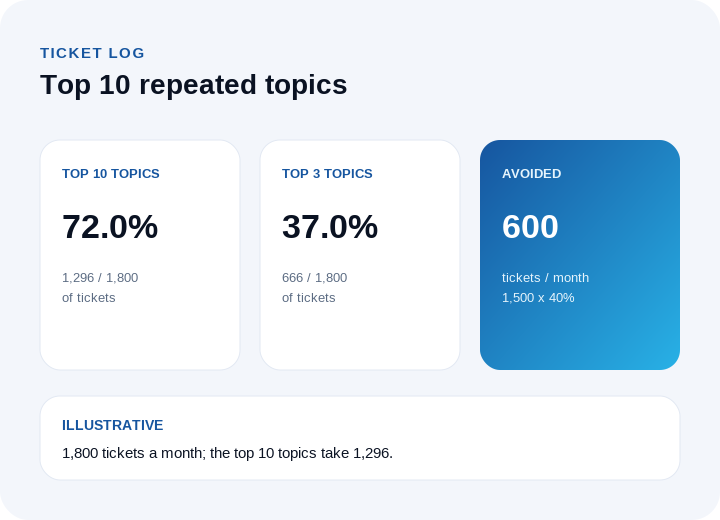
In the example dealer portal, 1,800 tickets arrive per month. After tagging, the top ten topics look like this:
| Rank | Topic | Monthly tickets | Self-solvability | Priority score |
|---|---|---|---|---|
| 1 | Checking order status | 270 | 0.8 | 216.0 |
| 2 | Password reset | 216 | 0.9 | 194.4 |
| 3 | Downloading an invoice copy | 180 | 0.9 | 162.0 |
| 4 | Opening a return request | 144 | 0.6 | 86.4 |
| 5 | Shipment tracking number | 126 | 0.8 | 100.8 |
| 6 | Is the price list current | 108 | 0.7 | 75.6 |
| 7 | Adding users and permissions | 90 | 0.5 | 45.0 |
| 8 | Balance and due date lookup | 72 | 0.7 | 50.4 |
| 9 | Bulk file upload error | 54 | 0.7 | 37.8 |
| 10 | Address change | 36 | 0.5 | 18.0 |
Total: 270 + 216 + 180 + 144 + 126 + 108 + 90 + 72 + 54 + 36 = 1,296 tickets; 1,296 ÷ 1,800 = 72.0%. The top three topics are 666 tickets, so 666 ÷ 1,800 = 37.0%. Priority score = monthly tickets × self-solvability, where self-solvability is your estimate of whether the customer can really resolve it with an article (low when approval or permission is required). The writing order follows the score: the shipment tracking number topic (100.8) moves up to fourth place. A topic with low self-solvability is fixed not by an article but by improving the screen or the process.
How Do You Write a Good Article?
If every article follows the same structure, readers find the section they need immediately. A five-part template is enough:
- Title in the customer's words: not "Order status module" but "Where is my order, and how do I see its status?". Take titles from real phrases in the ticket log.
- Symptom or goal: one or two sentences confirming which situation the reader is in.
- Solution steps: numbered, one action per step, using the button names shown on screen.
- Expected result: says what the reader will see when the steps are done, so they can tell whether something went wrong.
- When to contact support: if the solution fails, which information (order number, screenshot) to send and through which channel.
Show the last update date, the product version the article applies to and its owner on every article. Plan 3 hours per article.
We recommend reading: How to write software documentation
How Do You Set Up Search and Tagging?
Most customers do not browse menus; they type into the search box. Search quality matters as much as article quality.
- The customer's vocabulary: if the article says "send back" and the customer searches "return", they will not find it. Keep a synonym list (return, send back, give the product back).
- Searches with no result: review the monthly search log; queries that return nothing are your list of new articles.
- Few, consistent tags: topic (order, invoice, account), user type (dealer, employee) and product area are enough. Use at most three tags per article; many tags blur the search.
- One topic per title: an article answers one question.
How Do You Manage Article Owners and the Lifecycle?
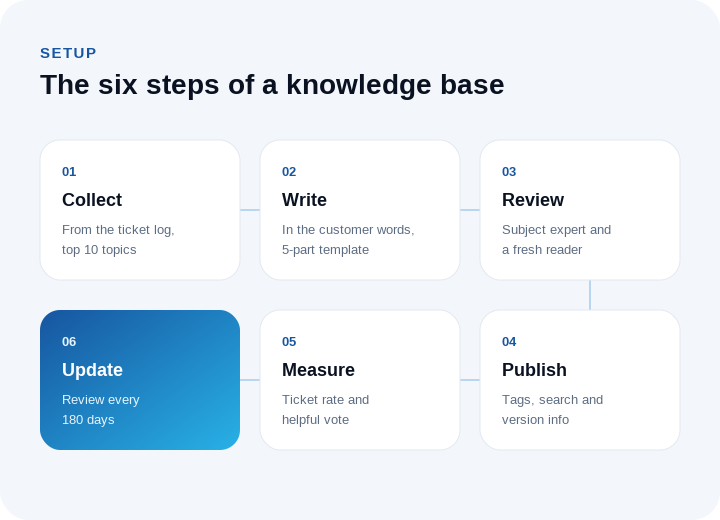
Knowledge bases do not collapse when they are written but when they are left without an owner. Every article needs a named owner, the person responsible for its accuracy (not necessarily the author).
| State | What happens | Responsible | Rule |
|---|---|---|---|
| Draft | The article is written with the template | Author | The title is linked to the ticket log |
| Review | Accuracy and clarity check | Subject expert and a fresh reader | The steps are actually tried |
| Published | Customers can see it | Owner | The update date is visible |
| To be reviewed | An article reaching 180 days is flagged | Owner | Reviewed within 30 days |
| Archived | The topic is no longer valid | Owner | Removed from publication, record kept |
In review, having a fresh reader follow the article matters: a step the author calls obvious is often not obvious.
How Do You Audit Knowledge Base Staleness?
An outdated article is worse than no article: the customer follows a wrong step and then opens a ticket anyway. Staleness is measurable: stale rate = number of articles last reviewed more than 180 days ago ÷ total articles.
In the example, 14 of 40 articles are older than 180 days: 14 ÷ 40 = 35.0%. As a target you can set below 10%, meaning at most 4 stale articles out of 40 (this threshold is illustrative; adjust it to how fast your product changes). The cost of staleness shows in the ticket-opening rate:
| Group | Articles | Sessions | Opened a ticket afterwards | Ticket-opening rate |
|---|---|---|---|---|
| Fresh (≤ 180 days) | 26 | 1,300 | 260 | 20.0% |
| Stale (> 180 days) | 14 | 700 | 240 | 34.3% |
| Total | 40 | 2,000 | 500 | 25.0% |
The ticket-opening rate is 240 ÷ 700 = 34.3% for stale articles and 260 ÷ 1,300 = 20.0% for fresh ones, a gap of 14.3 points. Refreshing the stale articles and bringing the rate to 20% means 140 tickets instead of 240 on the same 700 sessions: 700 × 20.0% = 140, so 100 fewer tickets per month. When the product version changes, the affected articles must also be flagged; when preparing release notes, the answer to "which articles are affected?" comes from each article's product-area tag.
How Do You Measure Knowledge Base Success?
View counts mislead; a heavily viewed article can mean the question is asked a lot or that the article does not solve it. Five measures should be read together.
- Ticket-opening rate: people who opened a ticket in the same session or within 24 hours of viewing the article ÷ article sessions. Example: 500 ÷ 2,000 = 25.0%. Its complement is the self-service resolution rate: 75.0% (at least no ticket was opened; whether it was truly solved is verified by votes and ticket data).
- "Was this helpful?" vote: across 2,000 sessions, 640 votes were cast (participation 32.0%), 448 positive: 448 ÷ 640 = 70.0%. Few people vote; read the rate together with the ticket-opening rate.
- No-result search rate: 288 of 3,200 searches returned nothing: 288 ÷ 3,200 = 9.0%. A target below 5% can be set (illustrative); every empty query is a content gap or a missing synonym.
- Tickets avoided per article: sessions that viewed the article and did not open a ticket × avoidance factor. The avoidance factor is the share of those sessions that would have opened a ticket had the article not existed; take 40% as an illustration.
- Stale rate: the 35.0% above.
Look at article level: the "Order status" article has 500 sessions and 100 ticket openings (20.0%); the 400 sessions that resolved × 40% = 160 tickets avoided. The "Bulk file upload error" article has 120 sessions and 54 ticket openings (45.0%); 66 resolved × 40% = 26.4 tickets avoided. The second exceeds the ticket-opening threshold (example: 35%); either the article lacks a step or the real problem is the error message on screen.
How Do You Separate Internal and External Knowledge Bases?
What the customer needs to see differs from what the agent needs to see. Explaining an "account lock threshold" to a dealer is pointless; the agent's "how do I verify the user" steps should not be exposed externally.
| Property | External article | Internal article |
|---|---|---|
| Reader | Customer, dealer | Agent, new employee |
| Language | Plain, no product jargon | Process and system terms allowed |
| Content | Solution steps | Verification, exceptions, escalation rule |
| Visibility | Everyone or signed-in customers | Only users with the role |
| Chatbot source | Yes (published ones) | No |
Producing two views from one source is the most robust way: the article carries a visibility field and access is granted by role. We covered how to build the role model in our role-based access control article. Internal articles should not contain personal data or customer records; consult your legal counsel for retention and access rules.
How Does a Knowledge Base Work with Chatbots and the Support Team?
A knowledge base does not have to stay where it is published; the same content creates value in three places.
- Customer portal: a "frequently asked about this page" link next to the relevant screen. We covered portal scope in our customer portal guide.
- Chatbot: if the chatbot builds answers only from published external articles, replies stay consistent, and stale content does not make the bot stale too. When the bot links to the article, the reader sees the source. For confidence thresholds and handoff rules see our chatbot article.
- Agent replies: on a repeated question the agent puts the article link in the reply; instead of writing a new answer, the article is improved. A "was there an article, did it help?" option when closing a ticket produces continuous feedback on missing content and stale articles.
When Does a Knowledge Base Investment Pay Back?
Payback = investment ÷ monthly net gain. Illustrative assumptions for the same dealer portal:
- Cost per ticket: 17 min × ₺300 ÷ 60 = ₺85.
- Article sessions 2,000, ticket openers 500, resolvers 1,500; with a 40% avoidance factor, tickets avoided = 1,500 × 40% = 600 tickets/month.
- Avoided ticket cost: 600 × ₺85 = ₺51,000/month.
- Monthly upkeep: 18 hours × ₺300 = ₺5,400 (new articles, reviews and reporting).
- Investment: first 40 articles 120 hours × ₺300 = ₺36,000; help center development (search, tags, votes, reports) 25 person-days × ₺9,000 = ₺225,000; total ₺261,000.
Monthly net gain is ₺51,000 − ₺5,400 = ₺45,600; payback is 261,000 ÷ 45,600 ≈ 5.7 months. If the avoidance factor falls to 20%, tickets avoided are 300, the gain is 300 × ₺85 = ₺25,500, net ₺20,100, and payback is 261,000 ÷ 20,100 ≈ 13.0 months. To pay back within twelve months the net must be at least ₺21,750; that means at least (21,750 + 5,400) ÷ 85 ≈ 320 avoided tickets per month, an avoidance factor of ≈ 21.3%.
For the cost items of software development in detail see our software development cost guide.
What Are Common Mistakes When Building a Knowledge Base?
- Describing the product instead of answering the question: a feature list does not meet the customer's question; titles should come from the ticket log.
- Leaving articles without an owner: an article with no owner goes stale within a year.
- Treating it as a one-off project: if upkeep effort is not budgeted, the momentum is lost within six months.
- Mixing internal and external content: agent steps get exposed, or customer articles fill up with technical jargon.
We recommend reading: What is CRM? A customer relationship management guide
We recommend reading: How to Build a Product Roadmap and Prioritize Features with RICE: From Requests to a Plan
We recommend reading: How to Build an Order Tracking Page and Reduce "Where Is My Order?" Tickets: Status Model, Delay Notices and Payback Guide
We recommend reading: How to Build Enterprise Search and Document Q&A with RAG: Chunking, Access Filters, Threshold and Payback Guide
We recommend reading: How to Collect and Analyze User Feedback in a Software Product: Channels, Scoring and Closing the Loop
Digitizing Customer and Support Processes with İnovabil
At İnovabil our focus is building software from scratch, tailored to the company: custom software, CRM, ERP, e-commerce, web, mobile and integration. We built the complaint and support management system for Sleepy and the CRM, purchasing and mobile solution for Avcılar İnşaat, and delivered logistics planning and wholesale order management for Karyak. For the customer or dealer side, we recommend settling how a knowledge base, a portal and the support record will work together during requirements analysis, with scope and priority in writing.
Send us a short summary of your ticket log and current channels; let us extract the top ten topics together and prepare a written assessment.
We recommend reading: Our software development process: from analysis to release, step by step
Frequently Asked Questions
What is a knowledge base and what is it for?
It is a searchable, regularly updated collection of articles that answer the questions of customers or employees. It reduces repeated support tickets and keeps answers consistent.
Which articles should a knowledge base start with?
The ten most frequent topics in the support ticket log. In the example they make up 1,296 of 1,800 tickets, or 72.0%. The order is set by monthly tickets multiplied by self-solvability.
How do you detect a stale article?
Keep the last review date of each article; the share of articles older than 180 days gives the stale rate. In the example 14 of 40 articles are stale, or 35.0%; the ticket-opening rate is 34.3% for stale articles and 20.0% for fresh ones.
How is knowledge base success measured?
Ticket-opening rate, the "was this helpful?" vote, no-result search rate, tickets avoided per article and stale rate are read together. View count alone does not show success.
How long does a knowledge base take to pay back?
In the example the investment is ₺261,000 and the monthly net gain is ₺45,600, so payback is about 5.7 months. If the avoidance factor drops to 20%, it is about 13.0 months; recalculate with your own ticket volume and costs.