

Open the support inbox of almost any online store and the most common message is the same: "Where is my order?" It is rarely a real problem; it is missing information. If the customer knew the parcel was on its way, they would not write. Building an order tracking page and telling customers about delays before they ask is the most direct way to cut these tickets.
The figures below are representative examples, not the average of any particular store or industry.
Why Are "Where Is My Order?" Tickets So Common?
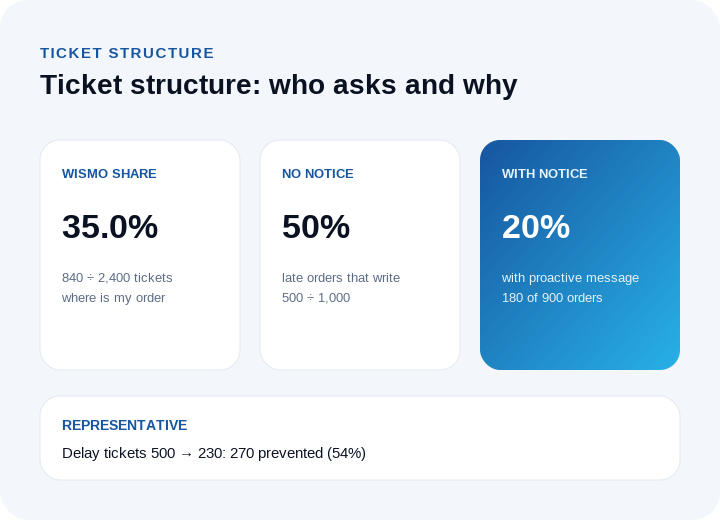
A WISMO ticket is one where the customer asks about order status or delivery time. The volume is high because the answer is simple, but the customer has nowhere to find it. Measure it with your own data: in our example store, 2,400 support tickets arrive per month and 840 of them are order-status questions, so the WISMO share is 840 ÷ 2,400 = 35.0%. Against 20,000 orders a month, that is 840 ÷ 20,000 = 4.2 tickets per 100 orders.
Customers usually write for one of five reasons:
| Reason | What the customer experiences | Direction of the fix |
|---|---|---|
| No information | Placed the order, heard nothing | Proactive stage-by-stage notifications |
| Delay | The promised day passed, no word | Delay detection and an automatic apology |
| Unclear status | "Processing" means nothing to them | Plain-language stages |
| No tracking number | Shipped, but the number was never sent | Put the number in the email and on the page |
| Tracking lives elsewhere | The carrier's page is confusing or in another language | One view on your own page |
We covered the process and SLA side of ticket handling in our help desk software guide; here we focus on cutting this one ticket type at its source.
We recommend reading: What Is Help Desk Software?
Which Statuses Should the Customer See?
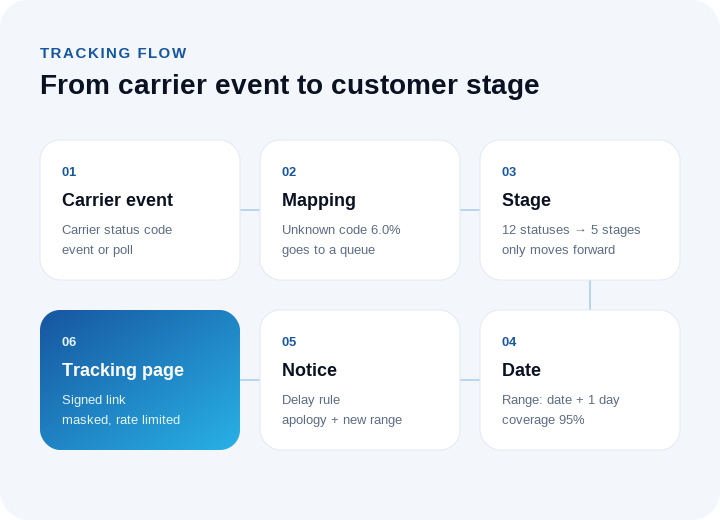
An order has many internal statuses, but the customer cares about "what is happening now and what comes next." Showing internal statuses as they are causes confusion. The fix is to map them to a small number of customer stages. In the example, 12 internal statuses collapse into five stages.
| Customer stage | Internal statuses mapped | Sentence shown to the customer |
|---|---|---|
| 1. Order received | Awaiting payment, paid, risk check (3) | We have your order and are confirming payment |
| 2. Being prepared | Stock allocated, awaiting picking, picked, packed (4) | Your items are being prepared |
| 3. Handed to carrier | Ready for carrier, carrier collected (2) | Your parcel has been handed to the carrier |
| 4. Out for delivery | Out for delivery, delivery failed (2) | Your parcel may reach you today |
| 5. Delivered | Delivered (1) | Your parcel has been delivered |
3 + 4 + 2 + 2 + 1 = 12 internal statuses mapped. Two rules matter. First, the stage only moves forward: a late or contradictory carrier event never rewinds the customer's screen. Second, exceptions do not change the stage, they add a notice: after a failed delivery attempt the customer is still at stage 4, but the page says "Delivery attempt failed, retrying."
For the internal lifecycle, see our order management system guide.
We recommend reading: What Is an Order Management System?
Should the Estimated Delivery Date Be a Single Day or a Range?
Short answer: a range. A single date looks precise, but when it is missed it feels like a broken promise. A range reflects real uncertainty honestly and protects trust.
In the example, past deliveries break down like this: 82% arrive on the estimated date, 13% arrive at most one day late and 5% arrive more than one day late. Show a single date to 1,000 customers and 1,000 × (1 − 0.82) = 180 of them see the promised day missed. Show the range "estimated date to the next day" and the 82% plus the 13% fall inside it, so coverage is 95%; only 1,000 × 5% = 50 customers miss the range. Missed promises fall from 180 to 50, a drop of 130, or 72.2%.
Calculate the range from your own history and widen it in campaign weeks. A range that is too wide says nothing; "3–5 business days" is good, "1–3 weeks" is not.
How Do You Tell Customers About a Delay Before They Ask?
Delay detection is written as a rule: "if the end of the range (estimated date + 1 day) has passed and the status has not become delivered, the order is late."
A detected order triggers an automatic message: a short apology, the new estimated range, the tracking link and, where relevant, an option (keep waiting or cancel). We covered message design, channel choice and delivery in our transactional SMS guide; what matters here is that the content and the trigger are right.
The effect: of 20,000 monthly orders, 1,000 (5%) are late. Without notices, 50% of late customers open a ticket: 1,000 × 0.50 = 500 tickets. The rule reaches 90% of late orders, 900 of them (detection lags for the remaining 100). Of the notified customers, 20% still write: 900 × 0.20 = 180. The 100 un-notified orders still produce 100 × 0.50 = 50. Total 230 tickets; prevented 500 − 230 = 270, a 54% drop in delay-driven tickets.
How Should a Tracking Page Be Designed and Secured?
A good tracking page answers three questions at a glance: Where is it now? When will it arrive? What can I do if something is wrong? The five-stage line sits at the top, the estimated range below it, then the parcel contents and action buttons.
Offer access two ways. The first is guest access: order number plus the email or the last four digits of the phone. The second is a signed link in the email and SMS, carrying the order number and an expiry in a form that cannot be altered.
Minimize personal data. Partial masking is enough: "F*** D***", "Main St. *** / Istanbul" instead of the full name and address. For obligations on processing and retaining personal data, consult your legal counsel.
Put a rate limit in place against guessable order numbers. If numbers are sequential and the second factor is the last four digits of the phone, there are 104 = 10,000 possibilities. At 5 attempts per hour from one address, that takes 10,000 ÷ 5 = 2,000 hours, about 83.3 days; but an attacker can use many addresses, so also limit per order number and make the signed link the primary channel.
We recommend reading: What Is a Customer Portal?
What Is Shown When One Order Has Several Parcels?
Split orders inflate WISMO tickets disproportionately. In the example, 12% of orders, 2,400, are multi-parcel. For them the ticket rate is 168 ÷ 2,400 = 7.0%; for the 17,600 single-parcel orders it is 672 ÷ 17,600 = 3.8%. Twelve percent of orders produce 168 ÷ 840 = 20% of the tickets.
The page should show each parcel on its own line: "1 of 3 parcels delivered." Example order: parcel 1 delivered, parcel 2 out for delivery, parcel 3 being prepared. The order's overall stage follows the furthest-behind parcel and its estimated date follows the latest parcel, but every parcel's own status and contents stay visible.
How Is Carrier Data Collected and Kept Fresh?
The customer stage is derived from carrier events, so data quality decides how far the page can be trusted. The integration itself is in our shipping integration guide.
Three problems appear. Event lag: the carrier reports late. Contradictory status: a parcel out for delivery shows "at transfer hub." Unknown events: a code arrives with no entry in your mapping table. In the example, 11,280 of 12,000 carrier events in the last 30 days were mapped and 720 were unknown: 720 ÷ 12,000 = 6.0%. Unknown events are not shown on the page; the last known stage is kept, the event goes to a queue and the mapping table is updated.
| Method | Daily queries (6,000 active shipments) | Average staleness |
|---|---|---|
| Poll hourly | 6,000 × 24 = 144,000 | 30 min |
| Poll every 4 hours | 6,000 × 6 = 36,000 | 120 min |
| Poll by stage (900 out for delivery at 30 min, 5,100 in transit at 4 h) | 900 × 48 + 5,100 × 6 = 73,800 | 15 min out for delivery, 120 min in transit |
| Event notification + daily reconciliation | 6,000 (reconciliation only) | Minutes |
Polling by stage cuts daily queries by 1 − 73,800 ÷ 144,000 = 48.8% against hourly polling. If the carrier offers event notifications (webhooks), that is the best route; our webhook guide covers retries and duplicate protection. If not, set the polling interval by shipment stage. In both cases, daily reconciliation catches missed events.
We recommend reading: What Is Shipping Integration?
What Should the Page Do for Cancellations, Returns and Delivery Problems?
A tracking page should not show only the happy path. A cancelled order reads "Cancelled, your payment will be refunded"; a return request reads "Return request received, awaiting parcel," on the same page. We cover the return process itself in our returns management guide.
For delivery problems, give the customer actions. Before the parcel leaves, they can change the address, book a delivery slot or file a complaint from the page. Each action has a window rule: the address can be changed only before picking starts, because afterwards the parcel is labelled. When the window closes, do not hide the button; show a passive state with the reason: "Your parcel is ready; contact support to change the address."
In the example, 150 of the 1,560 non-WISMO tickets are address changes. Self-service resolves 60% of them, 90, without an agent.
The page is designed for phone widths; the email and SMS link opens that exact order, and if you have an app, a deep link opens the in-app order screen. For marketplace orders, tracking lives on the marketplace's own page; your page covers only orders from your own site, and marketplace customers are directed to that platform's tracking. For the data side of marketplace orders, see our marketplace integration guide.
How Do You Measure Whether the Page Works?
Four measures are enough. WISMO share is the proportion of all tickets that are order-status questions and the most important indicator. Tracking page usage is the proportion of orders whose page was opened. Ticket prevention rate is the difference in tickets before and after the change. First status update delay is the time between a carrier event and the change on the page.
A customer who opens the page and still writes shows what the page lacks. In the example, 9,000 orders a month open the page (9,000 ÷ 20,000 = 45%); 2% of them, 180, still open a ticket. The 11,000 orders that never visited produced 254 tickets. Put a "was this helpful?" vote at the bottom: in the example 2,340 of 3,000 votes are positive, 78%. To link help content from the page, see our knowledge base guide; to route status questions to a chat assistant, see our chatbot guide.
| Measure | Before | After | Calculation |
|---|---|---|---|
| WISMO tickets | 840 | 434 | 230 delay + 204 normal |
| WISMO tickets prevented | – | 406 | 406 ÷ 840 = 48.3% |
| WISMO share | 35.0% | 22.8% | 434 ÷ (2,400 − 496) = 434 ÷ 1,904 |
| WISMO per order | 4.2% | 2.17% | 434 ÷ 20,000 |
The 434 add up like this: 230 from delays; the 840 − 500 = 340 tickets unrelated to delays fall 40% through status notices and the page, so 340 × 0.60 = 204. Total 230 + 204 = 434. The total tickets removed are 406 + 90 = 496, which is why the later share is 434 ÷ 1,904.
How Is the Payback Period Calculated?
Put the prevented tickets into money. Representatively, a ticket costs 12 minutes × ₺300/hour ÷ 60 = ₺60. Prevented tickets per month are 406 + 90 = 496, so the monthly gain is 496 × ₺60 = ₺29,760. Suppose monthly running cost for the page, notices and event processing is ₺6,000: monthly net ₺23,760. With a development investment of ₺285,000, payback is 285,000 ÷ 23,760 ≈ 12.0 months.
Sensitivity: if prevented tickets halve to 248, the gain is 248 × 60 = ₺14,880, net ₺8,880 and payback 285,000 ÷ 8,880 ≈ 32.1 months. So measure your WISMO volume first; if it is low, a simple status email is cheaper to start with. The calculation counts only agent time.
We recommend reading: How to Build an E-Commerce Website
How Do You Build a Tracking Page in Six Steps?
1. Measure your WISMO tickets: total tickets, WISMO share, late-order rate. 2. Map internal statuses to five customer stages and write the exception rules. 3. Collect carrier events; set up a queue for unknown events and a daily reconciliation. 4. Publish the page with signed links, masking and rate limits. 5. Switch on the delay rule and the automatic message. 6. Track the four measures weekly and turn negative votes into an improvement list.
We recommend reading: How to Reduce Shipping Costs in E-Commerce
We recommend reading: How to Set Up Transactional Message Template Management: Email, SMS and Push Templates, Variable Contracts, Versions and Payback Guide
We recommend reading: How to Prepare an E-Commerce Store for Peak Campaign Season: Demand, Stock, Capacity and Live Control Guide
E-Commerce and Order Processes with İnovabil
At İnovabil our focus is building software from scratch for your company: custom software, e-commerce, ERP, CRM, web, mobile and integration. Which stages an order status is shown through, and how carrier data is collected, are needs to settle in the requirements phase.
We built the prepaid shipping system for Kredili Kargo; logistics and shipment planning with wholesale order management for Karyak; and warehouse management plus a complaint and support management system for Sleepy. Send us a short summary of your order volume and current support process, and we will put the need in writing together.
We recommend reading: Our software development process: step by step from analysis to launch
Frequently Asked Questions
What is an order tracking page?
A page where customers, using an order number and email and without creating an account, see which stage their order is at and when it will arrive. Its purpose is to answer "where is my order?" without a ticket to your support team.
How do you reduce "where is my order" tickets?
With three moves: map internal statuses to five plain stages, show the estimated delivery as a range and notify customers about delays before they ask. In the example, these cut 840 monthly WISMO tickets to 434.
Should the estimated delivery date be a single day or a range?
A range is safer. In the example, with a single date 180 of 1,000 orders miss the promised day, while with a range widened by one day only 50 do.
Which personal data should a tracking page not show?
Full name, full address, phone number and delivery signature should not appear; use partial masking. For processing and retention obligations, consult your legal counsel.
Can you build a tracking page for marketplace orders?
Usually not. Tracking for a marketplace order lives on the marketplace's own page; your page covers only orders from your own site, and you direct marketplace customers to that platform's tracking.