

Your most knowledgeable developer leaves one day, and what remains is a working system and hundreds of decisions nobody can explain. That is the moment when how to write software documentation stops being an abstract question. Documentation moves what the people who built the software know (what it does, why it was built that way and what to do when it breaks) out of their heads and into a shared, current memory. Done well, it shortens the time a new developer needs to take over, speeds up the fix for a midnight incident and frees the business from depending on a single person.
This guide covers the whole document set of a project and its economics, not one document type. For APIs, see our API documentation guide; for the requirements document, our requirements analysis guide; for change history, our version control guide. We do not repeat them here. What we cover is which document is written for whom and how often it changes, how to stop documents from going stale, templates, measures and a six-step path. All example figures are illustrative; they are not measurements from a real company or sector.
What Is Software Documentation?
Software documentation is the full set of written records that explain a system's purpose, structure, decisions, installation, operation and use. Code says what was done; documentation says why it was done that way and how to run it. Whatever cannot be recovered by reading the code belongs in a document.
The goal is not to write everything: every document needs a reader and a question it answers.
Which Documents Should a Project Have?
Six documents form a sufficient core for most custom software projects: a requirements document, an architecture decision record (ADR), an installation and operations manual (runbook), a user guide, release notes and a handover package. The table shows the reader and update frequency of each.
| Document | Reader | Question it answers | Update frequency |
|---|---|---|---|
| Requirements document | Business unit, developer, tester | What will be built, and what is out of scope? | When scope changes |
| Architecture decision record (ADR) | Developer, architecture owner | Why was this decided, and what was the alternative? | Once per decision; a new record when it changes |
| Installation and operations manual (runbook) | On-call engineer, support team | What do I do when it breaks, and how do I rebuild it? | Every release and after every incident |
| User guide | End user, trainer | How do I do this task on screen? | Whenever a screen or flow changes |
| Release notes | User, support, manager | What changed in this version, and what should I watch for? | Every release |
| Handover package | New team, business owner | What do I have, and where do I look? | At project delivery and on team changes |
The frequencies also show how fast each document goes stale: an ADR stays as a historical record, while a runbook risks becoming wrong every time the system changes.
What Does a "Living Document" Mean?
A living document is kept next to the code, in the same version control repository, and updated in the same change as the code. A document left in a separate folder or tool starts going stale the moment the code changes.
- In the same repository: The document sits as text beside the code; history, authorship and rollback come from version control.
- In the same change: Every change that alters behavior also updates the related document, and the review asks "where is the doc?" We covered review practice in our code review guide.
- Part of the definition of done: Work whose document is not updated is not done. If this line is not in the team's definition of done, documentation always slips to the next sprint.
- Checks in the pipeline: Mechanical checks such as broken links and example code that must compile can run in the release pipeline; see our CI/CD guide for pipeline design.
How Do You Write an Architecture Decision Record (ADR)?
An ADR is a short document that records one architectural decision, its context and its consequences on a single page. Its purpose is that someone asking "why is it like this?" a year later finds the answer. The decision itself may change; a change is written as a new ADR, the old one is not deleted and is marked "superseded".
The template below is short enough to actually be used. The example shows a decision from the dealer portal project.
| Field | Example content (ADR-007) |
|---|---|
| Title and date | ADR-007: Order approvals are processed through a queue; 2026-03-10 |
| Status | Accepted (one of proposed, accepted, superseded) |
| Context | On campaign days approval calls slow the main application; approvals do not have to finish instantly, finishing within minutes is enough. |
| Decision | Approval jobs are written to a queue and processed in order by a separate worker process. |
| Alternatives | Synchronous processing (simple but slow under load); a separate service (powerful but more expensive than this scale needs). |
| Consequences | Positive: the main application is shielded from load. Negative: approval results appear with a delay; monitoring and retries are required. |
The rule is simple: write an ADR for decisions that are expensive to reverse and needed debate; do not write one for a variable name or a button color. Technical debt often traces back to a decision whose reason was forgotten; we covered the topic in our technical debt guide.
How Do You Write an Installation and Operations Manual (Runbook)?
A runbook is a guide for a specific incident or task that lists where to look first, the steps, the way back and who to notify. It is written as if a tired person will read it at midnight: short sentences and numbered steps.
- Symptom: What is visible? (example: "An order approval has been waiting for 15 minutes")
- Impact: Who is affected, and how urgent is it?
- First checks: Which dashboard, which log, which command?
- Steps: Numbered, each with its expected result.
- Rollback: How do we return to the previous state if it does not recover?
- Escalation: Whom to tell, through which channel, and when?
A runbook's value is measured during an incident. In the illustrative example, an incident such as a blocked queue takes 90 minutes on average to resolve without a runbook, because the on-call person first hunts for the cause, tries to find someone who knows the system and finds the steps by trial and error. With a runbook the same incident takes 35 minutes. The difference is 55 minutes, a reduction of 55 ÷ 90 ≈ 61.1%. Observing incidents and raising alerts is a separate job, covered in our software monitoring guide.
How Much Effort and Cost Does Documentation Take?
As a practical rule, documentation can be planned at roughly 5–8% of project effort. This is an illustrative starting point; it varies with the system's complexity, the team's habits and the audience the handover is for. We explained how project effort is derived in our software development cost guide.
Take the dealer portal project: 73 person-days in total, a daily team rate of ₺9,000. The calculation is as follows.
| Documentation share | Calculation | Person-days | Cost |
|---|---|---|---|
| 5% | 73 × 0.05 | 3.65 | ₺32,850 |
| 6% (example) | 73 × 0.06 | 4.38 | ₺39,420 |
| 8% | 73 × 0.08 | 5.84 | ₺52,560 |
The example uses 6%: 73 × 0.06 = 4.38 person-days, and 4.38 × ₺9,000 = ₺39,420. It is a small line item inside the project budget; the real question is what it brings back.
When Does Documentation Pay for Itself?
Documentation pays back in two places: the speed-up of the person taking over and a shorter incident fix; the cost of keeping it current is deducted. The assumptions are illustrative.
- Takeover time: A new developer needs 20 working days to understand the system and work productively without documents, and 8 working days with them. The difference is 12 working days: 12 × ₺9,000 = ₺108,000, a 60% reduction (12 ÷ 20).
- Expected departures: With a 25% yearly departure probability in a four-person team, the expected number of takeovers is 4 × 0.25 = 1, so the expected yearly gain is ₺108,000.
- Incident fixes: Four incidents a month, each saving 55 minutes: 4 × 55 = 220 min ≈ 3.67 hours. With an incident hour costing ₺3,500 (lost business and team time): 3.67 × ₺3,500 ≈ ₺12,833 a month, ₺154,000 a year.
- Keeping it current: 0.5 person-day a month = ₺4,500; 6 person-days a year = ₺54,000.
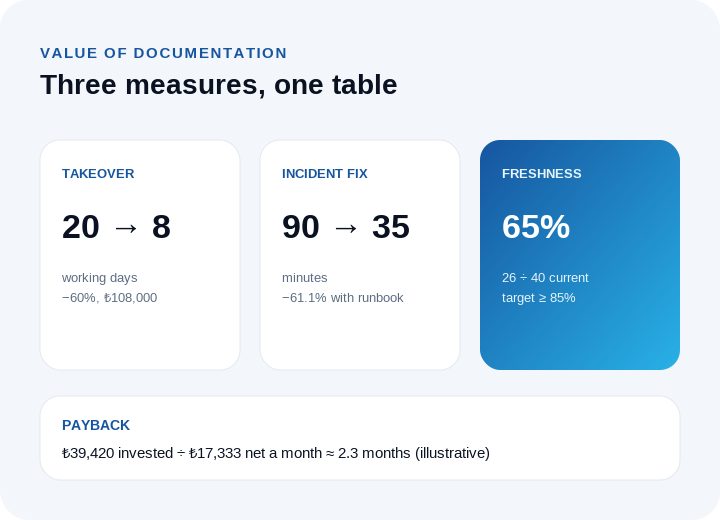
Gross yearly gain is ₺108,000 + ₺154,000 = ₺262,000. After deducting upkeep the yearly net is ₺208,000, about ₺17,333 a month. The one-off ₺39,420 investment pays back in ₺39,420 ÷ ₺17,333 ≈ 2.3 months, and the first-year net is ₺262,000 − ₺54,000 − ₺39,420 = ₺168,580.
What if the assumptions fail? The sensitivity table removes the optimistic numbers step by step.
| Scenario | Yearly net (upkeep deducted) | Payback | First-year net |
|---|---|---|---|
| Base (takeover + incidents) | ₺208,000 | ≈ 2.3 months | ₺168,580 |
| Nobody leaves during the year | ₺154,000 − ₺54,000 = ₺100,000 | ≈ 4.7 months | ₺60,580 |
| Nobody leaves and the incident gain halves | ₺77,000 − ₺54,000 = ₺23,000 | ≈ 20.6 months | −₺16,420 |
The honest conclusion: documentation pays for itself quickly under most assumptions, but if the team never changes and incidents are very rare it can lose money in the first year; even then, a single departure exposes the 12-day gap. The decision is made with your own incident count and turnover rate.
Why Do Documents Go Stale, and How Do You Measure Freshness?
Documents go stale because the code changes and they do not; the cause is usually that nobody owns them and updating is not part of the "done" definition. Staleness is silent: the first person to notice a mistake is the one following it.
The measure is simple: freshness = current documents ÷ total documents. "Current" means reviewed or changed in the last 6 months. In the illustrative example 26 of 40 documents are current and 14 have been untouched for 6 months: freshness 26 ÷ 40 = 65%; stale share 14 ÷ 40 = 35%.
| Document type | Total | Current | Freshness |
|---|---|---|---|
| Requirements document | 4 | 3 | 75.0% |
| Architecture decision record | 12 | 10 | 83.3% |
| Runbook | 6 | 3 | 50.0% |
| User guide | 8 | 4 | 50.0% |
| Release notes | 6 | 4 | 66.7% |
| Handover package | 4 | 2 | 50.0% |
| Total | 40 | 26 | 65.0% |
The table shows something notable: the types that go stale most are runbooks and user guides, the ones tied to the fastest-changing system parts. If a runbook is only 50% fresh, half of the steps read during an incident cannot be trusted, which is worse than having none. An illustrative target is ≥ 85%: at least 34 of 40 documents current. These rules help.
- Give every document an owner and a "last reviewed" date. A document without an owner goes stale.
- Set a threshold: any document older than 6 months drops onto a review list automatically.
- Update the runbook after an incident: every incident should produce a correction or a new step in the relevant runbook.
- Add it to the release checklist: ask "were the affected documents updated?" at every release.
- Delete or archive dead documents.
How Do You Hand Over Source Code and Documents?
Handover means transferring not only the code but everything needed to run and maintain it. Source code ownership and the contract side are a separate subject, covered in our guide to getting custom software developed. Here we look at what the handover package contains.
| Handover item | Contents | How to verify |
|---|---|---|
| Source code and history | The full repository, branches and tags | Build from the repository on a blank machine |
| Installation manual | Required environment, dependencies, list of configuration keys (not their values) | Install in a second environment by following the document |
| Runbooks | Known incidents, restore from backup, roll back a release | Act out at least one incident from the document |
| Architecture summary and ADRs | Components, data flow, decisions taken | A newcomer reads them and produces a list of questions |
| Access and secrets list | Which account, held by whom, how it is transferred | Secrets transferred through a secure channel, never shared in plain text |
| User guide and release notes | Matching the current screens | An end user completes a sample workflow by following them |
The most valuable test is a "second-environment install": if someone who did not write the documents can build the system from scratch following only the documents, the package is complete. We covered maintenance and support expectations in our maintenance agreement guide. Writing handover items into a contract is a legal matter; consult your legal counsel.
What Are Common Documentation Mistakes?
- Leaving documents to the end of the project: Documents written in the last week miss what was forgotten; write them piece by piece.
- A document with no clear reader: A document written "for everyone" speaks to no one.
- Writing everything: Explanation that can be read from the code goes stale and misleads; write only what the code cannot say.
- An ownerless document: Without an update owner, freshness drops.
- Not testing the handover: A package never installed in a second environment turns out incomplete on delivery day.
We recommend reading: What is the software development life cycle (SDLC)?
How Do You Write Software Documentation? Six Steps
Starting with a small core set and growing it by measuring is more sustainable.
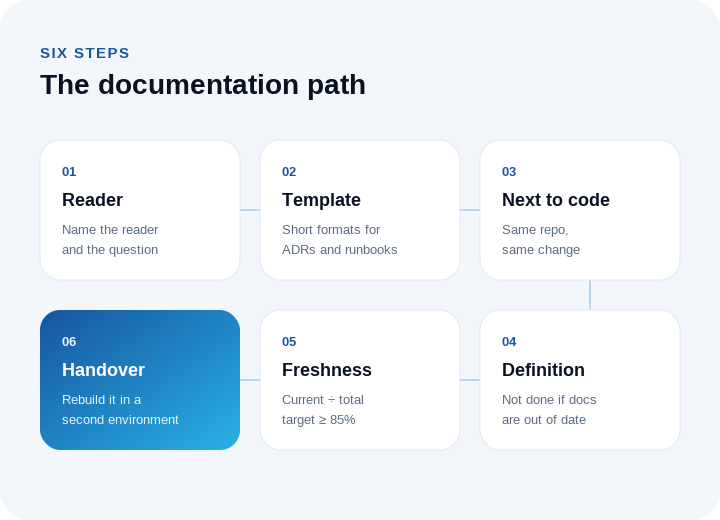
- Name the reader: For the six core documents, write down the reader and the question answered; do not write one that has neither.
- Pick a template: Settle on short templates for ADRs and runbooks so everyone uses the same format.
- Write next to the code: Keep technical documents in the repository, in the same package as the code change.
- Add it to the definition of done: Work whose affected document is not updated is not done; ask this in every review.
- Measure freshness: Track current ÷ total monthly; target ≥ 85%, threshold 6 months.
- Test the handover: Verify the package with a second-environment install and one incident drill.
We recommend reading: Our software development process: step by step from analysis to launch
We recommend reading: How to Drive Software Adoption: User Training, Champion Network, Rollout and Measurement Guide
We recommend reading: How to Do Incident Management and Post-Mortems: SEV Levels, On-Call, MTTR and Blameless Review Guide
We recommend reading: What Is a Document Management System (DMS)? Versioning, Access, Search, Retention and Payback Guide
We recommend reading: How to Build a Knowledge Base: Article Template, Staleness Audit, Metrics and Payback Guide
We recommend reading: What Is a Design System and How Do You Build One? Tokens, Components, Versioning and Payback
We recommend reading: How to Close a Software Project and Hand It Over: Criteria, Checklist, Access Handover and Lessons Learned
We recommend reading: How to Hire Software Developers: Technical Interviews, Scoring Rubric and the First 90 Days
We recommend reading: How to Do a Software Technical Due Diligence: Code and Architecture Audit, Scorecard and Decision Guide
Documentation and Handover with İnovabil
At İnovabil our focus is bespoke software built from scratch for your company. The outputs recorded on our process page include a scope document, work items and a timeline at the analysis step; approved screen designs and a data model at the design step; test scenarios and acceptance sign-off at the test step; and user training at the launch step. These correspond to part of the core set above. We suggest settling in writing, at the start of the project, whether extra documents (runbooks, ADRs, a handover package) are wanted and in what form they are delivered; we make no separate documentation service commitment.
We have built CRM, purchasing and mobile for Avcılar İnşaat; a purchasing system for İZBAN; logistics and shipment planning with wholesale order management for Karyak; and warehouse management with a complaint and support management system for Sleepy. Send us a short summary of which knowledge in your current system sits with whom, and we can work out together which document to write first.
Frequently Asked Questions
What is software documentation, and which documents are needed?
It is the written record of a system's purpose, decisions, installation, operation and use. Six core documents are enough for most custom software projects: a requirements document, an architecture decision record, a runbook, a user guide, release notes and a handover package.
What is an ADR and why write one?
An ADR (architecture decision record) holds the context, alternatives and consequences of one decision on a single page. It answers "why is it like this?" a year later. If the decision changes, the old record is not deleted; a new one is written.
How much effort does documentation add to a project?
As an illustrative starting point, plan 5–8% of project effort. In the 73 person-day example, 6% is 4.38 person-days; at ₺9,000 a day that is ₺39,420. Complex, long-lived systems may need a higher share.
What should we do when documents go stale?
Give each document an owner and a last-reviewed date, put anything older than 6 months on a review list and add updating to the definition of done. Measure freshness (current ÷ total) monthly; in the example 26 ÷ 40 = 65% against a target of at least 85%.
When does documentation pay for itself?
In the illustrative example, a new developer's takeover drops from 20 days to 8 and incident fixes from 90 minutes to 35, so the investment pays back in about 2.3 months. If the team never changes and incidents are rare, it takes longer, so calculate with your own numbers.