

Which version of the contract is final? Where is the approved policy? Is the customer's signed quote in an email, on the shared drive, or on someone's desktop? As documents pile up, these questions get asked again every day, and each one costs minutes and, sometimes, an expensive mistake. A document management system (DMS) is software that keeps a company's documents in one place, versioned, permissioned and searchable.
In this guide we explain what a DMS is, a metadata-based filing model, the document life cycle, version control, retention policy as a concept, access, search and scanning, cost and payback, migration, and a six-step setup. The article is about business documents: contracts, invoices, technical drawings, policies and procedures. The technical documentation of a software project is a different topic, covered in our software documentation guide. The sample figures are illustrative; they are not any product's price or an industry average.
What Is a Document Management System (DMS)?
A DMS is a central system where documents are uploaded, described by type and fields (metadata), versioned, sent for approval, shared according to permissions, searched, and routed to archive or disposal when their retention period ends. It stores the document and the information about it together: who uploaded it, which version it is, who approved it, who opened it.
For a solution that focuses on the contract life cycle (draft, negotiation, signature, term tracking), see our contract management guide; a DMS is broader and keeps contracts, invoices, drawings and policies in the same structure. The approval chain itself (who approves, at what amount, in what order) is a separate subject, covered in our workflow and approval software guide.
We recommend reading: Our custom software service
How Does a DMS Differ from a Shared Folder and Email?
A shared folder stores a document; a DMS manages it. The difference comes from three capabilities a folder lacks: version and approval status, field-based search, and detailed permissions with an audit trail.
| Topic | Email attachment | Shared folder | DMS |
|---|---|---|---|
| Single source of truth | None; every recipient has a copy | Partial; runs on file names ("final", "final2") | Yes; the approved version is flagged |
| Search | Sender and subject | File and folder name | Metadata and full text |
| Permissions | Depends on the sender | Folder level | Document and field level |
| Audit trail | None | Mostly none | Who did what, and when |
Should Documents Be Organised by Folder or by Metadata?
A folder structure ties a document to a single path; a metadata model lets you find the same document from many angles. Metadata means the fields stored next to the document: type, customer, date, status, owner.
A contract belongs to a customer, a type and a year at once; in folders only one of these can be the backbone. Illustrative maths: for 100 customers, 8 document types and 5 years, one folder per combination gives 100 × 8 × 5 = 4,000 folders. With metadata the same information is described by 100 + 8 + 5 = 113 values and can be filtered from any angle.
The condition is discipline: the required fields for each document type must be written down in advance, or "type" and "date" stay empty and search drifts back to file names.
| Document type | Required fields | Linked record | Approval needed? |
|---|---|---|---|
| Contract | Party, start and end date, owner | Customer account | Yes |
| Technical drawing | Part code, revision, status | Product card | Yes |
| Policy / procedure | Version, effective date, owner | Department or process | Yes |
How Does the Document Life Cycle Work?
Every document passes through five states: draft, approval, published, archived and disposed. Each transition needs an owner and a rule; otherwise documents stay in "draft" forever.
| State | Who sees it? | What happens? |
|---|---|---|
| Draft | Author and invitees | Changes freely; gets a new version number |
| Approval | Approvers | Locked for edits; approval or rejection is recorded |
| Published | Everyone permitted | The one approved version; older versions show as "superseded" |
| Archived | A limited, permitted group | Read-only; the retention clock runs |
| Disposed | Owner and administrator | Deleted in a recorded way at the end of the period; a disposal record remains |
Why Do Version Control and the Approved Version Matter?
Because the costliest document mistake is using the wrong version: a quote issued from an old price list, production run from a cancelled drawing, work done under a procedure that is no longer in force.
A DMS creates a new version at each save: 1.0 for the first approved version, 1.1 for a minor correction, 2.0 for a content change. Version control for code is a separate subject; in a DMS the aim is not merging code but keeping the current valid state of a document single and obvious.
Illustrative example: wrong or outdated versions are used 6 times a year at an average cost of ₺24,000 per incident: 6 × ₺24,000 = ₺144,000. If an approved-version rule cuts incidents to 2, the annual cost becomes 2 × ₺24,000 = ₺48,000, a saving of ₺96,000.
How Are Documents Linked to Related Records?
A document should appear inside the customer account, order or asset it belongs to, so it can be reached from that record without searching. The link is made through an identifier; the document is stored once in the system and called from the related records.
A customer account lists the contract and signed quote, an order shows the customer approval and delivery note, an asset card holds the licence, warranty and maintenance report, and a product card holds the drawing and quality certificate.
How Are Access Permissions and Sensitive Documents Managed?
Permissions are granted by document class and role; assigning people to individual documents is not sustainable. The principle of least privilege applies.
| Document class | Example | Who sees it? | Extra rule |
|---|---|---|---|
| Internal | Policy, procedure | Relevant departments | Sharing outside is limited |
| Confidential | Contract, price quote | Department and management | Downloads are logged |
| Sensitive | Personnel, health, identity documents | A few named people | Set with your legal counsel |
We explained how to design the role model in our role-based access control guide. For documents containing personal data, storage, access and disposal duties under KVKK (Turkey's personal data protection law) must be assessed separately; consult your legal counsel for the details. Every open, download and change should be written to an audit trail, and the trail must not be editable.
How Do Search, Scanning and OCR Work in a DMS?
Search works in two ways: by metadata (type, customer, date, status) and by document text. When paper documents are scanned and read with OCR, their text becomes searchable too.
OCR (optical character recognition) turns the writing in a scanned image into text. Information extraction then pulls field values (invoice number, date, amount) out of that text. Accuracy is never 100%; the system gives each field a confidence score and sends low-confidence fields to a person.
Illustrative calculation: 5 fields are extracted from each of 400 documents a month, so 400 × 5 = 2,000 fields. Of these, 1,600 (80%) are filled automatically with high confidence, and accuracy in that group is 1,584 ÷ 1,600 = 99.0%; 16 fields are wrong. The remaining 400 fields go to human review and are corrected. Correct fields in total are 1,584 + 400 = 1,984, that is 1,984 ÷ 2,000 = 99.2%. At 20 seconds per field: keying everything by hand takes 2,000 × 20 = 40,000 s ≈ 11.1 h; reviewing only 400 fields takes 400 × 20 = 8,000 s ≈ 2.2 h, about 80% less effort. For the remaining 16 errors, sample checks on critical fields (amount, date) are recommended.
What Is a Retention and Disposal Policy?
A retention policy is the set of rules that states, for each document type, how long it is kept, whether it then goes to archive or disposal, and who approves it. A DMS ties the period to the document type and notifies the owner when it falls due.
| Document type | Retention period | At the end | Who decides? |
|---|---|---|---|
| Accounting documents | As required by regulation | Archive, then disposal | Financial advisor (certified accountant) |
| Contracts | Per regulation and contract terms | Archive, then disposal | Legal counsel |
| Personnel records | As required by regulation | Archive, then disposal | Legal counsel |
| Technical drawings | Per product life and obligations | Archive | Department head and legal counsel |
Periods vary with regulation and your business, so this article gives no numbers; set them for each type with your financial advisor and legal counsel. If a DMS goes live without a policy, either everything is kept forever or documents are deleted before their period ends. The system should keep a disposal record (what was deleted, when, with whose approval). Backup is a separate subject; we cover it with RPO and RTO in our data backup guide.
How Are DMS Cost and Payback Calculated?
Benefit is measured in three places: search time, wrong-version incidents and scanning effort. Cost is setup, migration, licence or infrastructure, and operation. The assumptions below are illustrative.
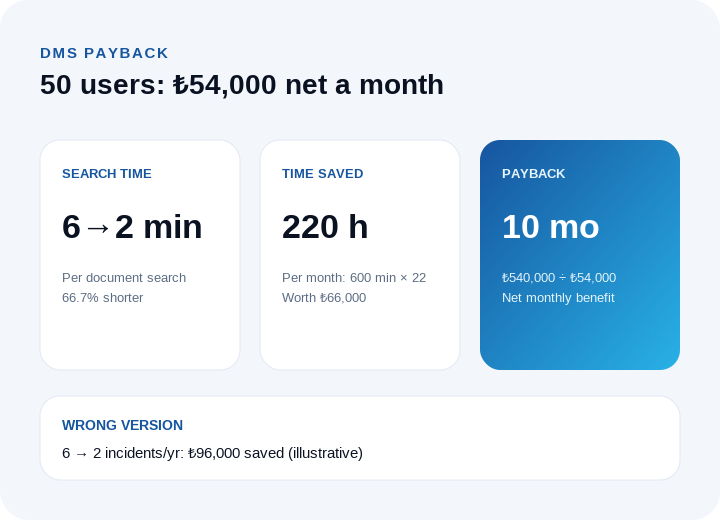
- Users: 50 people; 3 document searches per person per day; search time drops from 6 min to 2 min; staff cost ₺300 an hour; 22 working days a month.
- Wrong version: 6 incidents a year at ₺24,000 each; an approved-version rule brings it down to 2.
- Investment: setup and customisation ₺360,000; scanning and loading 12,000 documents with metadata at 3 min each: 12,000 × 3 = 36,000 min = 600 h × ₺300 = ₺180,000.
- Operation: indexing 400 new documents a month takes 400 × 3 = 1,200 min = 20 h × ₺300 = ₺6,000; licence and infrastructure ₺14,000.
| Item | Calculation | Amount |
|---|---|---|
| Search saving | 50 × 3 × 4 min = 600 min = 10 h/day; × 22 = 220 h × ₺300 | ₺66,000 / month |
| Wrong-version saving | (6 − 2) × ₺24,000 ÷ 12 | ₺8,000 / month |
| Gross monthly benefit | ₺66,000 + ₺8,000 | ₺74,000 |
| Running cost | ₺6,000 indexing effort + ₺14,000 licence and infrastructure | ₺20,000 / month |
| Net monthly benefit | ₺74,000 − ₺20,000 | ₺54,000 |
| Investment | ₺360,000 setup + ₺180,000 migration | ₺540,000 |
| Payback | ₺540,000 ÷ ₺54,000 | 10 months |
Test the sensitivity of the assumptions. If the search saving comes in at half the expected level (110 h, ₺33,000), gross benefit is ₺33,000 + ₺8,000 = ₺41,000, net is ₺21,000, and payback stretches to ₺540,000 ÷ ₺21,000 ≈ 25.7 months. The decision depends on how often users really look for documents, so measure it for two weeks first.
How Much Space Do Documents Take Over Time?
Storage grows with the number of versions and backup copies more than with the number of documents. Illustrative calculation (1 GB = 1,000 MB): an average document is 2 MB, 400 new documents arrive a month, and each is stored in 2 versions. Monthly growth is 400 × 2 × 2 MB = 1.6 GB, or 19.2 GB a year; the existing archive of 12,000 documents is 24 GB. After three years one copy is 24 + 3 × 19.2 = 81.6 GB, and with the original plus two backups 81.6 × 3 = 244.8 GB. The figure is not large; the real risk is documents whose retention has ended never being deleted. Measure your own average document size.
How Do You Migrate from Shared Folders and Email to a DMS?
The hardest part of migration is not the software but recognising and cleaning the old documents. The general logic of moving from tables to a system is the same as in our Excel-to-software guide.
There are three approaches: move everything (when the document count is small), move first the active documents and those tied to open work and leave the rest in a read-only archive (the default for most businesses), or take in only documents from today on (when old documents are rarely consulted). Before moving, remove duplicate copies, unclear "final" versions and orphaned files. Reconciliation, trial runs and cutover are detailed in our data migration guide. Do not delete the old shared folder at once; keep it read-only for a set period while you test the DMS.
What Steps Does a DMS Setup Follow?
A six-step path works well. Write down the output of each step.
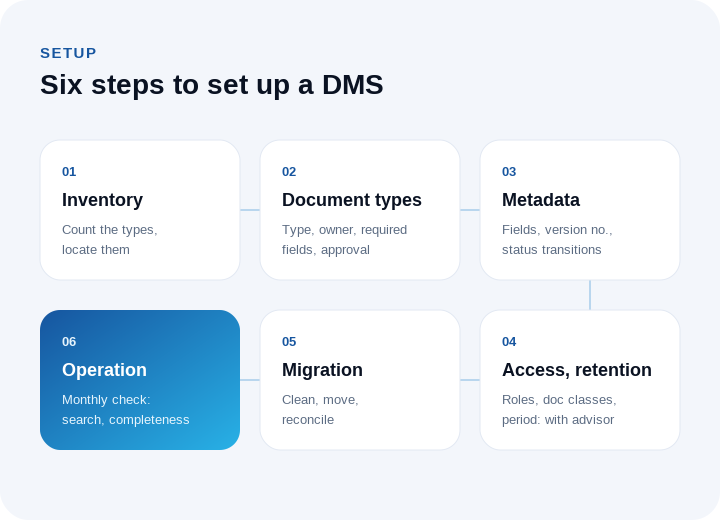
- Inventory: Which document types exist, where are they, who holds them, how many are there? Count first.
- Document types: Write the type list; for each type define the required fields, the owner and whether approval is needed.
- Metadata and life cycle: Define the fields, the version number rule and the status transitions.
- Access and retention: Set roles and document classes; write retention periods with your legal counsel and financial advisor.
- Migration: Clean, move the active documents, verify reconciliation, train users.
- Operation: Measure search time, wrong-version incidents, indexing delay and the share of untagged documents every month.
For example, if 372 of 400 uploaded documents have their required fields filled, completeness is 372 ÷ 400 = 93%; if that is below target, revisit training or the required-field rule.
What Mistakes Are Common with a DMS?
- Moving the old folder structure as it is: If the problem is the structure, it continues in the new system; design the metadata afresh.
- Not making fields required: Optional fields stay empty and search does not work.
- Leaving documents without an owner: A document nobody updates becomes wrong over time.
- Not separating the approved version: If users cannot tell a draft from the published version, version control is useless.
- Leaving retention policy until last: Without a period and disposal rule written early, storage and risk grow.
We recommend reading: How to Build a Knowledge Base: Article Template, Staleness Audit, Metrics and Payback Guide
We recommend reading: How to Generate PDF Documents and Labels from Software: Templates, Page Breaks, Barcodes and Payback Guide
We recommend reading: How to Set Up a Data Archiving and Retention Policy: Data Tiers, the Archive Rule, Legal Hold and Deletion Guide
We recommend reading: How to Build Enterprise Search and Document Q&A with RAG: Chunking, Access Filters, Threshold and Payback Guide
We recommend reading: How to Design Secure File Upload and Storage: Validation, Scanning, Signed Links and Cost Guide
We recommend reading: How to Integrate Electronic Signatures: E-Signature Flow, Identity Verification, Evidence and Payback Guide
Custom Software and Process Digitalisation with İnovabil
At İnovabil our focus is software built from scratch for the company: custom software, ERP, CRM, e-commerce, web, mobile and integration. This article is not a product pitch; we do not claim to have a DMS product. If your document management need comes together with your ERP, purchasing system or a portal, we recommend writing the document types, access and retention expectations down in the requirements analysis.
We have built CRM, purchasing and mobile for Avcılar İnşaat; a purchasing system for İZBAN; logistics and shipment planning with wholesale order management for Karyak; and warehouse management plus a complaint and support management system for Sleepy. Send us a short summary of your document types, user count and the systems you will connect, and we will prepare a written assessment together.
We recommend reading: Our software development process: step by step from analysis to launch
Frequently Asked Questions
What is a document management system (DMS) and what is it for?
It is software that keeps business documents central, versioned, permissioned and searchable, and manages their life cycle from draft to disposal. It helps you find the right document quickly and use only the approved version.
What is the difference between a DMS and a shared folder?
A shared folder stores a document; a DMS also provides version and approval status, metadata search, document-level permissions, an audit trail and links to records.
Should we use folders or metadata?
Metadata is more flexible: the same document can be found by customer, type and year. In the example, 113 values replace 4,000 folders.
How long should documents be kept?
The period depends on the document type and regulation, so this article gives none. Set it with your financial advisor for accounting documents and with your legal counsel for contracts and personnel records.
How fast does a DMS investment pay back?
In the example, net monthly benefit is ₺54,000, investment ₺540,000 and payback 10 months. If the search saving halves, it becomes about 25.7 months; recalculate with your own data.