

A weak signal on the warehouse floor, an archive in the basement, a rural delivery route: if your app is used in places like these, "it does not work without internet" is not a limitation, it is lost work. An offline-first app opens, accepts records and keeps working when the connection drops, then reconciles with the server once the connection returns. Adding a cache is not enough for that; local data, synchronization and conflicts have to be designed from the start.
This guide walks through every design step, from local data to the payback calculation: the offline-first principle, what to keep on the device, the first download and delta sync, the write queue, conflict strategies, stale data and partial success, battery and data use, local security, testing and return on investment. All numbers are representative; they are not measurements of any product or industry.
What Is an Offline-First App?
An offline-first app is designed on the assumption that the connection can drop, not that it is always there. A classic app asks the server on every screen and shows an error when no answer arrives. An offline-first app reads and writes a local database and treats talking to the server as a background job.
Three principles apply. Reads are local: screens are drawn from local data, so they open fast even without a connection. Writes are local: when the user taps "save", the action is stored on the device first. Sync is separate: the local queue is sent when the connection allows, and server-side changes are pulled down to the device.
We recommend reading: How to build a mobile app: a guide from planning to launch
What Data Should Be Kept on the Device?
Downloading everything is slow and risky; the rule is to pick the smallest data set that lets the user finish their work offline. Think by role: for a field team, the product catalog, their own customers and open orders are enough.
The size calculation is simple: number of records × size per record. In the example the catalog is 20,000 products × 1.5 KB = 30,000 KB = 30 MB, the customer list is 3,000 × 2 KB = 6 MB, and open orders are 500 × 6 KB = 3 MB, for a total of 39 MB. Images are not part of this total; they are downloaded on request and kept in a bounded cache.
| Data set | Records | Record size | Total | Goes to the device? |
|---|---|---|---|---|
| Product catalog | 20,000 | 1.5 KB | 30 MB | Yes, all of it |
| Customer list | 3,000 | 2 KB | 6 MB | Yes, the user's scope |
| Open orders | 500 | 6 KB | 3 MB | Yes |
| Product images | 20,000 | 60 KB | 1.2 GB | No; on request, bounded cache |
Every piece of personal data kept locally adds a security burden; for roles, see our role-based access control guide.
How Do the First Download and Delta Sync Work?
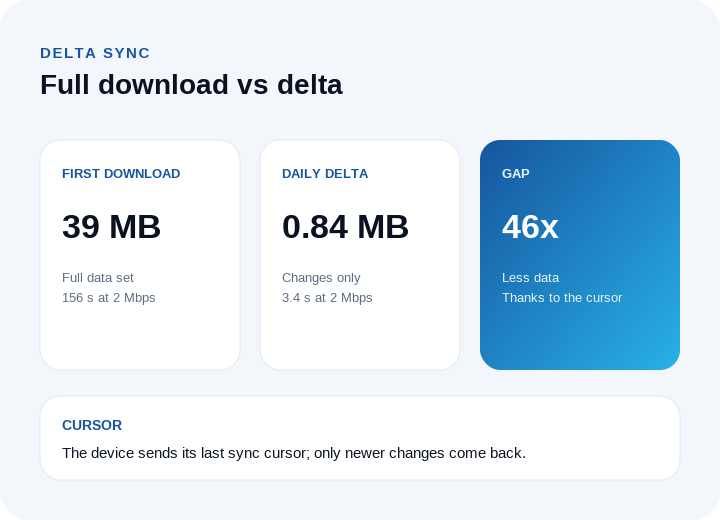
The full data set is downloaded on first launch; after that, each sync brings only what changed. Two things make this possible: a change stamp the server keeps on every record, and a last-sync cursor the device remembers. The device asks the server, "what changed after this cursor?", and the answer contains only those records.
In the example, 1% of products change per day: 200 products × 1.5 KB = 300 KB; customers add 30 × 2 KB = 60 KB; orders add 80 × 6 KB = 480 KB. The daily delta totals 840 KB ≈ 0.84 MB. 39 MB ÷ 0.84 MB ≈ 46 times less data. On a weak connection (2 Mbps), a full download takes 39 × 8 ÷ 2 = 156 seconds, while the delta takes about 3.4 seconds.
Two details are often missed. For deleted records the server must keep a "deleted" marker (a tombstone); otherwise the delta cannot report deletions and a ghost record stays on the device. If the cursor is too old (for example after the server has purged its markers), the device must fall back to a full download. For the event-log idea behind this, see our event-driven architecture guide.
How Should the Local Write Queue Be Designed?
Every user action is first written to an operation log on the device, independent of the network. A queue row carries at least a unique operation ID, a sequence number, the operation type and data, the creation time and a status. Order is preserved because if "place an order for this customer" is sent before "create the customer", the server rejects it.
| Status | Meaning | What the user sees |
|---|---|---|
| Pending | On the device, not sent yet | Clock icon, "not synced" |
| Sent | Request sent, no reply yet | Spinning icon |
| Confirmed | The server accepted it | Check mark |
| Rejected | Not accepted because of a rule or conflict | Red badge, explanation and a fix button |
The "sent" status is dangerous: the request may have reached the server while the reply was lost on the way. To avoid duplicates when the device resends, each operation's ID is sent as an idempotency key; if the server sees the same ID a second time, it does not process it again and returns the earlier result. We cover the same idea in more depth in our webhook guide.
How Are Conflicts Resolved?
A conflict happens when two sides change the same record differently before syncing, and the resolution strategy is chosen per data type, not once for everything. There are five basic strategies.
| Strategy | How it works | When it fits |
|---|---|---|
| Server wins | The device change is discarded | Centrally managed data such as prices and campaigns |
| Client wins | The device value overwrites the server | Data owned only by that user |
| Last writer wins | The newer timestamp is valid | Low-risk fields such as a phone number; clock skew is a risk |
| Field-level merge | Different fields are kept separately | People editing different fields of the same card |
| Manual resolution | The user sees both versions and chooses | Business-critical values such as quantity and amount |
| Data | Suggested rule | Reason |
|---|---|---|
| Customer note | Merge by appending | Both notes are valuable; one must not erase the other |
| Customer phone | Field-level, last writer wins | Rarely changes; low risk |
| Order quantity | Send as an operation, server validates; manual on dispute | Affects money and stock |
| Stock | Send the difference (−5 units), not an absolute value | The server sums differences; nobody is overwritten |
| Price | Server wins | Managed centrally |
You can estimate how often conflicts will occur with a simple model. If others change a given record at an average of λ times per hour, the probability of at least one change while you are offline for t hours is 1 − e−λt. For a customer note with λ = 0.005 (one change per 200 hours), 6 hours gives 1 − e−0.03 ≈ 2.96% and 18 hours gives ≈ 8.61%. For a price row with λ = 0.002, 6 hours gives ≈ 1.19%. For stock with λ = 0.5, 6 hours gives ≈ 95.0%: conflict is the rule, not the exception, so stock is sent as a difference.
If a user edits 12 customer records in an offline session, the expected number of conflicts is 12 × 2.96% ≈ 0.35; across 40 users that is about 14 conflicts a day. Fields that can be merged are resolved automatically, and the rest need a clear screen. For the version-column idea, see our concurrency control guide. For concrete examples on the sales side, see our field sales app article.
How Are Partial Success and Connection Status Shown to Users?
Users must be able to see the answer to "did my record go through?". The screen shows a persistent connection status (online, weak, offline) and every record carries a sync badge.
Partial success is unavoidable. With 50 operations in the queue, 47 may be confirmed and 3 rejected. The right behavior is to complete the 47 quietly and show the 3 with their reasons (credit limit, product no longer on sale, conflict): "47 operations synced, 3 need a decision". A rejected operation is not deleted; the user fixes it or gives up.
Stale data needs its own treatment. If the last sync was 18 hours ago, the screen should say so. Set a validity period per data type, for example 12 hours for prices and 4 hours for stock. When the period is exceeded, the relevant screen shows "Data shows the state from 18 hours ago". For stock the reason is concrete: if a product moves 3 units an hour across the network, 3 × 18 = 54 units have moved in 18 hours, so the "40 units" on the device is no longer a guide.
How Are Battery, Data Use and Weak Connections Managed?
Sync frequency is a trade-off between battery and data on one side and freshness on the other. Over 24 hours, polling every 5 minutes makes 288 requests a day and every 30 minutes makes 48: a 6-fold difference. A smarter approach is event-based: sync when a new operation is queued, when the app comes to the foreground and when the connection returns, and poll rarely in between.
A weak connection and being fully offline are handled separately. For example, if a connection cannot be made within 5 seconds or no reply arrives within 15 seconds, the request times out and the device treats that round as offline and waits for the next opportunity.
Chunked sending saves the day on weak connections. Sending 50 pending operations × 6 KB = 300 KB in one request over a 50 kbps line takes 300 × 8 ÷ 50 = 48 seconds; it hits the 15-second timeout and starts over, never finishing. Split into five groups of 10, each request takes 60 × 8 ÷ 50 = 9.6 seconds, stays under the timeout and progress is saved. For the background-job logic, see our message queue guide.
How Are Local Storage, Security and Cleanup Managed?
Devices get lost. Local data is encrypted, app access is protected with a PIN or biometric check, and a remote wipe mechanism that the server can trigger is planned for device loss; the wipe command is applied the next time the device connects. For key handling, see our data encryption guide. Keeping personal data on a device and reporting device loss should be assessed under KVKK (Turkey's personal data protection law); consult your legal counsel for details.
Storage quota must be planned too. Example budget: the data set is 39 MB, a 90-day order history per user is 12 orders/day × 90 days × 6 KB = 6,480 KB ≈ 6.5 MB, and the image cache is capped at 200 MB (least recently used is deleted); the total is ≈ 245.5 MB. Set a retention period for old orders; an expired record is deleted only if it has been synced and confirmed, and a pending operation is never cleaned up.
Which Operations Cannot Be Done While Offline?
Operations that depend on an instant server decision cannot be done offline and should be disabled explicitly. Taking a payment, getting a credit approval, changing a password and other sensitive, permission-bound actions belong to this group. Disabling the button and saying "This action needs a connection" is the honest choice.
How Is an Offline App Tested and Measured?
Five network states (normal, weak, offline, repeatedly dropping and reconnecting, cut mid-request) and four operations (create, edit, delete, read) make 5 × 4 = 20 scenarios. On the conflict side, four data types and three situations (same field, different field, deleted on the server) add 4 × 3 = 12 scenarios, for a total of 32. For the general testing approach, see our software testing guide.
Four measures are tracked in production. Example day: 40 users, 1,200 operations; 1,176 confirmed and 24 rejected.
| Indicator | Calculation | Example value |
|---|---|---|
| Sync success rate | 1,176 ÷ 1,200 | 98.0% |
| Rejection rate | 24 ÷ 1,200 | 2.0% |
| Conflict rate | 14 ÷ 1,200 | 1.17% (58.3% of rejections) |
| Offline session share | 24 ÷ 80 sessions | 30.0% |
The 24 rejections split into 14 conflicts, 6 validation errors and 4 permission problems (14 + 6 + 4 = 24). High delay shows up in p95; the average hides it.
How Is the Return on Offline-First Design Calculated?
The payoff is the reduction in work lost or re-entered because of missing connectivity. The following assumptions are representative: there are 6 problem orders a day; 2 are lost completely and 4 are re-entered. A lost order averages ₺4,000 with 25% gross margin, so ₺1,000 of profit lost per order. Re-entry takes 8 minutes at an hourly cost of ₺300. A month has 22 working days.
| Item | Calculation | Amount |
|---|---|---|
| Profit on lost orders | 2 × 22 × ₺1,000 | ₺44,000 |
| Re-entry labor | 4 × 22 × 8 min = 704 min = 11.73 h × ₺300 | ₺3,520 |
| Monthly loss (before) | 44,000 + 3,520 | ₺47,520 |
| 80% reduction: gross gain | 47,520 × 80% | ₺38,016 |
| Extra running cost (sync server, monitoring) | Monthly | ₺4,000 |
| Net monthly gain | 38,016 − 4,000 | ₺34,016 |
If development is 45 person-days × ₺9,000 = ₺405,000, payback is ₺405,000 ÷ ₺34,016 ≈ 11.9 months. If the reduction is only 40%, the gross gain is ₺19,008, the net ₺15,008 and payback stretches to ≈ 27.0 months. The gain depends on how often and how expensive lost connectivity is for you. We break down cost items in our mobile app development cost guide.
How Is an Offline-First Project Run?
Six steps are enough; keep the outputs in writing.
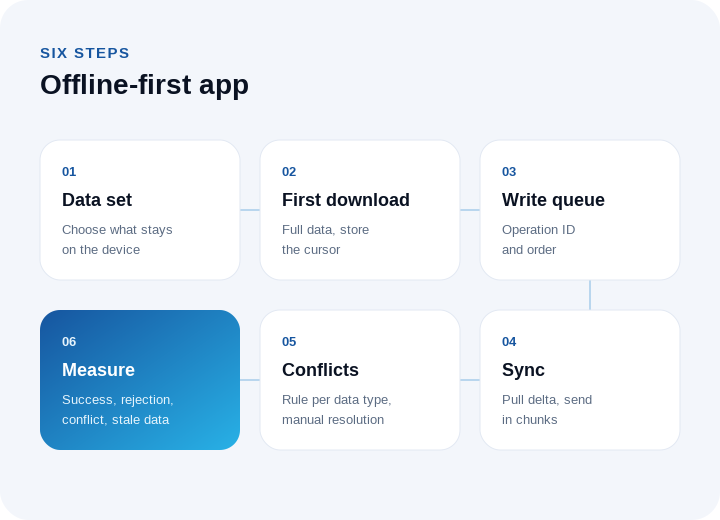
- Data set: Calculate what stays on the device per role and how large it is.
- First download: Design the full download, the cursor and the deletion marker.
- Write queue: Build the operation ID, the order and the four-status queue.
- Sync: Write down delta pull, chunked sending and timeout rules.
- Conflicts: Choose a strategy per data type and design the manual resolution screen.
- Measurement: Put success, rejection, conflict and stale-data indicators into production.
When versions change, the local database schema changes too; we cover that in our app version management guide.
We recommend reading: What is API integration? A guide to connecting systems
We recommend reading: What Is POS Integration? Connecting Tills to ERP, Stock and E-Commerce, Day Close and Payback Guide
We recommend reading: How to Publish a Mobile App to App Stores: Developer Account, Listing, Privacy Declaration, Review and Staged Rollout Guide
Mobile and Field Applications with İnovabil
At İnovabil our focus is building software from scratch, specific to your company: custom software, ERP, CRM, e-commerce, web, mobile and integration. We built CRM, purchasing and mobile for Avcılar İnşaat; a purchasing system for İZBAN; logistics and shipment planning with wholesale order management for Karyak; and warehouse management with a complaint and support management system for Sleepy. We do not present these as offline-working products.
If your application needs disconnected use, we recommend settling in the requirements phase, in writing, which data and operations will work offline, the conflict rules and the indicators you will measure.
We recommend reading: Our software development process: step by step from analysis to launch
Frequently Asked Questions
What is an offline-first app?
An app that treats the local database as the source of truth, writes actions to the device first and reconciles with the server when a connection arrives. It opens and keeps working even when the connection drops.
What is the difference between offline-first and a simple cache?
A cache only helps read an old copy and does not support writes. Offline-first also queues writes locally, syncs them and resolves conflicts. That makes its design and testing much heavier.
How are conflicts resolved?
There is no single method; it depends on the data type. The server wins for central data, notes are merged, stock is sent as a difference, and for critical values such as quantity the user sees both versions and decides.
How much data should be downloaded to the device?
The smallest set a role needs to finish its offline work. In the example a 39 MB data set is downloaded first, then a delta of about 0.84 MB arrives daily; images are fetched on request and kept in a bounded cache.
Should every app work offline?
No. If users are mostly in connected places, the investment may not pay back. It is valuable where interruptions are frequent and costly, such as warehouses, the field and basements; calculate the payback with your own numbers.