

A sales rep spends the day visiting dealers and customers. They write the order in a notebook, phone or message it to the office in the evening, and someone in the office types the same order into the system again. The price list is out of date, there is no stock information, and the customer's open balance only surfaces the next day. A field sales mobile order app shortens this chain: in front of the customer, the rep sees current prices and stock on a phone or tablet, enters the order, and the order lands in the ERP directly.
In this guide we explain what the app is, which screens it contains, how offline work is managed, how credit limits and visit verification are set up, a payback calculation for a representative 25-rep team, and a six-step rollout. The example figures are illustrative; they are not a specific product's price or an industry average.
What Is a Field Sales Mobile Order App?
A field sales mobile order app is a business app that lets a sales rep who visits customers or dealers see the visit plan, open the customer card, show the catalog with customer-specific prices and stock, and enter the order on the spot, from a phone or tablet. The app talks to the ERP or order system, so the order arrives there without being retyped.
It is not an e-commerce site: the buyer does not place the order, the rep enters it on the buyer's behalf. We covered the setup where dealers order from their own screen in our B2B e-commerce guide; the two can run side by side. A different scenario, where a technician closes work orders at the customer's site, is the subject of our field service management software guide.
We recommend reading: Our mobile app development service
How Does a Mobile App Change a Rep's Day?
The difference shows up in time per visit. In the illustrative example, travel and conversation take 55 minutes per visit and stay the same; what changes is the order work.
| Item | Paper and phone | Mobile app |
|---|---|---|
| Writing the order on site | 15 min | 8 min (repeat order 4 min, new order 14 min; 60% / 40%) |
| Passing it to the office | 8 min (call, message) | 0 min (instant) |
| Re-entry in the office | 6 min per order | 1 min review per order |
| Price and stock information | Printed list, phone calls | On the device, customer-specific |
| Credit limit | Learned the next day | Warning at the time of the order |
| Time per visit (travel + conversation + order) | 55 + 23 = 78 min | 55 + 8 = 63 min |
| Visits in an 8-hour (480 min) day | 480 ÷ 78 = 6.15 → 6 | 480 ÷ 63 = 7.62 → 7 |
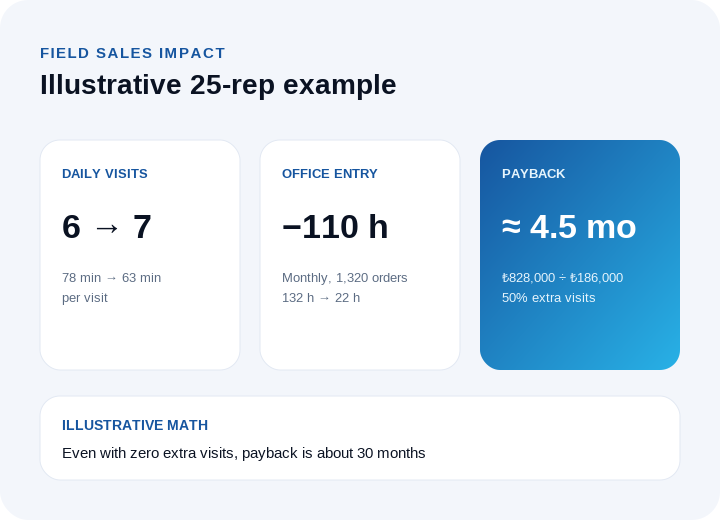
Six visits take 468 minutes and seven take 441; an eighth would need 504 and overflow the day. So the capacity gain is one visit per day: 6 → 7, about 16.7%. The calculation does not count any route savings; if the app clusters the visit order by area, there is an additional gain.
Which Screens and Features Should the App Have?
The core set is six screens. Each should have a measurable purpose; a feature without one is just a button nobody uses in the field.
| Screen | Content | Purpose |
|---|---|---|
| Visit plan and route | Daily customer list, map, suggested order, visit status | Avoid wasted travel, follow the plan |
| Customer card | Address, contact person, recent orders, open balance, notes | Arrive prepared |
| Catalog | Product, image, customer-specific price, stock, promotion | Sell at the right price |
| Order entry | Cart, repeat order, discount rule, delivery date | Fast, error-free entry |
| Visit note | Note, photo (shelf, competitor, damaged goods), next step | Record information on site |
| Payment record | Posting a received payment to the customer account | Keep the customer account current |
How a collection is posted to the books and how receipts are issued should be settled with your financial advisor (certified accountant). We explained how to monitor the customer account afterwards in our customer account tracking guide.
How Do Customer-Specific Prices and Stock Reach the Device?
Prices and stock live in the ERP; the app pulls them to the device at set intervals. The problem is that the device can lag behind the server.
- Price: The price list that depends on customer and promotion should download per customer. We described the pricing logic itself in detail in our B2B price list guide; the app carries those rules and does not reinvent them.
- Stock: Stock changes constantly; the figure on the device is informational, not binding. What binds is the stock on the server when the order syncs.
- The critical rule: When an order reaches the server, price, stock and limit are recalculated. The device's calculation is a proposal; the final calculation happens on the server.
How Are Offline Work and Sync Managed?
Offline work is essential for warehouses, basements and rural routes with weak signal, but it also creates data conflicts. What matters is resolving conflicts with rules defined in advance.
| Conflict | Example (illustrative) | Suggested rule |
|---|---|---|
| Stale stock | Stock is 40; three reps ordered offline 15 + 20 + 12 = 47 units; 7 units (17.5%) over | The server fulfills in order and reports the line it cannot fill; the line is partly confirmed |
| Stale price | ₺100 on the device, ₺104 on the server; 4% difference; ₺200 on 50 units | The server reprices; if the difference exceeds a threshold (for example 1%), it asks for approval |
| Credit limit | Limit ₺120,000; open balance ₺85,000 + pending ₺20,000 + new ₺18,000 = ₺123,000; ₺3,000 over | The order moves to "awaiting approval"; a manager approves or rejects |
| Same order sent twice | The connection dropped and the rep resent it | A unique ID generated on the device for each order; the same ID is never processed twice |
| Two people edited the same customer | The rep and the office changed the address and phone | The latest change per field wins, or the field's owner decides |
The duplicate-event and ID logic applies to webhook and order flows too; see our order management system guide for details. To monitor sync health, use this measure: if 18 of 1,200 order lines a week are rejected at sync because of stock or price, the rate is 18 ÷ 1,200 = 1.5%. If it rises, shorten the sync interval or refresh the stock view more often.
How Does the Credit Limit and Open Balance Warning Work?
The rep should see the customer's risk status at the moment of entering the order. Otherwise a shipped order is blocked later, and both the customer and the rep end up in an awkward position.
- The calculation: Used limit = open balance + orders awaiting approval + the new order. In the example above, ₺85,000 + ₺20,000 + ₺18,000 = ₺123,000; the limit is ₺120,000, so there is a ₺3,000 excess.
- Warning levels: An informational notice at 80% of the limit and an approval request at 100% can work. The thresholds are illustrative; set them with your own risk policy.
- What the rep sees: Showing the rep a plain status such as "limit OK / approval needed" instead of the full balance limits sensitive data.
- The limit itself: How a limit is set, with its formula, is in our dealer management system guide.
How Are Visit Verification and Location Data Set Up?
Visit verification is a check-in record that proves the rep was at the customer; it does not mean tracking the rep continuously. The distinction matters both for efficiency and legally.
- Location at visit time: Location is captured only when the rep starts and ends a visit, and it is checked against the address on the customer card within a radius (for example 150 m). The radius is illustrative; indoor location can drift, so the rep can enter a reason when there is a mismatch.
- Legal framework: The processing of employee location data, the notice text, retention period and consent are matters for KVKK (Turkey's personal data protection law) and employment law; consult your legal counsel.
Which Metrics Show Whether a Field Sales App Works?
Track metrics by rep and by month; none is enough alone. The values below are illustrative.
| Metric | Calculation | Example value |
|---|---|---|
| Daily visits per rep | 480 ÷ time per visit (rounded down) | 7 |
| Planned-visit adherence | Completed ÷ planned = 6 ÷ 7 | 85.7% |
| Order-to-visit conversion | Orders ÷ visits = 1,320 ÷ 3,300 | 40% |
| Daily order value per rep | 7 visits × 40% × ₺10,000 | ₺28,000 |
| Order error rate | Erroneous ÷ total orders | 5% → 2.5% |
| Lines rejected at sync | 18 ÷ 1,200 | 1.5% |
| Repeat-order usage | Created from history ÷ all orders | 60% |
How Is Payback Calculated for a 25-Rep Example?
Assumptions (illustrative): 25 reps, 22 working days a month; 6 visits a day; order conversion 40% per visit; average order ₺10,000; gross margin 18%; office hourly cost ₺300; cost per erroneous order ₺1,200 (return, reshipment, phone traffic); devices already owned. Investment: the mobile app is 60 person-days × 1.2 buffer = 72 person-days × ₺9,000 = ₺648,000 (see our mobile app development cost guide for how that figure is built) plus ERP integration of 20 person-days × ₺9,000 = ₺180,000; total ₺828,000. Monthly running cost (hosting, maintenance, support) ₺45,000.
- Monthly orders: 25 × 6 × 22 = 3,300 visits × 40% = 1,320 orders.
- Office entry effort: First 1,320 × 6 min = 7,920 min = 132 h; afterwards 1,320 × 1 min = 22 h. The saving is 110 h × ₺300 = ₺33,000.
- Fewer errors: 1,320 × 5% = 66 erroneous orders; 1,320 × 2.5% = 33. The difference is 33 × ₺1,200 = ₺39,600.
- Extra visit capacity: 25 × 1 × 22 = 550 extra visits. Not all are used; assume half (275) are. Extra visits convert at a lower rate, 32%: 88 orders × ₺10,000 = ₺880,000 revenue × 18% = ₺158,400 gross profit.
- Total monthly benefit: ₺33,000 + ₺39,600 + ₺158,400 = ₺231,000. After running costs, the net is ₺186,000.
- Payback: ₺828,000 ÷ ₺186,000 ≈ 4.5 months.
The calculation measures entry effort and errors on the current 1,320 orders and does not separately count the effect of the extra orders. The real uncertainty is how much of the extra visit capacity gets used. The sensitivity table below shows this.
| Extra-visit usage | Monthly extra profit | Net monthly benefit | Payback |
|---|---|---|---|
| 0% | ₺0 | ₺72,600 − ₺45,000 = ₺27,600 | ≈ 30.0 months |
| 25% (137.5 visits → 44 orders) | ₺79,200 | ₺106,800 | ≈ 7.8 months |
| 50% (275 visits → 88 orders) | ₺158,400 | ₺186,000 | ≈ 4.5 months |
| 100% (550 visits → 176 orders) | ₺316,800 | ₺344,400 | ≈ 2.4 months |
The 25% row is a monthly average (550 × 25% = 137.5 visits × 32% = 44 orders × ₺10,000 × 18% = ₺79,200). Even if no extra visit is ever made, the project pays back in 30 months; that is the reason to treat the extra revenue as a bonus. Replace the inputs with your own figures (number of reps, order value, margin, error cost) and recalculate.
How Does a Field Sales App Talk to the Order System and ERP?
The app is only a front end; the data lives in the ERP. The integration runs in three directions: customer, price and stock flow from the ERP to the app; the order goes from the app to the ERP; and the order status (approved, shipped, invoiced) flows back.
- Single source of truth: Customer, price and stock are kept in the ERP; the app's copy is never the permanent source.
- Event-based flow: When an order is accepted, the shipping and invoice status returns to the rep as a notification, so the rep can tell the customer "your order ships tomorrow".
We explained the logic of connecting systems in detail in our API integration guide. For the general development steps of a mobile app, see how to build a mobile app.
How Is a Field Sales App Rolled Out?
A six-step path works. The third step is the most critical: offline rules are settled in the field, and discovering them late is expensive.
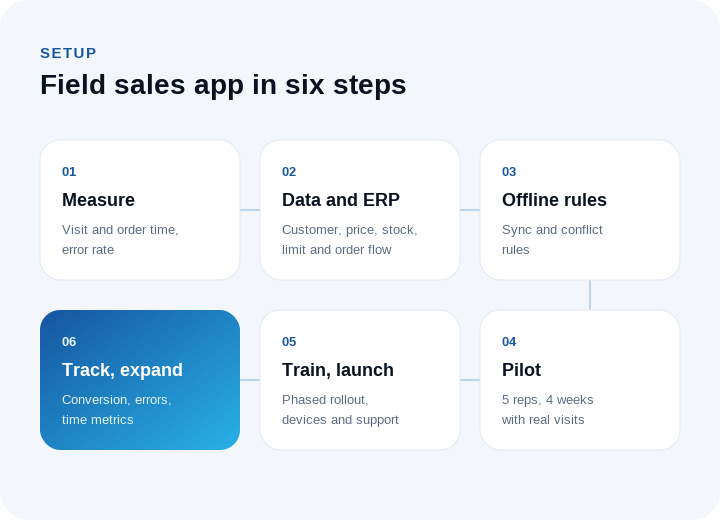
- Measure the process: Measure time per visit, order entry time, error rate and conversion as they are today; you will count the gain against this baseline.
- Data and ERP: Write down which customer, price, stock and limit data goes to the device and which fields the order returns to the ERP with.
- Offline and sync rules: Decide which rule applies in conflicts over stock, price, limit and resending.
- Pilot: Work with 5 reps for 4 weeks on real visits; measure times and sync errors. The first release should only have the visit, the customer card and order entry.
- Training and launch: Open it in phases; prepare devices, login and the support channel beforehand. Running the old method in parallel for a while builds confidence.
- Track and expand: Compare the metrics table against the pilot; add the payment, photo and promotion screens later.
What Are the Common Mistakes with Field Sales Apps?
- Not removing office entry: The rep enters the order in the app, but the office still keys it from paper; the gain is zero.
- Treating device stock as binding: Overselling and wrong promises to customers follow.
- Leaving offline rules for last: The pilot has good signal, so problems stay hidden and burst open in production.
- Collecting location data without limits: It damages both trust and legal compliance.
We recommend reading: What is field service management software? Work orders, technician scheduling and first-visit resolution guide
We recommend reading: How to Set Up Sales Commission Calculation Software: Quota, Tiers, Clawbacks and Cost Guide
We recommend reading: How to Manage Mobile App Versions and Forced Updates: Version Policy, Staged Rollout and Rollback Guide
We recommend reading: How to Design an Offline-First App: Local Data, Sync, Conflict Resolution and Payback Guide
We recommend reading: How to Plan Sales Territories: Workload Balance, Rep Headcount, Account Transitions and Quota Fairness
We recommend reading: How to Measure and Improve Mobile App Performance and Crash Rate: Indicators, Crash Analysis and Performance Budget Guide
We recommend reading: How to Publish a Mobile App to App Stores: Developer Account, Listing, Privacy Declaration, Review and Staged Rollout Guide
Mobile Apps and Sales Process Solutions with İnovabil
İnovabil focuses on building tailor-made software from scratch: custom software, ERP, CRM, e-commerce, web, mobile and integration. We do not offer a ready-made field sales product; instead, we suggest covering such a need in requirements analysis together with the visit, order, price and ERP flows, and putting a scope specific to your business in writing.
We built CRM, purchasing and mobile solutions for Avcılar İnşaat; logistics and shipment planning with wholesale order intake and management for Karyak; and a purchasing system for İZBAN. These are our recorded references; none of them is a field sales app. Send us a short summary of your rep count, visit pattern and current ERP; let us first measure your visit and order process together and produce a written assessment.
We recommend reading: Our software development process: step by step from analysis to launch
Frequently Asked Questions
What is a field sales mobile order app?
It is a mobile business app that lets a sales rep, during a customer or dealer visit, see the visit plan, the customer card and customer-specific price and stock on a phone or tablet, enter the order on site, and pass it to the ERP.
Can orders be entered without internet?
Yes; if the catalog and customer data are downloaded to the device, the order is taken offline and synced when a connection returns. Stock, price and limit are revalidated on the server at sync; conflict rules should be written beforehand.
How long does a field sales app take to pay back?
In the illustrative example (25 reps, ₺828,000 investment), about 4.5 months if half of the extra visits are used, and about 30 months through entry effort and error savings alone if none are. Recalculate with your own figures.
Is the rep's location tracked?
The suggested design captures location only at visit start and end and does not track outside work. Employee location data falls under KVKK and employment law; consult your legal counsel on notice, retention and consent.
Is a dealer portal the same as a field sales app?
No. In a dealer portal the buyer places their own order; in a field sales app the rep enters the order on the buyer's behalf. Both can use the same ERP data and work together.