Publishing a mobile app to app stores is a separate work package that does not end when the code is finished: you need a company-owned developer account, a store listing, a privacy declaration, a test account for the review team, a signing key and a staged rollout plan. Any submission that is missing one of these is rejected and goes back into the review queue, and every round costs days on the calendar.
This guide focuses on the first release: who should own the account, how to prepare the listing and screenshots, keeping the privacy declaration consistent with your data inventory, review and common rejection reasons, version and build numbers, staged rollout and signing-key storage. The example is a dealer order app; all figures are illustrative. How the app is built is covered in our mobile app guide, and the version routine after release in our version management article; this one covers only the first submission and the review.
Why Is Store Publishing a Separate Work Package?
Because part of the work depends on a third party's approval: the store team decides whether your app meets the rules, and the timing can change. For current rules, review times and fees, read each store's official documentation; this article is not a rule list but the preparation routine for the business side.
An illustrative calendar looks like this: open the account about 30 days ahead, prepare the listing and the privacy inventory 21 days ahead, run external testing 14 days ahead, and submit at least 9 working days before the critical date. Those nine days are the buffer for the three rejection rounds calculated below.
Who Should Own the Developer Account, and How Should It Be Opened?
Open it in the company's name, with a company email address, in a way that does not depend on one person. If the app is published under an individual's account, the authority stays with that person after they leave, and a transfer can be slow and conditional.
| Role | Who | Why |
|---|---|---|
| Account owner | Legal representative or an authorised executive | Holds the agreement and company verification |
| Backup owner | A second authorised person | Ownership can be transferred if the owner is unreachable |
| Release managers (2 people) | Tech lead, product owner | Submissions do not depend on one person |
| Developers and testers | Team members | Build and test access only, no release rights |
- Shared email: Notifications go to a shared address, not to an individual mailbox.
- Two-step verification: Turn it on for every admin; keep recovery codes in the company's secure vault.
- Verification time: A company account may require business verification and the time varies; open the account early.
Fees and commissions are not quoted here; check the official pages. For access control, see our account lifecycle guide.
Which Fields Does the Store Listing Need?
Text that describes a feature the app does not have is a rejection reason. Field limits (characters, sizes, counts) differ by store and live in the official documentation.
| Field | What to write | Pitfall |
|---|---|---|
| App name | Brand name, short and distinctive | Keyword stuffing |
| Description | What it does, real features | Describing a feature that does not exist |
| Keywords (if offered) | Phrases users search for | Other brands' names |
| Icon | Simple, sharp at every size | Detail that vanishes when small |
| Screenshots | Real screens in main-flow order | Screens that are not in the app |
| Category and age rating | An honestly completed questionnaire | Not declaring user-generated content |
| Support and privacy links | Working, current pages | A link that does not open |
Screenshots take more effort than expected: five screens, two device classes and two languages need 5 × 2 × 2 = 20 images; at 45 minutes each that is 20 × 45 = 900 minutes, or 15 hours. With a shared template at 20 minutes each it drops to 400 minutes, about 6.7 hours.
How Do You Fill In the Privacy Declaration and Data Form Correctly?
The declaration must match the data the app actually collects, exactly. The inventory covers not only your own code but every embedded component (crash reporting, maps, notifications, analytics); the data those components collect is part of your declaration.
| Data group | Data types | Examples |
|---|---|---|
| Identity and contact | 4 | Name, email, phone, company title |
| Device and identifiers | 3 | Device ID, notification token |
| Usage and diagnostics | 4 | Crash logs, performance, interactions |
| Location | 2 | Approximate location, visit location |
| Orders and finance | 3 | Order history, account balance, payment status |
| User content | 2 | Photos, file attachments |
| Total | 18 |
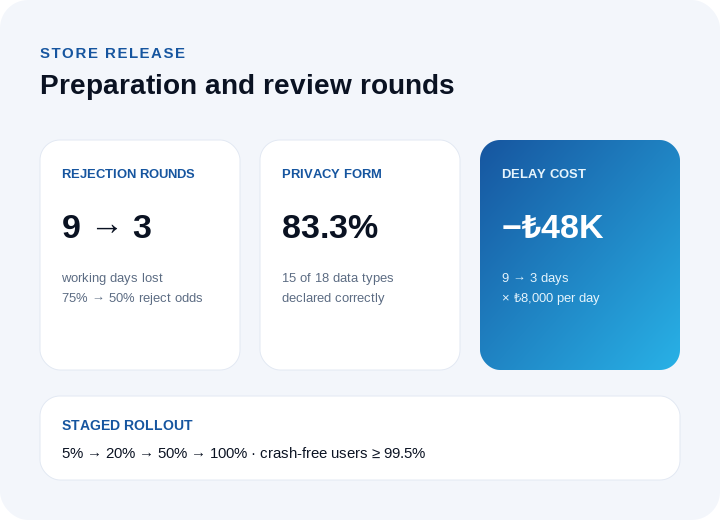
In the illustrative example the inventory finds 18 data types and the first declaration form lists 15. The consistency rate is 15 ÷ 18 = 83.3%; the three missing types (crash logs, device ID, interactions) all come from an embedded diagnostics component. Such a gap can turn into a rejection for privacy inconsistency; the target is 100%. Compare component documentation and the network requests on a test device with the inventory.
- Permission texts: Every screen that asks for location, camera or notification permission should state the reason plainly.
- Account deletion: If users can create an account, stores generally expect a way to start deletion from inside the app and a declaration of it on the form; details are in the store's current rules. For the server side, see our data subject requests guide.
- Legal text: The privacy policy, age limits and children's data are settled with legal counsel under KVKK (Turkey's personal data protection law); this article is not legal advice. For the web side, see our cookie consent guide.
How Do You Prepare a Test Account and Notes for the Review Team?
If a login-based app has no demo account, the review team cannot try it and the first round often ends in rejection. Credentials go only into the review notes.
- Demo user: An account that does not expire and does not ask for an extra verification code (or uses a fixed one); it holds no real customer data. For masking, see our data masking guide.
- All roles: Provide an account for every role, such as dealer and sales representative.
- Server ready: No maintenance window during review, and the address is not blocked by a network or region restriction.
- Step-by-step note: Write the main flow (sign in, choose products, place an order) in five lines; the payment flow runs in test mode and the note says so.
What Is the Review Process, and Why Do Apps Get Rejected?
Review checks whether the app follows the store rules and matches its listing; most rejection reasons can be closed in advance.
| Rejection reason | Preparation that prevents it |
|---|---|
| Crash or no response on launch | Test the production build on real devices |
| Demo account missing or not working | Review notes, and trying the account right before submission |
| Privacy declaration inconsistent with real data flows | The 18-type inventory and component check |
| Misleading description or screenshots | Comparing the listing with the features line by line |
| Payment rule violation | Deciding whether what you sell is digital content or a physical good, then reading the official rule |
| No account deletion path | An in-app deletion flow |
| Permission reason not explained | A reason text for every permission |
| An app that only wraps a website | Showing device-specific function (notifications, camera, offline) |
Each rejection round, covering the fix, a new build and the re-review wait, costs an illustrative 3 working days. With the same rejection probability p on every submission (attempts treated as independent), the expected number of rejections is p ÷ (1 − p).
| Rejection probability (p) | Expected rejections | Expected delay |
|---|---|---|
| 75% (unprepared) | 0.75 ÷ 0.25 = 3.0 | 3 × 3 = 9 working days |
| 50% (with a checklist) | 0.50 ÷ 0.50 = 1.0 | 1 × 3 = 3 working days |
| 25% (after two releases) | 0.25 ÷ 0.75 ≈ 0.33 | ≈ 1 working day |
The probabilities are illustrative; your own submission history shows your real rate. The direction matters: every rejection cause you prevent saves one round, that is 3 working days.
How Do You Manage Version Numbers, Build Numbers and Staged Rollout?
The version number is the label users see (1.0.0); the build number is a counter that rises with every upload. A fix for a rejected upload is usually sent under the same version number with a higher build number (the rule is in the official documentation).
| Version | Build | Status |
|---|---|---|
| 1.0.0 | 1 | Rejected (privacy inconsistency) |
| 1.0.0 | 2 | Rejected (demo account not working) |
| 1.0.0 | 3 | Approved, in staged rollout |
| 1.0.1 | 4 | First fix release |
After approval, use a staged rollout instead of opening to everyone at once; it can be the store's own option or a server-controlled flag (see our feature flags article). The first-release plan uses 5%, 20%, 50% and 100% stages with a crash-free user threshold of 99.5%.
| Stage | Users (10,000) | Threshold: most users who crash | Decision |
|---|---|---|---|
| 5% | 500 | 2 (3 gives 99.4%: stop) | Look for fatal errors; the rate is noisy |
| 20% | 2,000 | 10 | Review crash signatures, proceed |
| 50% | 5,000 | 25 | Compare order success with the current version |
| 100% | 10,000 | 50 | Open to all, watch the first 7 days |
The threshold is 0.5% × users: 500 × 0.005 = 2.5 (at most 2 users), 2,000 × 0.005 = 10, 5,000 × 0.005 = 25 and 10,000 × 0.005 = 50. In the first stage one user is a 0.2% difference, so look for fatal errors rather than rates. For crash measurement, see our performance and crash rate guide.
How Should the Signing Key Be Stored and Handed Over?
The signing key proves that updates come from you; losing it or letting it reach the wrong hands is a serious problem. Depending on the platform, the store may manage the key for you; the options and recovery paths are in the official documentation.
- A vault, not a person: The key and its password live in the company's secrets vault, not on a developer's laptop. See our secrets management guide.
- Backups in two places: Store the key and its password separately.
- Secret variable in the build pipeline: The key never enters the code repository; the CI/CD pipeline uses it as a secret variable.
- Yearly drill: Once a year, confirm that a signed build can really be produced from the backup.
- Handover: When the responsible person leaves, ownership and access are handed over in writing.
Consider the worst case with illustrative numbers: the key cannot be recovered and the app must be republished as a new app (if a recovery option exists, nothing is lost). For an app that has grown to 40,000 users, if 30% of users move to the new listing, 40,000 × (1 − 0.30) = 28,000 users are lost. At ₺120 annual contribution per user, that is 28,000 × 120 = ₺3,360,000. With a 2% yearly probability the expected loss is 3,360,000 × 0.02 = ₺67,200; with backups and a drill that fall to 0.2%, it is ₺6,720. This is a worked example of the value of the precaution, not a promise about losses.
What Does the 32-Item Pre-Release Checklist Cover?
The list is grouped under six headings, and each item is ticked off before submission.
| Heading | Items | Example items |
|---|---|---|
| Account and ownership | 5 | Company account, two owners, shared email, verification, role list |
| Listing | 6 | Name, description, icon, 20 images, category and age, support link |
| Privacy and data | 6 | 18-type inventory, component check, declaration, policy, account deletion, permission texts |
| Review preparation | 5 | Demo account, notes, ready server, payment rule, misleading-claim scan |
| Technical and signing | 6 | Key in vault, two backups, build number, production configuration, crash logging, real device |
| Release and monitoring | 4 | Staged plan, stop threshold, version check, owner for the first 7 days |
| Total | 32 | 5 + 6 + 6 + 5 + 6 + 4 |
The list has a single owner; nothing is submitted with an item unticked. For testing, see our software testing and user acceptance testing guides.
What Do You Do If Something Goes Wrong After Release?
Replacing the live build with an older one is not always possible; in most cases you need a new, higher-numbered fix release. First check which layer the problem can be solved in.
| Situation | Action |
|---|---|
| Threshold exceeded during staged rollout | Stop raising the percentage, study the crash signature |
| The faulty behaviour can be switched off on the server | Turn it off with a flag, ship the fix in a planned release |
| A code fix is needed | Send a fix with a new build number; if an expedited review exists, apply through the official documentation, with no guarantee |
| An old version corrupts data | Protect on the server first, then decide on a forced update (version management) |
What Do Release Delays and Preparation Cost?
A delay is measured by the value of the work tied to the date. In an illustrative case, a dealer campaign tied to the release date loses ₺8,000 per day of delay.
- Unprepared (p = 75%): 3 × 3 = 9 working days × ₺8,000 = ₺72,000.
- Prepared (p = 50%): 1 × 3 = 3 working days × ₺8,000 = ₺24,000.
- Difference: ₺48,000 (one-off, at the first release).
The preparation programme is 14 person-days: checklist 3, privacy inventory 3, listing and screenshot set 4, account and signing 4. At ₺9,000 per day that is ₺126,000; after deducting the first release's ₺48,000 gain, the net investment is ₺78,000. Annual gains:
- Updates: Across 8 submissions a year, average rejection rounds fall from 0.5 to 0.2; 8 × 0.3 = 2.4 rounds × 3 days × ₺8,000 = ₺57,600.
- Key-loss risk: ₺67,200 − ₺6,720 = ₺60,480.
- Running cost: Maintaining the checklist and the key drill costs ₺12,000 a year, ₺1,000 a month.
Monthly net benefit is (57,600 + 60,480) ÷ 12 − 1,000 = 9,840 − 1,000 = ₺8,840, and payback is 78,000 ÷ 8,840 ≈ 8.8 months. If the gains halve, the monthly net is 4,920 − 1,000 = ₺3,920; if the first-release gain also falls to ₺24,000, the net investment is ₺102,000 and payback is 102,000 ÷ 3,920 ≈ 26.0 months. For build cost, see our mobile app cost guide.
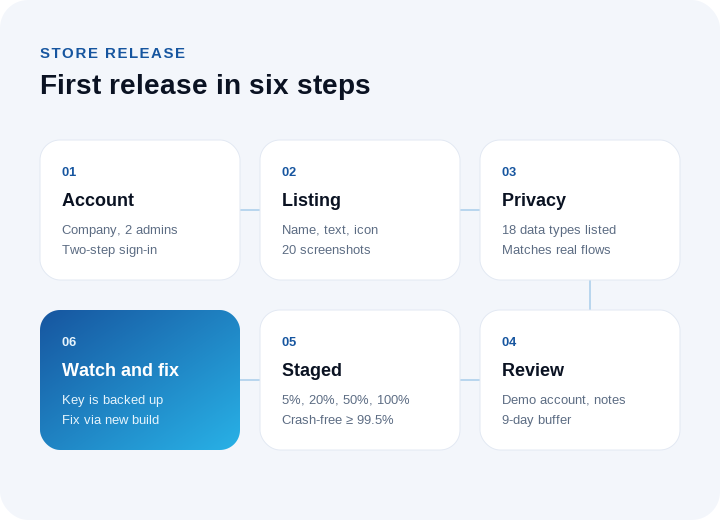
How Is Store Publishing Carried Out in Six Steps?
- Set up the account: Company-owned, two owners, two-step verification.
- Prepare the listing: Text, icon and 20 screenshots.
- Verify privacy: Match the 18-type inventory to the declaration.
- Submit for review: Demo account, notes and a 9-working-day buffer.
- Roll out in stages: 5%, 20%, 50%, 100%; crash-free users ≥ 99.5%.
- Watch and fix: Key safe, and fix problems with a new release.
We recommend reading: How to build a mobile app: a step-by-step guide from idea to store release
We recommend reading: How to close a software project and hand it over
Mobile Apps and the Release Routine with İnovabil
At İnovabil our focus is bespoke software built from scratch: custom software, ERP, CRM, e-commerce, web, mobile and integration. We built CRM, purchasing and mobile for Avcılar İnşaat; a purchasing system for İZBAN; and custom software for Karyak, Sleepy, Bofigo and Kredili Kargo. The figures in this article are illustrative; they are not a store publishing service or a promise about review outcomes.
On our process page, release is a step of its own, and we suggest settling the scope of release preparation during requirements: who holds the account, the privacy inventory and where the signing key is kept. Raised at the start rather than later, they leave fewer surprises at the first submission. Send us a short summary of your target user base and we will prepare a written assessment.
We recommend reading: Our mobile app development service
We recommend reading: Our software development process: step by step from analysis to release
Frequently Asked Questions
What is publishing a mobile app to app stores, and how long does it take?
It is getting the app live in a store through the account, listing, privacy declaration and review steps. The time varies, so check the official documentation. In planning, leave a buffer equal to the expected rejection rounds, 9 working days in the example.
Should the developer account be personal or company-owned?
For a business app it should be company-owned. In a personal account the app is tied to one person, and a handover becomes a problem when that person leaves.
Why do apps get rejected most often?
Crashes, a missing demo account, a privacy declaration that does not match reality, misleading descriptions, payment rule violations and no account deletion path are the main causes; a checklist can close all of them.
Why does the privacy declaration matter so much?
Because a declaration that does not match real data flows causes both rejection and a trust problem. Data collected by embedded components is part of the declaration; legal requirements go to legal counsel.
What happens if the signing key is lost?
Depending on the platform, a recovery option may exist; otherwise the app is republished as a new app and some users are lost. So keep the key in a vault with two backups and test a restore once a year.