

Picture a retailer with six stores. Every till records its own sales, prices are typed into each store by hand, the web shop sees stock through a file transfer run in the evening, and accounting re-keys the till reports at the end of the day. The problems are quiet ones: the website sells an item that is not on the shelf, two stores charge different prices for the same product, and nobody can explain a cash variance. POS integration means connecting the store till (point of sale, POS) software to your ERP, stock, e-commerce and accounting systems so that they share the same data.
This guide explains what POS integration is, which data flows in which direction, how sync delay turns into oversold stock, how a till keeps working when the internet drops, how to manage prices and returns, how the daily till close works, how bank reconciliation fits in, and how to calculate payback. All example figures are representative; they are not the features of any specific till product or an industry average.
What Is POS Integration?
POS integration is the automatic, traceable exchange of data between the till application in a store and the central systems: ERP, web shop, accounting and e-document services. The till issues the receipt, takes the payment and reduces stock at the moment of sale. Integration makes sure those movements reach head office, and that product, price and promotion data from head office reach the till correctly and on time.
Without integration, the same work is done through file transfers, manual entry and end-of-day corrections. The price of that is late stock figures, inconsistent prices and hours lost at close. Integration is not about choosing a till program; it is about designing how your existing till and your central system will talk to each other. We explained what the ERP itself does in our guide to what ERP is.
We recommend reading: Our ERP software service
Which Data Flows Between POS, ERP and E-Commerce, and in Which Direction?
The rule is simple: every piece of data has one owner and the other systems copy it. Head office owns products and prices, the till owns the sale, and the ERP owns stock, which the till and the web shop both feed.
| Data | Owner | Direction | Typical frequency |
|---|---|---|---|
| Product card, barcode | ERP | Head office → till, web shop | On change |
| Price and promotion | ERP | Head office → till, web shop | Versioned, with a validity date |
| Sales receipt | Till | Till → ERP | When the receipt is issued |
| Return and exchange | Till | Till → ERP | At the moment, linked to the original receipt |
| Stock movement | ERP | Till → ERP → web shop | On sale; event-based or short interval |
| Payment breakdown | Till | Till → ERP, accounting | At the day close |
| Customer and loyalty | CRM | Two-way | Consent-based; settle details with your legal advisor |
The same logic applies on the marketplace side. We cover stock sync across channels in our marketplace integration guide, and the link between a web shop and an ERP in our separate piece on integrating e-commerce with ERP.
How Does a Sales Receipt Reach the ERP?
Every receipt must carry a unique number built from the store code, date and a sequence; if the ERP sees the same number a second time, it does not open a new record. This one rule prevents the duplicate sales that retries would otherwise create.
In our representative example each of the six stores issues 280 receipts a day. If the connection drops during transfer, the till resends the receipt. Without a unique-number check, and if 2% of receipts arrive twice, that is 280 × 2% = 5.6 receipts a day per store, or 5.6 × 6 = 33.6 duplicate receipts across six stores. With an average basket of ₺650, the inflated revenue is 33.6 × ₺650 = ₺21,840, and stock is reduced for nothing as well.
- Unique receipt number: An example format is "M03-20261213-000142" (store, date, sequence).
- Duplicate guard: If the same number arrives again, the record is skipped and a success response is returned.
How Does Stock Sync Delay Affect Overselling?
If the web shop sees store sales late, it can sell an item that has already left the shelf. The risk is the delay multiplied by the item's sales rate.
In our representative example, one item sells 12 units an hour across six stores in total; on a busy Saturday the rate rises by a factor of 2.5 to 30 an hour. The table shows the most sales the web shop cannot see (the worst case) for each sync interval.
| Sync interval | Normal day (12 units/hour) | Busy day (30 units/hour) |
|---|---|---|
| Nightly batch (24 h) | 12 × 24 = 288 | 30 × 24 = 720 |
| Hourly | 12 × 1 = 12 | 30 × 1 = 30 |
| 15 minutes | 12 × 0.25 = 3 | 30 × 0.25 = 7.5 |
| Event-based (~1 min) | 12 × (1 ÷ 60) = 0.2 | 30 × (1 ÷ 60) = 0.5 |
The rule: the stock offered to the web shop is physical stock minus a buffer, where buffer = hourly sales rate × sync interval (in hours), rounded up. At a 15-minute interval the buffer is 3 units on a normal day and 8 on a busy day (7.5 rounds up). With event-based sync the buffer drops to 1 unit. For the order side of this topic see our order management system guide, and for opening store stock to online sales see our omnichannel inventory article.
How Does a Till Keep Working When the Internet Drops?
A till must be able to sell without internet: sales are recorded locally and sent to head office in order once the connection returns. This design is called offline-first operation.
In our representative example, a store issues 40 receipts an hour at peak and the connection is down for 90 minutes: 40 × 1.5 = 60 receipts enter the queue. During that time head office does not see these sales; if the item above sells 12 units an hour, 12 × 1.5 = 18 units are hidden from the web shop. The fix has three parts.
- Local catalogue and prices: The till holds the latest version of products and prices locally, and the version number travels with each receipt.
- Durable queue: Unsent receipts survive a device restart and are sent in order with their unique numbers.
- Outage report: Outage length and queue size are monitored; in a long outage, head office marks that store's stock as uncertain and applies a wider buffer for the web shop.
For conflict handling and sync details of offline architecture, see our guide to designing an offline-first app.
How Are Prices and Promotions Distributed to Stores?
Prices are managed in one place and sent to stores with a version and a validity date. Each store confirms that it received the new price; a store that does not confirm shows up on a list.
In our representative example there are 600 price changes a week and six stores: 600 × 6 = 3,600 product-store pairs. With manual or file-based distribution, if 2% stay on the old price, that is 3,600 × 2% = 72 wrong pairs. If each sells 3 times a week with a ₺20 unit difference, the weekly loss is 72 × 3 × ₺20 = ₺4,320. With versioned push and confirmation, if the error rate falls to 0.2%, 3,600 × 0.2% = 7.2 pairs remain and the loss is 7.2 × 3 × ₺20 = ₺432, a weekly difference of ₺3,888.
- Validity date: A promotion is sent with its start and end; the till applies it by itself when the time comes.
Correct reflection of a promotional sale in the stock movement is part of the same integration; we walked through how to track stock movements step by step in our inventory tracking guide.
How Are Returns and Exchanges Managed?
A return must be tied to the original receipt. The rule for returns without a receipt, or for goods bought in another store, is written in advance; otherwise stock and payment go in the wrong direction.
In our representative example 5% of the 1,680 daily receipts are returns: 1,680 × 5% = 84 returns. In a non-integrated setup, if 15% are recorded wrongly (stock put back on the wrong item, or not put back at all), that is 84 × 15% = 12.6 wrong stock movements a day. If returns are linked to receipts and the error falls to 3%, it becomes 84 × 3% = 2.52.
- Payment direction: A card sale is refunded to the same card and a cash sale from the till; at the close they show as separate lines.
- Stock decision: Does the returned item go to sellable stock or to damaged stock? The choice is made at the time of return.
- Online order returned in store: The web order number must be readable at the till.
The root-cause and cost side of returns is covered in our separate article on managing returns. For consumer return rights and time limits, consult your legal advisor.
How Does the Daily Till Close and Z Report Work?
The till close compares the day's sales, returns and payment types with the cash and card totals counted from the register's daily closing report (the Z report). If there is a variance, its cause and owner are recorded.
Details on fiscal devices, cash register use and daily report obligations depend on legislation; ask your financial advisor (certified accountant) and the relevant authority. On the software side, the goal is for the report and the count to match the ERP sales records line for line.
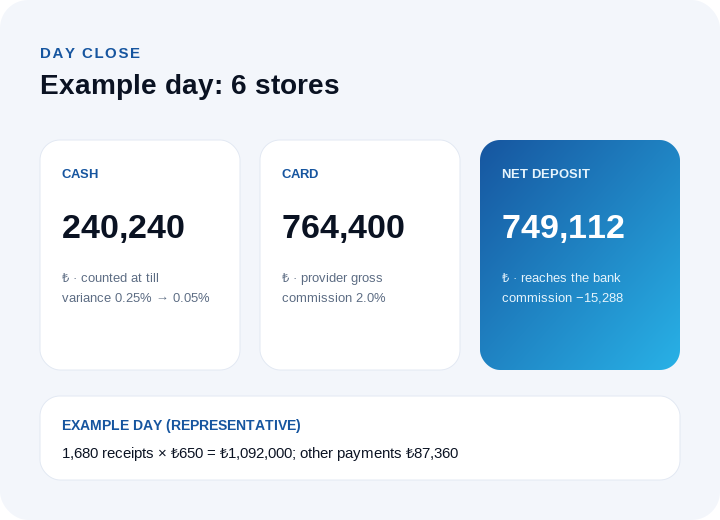
Representative example: 1,680 receipts × ₺650 = ₺1,092,000 revenue.
| Payment type | Daily amount | Share | Compared against |
|---|---|---|---|
| Card | ₺764,400 | 70% | Payment provider statement |
| Cash | ₺240,240 | 22% | Till count |
| Gift voucher and other | ₺54,600 | 5% | Voucher records |
| Transfer and mobile payment | ₺32,760 | 3% | Bank movement |
| Total | ₺1,092,000 | 100% | ERP sales records |
Total check: 764,400 + 240,240 + 54,600 + 32,760 = 1,092,000. On the cash side, daily cash for six stores is 240,240 ÷ 6 = ₺40,040 per store. If the manual close shows a variance of 0.25% of cash, the daily variance is 240,240 × 0.0025 = ₺600.60 (₺100.10 per store); if the integrated close brings it to 0.05%, it is ₺120.12 (₺20.02 per store). If closing time falls from 45 to 15 minutes per store, six stores save 6 × 30 = 180 minutes, or 3 hours, a day.
How Do Card Sales Connect to Bank Reconciliation?
A card sale appears in three places: at the till, in the payment provider's statement and in the bank deposit. Reconciliation matches the three, and differences are listed as open items.
In the example, daily card sales are ₺764,400 with a representative commission of 2.0%: 764,400 × 2.0% = ₺15,288; net deposit is 764,400 − 15,288 = ₺749,112. If one batch is counted per store per day, there are 6 × 30 = 180 batches a month. If 174 match automatically, the rate is 174 ÷ 180 = 96.7%; the remaining 6 batches go to human review. Manually, at 15 minutes per batch, 180 × 15 = 2,700 minutes = 45 hours are spent; with automatic matching only 6 × 20 = 120 minutes, or 2 hours, remain, a saving of 43 hours.
- Causes of unmatched items: Late-settling batch, commission difference, cancelled transaction, wrong batch number.
Reconciliation details and matching layers are described in our online payment reconciliation guide.
In How Many Months Does POS Integration Pay Back?
Payback comes from closing effort, cash variance, oversell cancellations, price errors and reconciliation effort. Representative assumptions: investment ₺360,000, monthly integration running cost ₺18,000, labor cost ₺300 an hour, a 30-day month, and 4 weeks a month for price errors.
| Item | Calculation | Monthly gain |
|---|---|---|
| Closing effort | 3 h × 30 days × ₺300 | ₺27,000 |
| Cash variance | (₺600.60 − ₺120.12) × 30 | ₺14,414.40 |
| Price errors | (₺4,320 − ₺432) × 4 weeks | ₺15,552 |
| Oversell cancellations | (24 − 4) cancellations × ₺180 | ₺3,600 |
| Reconciliation effort | 43 h × ₺300 | ₺12,900 |
| Gross | ₺73,466.40 | |
| Running cost | −₺18,000 | |
| Net | ₺55,466.40 |
Total: 27,000 + 14,414.40 + 15,552 + 3,600 + 12,900 = ₺73,466.40; net 73,466.40 − 18,000 = ₺55,466.40. Payback = 360,000 ÷ 55,466.40 ≈ 6.5 months. If the gain halves, gross is ₺36,733.20 and net ₺18,733.20, and payback becomes 360,000 ÷ 18,733.20 ≈ 19.2 months. Recalculate with your own store count, receipt volume and labor cost.
How Is POS Integration Set Up?
A six-step path works well; the output of each step is the input of the next.
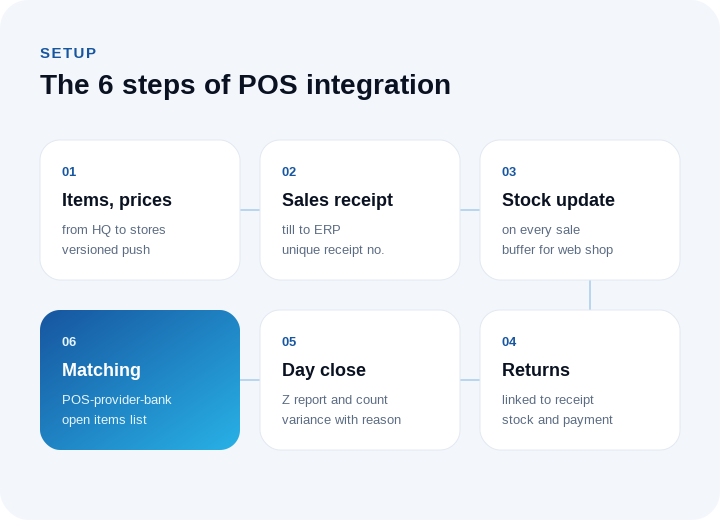
- Items and prices: The product card and price go from head office to the stores in versioned form; confirmations are tracked.
- Sales receipt: The receipt is sent to the ERP with a unique number; the duplicate guard runs.
- Stock update: Every sale reduces stock; a buffer is calculated for the web shop.
- Returns and exchanges: Linked to the original receipt; stock and payment direction are recorded at the moment of the transaction.
- Day close: The daily report and the count are compared with ERP sales; each variance is recorded with its cause.
- Matching: Card and other payments are matched with provider and bank movements; open items are listed.
Starting with one store is enough to test the process and the data; then it spreads in store groups. For the barcode and label side, our barcode system guide covers the basics.
What Are the Common Mistakes in POS Integration?
- Not naming a data owner: Letting prices be changed both at head office and in the store makes inconsistency permanent.
- Skipping duplicate protection: Retries create duplicate receipts and inflate revenue and stock.
- Not testing the offline case: A connection outage will happen in the first week.
- Leaving the legal and fiscal side for later: Fiscal device, invoice and document requirements should be settled with your financial advisor at the start. For the e-invoice (e-Fatura) and e-archive invoice (e-Arşiv) flow, see our e-invoice integration guide.
We recommend reading: What is a barcode system? A guide to codes, labels and readers
POS and ERP Connection with İnovabil
At İnovabil our focus is building software from scratch, specific to your company: custom software, ERP, CRM, e-commerce, web, mobile and integration. For a till-to-ERP and web shop connection, we suggest first writing down the existing till, the number of stores and your expectations in a requirements analysis, and comparing the file, API and event-based routes with their costs. Fiscal device and document requirements are settled together with your financial advisor.
We have built logistics and shipment planning with wholesale order management for Karyak, warehouse management for Sleepy, shipment planning for Bofigo, CRM, purchasing and mobile for Avcılar İnşaat, and a purchasing system for İZBAN. These are not till software references; data flow, stock and integration design are built on that experience. Send us a short summary of your store count and current system, and we will prepare a written assessment together.
We recommend reading: Our software development process: step by step from analysis to launch
Frequently Asked Questions
What is POS integration, in short?
It is the automatic data exchange between the store till and your ERP, stock, e-commerce and accounting systems. Sales and returns reach head office, and products and prices reach the stores correctly and on time, so stock and the day close stay consistent.
Which data flows in which direction between POS and ERP?
The product card and price flow from head office to the till; sales receipts, returns and stock movements flow from the till to head office. Every piece of data has one owner and the other systems copy it.
Can the till keep selling if the internet goes down?
Yes, in an offline-first design. The till holds products and prices locally, writes receipts to a durable queue and sends them in order with unique numbers once the connection returns. During an outage a wider buffer applies to web shop stock.
Why does stock sync delay matter?
If the web shop sees store sales late, it can sell what is not on the shelf. In the example, for an item selling 12 units an hour, a 15-minute interval means 3 unseen units and a nightly batch means 288.
In how many months does POS integration pay back?
In the representative example, a ₺360,000 investment for six stores pays back in about 6.5 months with a net gain of ₺55,466.40 a month; if the gain halves it takes about 19.2 months. Recalculate with your own figures.