

A customer places an order but never gets the confirmation. A dealer asks for a password reset and the link never arrives. An invoice notice ends up in the spam folder. The application counts the email as "sent"; the user never received it. Transactional email deliverability is the set of configuration and monitoring practices that make sure the order confirmations, password resets, invoices and notifications your application sends automatically actually reach the recipient. This guide is defensive and configuration-focused: its purpose is to keep your own sending healthy.
Below we cover separating transactional from marketing email, what the authentication records do, sender reputation, a warm-up plan, bounce types, queues, template hygiene, tracking through webhooks, the measures to watch and the payback calculation. Example figures are representative; they are not the measure of any service or sector. For official thresholds, follow the guidelines published by the providers.
What Is Transactional Email Deliverability?
A transactional email is an automatic message triggered by a user's own action and sent to a single recipient: an order confirmation, a shipping notice, a password reset, a one-time code, an invoice, an account alert. Because the recipient is expecting it, a missing message quickly turns into a support ticket.
Delivery can fail at three points: the receiving server rejects the message (a bounce), or it accepts the message but files it in the junk folder, or it never shows it at all. The first case is visible in your sending logs; the second is invisible and can only be prevented by managing reputation and content well.
We recommend reading: Our integration services
Why Should Transactional and Marketing Email Be Managed Separately?
The two kinds of message get different reactions from recipients. Complaints and opt-outs are normal for marketing; for transactional mail they should be very low. If both leave from the same domain and the same sending path, the reputation damage from marketing also hits your password resets. We covered marketing flows in our marketing automation guide; here we look only at how the separation affects deliverability.
| Topic | Transactional email | Marketing email |
|---|---|---|
| Trigger | The user's own action | The business's campaign decision |
| Recipient expectation | High; they are waiting | Variable; depends on consent |
| Acceptable complaints | Very low | Higher, but still limited |
| Delay tolerance | Seconds (reset code) | Minutes to hours |
| Volume shape | Steady, event-driven | Spiky, piles up on campaign days |
| Sending domain | Its own subdomain or path | Its own subdomain and path |
Representative example: 180,000 transactional emails a month receive 36 complaints, a complaint rate of 36 ÷ 180,000 = 0.02%. The same path also sends 40,000 marketing messages that receive 0.25% complaints: 40,000 × 0.0025 = 100 complaints. The combined rate is (36 + 100) ÷ 220,000 = 0.0618%, so the effective complaint rate of the transactional mail rises about 3.1 times. Providers may calculate the rate on delivered or on sent messages; follow their definition in your own dashboard.
The separation is not only technical. A password reset must go through the transactional flow even for someone on a marketing list, and adding advertising to a transactional message raises commercial-messaging questions. For consent and content limits, consult your legal counsel.
What Do SPF, DKIM and DMARC Do?
These three records prove to the receiving server that the email was really sent on behalf of your domain. You set up the details together with your domain administrator and your provider; for this guide the concept is enough.
| Record | Question it answers | What happens without it? |
|---|---|---|
| SPF | Which servers may send on behalf of this domain? | Mail from an authorized server looks suspicious |
| DKIM | Was the message altered in transit, and does it really come from this domain? | Without a signature, the trust score drops |
| DMARC | What should happen if SPF and DKIM fail, and who gets the reports? | Spoofing is not stopped and you get no visibility |
The important detail is alignment: the domain in the records must match the sender domain the recipient sees. Switching DMARC straight to a strict policy is risky. First run it in monitoring mode only, collect the reports, see who is sending in your name, and then tighten the policy gradually.
Representative example: in the first two weeks of reports, 171,000 of 180,000 messages pass alignment: 171,000 ÷ 180,000 = 95.0%. The remaining 9,000 come from two forgotten systems (for example an old form tool). Before tightening the policy, those sources are either fixed or switched off; otherwise legitimate messages could be rejected too.
How Is Sender Reputation Built and How Do You Plan a Warm-Up?
Receiving servers look at the history of your domain and sending address: how many messages, how many bounces, how many complaints, how much engagement. A new domain or sending path has no such history; if you send high volume at once, you look suspicious. The solution is to raise the volume gradually (warm-up).
| Day | Daily volume | Ratio to previous day | To whom? |
|---|---|---|---|
| 1 | 250 | - | Most active, verified recipients |
| 2 | 400 | 1.60 | Same group |
| 3 | 650 | 1.63 | Transacted in the last 30 days |
| 4 | 1,000 | 1.54 | Same group |
| 5 | 1,600 | 1.60 | Transacted in the last 90 days |
| 6 | 2,500 | 1.56 | Same group |
| 7 | 4,000 | 1.60 | All active users |
| 8 | 6,000 | 1.50 | Normal volume |
Over eight days the plan sends 250 + 400 + 650 + 1,000 + 1,600 + 2,500 + 4,000 + 6,000 = 16,400 messages and grows by at most about 63% a day. Had you sent 6,000 on day one, you would have pushed 24 times the starting volume (6,000 ÷ 250) through a path with no reputation at all. Treat the plan as a gate, not a fixed calendar: if bounces or complaints rise above what you expect, do not increase the volume. How fast you can ramp up differs by provider; follow their guidelines.
What Are the Bounce Types and How Does a Suppression List Work?
A bounce is a case where the receiving side does not accept the message. There are two kinds, and they call for different behavior.
| Type | Meaning | Typical cause | What to do |
|---|---|---|---|
| Permanent (hard) | The address is invalid | Typo, closed account | Add to the suppression list at once, never send again |
| Temporary (soft) | Cannot be delivered right now | Full mailbox, busy server | Retry a limited number of times, give up if it persists |
A suppression list is the record that automatically excludes addresses that bounced permanently or complained. Without it, the application keeps retrying the same invalid address with every order and notification. Representative example: 540 permanent bounces a month (0.30%), and those addresses receive four more messages each on average: 540 × 4 = 2,160 extra attempts. Permanent bounces rise to 540 + 2,160 = 2,700, a rate of 2,700 ÷ 180,000 = 1.5%, five times higher. A suppression list is the cheapest way to protect reputation.
Close the source too: ask for the address twice on registration and profile forms, or send a verification link before the first message. Most typo-driven permanent bounces are prevented this way.
How Should You Set Up the Queue and Retries?
Send email from a queue, not inside the code that handles the request, so a slow send never makes the order screen wait. For queue fundamentals see our message queue guide. Two decisions are specific to email: separating critical from bulk messages, and limiting retries to the message's useful lifetime.
Representative example: the nightly invoice run produces 3,000 emails and the path sends 10 messages per second: 3,000 ÷ 10 = 300 seconds, or 5 minutes. If a password reset lands in the same queue, it may wait up to five minutes. With a separate priority queue, the wait drops to a few seconds.
Take retry intervals of 1, 3 and 9 minutes: the attempts happen at minute 0, 1 (0 + 1), 4 (1 + 3) and 13 (4 + 9). If a reset code is valid for 15 minutes, the last attempt at minute 13 leaves the user two minutes and is practically useless. For this kind of message, limit retries to the first two (up to minute 4) and give the user a "resend code" button. Give every send a unique identifier so a retry never sends the same message twice.
What Does Template and Content Hygiene Cover?
Content affects placement together with reputation. A transactional message has one clear purpose; decorating it only adds risk.
| Area | Good practice | Avoid |
|---|---|---|
| Subject line | Clear and specific ("Your order has been received") | Exaggerated promises, all capitals |
| Format | Simple HTML with a plain-text version | A single large image only |
| Links | Pointing to your own domain, matching the visible text | Shorteners, redirects through other domains |
| Sender | Familiar name, an address that can be answered | No-reply address |
| Advertising | None, or very limited and separate | Adding a campaign to a password message |
Define default text in case a variable comes through empty; a message that opens with "Dear , your order" damages trust. Prevent test environments from sending to real customer addresses; for test data and privacy law, consult your legal counsel.
How Do You Track Delivery Status with Webhooks?
The application's "I sent it" record does not tell you what the recipient's server did. Most sending paths report delivery, bounce, deferral and complaint events through webhooks. Match those events to the message identifier in your own system and update a status field. We covered how webhooks work, signatures and duplicate protection in our webhook guide; the same principles apply here.
- Event types: accepted, delivered, permanently bounced, temporarily deferred, complained, unsubscribed.
- Permanent bounce and complaint events: add the address to the suppression list immediately and flag the user record.
- Daily reconciliation: compare the number sent with the event total; any gap means missed events.
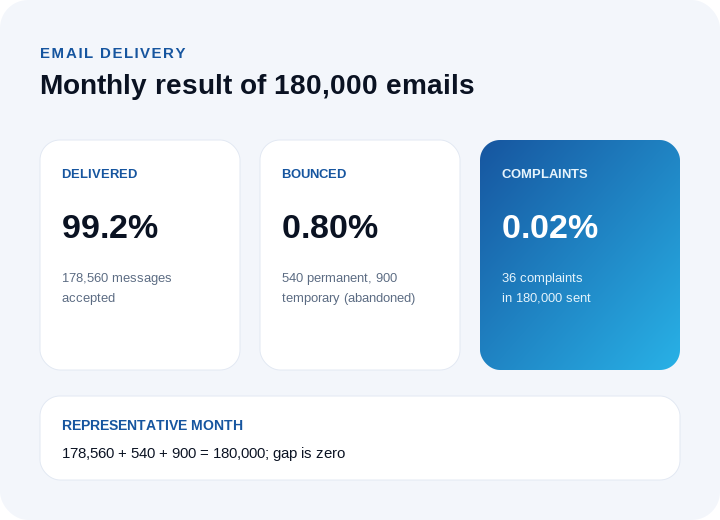
Representative month: 180,000 sent; 178,560 delivered, 540 permanent bounces and 900 temporary bounces abandoned after retries. 178,560 + 540 + 900 = 180,000, so the reconciliation gap is zero. A non-zero result means the webhook receiver is missing events.
What Should the Target Delay Be for Password Resets?
Password resets and one-time codes are messages that must arrive within seconds. A user who waits 30 seconds asks again, and every extra request adds load and complaints. Tie the target to a percentile, not an average. An example target: p95 of first delivery time at 30 seconds or less. If 1,176 of 1,200 daily reset messages arrive within 30 seconds, the rate is 1,176 ÷ 1,200 = 98.0%; the remaining 24 are reviewed separately.
If the time rises, check in order: is the critical queue mixed with bulk work, is there a rate limit, is there deferral by recipient domain. Also guide the user: a prompt such as "if it has not arrived, check your spam folder or resend the code" reduces support load.
Which Measures Should You Monitor Regularly?
| Measure | Calculation | Representative value |
|---|---|---|
| Delivery rate | 178,560 ÷ 180,000 | 99.2% |
| Total bounce | (540 + 900) ÷ 180,000 | 0.80% |
| Permanent bounce | 540 ÷ 180,000 | 0.30% |
| Complaint rate | 36 ÷ 180,000 | 0.02% |
| First delivery time (reset) | p95 | 22 s |
| Authentication alignment | 171,000 ÷ 180,000 | 95.0% |
Set your internal alarm threshold from your own baseline: if permanent bounces rise from 0.30% to 0.90%, they have tripled, which usually points to a registration form or an imported list. Provider thresholds are separate; also watch the limits they publish.
What Is the Payback on Investing in Deliverability?
The gain comes from fewer "the email did not arrive" tickets and more completed transactions. Representative example: 420 tickets a month fall to 150 after the changes, 270 fewer. At 12 minutes per ticket and an hourly cost of ₺300, each ticket costs 12 ÷ 60 × 300 = ₺60; the monthly gain is 270 × ₺60 = ₺16,200. If monitoring and the sending path add ₺4,200 a month, the net gain is ₺12,000.
With a one-time investment of ₺84,000 (separate domain, authentication records, queue separation, webhook tracking, dashboard and warm-up), payback is 84,000 ÷ 12,000 = 7 months. If the reduction is only half (135 tickets): 135 × ₺60 = ₺8,100; net ₺3,900; payback 84,000 ÷ 3,900 ≈ 21.5 months. Lost orders are not counted, so the estimate is conservative; recalculate with your own ticket numbers.
How Do You Set Up Deliverability in Six Steps?
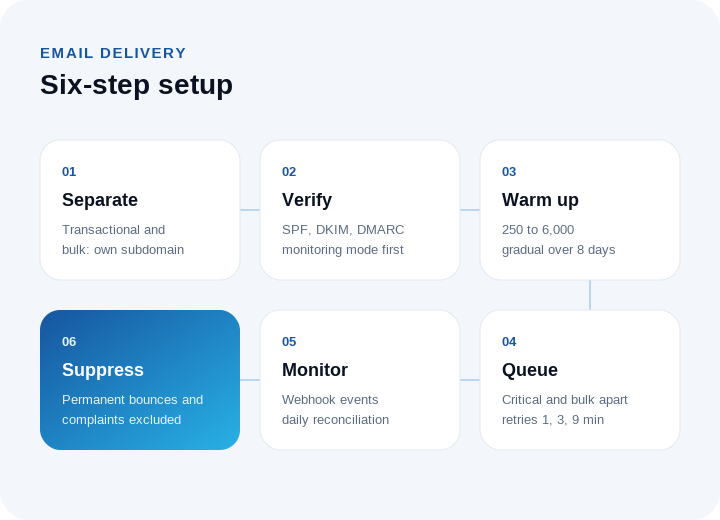
- Separate: Move transactional and marketing sending to separate subdomains and paths.
- Verify: Set up the authentication records and start DMARC in monitoring mode.
- Warm up: Raise the volume gradually with the gate rule.
- Queue: Put critical and bulk messages in separate queues and limit retries to the message lifetime.
- Monitor: Match webhook events to the message identifier and reconcile daily.
- Suppress: Automatically exclude permanently bounced and complaining addresses.
What Are the Common Mistakes?
- Sending everything from one path: Marketing's reputation loss spills onto password resets.
- Skipping the warm-up: Full volume on day one on a new path brings bounces and blocking.
- Not keeping a suppression list: Sending repeatedly to invalid addresses inflates the rate several times over.
- Looking only at "sent": Without a delivered event, success is unknown.
We recommend reading: How to design mobile push notifications: channel choice and consent guide
We recommend reading: What is e-invoice integration? Flow, statuses and setup guide
We recommend reading: How to secure an API
We recommend reading: What is software monitoring?
We recommend reading: How to Build Customer Consent Management: Channel-Level Records, Double Opt-In and Sync Guide
We recommend reading: How to Design Transactional SMS and OTP Messages: Segments, Pumping Defense and Cost Guide
We recommend reading: How to Set Up Transactional Message Template Management: Email, SMS and Push Templates, Variable Contracts, Versions and Payback Guide
We recommend reading: SSL Certificate Management: How to Manage Domains, DNS and Certificates (Ownership, TTL, Renewal and Inventory Guide)
Integration and Custom Software with İnovabil
At İnovabil our focus is building company-specific software from scratch: custom software, ERP, CRM, e-commerce, web, mobile and integration. Notification emails are part of these systems; during requirements analysis we suggest settling in writing which messages are critical, on which event each is sent and where delivery status will be tracked.
We have built CRM, purchasing and mobile for Avcılar İnşaat; a purchasing system for İZBAN; logistics and shipment planning with wholesale order management for Karyak; and warehouse management plus a complaint and support management system for Sleepy. Send us a short note on which emails your current system sends, and we will draw up an inventory together.
We recommend reading: Our software development process: from analysis to release
Frequently Asked Questions
What is transactional email deliverability?
It is the practice that makes sure the order, password reset, invoice and notification emails your application sends automatically actually reach the recipient. It consists of authentication records, sender reputation, a clean list and monitoring.
Why should transactional and marketing email be sent separately?
Complaints and opt-outs are higher in marketing. If both leave from the same path, reputation is shared and critical messages such as password resets suffer. In the example, the effective complaint rate rose about 3.1 times.
Are SPF, DKIM and DMARC mandatory?
The requirement and accepted settings are set by the providers' guidelines; in practice, leaving them out makes delivery much harder. Start DMARC in monitoring mode, review the reports and then tighten it gradually.
How do you warm up a new sending path?
You start with a small volume to the most active recipients and raise it by a limited amount each day. The example plan went from 250 to 6,000 in eight days. If bounces or complaints are above expectation, the volume is not raised.
Should you send again to an address that bounced permanently?
No. Put addresses that bounced permanently or complained on the suppression list. In the example, without a list the permanent bounce rate rose from 0.30% to 1.5%.