

A dealer's order ships and the phone buzzes, but twelve more notifications arrive the same day. A few days later the user switches them all off, and the one alert that truly mattered reaches nobody. The answer to how to design mobile push notifications lies not in "when can we send?" but in "which event deserves the user's attention?". Sending is technically easy; the hard part is treating notifications as a design problem.
In this guide we cover, for business apps (dealer, field and customer apps), the notification types, the flow from event to message, permission timing, quiet hours and the daily cap, the digest calculation, invalid device token cleanup, fallback for undelivered notifications, and measurement. All figures are illustrative; none is a real rate or an industry average.
What Are the Types of Push Notifications?
Notifications fall into four types, each with its own rules: transactional, alert, reminder and marketing. A notification sent without a type leaves frequency and permission decisions undefined too.
| Type | Example (dealer app) | Urgency | In quiet hours | Counts toward the daily cap? |
|---|---|---|---|---|
| Transactional | Order approved, order shipped | Medium | Deferred to morning | Yes; can be digested |
| Alert | Credit limit exceeded, payment failed | High | Sent (unless the user opted out) | No; separate quota |
| Reminder | Payment due tomorrow, planned visit at 09:00 | Medium | Deferred to morning | Yes |
| Marketing and announcements | Campaign, new catalog | Low | Never sent | Yes; strictest cap |
The marketing type needs its own explicit consent and its own off switch. Commercial electronic message consent and personal data obligations should be settled with your legal counsel. Store and platform rules can also change over time, so check them against the official documentation.
How Is a Notification Produced?
Every notification passes through a four-link chain: event, rule, channel and message. The event is born on the server, the rule decides whether to send, the channel picks the route, and the message is the text the user sees.
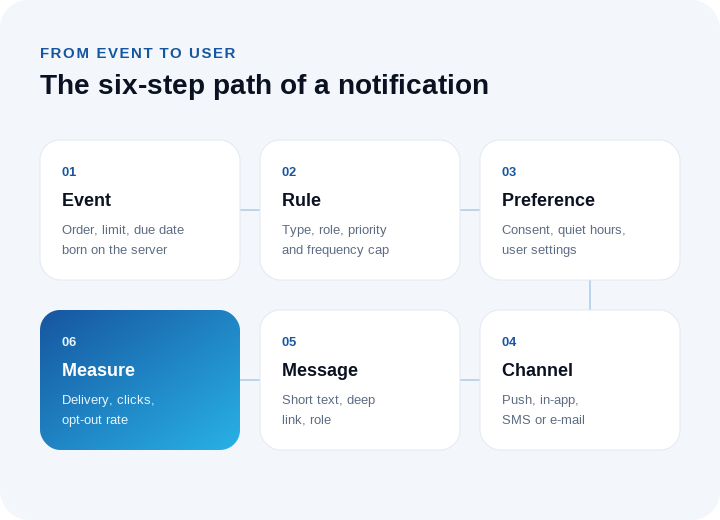
Being able to write the rule in one sentence is the test of a good design: "If this event happens, send to this role, under this condition, through this channel, within this time; do not send in this case." The table below breaks one example rule into fields.
| Field | Example rule: order rejected because of a credit limit |
|---|---|
| Event | order.rejected (comes from the server, not the app) |
| Recipient | The dealer who placed the order and the responsible representative |
| Condition | Reason code "limit"; not already notified for the same order |
| Type and quota | Alert; outside the daily cap |
| Channel | Push; SMS if not delivered or read within 10 minutes |
| Message | "Order #2187 is on hold due to the limit" + deep link to the order screen |
It matters that the event is born on the server, not in the app. If the mobile app triggers the notification when an order status changes, nothing goes out while the app is closed. To separate event production from sending, use the structure in our message queue guide, and for events arriving from external systems, our webhook guide.
When and How Should You Ask for Permission?
Ask for permission not when the app first opens but at the moment the user sees the value of notifications. A system prompt with no context makes most users ask "why?", and a denied permission is a decision that platforms may allow you to re-ask only in limited ways. For the details of that behavior, see the official platform documentation.
Illustrative example: 2,000 active users (dealers and representatives). If permission is requested right at first launch, assume a 40% opt-in rate: 2,000 × 0.40 = 800 users. If it is requested after the first order, with a pre-prompt screen such as "Shall we tell you when your order ships?", assume 70%: 2,000 × 0.70 = 1,400 users. The gap is 600 users, a loss that no campaign closes easily.
- In-app pre-prompt first: Say what will be notified and how often; show the system prompt only to those who answer "Yes".
- Choice by type: Order, payment and campaign notifications should have separate switches.
- Do not pressure those who declined: A calm link to settings is enough.
How Do You Set Quiet Hours and a Daily Cap?
Quiet hours stop sending at night; the daily cap puts a ceiling on how many notifications one user receives in a day. Together they fold everything except critical events into a morning digest.
The rule works like this: between 21:00 and 08:00 no marketing goes out, transactional and reminder messages are deferred to morning, and only the alert type is sent, provided the user has not turned it off. The user's time zone is read from the user's setting, not from the server clock.
Illustrative digest calculation: the number of opted-in, reachable users is 1,316 (how we get it is shown below), with 12 raw events per user per day. Without rules, 1,316 × 12 = 15,792 notifications go out. Let the daily cap be 5: 2 instant (time-sensitive events such as an order rejection) + 3 digests (08:00, 12:30, 16:30; events that pile up overnight go into the morning digest). Capped sending is 1,316 × 5 = 6,580 notifications. The reduction: (15,792 − 6,580) ÷ 15,792 = 9,212 ÷ 15,792 ≈ 58.3%.
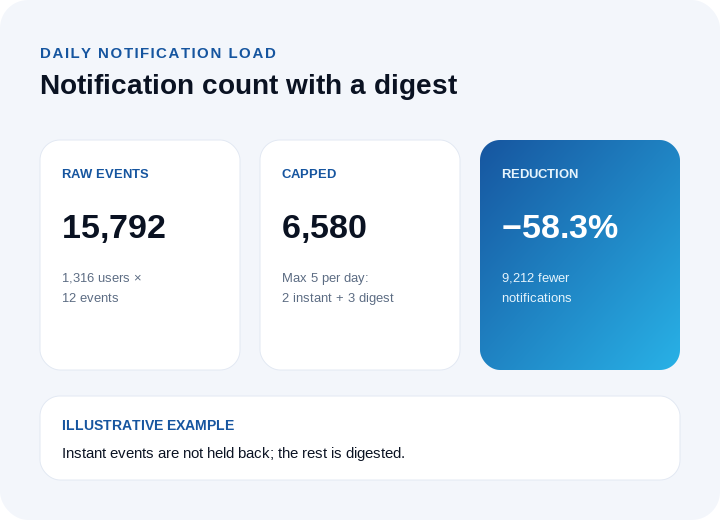
The digest's safety net is that the user can see every event in an in-app inbox; we cover that below.
How Do You Write and Personalize a Message?
A good message says what happened on the first line, what to do on the second, and opens the relevant screen directly on tap. Personalization is not adding a name; it is getting the context right.
- Role and context: The dealer gets "Your order has shipped", the representative gets "Dealer A's order is on hold due to the limit"; the same event is two different texts for two recipients.
- Deep link: A tap opens the order detail, not the home screen. If sign-in is required, it returns to the same place afterward.
- Lock screen privacy: Amounts and customer names can stay off the lock screen, with details shown only inside the app. For personal data details, consult your legal counsel.
- Brevity: Text can be truncated depending on the device; put the key information first.
The user flow method in our UX design guide applies equally to the screen a notification opens.
How Do You Manage the Queue and Invalid Device Tokens?
Sending goes through a queue, not directly from the application server, and device tokens are cleaned regularly. Each device gets a token from the platform notification service, and the server sends a notification with that token. When the app is uninstalled or the token is refreshed, the old token becomes invalid.
- Queue: Events are written to the queue, the sender runs under a rate limit, retries on temporary errors and blocks repeats using the event ID.
- Registration: The token is saved at sign-in, updated when refreshed and detached from the user at sign-out. One user can have several devices.
- Cleanup: When the service answers "invalid" or "not registered", the token is deleted immediately; a monthly sweep is also run.
Illustrative measure: 6% of the tokens of the 1,400 opted-in users are invalid: 1,400 × 0.06 = 84. Reachable users are 1,400 − 84 = 1,316, which is the base of the calculation above. The reachability rate is 1,316 ÷ 2,000 = 65.8%; push does not reach the other 684 users, so they need a backup path.
What If a Notification Does Not Arrive? Fallback and the Inbox
Push does not guarantee delivery; the device may be off or the permission may have been revoked. So two safeguards are built: an SMS or e-mail fallback for critical events, and an in-app inbox that records every event.
The fallback runs only for the highest-priority (P1) events and is triggered when the push is not delivered or read within 10 minutes; if it was read, no SMS goes out. Illustrative cost calculation: 300 P1 events a day, 35% fall back (the 34.2% of users who are unreachable, plus slow readers, roughly match this share): 300 × 0.35 = 105 SMS. At ₺0.40 per message, that is 105 × ₺0.40 = ₺42 a day, or ₺1,260 over a 30-day month. Sending every P1 event by SMS would be 300 × ₺0.40 × 30 = ₺3,600; the fallback is 35% of that.
The inbox is the real safeguard for digested events and unreachable users. At 12 raw events per user per day kept for 30 days, that is 12 × 30 = 360 records, or 720,000 records for 2,000 users; the volume is small.
We recommend reading: What is a field sales and mobile order app?
How Do You Measure Notification Success? What Is Notification Fatigue?
Notification success is measured not by the number sent but by delivery, click-through, action conversion and opt-out rates. Four indicators are enough; track each by type.
- Delivery rate: If 19,000 of 20,000 sends are delivered, 19,000 ÷ 20,000 = 95.0%.
- Click-through rate: With 2,280 taps out of 19,000 deliveries, 2,280 ÷ 19,000 = 12.0%. Read information does not arrive with the same reliability on every platform; an in-app tap is a sturdier measure.
- Action conversion: If 570 orders came from 2,280 taps, 570 ÷ 2,280 = 25.0%.
- Opt-out rate: The share of users who turn notifications off during the period.
Notification fatigue is users getting tired of too many notifications, switching permission off, and the reachable audience eroding over time. The hypothetical table below starts from the same 1,316 users and shows how frequency affects reach six months later. The monthly opt-out rates are not real data; they are illustrative values chosen only to show the mechanism.
| Notifications per week | Monthly opt-out (illustrative) | Calculation | Reachable after 6 months |
|---|---|---|---|
| 1 | 0.8% | 1,316 × 0.992⁶ | 1,254 |
| 3 | 2.0% | 1,316 × 0.98⁶ | 1,166 |
| 7 | 5.0% | 1,316 × 0.95⁶ | 967 |
| 14 | 11.0% | 1,316 × 0.89⁶ | 654 |
The gap between 3 and 7 notifications a week is 1,166 − 967 = 199 users. Do not raise frequency without weighing the return on the extra notifications against this loss.
How Many Users Does a Notification A/B Test Need?
Comparing two message variants reliably may take thousands of users per variant. A practical approximation is n ≈ 16 × p × (1 − p) ÷ δ² (for roughly 95% confidence and 80% power). If the click-through rate rises from 12% to 14% (δ = 0.02), the midpoint is p = 0.13:
n ≈ 16 × 0.13 × 0.87 ÷ 0.0004 = 1.8096 ÷ 0.0004 ≈ 4,524 users per variant. With 1,316 users per variant, the smallest difference you can measure is δ ≈ √(1.8096 ÷ 1,316) ≈ 0.037, about 3.7 points. In a small audience, rather than hunting for subtle differences, test options likely to make a big difference (timing, first line, deep link).
How Long Does a Push Notification System Take to Pay Back?
The payback of a notification system comes from reduced calls and follow-up work. Illustrative example: 24 person-days × ₺9,000 = ₺216,000 investment for design, queue, rule engine and preference screen.
| Item | Calculation | Monthly |
|---|---|---|
| "Where is my order?" calls | 600 × 40% = 240 calls × 6 min = 1,440 min = 24 h × ₺300 | ₺7,200 |
| Field team's manual reminder calls | 25 people × 20 min × 22 days = 11,000 min; half = 91.67 h × ₺300 | ₺27,500 |
| Gross benefit | ₺34,700 | |
| SMS fallback | 105 × ₺0.40 × 30 | ₺1,260 |
| Notification service and infrastructure | Assumption | ₺3,000 |
| Maintenance | ₺216,000 × 15% ÷ 12 | ₺2,700 |
| Net monthly benefit | 34,700 − 6,960 | ₺27,740 |
Payback is ₺216,000 ÷ ₺27,740 ≈ 7.8 months. If the benefits halve, gross is ₺17,350, net is ₺10,390, and payback stretches to 216,000 ÷ 10,390 ≈ 20.8 months. Recalculate with your own call volume, hourly cost and SMS price. For cost items, see our mobile app development cost guide.
How Do You Build a Notification System? Six Steps
- List the events: Write down which event carries value for whom; do not make a notification out of one that has none.
- Set types and quotas: Four types, a daily cap, quiet hours, the P1 list.
- Design the permission flow: A pre-prompt, switches by type, an easy way back to settings.
- Build the queue and token routine: Duplicate protection, retries, invalid token cleanup.
- Add the backups: The inbox and a fallback for P1.
- Measure and tune: Four indicators, a monthly frequency review, controlled A/B tests.
Notifications are not a product of their own but shared work between the app and the back-end systems. For the general build of a mobile app, see our how to build a mobile app guide, and for campaign flows, our marketing automation guide.
What Are Common Mistakes in Push Notification Design?
- Notifying every event: The raw event count cannot be the notification count; digests and a cap are essential.
- Asking for permission at first launch: Permission requested before the user sees the value is denied.
- Mixing marketing with transactional notifications: Marketing needs its own consent, switch and quota.
- Not cleaning invalid tokens: Sending cost and error rates creep up silently.
- Not building a backup channel: A critical alert never reaches an unreachable user.
- Measuring only sends: A system that does not watch the opt-out rate notices fatigue late.
We recommend reading: How to Ensure Transactional Email Deliverability: Authentication, Warm-Up, Bounces and Monitoring Guide
We recommend reading: How to Build Customer Consent Management: Channel-Level Records, Double Opt-In and Sync Guide
We recommend reading: How to Manage Mobile App Versions and Forced Updates: Version Policy, Staged Rollout and Rollback Guide
We recommend reading: How to Design Transactional SMS and OTP Messages: Segments, Pumping Defense and Cost Guide
We recommend reading: How to Design an Offline-First App: Local Data, Sync, Conflict Resolution and Payback Guide
We recommend reading: How to Set Up Transactional Message Template Management: Email, SMS and Push Templates, Variable Contracts, Versions and Payback Guide
We recommend reading: WebSockets vs SSE vs Polling: How to Choose Real-Time Updates for a Business App
We recommend reading: How to Publish a Mobile App to App Stores: Developer Account, Listing, Privacy Declaration, Review and Staged Rollout Guide
Mobile and Custom Software Development with İnovabil
At İnovabil our focus is building software from scratch, tailored to the company: custom software, ERP, CRM, e-commerce, web, mobile and integration. In mobile apps we recommend writing the notification expectations down during requirements: which event, which role, which quota. We do not have a ready-made notification product; we extract the requirement and design it specifically for your app and back end.
We built CRM, purchasing and mobile for Avcılar İnşaat; a purchasing system for İZBAN; logistics and shipment planning with wholesale order management for Karyak; and warehouse management with a complaint and support management system for Sleepy. Briefly describe the events and user roles in your app, and let us write the notification rules together.
We recommend reading: Our software development process: from analysis to release, step by step
Frequently Asked Questions
How do you design mobile push notifications?
First list the events and recipient roles, place each event into one of four types (transactional, alert, reminder, marketing), and set the channel, quiet hours and daily cap by type. Ask for permission in context, send events from a queue, add a fallback for critical events and an in-app inbox, and measure the result by delivery, click-through and opt-out rates.
How many notifications should be sent per day at most?
There is no single right number; it depends on the audience and the type. The example used at most 5 a day, made of 2 instant and 3 digests. Tune the cap by watching the opt-out rate; critical alerts have a separate quota.
What happens if a push notification does not arrive?
Push has no delivery guarantee. Only for the highest-priority events, a second channel (SMS or e-mail) is used when there is no delivery or read within 10 minutes, and every event is also stored in the in-app inbox.
Why should invalid device tokens be cleaned up?
When an app is uninstalled or refreshed, the old token stops working. If it is not removed, send errors and queue load grow and the reachable user count looks higher than it is. Deleting a token when the platform service answers "invalid" and running a monthly sweep is enough.
Is separate permission needed for marketing notifications?
Generally a separate, explicit consent and a separate off switch are designed for marketing, apart from transactional notifications. For legal requirements (commercial electronic messages, personal data), consult your legal counsel, and for platform rules, the official documentation.