

A marketplace order never reached the ERP, a shipping label was not created, an invoice did not make it to accounting. An integration works on the day it is built; the real problem comes months later, when a single record quietly gets stuck and you only learn about it when the customer complains. Integration operations is the discipline of running system-to-system flows in production: which record got stuck and why, who fixes it, how it is reprocessed, and how you prove that no record was lost.
This guide walks through error classes, error queue design, safe reprocessing, error volume math, error age targets, silent loss detection, the dashboard and ownership model, and the payback calculation. All figures are illustrative; they are not the average of any company or industry.
Why Are Integration Operations a Separate Job?
Building an integration and running it take different skills. Building is a project and it ends; running is a task that repeats every day. A source system renames a field, a new code is added to the product catalog, the target goes into maintenance; any of these can break a flow without a single change to the integration code.
We covered the build side in our API integration guide and event notification in our webhook guide. This article is about something else: the record, owner and resolution path of every individual error that appears while a flow is running.
We recommend reading: Our integration service
What Classes of Integration Errors Are There?
Not every error deserves the same response. Retrying a transient timeout is enough; retrying an unknown product code a hundred times fixes nothing. Classifying the error decides who steps in and when.
| Error class | Example | Default response |
|---|---|---|
| Transient (network, timeout) | Target did not answer within 8 seconds | Retry automatically; hand to a person once the limit is hit |
| Data validation | Required field empty in the delivery address | A person fixes it; resend after the fix |
| Mapping | Unknown product code | Add it to the mapping table, then reprocess |
| Business rule rejection | Out of stock, credit limit exceeded | The business owner decides; give up if needed |
| Credentials and permission | Access key has expired | Affects the whole flow; page the on-call person |
| Target system down | Maintenance or outage | Hold in queue, circuit breaker; retry later |
The responses in the table fall into three categories: retry automatically, a person fixes it and give up. Giving up is also a decision and it is recorded; for example, the transfer error of an order the customer already cancelled is closed with a note.
How Do You Design an Error Queue?
An error queue is the list where records that could not be processed wait without being lost, and where people work on them. It differs from a log file in one way: a log tells the story of an event, a queue manages the work. Every row has an owner and a status. We covered the link between a correlation ID and the log in our centralized log guide; the queue carries that ID in the error record.
| Field | What it is for |
|---|---|
| Correlation ID | Finding the record's trail from source to target |
| Source, target, record type | Which flow and which business object (order, stock, invoice) |
| Error class and message | Routing and root cause analysis |
| First seen, attempt count | Error age and the moment automatic retries ended |
| Status and owner | New, claimed, fixed, resent, closed |
| Original payload and corrected payload | Showing what changed; audit trail |
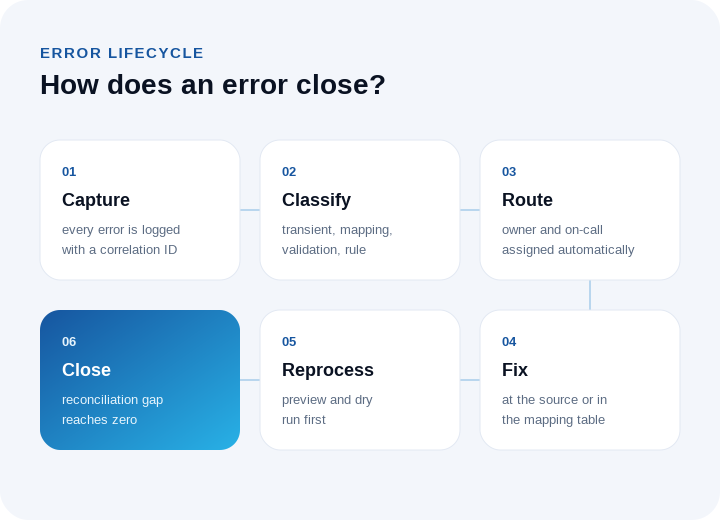
The status flow is one-directional. A new record enters automatic retry; by class it lands with its owner; the owner claims, fixes and resends it; and it closes when the target confirms success. Records that stay in "resent" and never close are a second source of errors, so closing is tied to the target's confirmation.
How Do You Reprocess a Failed Record Safely?
Resending a corrected record looks harmless. It is not. There are three risks.
- Double processing: The first send may actually have reached the target and only the response got lost. A resend uses a unique key, and the target does not process the same key twice. We described the mechanism in the webhook article; the principle is the same here.
- Broken order: A product's stock update failed at version 7, version 8 (95 units) was applied to the target, and then version 7 (120 units) was corrected and sent. Without version checking the target shows 120 while real stock is 95, creating a 25-unit overselling risk. The rule: the target rejects anything older than what it already holds.
- Bulk reprocessing: Sending fifty records with one click can break all fifty at once. Only selected records are processed, a preview comes first, and a "dry run" shows the validation result without writing to the target.
Example: if a dry run on 56 records shows 52 passing and 4 failing, 52 are sent and 4 go back to their owner. Starting a large group with the first 20 records and watching the result is also a safe habit. For the general design of bulk jobs, see our batch processing guide.
How Do You Calculate Daily Error Volume and Human Effort?
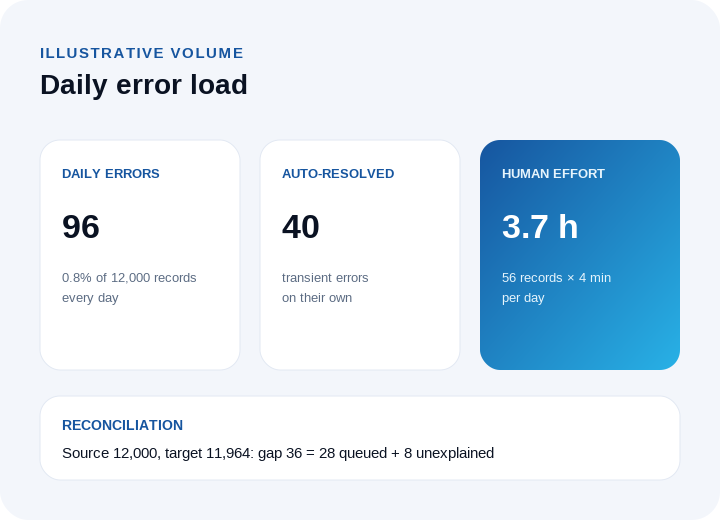
Before building operations, calculate how much work will come out of it. Example: four flows carry a total of 12,000 records a day and the error rate is 0.8%.
Error count = 12,000 × 0.008 = 96. Class split: 40 transient, 30 mapping, 16 validation, 10 business rule (total 96). The 40 transient errors resolve on their own through automatic retry: automatic resolution share 40 ÷ 96 = 41.7%. The remaining 56 records fall to people.
Human effort = 56 × 4 min = 224 min ≈ 3.7 hours/day. That is about half of one person's day; if nobody is assigned, the queue grows.
| Flow | Records per day | Errors | Error rate | Left for people |
|---|---|---|---|---|
| Orders (marketplace to ERP) | 5,000 | 40 | 0.8% | 23 |
| Stock (ERP to marketplace) | 4,000 | 24 | 0.6% | 14 |
| Shipments (ERP to carrier) | 2,000 | 20 | 1.0% | 12 |
| Invoices (ERP to accounting) | 1,000 | 12 | 1.2% | 7 |
| Total | 12,000 | 96 | 0.8% | 56 |
How Does Root Cause Analysis Reduce the Error Load?
The cheapest way to cut errors is to stop fixing the same error over and over. A Pareto by class shows where. In the example, 21 of the 30 mapping errors come from just three product codes (70%): these codes exist in the source catalog but not in the target's mapping table.
Fixing the three codes once in master data brings mapping errors from 30 down to 9. Records left for people drop from 56 to 35, and effort falls from 224 minutes to 35 × 4 = 140 minutes, or 2.3 hours. That saves 84 minutes (1.4 hours) a day. As you can see in our order management article, mapping problems lead back to master data.
The repeat error share is also a measure: records with the same root cause divided by records left for people. Here 21 ÷ 56 = 37.5%; the goal is to bring this share down every month.
How Do You Set Error Age and Time Targets?
How long an open error has been waiting matters more than how many there are. Split the queue into age bands and set a claim target for critical flows.
| Error age | Open records | Share | Expected response |
|---|---|---|---|
| Under 1 hour | 30 | 53.6% | Normal flow |
| 1 to 4 hours | 14 | 25.0% | Owner should have claimed it |
| 4 to 24 hours | 8 | 14.3% | Visible to the shift lead |
| Over 24 hours | 4 | 7.1% | Manager alert, reason written down |
| Total | 56 | 100% |
The number of records older than four hours is 8 + 4 = 12, a share of 12 ÷ 56 = 21.4%. Example targets for critical flows: an order transfer error is claimed within 1 hour, an invoice transfer error within the same business day. You can tie these timers to the service-level thinking in our monitoring guide; here the target applies per record.
How Do You Detect Silent Loss?
The most dangerous failure is the one that produces no error: the record stays at the source, never enters the flow, and nobody sees anything. Two methods catch it.
Daily reconciliation: At the end of the day, the source count is compared with the target count. Example: source 12,000, target 11,964; gap 36. At reconciliation time, of the 96 errors, 40 were resolved automatically, 28 were fixed by hand and 28 are still in the queue. The 28 queued records explain part of the gap; the remaining 36 − 28 = 8 records are unexplained (0.07% of 12,000) and get investigated. Check: 12,000 − 28 − 8 = 11,964. Reconciliation does not close until the unexplained gap is zero.
Silence alarm: The error rate is normally 0.8% and the alarm threshold is 3%. If an average of 500 records flow per hour, normal errors are 500 × 0.008 = 4 and the alarm threshold is 500 × 0.03 = 15. But the more important alarm is the reverse: if no record flows for 15 minutes, the flow is broken even though the error count is zero. "Zero load" is not a success; it is a warning.
We recommend reading: How to Do Incident Management and Post-Mortems: SEV Levels, On-Call, MTTR and Blameless Review Guide
What Should You Do When the Target System Is Down?
When the target goes into maintenance, every record produces its own error and floods the system with retry requests. A circuit breaker is used instead: after N consecutive failures sending stops, records wait in the queue, a single probe is made at intervals, and the flow reopens when it succeeds.
Backlog math: 150 records per minute flow and maintenance lasts 40 minutes: 150 × 40 = 6,000 records pile up. If the target can process 250 records per minute, the net drain is 250 − 150 = 100 records/min and the backlog clears in 6,000 ÷ 100 = 60 minutes. That is longer than the maintenance window itself; when announcing planned maintenance, "maintenance 40 minutes, back to normal in 100 minutes" is the honest expectation. We covered the mechanics of the queue itself in our message queue article.
A schema change in the source system is a separate risk: when a field name changes, validation errors can jump to hundreds at once. The fix is communication: notice before the change and a contract test in a staging environment. See the API versioning guide for details.
How Do You Organize the Dashboard, Ownership and On-Call?
The dashboard shows one row per flow: incoming, successful, failed and pending record counts, the age of the oldest open error and the first response time. Clicking an order should show its trail from source through the middle layer to the target. The dashboard connects to the error queue and the log; it is not a standalone chart.
- Owner: Every flow has a business owner (who can correct data) and a technical owner (who can repair the flow). Mapping and validation errors go to the business owner; credential and connection errors go to the technical owner.
- Shift: During working hours someone is assigned to watch the queue; outside hours only alarms for critical flows reach the on-call person. The handover note lists open and aging records.
- Routing: Alarms go to the right person by error class; an alarm sent to everyone counts as sent to no one.
Which Metrics Should You Track?
- First response time: The time until someone claims an error after it occurs. Target: 1 hour on critical flows.
- Error resolution time: The median closing time and the longest cases.
- Automatic resolution share: 41.7% in the example. If it falls, a new error type has appeared.
- Repeat error share: 37.5% in the example; it falls as root causes get fixed.
- Silent loss count: The unexplained gap. Target: zero every day; 8 in the example.
What Do Integration Operations Pay Back?
The illustrative calculation uses the 23 human-handled errors in the order flow above. Without an error queue, errors are noticed through customer complaints after an average of 20 hours; with a dashboard, after 3 hours. Assume a stuck order costs ₺8 per hour of delay (an average of communication, customer compensation, support and extra shipping cost).
- Delay cost: 23 × 20 × ₺8 = ₺3,680/day; with the dashboard 23 × 3 × ₺8 = ₺552/day. The difference is ₺3,128/day × 22 working days = ₺68,816/month.
- Overselling caused by stock errors: 1.5 events a day × ₺400 = ₺600; with the dashboard 0.5 events × ₺400 = ₺200. The difference is ₺400 × 22 = ₺8,800/month.
- Manual tracking effort: 1.5 hours a day × ₺300 × 22 = ₺9,900/month.
Gross benefit is 68,816 + 8,800 + 9,900 = ₺87,516/month. If running the dashboard costs ₺12,000/month, the net benefit is ₺75,516/month, and a ₺360,000 build pays back in 360,000 ÷ 75,516 ≈ 4.8 months. If the benefit is halved (₺43,758 − ₺12,000 = ₺31,758), payback takes about 11.3 months. The numbers are illustrative; substitute your own delay cost and error volume.
How Do You Set Up Integration Operations Step by Step?
- Count the flows: For each flow write the daily record count, current error rate and owner.
- Classify the errors: Record the six classes and the response for each.
- Build the queue: Fix the fields, statuses and owners; resend with a unique key.
- Add reconciliation: A daily count comparison and the silence alarm.
- Open the dashboard: Per-flow status, error age and first response time.
- Review weekly: Use the Pareto to close the most frequent root causes in master data and mappings.
Common mistakes: leaving errors only in the log, collecting all errors in one unclassified queue, sending a corrected record without version checking, skipping reconciliation, and never setting up a "no records flowed" alarm.
We recommend reading: What Is Marketplace Integration? A Guide to Managing Products, Stock and Orders in One Place
We recommend reading: How to Ensure Data Pipeline Reliability and Data Observability: Freshness, Volume, Tests and Payback Guide
We recommend reading: How to Integrate Ecommerce with ERP: Order, Stock, Price and Customer Sync, Error Handling and Payback
We recommend reading: What Is the Saga Pattern and Distributed Transactions? Compensation, Step Order and Failure Math Guide
Integration and Process Software with İnovabil
At İnovabil our focus is custom software built from scratch for your company: custom software, ERP, CRM, e-commerce, web, mobile and integration. For integration operations we draw on registered capabilities such as role-based permissions, audit logs and secure hosting; we suggest writing the error queue, ownership and reconciliation expectations down during the requirements phase.
We developed logistics and shipment planning with wholesale order management for Karyak, warehouse management and a complaint and support management system for Sleepy, a prepaid shipping system for Kredili Kargo, and a purchasing system for İZBAN. Send us a short summary of your current flows and error volume, and we will review it together and produce a written plan.
We recommend reading: Our software development process: from analysis to launch
Frequently Asked Questions
What are integration operations?
Running system-to-system flows in production: recording errors, classifying them, routing them to owners, reprocessing them safely and verifying through reconciliation that no record was lost.
What is the difference between an error queue and a log file?
A log tells the story of an event; an error queue manages the work. Every record in the queue has an owner, a status and an age, and can be corrected and resent. A log does none of this.
What should you watch for when resending a failed record?
Prevent double processing with a unique key and broken ordering with version checks. In bulk jobs send only the selected records, and run a preview and a dry run first.
How is silent loss noticed?
Through a daily source and target count reconciliation and an alarm for periods when no record flows. In the example, with 12,000 at the source, 11,964 at the target and 28 queued records, the remaining 8 are an unexplained gap and get investigated.
Who should watch the error queue?
Each flow needs a business owner and a technical owner. Mapping and validation errors go to the business owner, credential and connection errors to the technical owner; outside working hours only critical-flow alarms reach the on-call person.