

If orders from your website, marketplaces, dealers and phone calls sit on four separate screens, someone is checking stock, address and payment by hand for each one. An order management system (OMS) is the software layer that pulls orders from every channel into one queue, validates them against rules, reserves stock, routes them to a warehouse and carrier, and reports status back to the channels and the customer.
In this guide we explain what an order management system is, how it differs from an ERP, a WMS and shipping integration, the order life cycle, validation and stock reservation rules, split shipments, returns and cancellations, four KPIs and the payback calculation. All example figures are illustrative; they are not data from a real company or industry.
What Is an Order Management System (OMS)?
An OMS manages the steps an order goes through from the sales channel to the customer: it receives the order, validates it against rules, reserves stock, decides which warehouse ships it, triggers shipping and invoicing, notifies the channel and the customer, and handles cancellations and returns.
The order itself is the centre of the system, not the product catalogue, the work inside the warehouse or the accounting books. That is why an OMS is sometimes a module of an ERP and sometimes a separate application. For the system that covers the whole business, see our what is ERP guide.
We recommend reading: Our ERP development service
How Is an OMS Different from an ERP, a WMS and Integrations?
An OMS sits between the other systems: it decides what happens to the order and leaves the doing to the warehouse, the carrier and accounting.
| System | Main job | Relationship with the OMS |
|---|---|---|
| Order management system | Receiving, validating, allocating and tracking orders | Itself |
| ERP | Business records: stock, finance, production, purchasing | Supplies stock and customer account data; handles invoicing and accounting |
| WMS | Layout, picking and shipping preparation inside the warehouse | Receives a "prepare this" instruction from the OMS and returns "ready" |
| Marketplace integration | Keeping products, stock and prices in sync with channels | Brings the order in from the channel and writes status back |
| Shipping integration | Labels, tracking codes and delivery data | Triggered by the OMS at the shipping step; returns tracking data |
Our guides on WMS, marketplace integration and shipping integration each cover one of these boundaries in depth.
What Steps Make Up the Order Life Cycle?
Every order passes through the same states; the difference is whether it is clear who does what. The table below shows eight states.
| State | What happens | Who or what acts |
|---|---|---|
| 1. Received | The order arrives from a channel and is converted to one format | Channel connection |
| 2. Validated | Address, product, stock, credit limit and risk signals are checked | OMS rules; an employee for exceptions |
| 3. Approved | Payment is received, or the dealer's payment terms are accepted | Payment system, finance |
| 4. Stock reserved | Units are reserved for this order; sellable stock drops on every channel | OMS, ERP stock |
| 5. Fulfilled | The warehouse picks and packs | WMS or warehouse staff |
| 6. Shipped | Label printed, carrier collects, tracking code recorded | Carrier connection |
| 7. Delivered | Delivery data arrives; invoice and collection are closed | Carrier, ERP |
| 8. Cancelled or returned | Stock returns and payment is refunded | OMS, warehouse, finance |
How Do Orders from Several Channels End Up in One Queue?
Each channel sends orders in a different shape. The OMS maps all of them to the same fields (customer, address, product code, quantity, amount, channel) and puts them in a single queue, so validation rules are not rewritten per channel.
- Your own website: The order arrives instantly with its payment data.
- Marketplaces: Orders are pulled through the channel connection; the channel's own status names are mapped to OMS states.
- Dealer portal: The order depends on the dealer's account balance and credit limit. Our B2B e-commerce guide covers the dealer side.
- Phone or email: An employee enters the order on the same screen, so manual orders also land in the one queue.
The more channels you have, the bigger the gain, because each new channel becomes another source for the same queue rather than another screen to watch.
What Are Order Validation Rules?
Validation stops faulty orders from reaching the warehouse. Rules are written down and defined in the system; an order that breaks a rule goes on hold and an employee decides.
| Rule | Check | Result |
|---|---|---|
| Address | Are city, district and phone fields filled in and consistent? | If not, a correction request goes to the customer |
| Product | Is the product code defined and on sale? | If not, the order is held |
| Stock | Does sellable stock cover the order quantity? | If not, partial shipment or waiting |
| Credit limit | Open balance + order amount ≤ limit? | If exceeded, finance approval |
| Risk signal | Unusual amount, quantity or repeated attempts? | Review queue |
Credit limit example: a dealer's limit is ₺200,000, the open balance is ₺150,000 and the new order is ₺60,000. 150,000 + 60,000 = ₺210,000, which exceeds the limit by ₺10,000, so the order goes to finance approval. Risk signals never produce a final "fraud" verdict; they only set unusual orders aside for a person to look at. For legal details on payments and personal data, consult legal counsel.
How Does Stock Reservation Prevent Overselling?
Stock reservation means deducting an order's units from sellable stock the moment the order arrives; even while the goods still sit on the shelf, the stock other channels see goes down.
Illustrative example: the warehouse holds 120 units and 45 are already reserved for approved orders. Sellable stock is 120 − 45 = 75 units. Within the same hour the website receives an order for 30 units, a marketplace for 28 and a dealer for 25: 83 units in total.
- Without central reservation: Each channel sells the 75 it can see and 83 units are accepted; 83 − 75 = 8 units are oversold and must be cancelled. The overselling rate is 8 ÷ 83 ≈ 9.6%.
- With an OMS: Each order is reserved in sequence; the order that arrives after the 75th unit automatically gets a backorder or "out of stock" response. No order is accepted and then cancelled.
Stock accuracy itself is a separate subject; for how to count and record movements, see our inventory tracking guide.
How Are Allocation and Split Shipments Decided?
With more than one warehouse or store, the OMS picks the shipping point with routing rules. The rules are tried in order: first the nearest warehouse that can fill every line, then the warehouse with the most stock, then a split shipment.
Example: an order has 10 units. Warehouse A has 6 and warehouse B has 4; neither has 10. The options are to wait for one warehouse to receive a transfer or to send two parcels. With a split shipment the customer gets two tracking codes and the parcel count rises from 1 to 2. Which option wins depends on how you weigh delivery time against the extra shipping cost, and that weighing is written into the rule rather than decided order by order.
How Does Status Information Flow Back to Channels and Customers?
Each time an order changes state, the OMS publishes an event: "shipped", "delivered", "cancelled". The marketplace takes the tracking code from that event, the website notifies the customer, and the ERP issues the invoice.
- Tracking code: The carrier connection writes the code to the OMS, which passes it to the channel.
- Invoice: The "shipped" event triggers the invoicing step. Our e-invoice integration guide explains how to set that step up.
- Duplicate-event protection: If the same event arrives twice, the second is silently ignored; otherwise the customer gets two notifications and finance two invoices.
How Are Cancellations and Returns Handled?
Cancellation and return are the order moving in reverse, and each state triggers different work.
| Order state | Cancellation or return | Stock | Money |
|---|---|---|---|
| Before picking | Cancelled; channel notified | Reservation released | Refund starts if already paid |
| Picked, not shipped | Pulled from the warehouse | Goods return to the shelf | Refund starts |
| In transit | Carrier moves it to the return flow | Inspected on arrival | After the goods are accepted |
| After delivery | Return request; accepted by rule or reviewed | Sellable stock if intact, a separate area if not | Refund after acceptance |
The return reason should be a mandatory field; the split between "wrong item", "damaged" and "changed mind" shows which problem starts at which step. Return periods and consumer rights are set by law; consult legal counsel for details.
Which KPIs Should You Track in Order Management?
Four indicators summarize how the system performs. The calculations below use illustrative data for one period of 300 orders.
| KPI | Formula | Example |
|---|---|---|
| Order cycle time | Sum of (shipped time − received time) ÷ number of orders | 5 orders: 6, 8, 5, 12, 9 hours; 40 ÷ 5 = 8 hours |
| On-time shipment rate | Orders shipped within the promised time ÷ total | 276 ÷ 300 = 92.0% |
| Cancellation rate | Cancelled orders ÷ total | 12 ÷ 300 = 4.0% |
| Perfect order rate | On time × complete × undamaged × correct documents | 0.92 × 0.98 × 0.99 × 0.995 ≈ 88.8% |
Because the perfect order rate is a product, one weak step pulls the whole figure down: four steps between 92% and 99.5% give 88.8%. Tracking cancellations caused by overselling separately inside the cancellation rate shows the effect of stock reservation directly.
How Long Does an Order Management System Take to Pay Back?
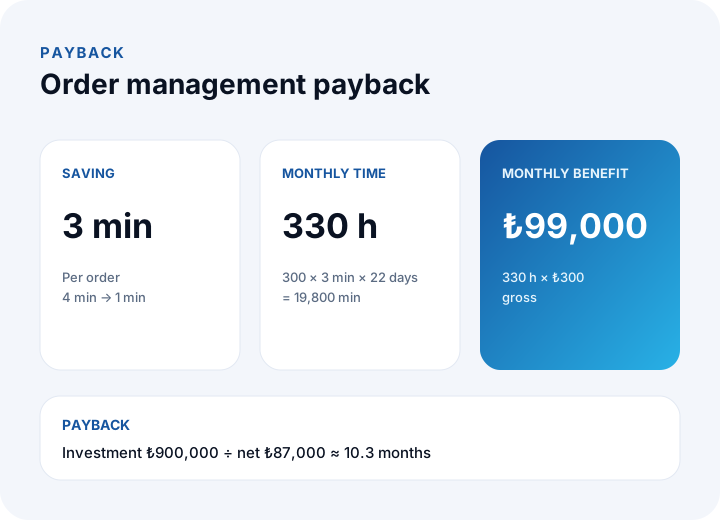
Payback is the investment divided by the monthly net benefit. Illustrative example: 300 orders a day; handling takes 4 minutes per order by hand and 1 minute with the system, a saving of 3 minutes. Use 22 working days a month and an hourly cost of ₺300.
- Monthly time saved: 300 × 3 × 22 = 19,800 minutes = 19,800 ÷ 60 = 330 hours.
- Monthly gross benefit: 330 × ₺300 = ₺99,000.
- Monthly running cost (infrastructure, maintenance): ₺12,000. Monthly net benefit: 99,000 − 12,000 = ₺87,000.
- Initial investment (analysis, development, integration, training): ₺900,000.
- Payback: 900,000 ÷ 87,000 ≈ 10.3 months.
The calculation counts labour only. Fewer overselling cancellations, fewer shipments with a bad address and the effect of faster delivery on customer satisfaction have value too, but they should not enter the calculation until you have measured them with your own data. If your volume halves, the time saving halves as well and payback stretches: at 150 orders the saving is 165 hours × ₺300 = ₺49,500, the net is 49,500 − 12,000 = ₺37,500, and payback is 900,000 ÷ 37,500 = 24 months. Recalculate with your own numbers.
What Are the Steps to Implement an Order Management System?
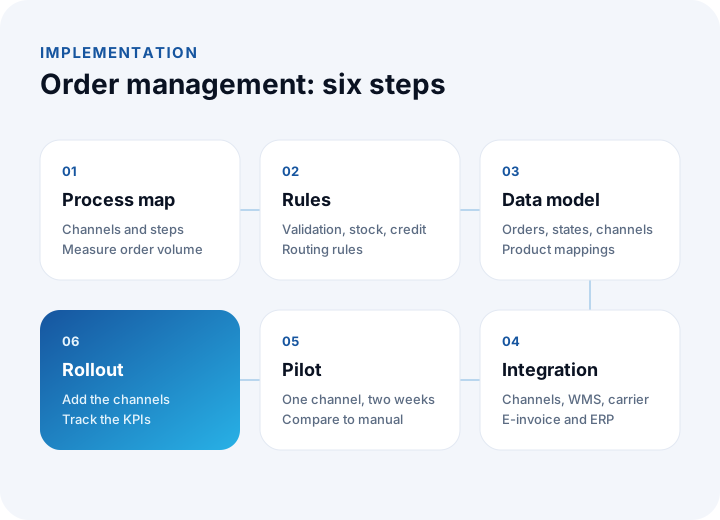
Implementation runs in six steps, starting with one channel and a small scope.
- Process map: Write down the channels, current steps, manual copying and daily order volume.
- Rules: Put validation, stock reservation, routing and approval rules in writing.
- Data model: Define orders, states, channels and product mappings.
- Integration: Connect channels, warehouse, carrier, e-invoice and ERP.
- Pilot: Run one channel for two weeks and compare time and error counts with the manual process.
- Rollout and measurement: Add the remaining channels and track the four KPIs weekly.
Off-the-Shelf OMS, ERP Module or Custom Development?
There are three routes; the choice depends on how unusual your order rules are.
| Option | When it fits | What to watch |
|---|---|---|
| Off-the-shelf OMS | Standard channels, standard rules | Custom rules are hard to add; licences grow with users or order volume |
| ERP order module | Stock and finance are already in the ERP | Channel connections and exception rules may stay limited |
| Custom development | Unusual rules: dealer terms, regional routing, special approvals | Higher upfront investment; maintenance and ownership are yours |
For the general comparison, see our off-the-shelf vs custom software guide.
What Are the Most Common Order Management Mistakes?
- Keeping stock separately per channel: Without one central sellable stock, overselling is unavoidable.
- Not writing the rules down: If validation and routing live in an employee's head, they change with every shift.
- Skipping the exception queue: Expecting every order to pass automatically; orders that break the rules need a human step.
- Not mapping statuses to channels: If the channel says "preparing" while you show "shipped", the customer opens a support ticket.
- Treating returns as an afterthought: If stock return and refund are not in the design, manual handling begins.
- Not measuring: Without a baseline you cannot say anything improved.
We recommend reading: CRM vs ERP: what is the difference?
Order Management and Shipping Solutions with İnovabil
At İnovabil we build bespoke software from scratch. We have developed logistics and shipment planning plus wholesale order intake and management for Karyak, shipment planning for Bofigo, warehouse management (WMS) for Sleepy, CRM, purchasing and mobile for Avcılar İnşaat, and a purchasing system for İZBAN.
Send us a short summary of your order flow with its channels, rules and daily volume; in the requirements analysis we will compare an off-the-shelf option with custom development in writing, using the payback calculation. You can review how we work on our process page.
Frequently Asked Questions
What is an order management system (OMS)?
Software that gathers orders from different sales channels into one queue, validates them, reserves stock, routes them to the warehouse and carrier, and reports status back to the channels.
Is an OMS the same as an ERP?
No. An ERP holds business records such as stock, finance and production; an OMS manages the life cycle of the order. Some ERPs include an order module, but as the number of channels and the complexity of rules grow, a separate layer may be needed.
How does an order management system prevent overselling?
Each order is reserved against stock the moment it arrives, and every channel sees the same sellable stock. In the example, when orders for 83 units arrive against 75 sellable units, the last 8 are not accepted.
Does a small business need an OMS?
With one channel and low volume, usually not. It becomes worth evaluating when a second or third channel arrives, or when manual copying and overselling start. Run the payback calculation with your own volume.
How long does an OMS implementation take?
It depends on scope and the number of channels. Running a two-week pilot on one channel and adding the rest in sequence lowers the risk; duration and cost should be put in writing at the end of the requirements analysis.