

The screens of the new ERP, CRM or custom application are ready and training is done, but ten years of customer, stock and order records still sit in the old system. Data migration is the work of moving those records from the old application to the new one completely, correctly and with as little downtime as possible. It is the least talked-about phase of a project, and the one that causes the most delay and loss of trust.
In this guide we explain why migration is risky, how to choose a strategy, the six steps (inventory, field mapping, cleansing, trial runs, cutover, reconciliation), how to calculate the cutover window, how to prepare a rollback plan and how to retire the old system. If you are looking for moving from spreadsheets to a system, see our guide to moving from Excel to software; here the subject is system-to-system migration. Example figures are representative.
What Is Data Migration and Why Is It Risky?
Data migration is the extraction of records from a source system, their transformation and their loading into a target system; in the industry this is also called extract-transform-load (ETL). The risk comes from the same data meaning different things in two systems: a free-text field in the old system is a pick list in the new one, and a record the old system calls "passive" has been deleted in the new one.
| Risk | How it appears | Countermeasure |
|---|---|---|
| Data loss | A column forgotten in mapping, long text truncated | Field inventory and mapping table |
| Wrong transformation | Debit/credit sign loaded the wrong way round, date format | Transformation rules and sample record tests |
| Duplicate records | The same customer's two cards are both carried over | Cleansing before migration |
| Extended downtime | The load speed was never measured | Measure speed in trial runs |
| Irreversible cutover | The old system is shut down while the new one is faulty | Keep the old system read-only |
| Personal data issues | Unnecessary personal data is migrated too | Written decision on what moves; legal counsel |
Moving personal data, retention periods and KVKK (Turkey's personal data protection law) obligations are legal matters; decide with your legal counsel which data is migrated and which is deleted.
Which Data Migration Strategy Should You Choose?
There are three basic strategies: big bang, phased and parallel. The choice depends on how much downtime you can tolerate, the data volume and how well the two systems can be connected.
| Strategy | How it runs | Upside | Downside | Suits |
|---|---|---|---|---|
| Big bang | Over a weekend the old system stops, all data is loaded, and Monday opens on the new system | Short project, a single cutover | Downtime and risk concentrated; errors show late | Medium volume, short downtime acceptable |
| Phased | Modules, branches or periods are migrated in sequence | Risk is split, learning accumulates | Two systems side by side for a long time; a bridge is needed | Large volume, many modules |
| Parallel | Both systems run for a set period and results are compared | Safest verification | Double entry effort, extra cost | Areas that tolerate no error, such as finance |
In practice a hybrid is common: master data (customers, products) in one go, transactions period by period, and a short parallel run in finance. If you have not yet chosen the new system, test the migration scenario at selection time using how to choose an ERP and how to choose a CRM.
We recommend reading: Our integration service
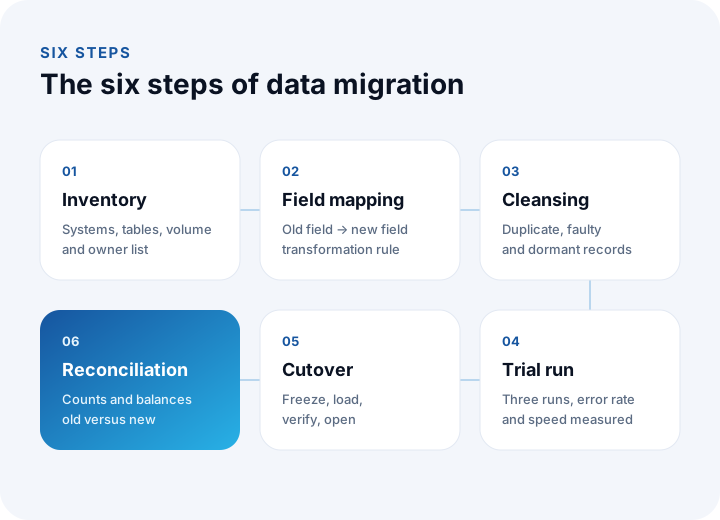
What Are the Six Steps of Data Migration?
Every project follows the same six steps; the difference is how seriously each one is taken. In the sections below we work through all of them on a single example: 300,000 records moving from an old ERP to a new ERP (10,000 customer accounts, 6,000 stock items, 4,000 open orders and 280,000 transaction lines). The figures are representative.
How Do You Build a Data Inventory?
The inventory is the list that shows what data lives where, who owns it and how large it is. What will be migrated and what will not is decided in this list.
- Sources: The main database, side tables, attached files, users' own spreadsheets and records arriving from other systems.
- Volume: The record count per object (in the example 10,000 + 6,000 + 4,000 + 280,000 = 300,000).
- Owner: The business-side person responsible for each data group; they answer the question "is this field correct".
- Decision: Migrate, transform and migrate, archive or leave behind. For example, an account with no activity for five years goes to the archive.
How Do You Do Field Mapping?
Field mapping is the table that states which field in the new system each field of the old system goes to, and with which transformation rule. Without the table, migration is guesswork.
| Old field | New field | Transformation rule | Check |
|---|---|---|---|
| MUSTERI_ADI | Company name | Leading and trailing spaces removed, one consistent letter case | Empty names: 0 |
| VERGI_NO | Tax / national ID no. | Digits only; 10 digits for a tax number, 11 for a national ID | Records with the wrong digit count are listed |
| TEL | Phone | Converted to international format (+90...) | Unconvertible ones handled by hand |
| BAKIYE | Opening balance | Debit positive, credit negative; sign tested one by one | Total equals the old total |
| DURUM (A/P) | Active | A = yes, P = no | Active count equal |
| BOLGE_KODU | Region | Mapping table: 14 old codes, 9 new regions | Unmapped codes: 0 |
The business owner signs the table: the question "if we migrate with this rule, is it right for you" is asked here, not on cutover night. If the source system exposes an API, the basic concepts in our API integration guide help with extraction and loading, and our database selection guide helps when you design the target data model.
How Do You Clean Duplicate and Faulty Records?
Migrating garbage means installing garbage in the new system; cleansing is done before migration, at the source. Three groups are separated: exact duplicates, similar records and dormant ones.
- Exact duplicates: Accounts with the same tax number are merged automatically. In the example, 640 accounts.
- Similar records: Accounts with similar names but a different or empty tax number are candidates and are reviewed by hand. In the example 260 candidates came up, 230 were merged and 30 turned out to be separate companies.
- Dormant accounts: Accounts with no activity for the period you set (five years in the example) and a zero balance go to the archive. In the example, 130 accounts.
The arithmetic: 11,000 raw accounts − 640 − 230 − 130 = 10,000 accounts; the share removed by cleansing is 1,000 ÷ 11,000 ≈ 9.1%. When merging, the transactions are combined on one account; the rule for which account stays as the "master" (the oldest, or the one with the most activity) is written in advance. Merges are logged so they can be traced back later.
How Do You Run Trial Migrations?
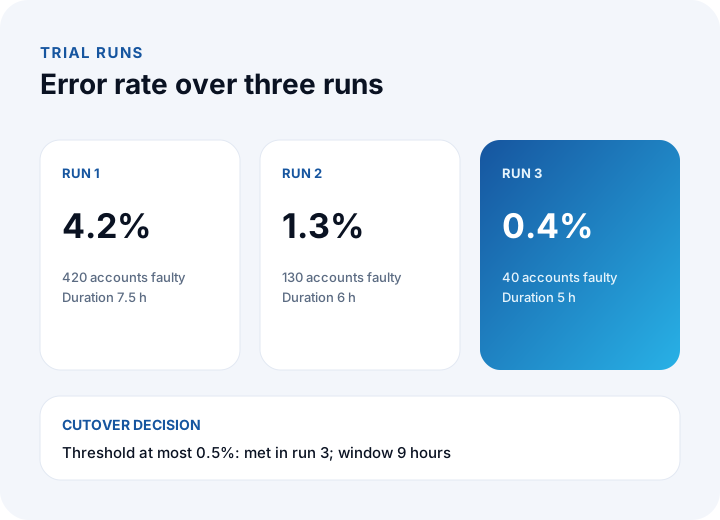
A trial migration is running the whole migration end to end with live data, but in a non-live environment. In each run the error rate is measured, errors are fed back into the mapping and cleansing rules, and speed is measured.
| Run | Error rate | Faulty accounts (out of 10,000) | Load speed and duration | Fixes that came out of the run |
|---|---|---|---|---|
| 1 | 4.2% | 420 | 40,000 records/h; 300,000 ÷ 40,000 = 7.5 h | Missing mapping rules, region codes, sign error |
| 2 | 1.3% | 130 | 50,000 records/h; 300,000 ÷ 50,000 = 6 h | Phone format, truncated long text, orphan records |
| 3 | 0.4% | 40 | 60,000 records/h; 300,000 ÷ 60,000 = 5 h | A list of 40 accounts to correct by hand |
The error rate fell from 4.2% to 0.4% over three runs: (4.2 − 0.4) ÷ 4.2 ≈ 90.5% reduction. The acceptance threshold for cutover is written beforehand; in the example it is "error rate at most 0.5% and equal counts in every record group". The third run passed this threshold, so we are ready for cutover. If the threshold is not met, a fourth run is made; the date moves to fit the threshold, and the threshold is not loosened to fit the date.
How Do You Calculate the Cutover Window?
The cutover window is the time from the moment the old system is closed to writes until the new system opens. The formula: window = load time + reconciliation time + first-check time.
- Load: record count ÷ hourly speed = 300,000 ÷ 60,000 = 5 h. The speed is the value measured in the third trial run; you work from measurement, not estimates.
- Safety margin: 20% = 5 × 1.2 = 6 h. The live environment can turn out slower than the trial one.
- Reconciliation: Comparing counts and balances takes 2 h.
- First check: A smoke test with a real user (log in, one order, one invoice) takes 1 h.
Total: 6 + 2 + 1 = 9 hours; from Saturday 20:00 to Sunday 05:00. If the window is longer than that, or the business cannot take it, there are two options: load the transaction lines in advance (before cutover) and move only the last day's difference (the delta) at cutover, or switch to a phased strategy. The delta approach shortens the window, but needs extra logic to capture the difference correctly.
How Do You Reconcile After Cutover?
Reconciliation is showing with numbers that the old and new systems give the same answer to the same question. Two kinds of checks are made: count checks (how many records) and value checks (total amount, balance, quantity).
| Check | Old system | New system | Difference |
|---|---|---|---|
| Customer account count | 10,000 | 10,000 | 0 |
| Stock item count | 6,000 | 6,000 | 0 |
| Open order count | 4,000 | 4,000 | 0 |
| Total stock quantity | 1,284,500 | 1,284,500 | 0 |
| Total account balance | ₺48,250,000 | ₺48,246,800 | ₺3,200 |
| Correct records field by field (accounts) | 10,000 | 9,960 | 40 accounts |
Accuracy rate: 9,960 ÷ 10,000 = 99.6%. The balance difference is ₺3,200 and is spread over the 40 faulty accounts: 3,200 ÷ 40 = an average of ₺80. In other words, the difference is not random; it sits inside the 40 known accounts, which are corrected by hand and the comparison is repeated. An important rule: reconciliation is not closed until the source of the difference is found. Even when the totals match, two errors may cancel each other out, so alongside the total a sample check at account level (for example 200 random accounts) is made.
How Do You Prepare a Rollback Plan?
A rollback plan is the written route for returning safely to the old system if cutover fails. The plan is written and rehearsed before cutover, because nobody wants to write a plan on cutover night.
- Decision point: Under what condition do you roll back? For example: the record counts stop matching, the balance difference exceeds a limit set in advance (say ₺5,000), or the smoke test fails.
- Decision owner: Who says "roll back"? One named person, agreed beforehand.
- State of the old system: At cutover it is only made read-only, not deleted; its backup has been taken. For the backup plan see our data backup guide.
- Duration: The rollback time must have been measured; in the example 1 h. This time goes into the cutover window as a reserve.
- Communication: Users are told which system to work in, by whom, and through which channel.
Because new records are written once the new system has been in use for a day, the option to roll back narrows over time. That is why the decision window is short: at the end of the first working day, the decision "continue" or "roll back" is made.
How Do You Archive and Shut Down the Old System?
After reconciliation is accepted, the old system is kept read-only for a while, then archived and shut down. Shutting it down immediately removes the rollback option; never shutting it down keeps the cost and the risk alive.
- Read-only period: 6 months in the example; if the old system's monthly running cost is ₺20,000, then 6 × ₺20,000 = ₺120,000 is the cost of this. The period is chosen so that it covers one financial period and the first closing.
- Archive format: Historical records that were not migrated are stored in a readable file format (for example spreadsheets or a database dump) with a note on how to open them.
- Retention periods: How long each record must be kept depends on legislation; settle it with your financial advisor (certified accountant) and legal counsel. Personal data whose period has expired is deleted.
- Access and authorization: The list of people with access to the archive is restricted; the old system's user accounts are closed.
- Shutdown record: Who shut it down, when and with which backup is kept in writing.
What Are the Common Mistakes in Data Migration?
- Skipping the inventory: A forgotten table is noticed only after going live.
- Settling for a single trial run: A migration that showed a 4.2% error rate in its first run, if taken live on that first attempt, runs with 420 faulty accounts.
- Verifying the count but skipping the value: The record count can match while the balance differs.
- Not measuring load speed: The window is planned on guesswork and runs into the morning.
- Leaving cleansing until after migration: A duplicate account creates two transaction chains in the new system as well.
- Not writing a rollback plan: Once the old system is shut down, there is nothing to return to.
- Not involving the business side: If only the technical team writes the transformation rules, the business meaning is lost.
Migration should be handled as a planned line item of the project, not as a separate job; for the effort and budget side you can use the milestone logic in our guide to getting custom software developed.
Data Migration and System Transition with İnovabil
In our custom software, ERP, CRM and integration projects at İnovabil, we handle the move from the old system to the new one in the analysis phase of the project: which data is migrated, how it is mapped and how the transition will be verified are all put on record. The analysis, development, testing and release steps we describe on our process page are the foundation of this plan.
We have built CRM, purchasing and mobile for Avcılar İnşaat; a purchasing system for İZBAN; logistics and shipment planning with wholesale order management for Karyak; and warehouse management plus a complaint and support management system for Sleepy. Write a short note on the type of your current system, the approximate record count and your target; let us produce the inventory and a strategy proposal together.
We recommend reading: Our ERP development service: modules, flows and sample screens
Frequently Asked Questions
How do you do data migration, and what are the steps in short?
Six steps are followed: data inventory, field mapping, cleansing, trial migrations, cutover in the downtime window, and reconciliation. Every step is measured; you do not go live until the error rate in the trial runs is below the threshold.
How long does data migration take?
Load time is calculated as record count ÷ hourly speed. In the example 300,000 ÷ 60,000 = 5 hours, which with a safety margin and verification gives a 9-hour window. The real time goes into preparation: the inventory, mapping and trial runs can take weeks.
Is it better to migrate in one go or in phases?
With medium volume and a short acceptable downtime, a big-bang migration is simpler. If the volume and the number of modules are large, or there is finance data that tolerates no error, a phased approach with a parallel run lowers the risk. Most projects use a mix of the two.
How do I know the data is correct after migration?
Through reconciliation: record counts and total values (balance, stock quantity) are compared between the old and new systems, the source of any difference is found, and a field-level check is done on random accounts. In the example 9,960 of 10,000 records are correct, that is 99.6%; the remaining 40 accounts are corrected by hand.
When is the old system shut down?
After the business owner has accepted the reconciliation and at least one financial closing has passed without problems in the new system. Until then the old system is kept read-only; for retention periods consult your financial advisor and legal counsel.