

The supplier contract sits in one folder, the customer contract in a salesperson's inbox, and when someone asks for the latest version, three different files turn up. You only learn that a service agreement renewed automatically when next year's invoice arrives. Contract management software is software that records customer and supplier contracts in one place, tracks each contract through its life cycle from draft to signature and renewal, alerts you on critical dates, and connects contract data to your other systems.
In this guide we explain what contract management software is, the contract life cycle, how to set up renewal alerts, what the auto-renewal risk costs, templates and a clause library, version history and audit trail, the link to ERP and CRM, the choice between off-the-shelf and custom software, and a six-step setup. All sample figures are illustrative; they are not any product's price or an industry average. This article is not legal advice; for clause drafting, the validity of electronic signatures and retention periods, consult your legal counsel.
What Is Contract Management Software?
Contract management software keeps every contract as a record: the counterparty, type, value, start and end dates, renewal terms, notice period, owner and the signed document. On top of the record sit a life cycle, an approval flow, alerts, version history and search. The goal is to manage a contract as tracked data rather than as a file.
This topic differs from nearby articles on our site. Software licences and maintenance and support agreements (SLAs) explain the content of specific contract types; our guide to commissioning custom software covers the clauses of a software contract; quote management covers the stage before the contract. Here we describe the layer that manages contracts of every kind: records, dates, approvals and data links.
We recommend reading: Our custom software service
Why Are Folders and Spreadsheets Not Enough for Tracking Contracts?
Once you pass a few dozen contracts, folders and spreadsheets can no longer guarantee three things: which version is the latest, who approved what, and which date is approaching. The problem is not the document itself but the scattered information attached to it.
- Scattered copies: Two or three versions of the same contract sit with different people.
- Date blindness: The notice period is written inside the contract but never reaches anyone's calendar.
- No approval trail: Who approved which version, and when, is lost in an email chain.
- Disconnected data: Prices and payment terms in the contract are re-keyed into billing and purchasing systems by hand, and gaps appear.
- Dependence on one person: When the owner leaves, nobody knows the status of the contract.
We described the general logic of moving from spreadsheets to a system in our guide to moving from Excel to software; contract tracking is one of the typical candidates for that move.
What Stages Does a Contract Go Through?
The life cycle has six stages, and the software knows the record and the owner at each one. The table below summarises the stages and what gets recorded.
| Stage | What happens | Recorded in the software |
|---|---|---|
| 1. Draft | A document is prepared from a template or a previous contract | Template version, author, draft date |
| 2. Approval | Business unit, finance and, where needed, legal give their view | Approver, date, comments, version number |
| 3. Signature | The parties sign the document | Signed document, signature date, signatories |
| 4. In force | The contract runs; amounts and obligations are tracked | Start, end, value, payment plan, SLA |
| 5. Renewal or end | Extended, renegotiated or terminated | Decision, notice date, new-term record |
| 6. Archive | The closed contract is stored and remains retrievable | Reason for closure, retention tag |
The legal validity of an electronic signature and how long documents must be kept depend on legislation; settle the details with your legal counsel. The software does not make these decisions; it only records the outcome.
How Do You Set Up Critical-Date and Renewal Alerts?
Set the alert from the notice period, not from the end date. The time you need to decide is counted back from the last day for notice, not from the expiry.
A common practice is to alert 90, 60 and 30 days ahead. That calendar works for short notice periods, but as the notice period grows, the last alert misses the notice day. In the table, the decision time each alert leaves is the alert day minus the notice period.
| Notice period | Alert at day 90 | Alert at day 60 | Alert at day 30 | Suggested first alert |
|---|---|---|---|---|
| 30 days | 90 − 30 = 60 days to decide | 30 days | 0 days (last day) | 30 + 30 = day 60 |
| 60 days | 90 − 60 = 30 days | 0 days (last day) | −30 days (late) | 60 + 30 = day 90 |
| 90 days | 0 days (last day) | −30 days (late) | −60 days (late) | 90 + 30 = day 120 |
A practical rule: send the first alert at the notice period plus 30 days, a reminder at plus 14, and a manager alert at plus 3. For a 60-day notice period, that is day 90, day 74 and day 63. Send the alert not only to the owner but also to a backup and to the unit manager; otherwise one person on holiday can let the contract slip.
How Costly Is the Auto-Renewal Risk?
With auto-renewing contracts, a missed notice window means paying another year for a service you no longer need, or losing the chance to negotiate. The calculation below is illustrative.
- There are 400 contracts in total; 40% of them, 400 × 0.40 = 160, renew automatically.
- With spreadsheet tracking, 10% of notice windows are missed: 160 × 0.10 = 16 contracts.
- The missed ones average ₺90,000 a year. Four of them were unnecessary: 4 × ₺90,000 = ₺360,000. On the other 12, a 10% discount negotiation is lost: 12 × ₺90,000 × 0.10 = ₺108,000.
- Annual loss: ₺360,000 + ₺108,000 = ₺468,000.
Suppose alerts bring the miss rate down to 1.25%: 160 × 0.0125 = 2 contracts. The loss becomes ₺468,000 × 2 ÷ 16 = ₺58,500, and the annual difference is ₺468,000 − ₺58,500 = ₺409,500.
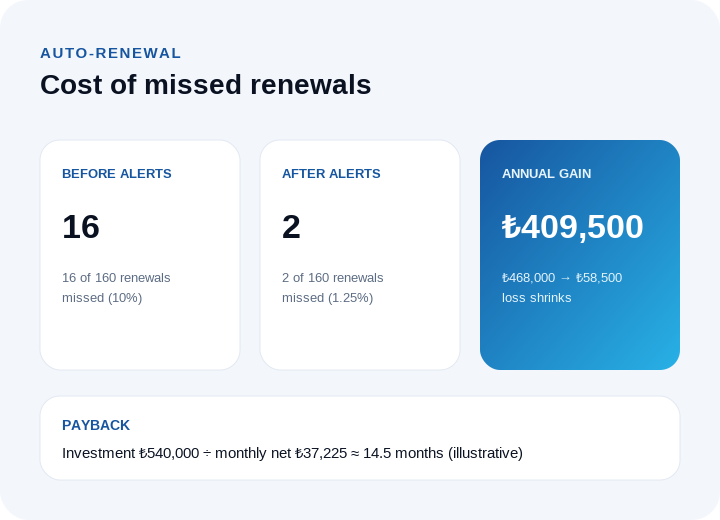
This figure depends on contract value and your miss rate; recalculate it with your own inventory. We covered the payment-term and collection side of fixed-payment contracts in our guide to tracking customer accounts (current accounts).
How Do Templates and a Clause Library Cut Drafting Time?
A template holds the fixed skeleton of a contract; a clause library holds approved, reusable paragraphs. Instead of writing from scratch or copying an old file, the author picks from the library. Your legal counsel decides the content of the clauses; the software only distributes the approved text and makes deviations visible.
Illustrative example: 180 new contracts are drafted a year. With the old method each takes 3 hours; with templates, 1.2 hours. The saving is (3 − 1.2) × 180 = 324 hours; at ₺300 an hour, 324 × ₺300 = ₺97,200 a year. The time reduction is (3 − 1.2) ÷ 3 = 60%.
- Standard-clause deviation: 144 of the 180 contracts use the standard template (144 ÷ 180 = 80%). Deviations in the remaining 36 go to legal review.
- Approval routing: The approver changes with the amount and the deviation. Thresholds are specific to each business; for example, below ₺100,000 the unit manager, above it finance.
- Library upkeep: Assign a clause owner and review the library at least once a year.
Why Do You Need Version History and an Audit Trail?
Every change becomes a new version, and who changed what and when is recorded. In a dispute you can see at a glance which text was signed and what changed after signature.
- Version comparison: The difference between v3 and v4 is visible clause by clause.
- Signed-version lock: The signed version cannot be altered; a change opens a new record as an addendum.
- Access and audit log: Who viewed, downloaded or changed which contract. Role-based permissions come into play here; we described the approach in our role-based access control guide.
- Backup: Write down restore targets for the contract archive; details are in our guide to backing up business data.
Contracts can contain trade secrets and personal data; take your legal counsel's view on access rules and KVKK (Turkey's personal data protection law) obligations.
How Is Contract Data Connected to ERP and CRM?
The amount, payment term and service level in a contract matter to other systems too. Connecting this data instead of moving it by hand removes both errors and delays. The table shows where each field is used.
| Contract field | Consuming system | What it provides |
|---|---|---|
| Counterparty and contract type | CRM | Valid contracts on the customer card; a won opportunity turns into a contract |
| Unit price and payment plan | ERP, billing | Invoice price matching the contract, payment calendar |
| Supply price and lead time | Purchasing | Order price compared with the agreed price |
| SLA targets | Support system | Ticket priority and response-time target |
| End and renewal date | Finance, budgeting | Forecast of the renewal amount |
An example gap: the contract unit price is ₺85, the invoice says ₺88, and 1,200 units ship in the month. The monthly difference is 1,200 × ₺3 = ₺3,600, or ₺43,200 a year; in a system that reads the price from the contract, that gap does not arise. For the related flows, see our articles on procurement software, CRM and ERP. How to connect the systems is the subject of our integration service.
Off-the-Shelf or Custom Software?
For standard contract types and a small number of users, an off-the-shelf solution is often enough; if you have your own approval hierarchy, distinctive fields or a deep link to ERP, custom software stands out. The table gives an idea.
| Criterion | Spreadsheet and folder | Off-the-shelf | Custom software |
|---|---|---|---|
| Setup speed | Immediate | Fast | Longer |
| Renewal alerts | Manual, person-dependent | Built in | To your rules |
| Approval flow | Configurable | Exactly your hierarchy | |
| ERP and CRM link | None | Limited to ready connectors | Built for each system |
| Cost structure | Low, but costly errors | Per-user licence | Development and maintenance |
Before deciding, write the requirements down; we explained how in our requirements analysis guide.
How Do You Calculate the Payback of Contract Management Software?
Payback is the investment divided by the monthly net benefit. The example below combines the two gains above; all figures are illustrative.
- Investment: 60 person-days × ₺9,000 = ₺540,000.
- Annual gain: avoided renewals ₺409,500 + drafting time ₺97,200 = ₺506,700.
- Annual running cost (infrastructure and maintenance): ₺60,000. Net annual benefit ₺506,700 − ₺60,000 = ₺446,700; monthly ₺446,700 ÷ 12 = ₺37,225.
- Payback: ₺540,000 ÷ ₺37,225 ≈ 14.5 months.
If the avoided-renewal gain halves, the annual net is ₺204,750 + ₺97,200 − ₺60,000 = ₺241,950, about ₺20,163 a month, and payback stretches to roughly 26.8 months. So the decision depends on measuring your miss rate realistically; first check how many notice windows you actually missed on existing contracts.
How Do You Set Up Contract Management in Six Steps?
Setup starts with an inventory; choosing software comes second. The six steps are as follows.
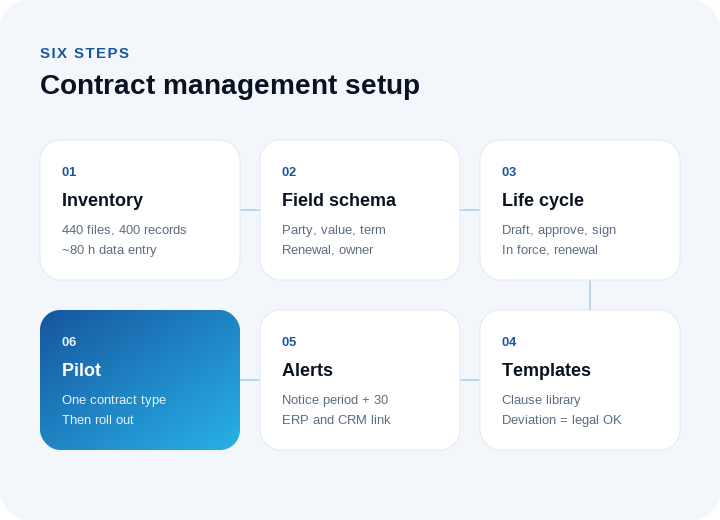
- Inventory: Collect every contract. In the example, 40 of 440 files turn out to be duplicates or expired; 440 − 40 = 400 records remain (a 9.1% clean-up). Entering the key fields takes 12 minutes per record, so 400 × 12 = 4,800 minutes, or 80 hours.
- Field schema: Make counterparty, type, value, start, end, renewal terms, notice period, owner and backup owner mandatory.
- Life cycle and approval: Define the six stages and the approval route by amount.
- Templates and clause library: Start with your three most used contract types; the content should be approved by your legal counsel.
- Alerts and integration: Set alerts from the notice period and connect contract data to ERP and CRM.
- Pilot and roll-out: Start with one contract type or one unit, then expand.
After setup, four indicators are worth watching.
| Indicator | Example calculation | Target |
|---|---|---|
| Record coverage | 372 ÷ 400 = 93.0% | 98% or more |
| Renewals decided on time | 158 ÷ 160 = 98.8% | 100% |
| Template usage rate | 144 ÷ 180 = 80.0% | 85% or more |
| Drafting time per contract | 1.2 hours | Downward trend |
What Are the Common Mistakes in Contract Management?
- Only scanning documents: If you do not enter the fields as data, the system is just a digital folder and cannot raise alerts.
- Setting alerts on the end date: If the notice period is ignored, the alert arrives too late.
- Naming a single owner: Without a backup, holidays and departures leave the contract ownerless.
- Letting templates run uncontrolled: If deviations are not visible, the library loses its purpose.
- Leaving integration to the end: If price and payment-term data are not connected, gaps keep being closed by hand.
- Opening access to everyone: Contracts with commercial terms and personal data should be protected by role-based permissions.
We recommend reading: What is the difference between CRM and ERP? Which do you need and how do you connect them?
We recommend reading: What Is a Document Management System (DMS)? Versioning, Access, Search, Retention and Payback Guide
We recommend reading: How to Manage B2B Collections and Receivables: Aging, DSO, CEI and Collection Priority Guide
We recommend reading: How to Do a Procurement Spend Analysis: Data Cleaning, Tail Spend, Price Variance and Savings Tracking Guide
We recommend reading: How to Do Key Account Management and Account Planning: Selection, Share of Wallet, QBR and Renewal Guide
We recommend reading: How to Integrate Electronic Signatures: E-Signature Flow, Identity Verification, Evidence and Payback Guide
Custom Software and Process Digitalisation with İnovabil
At İnovabil our focus is building bespoke software from scratch: custom software, ERP, CRM, e-commerce, web, mobile and integration. We do not have a ready-made contract management product; if your need is specific to your approval hierarchy, your fields or your ERP and CRM connection, we suggest assessing it in a requirements analysis, in writing, with scope, cost and the off-the-shelf alternative side by side.
We built CRM, purchasing and mobile for Avcılar İnşaat; a purchasing system for İZBAN; logistics and shipment planning with wholesale order management for Karyak; and warehouse management together with a complaint and support management system for Sleepy. Write a short description of your current contract process and systems; let us first clarify together what needs to be tracked as data.
We recommend reading: Our software development process: step by step from analysis to launch
Frequently Asked Questions
What is contract management software and what is it for?
It is software that records customer and supplier contracts in one place, tracks their life cycle, alerts you on renewal and end dates, and connects contract data to ERP and CRM. Its aim is less to store the document than to make the date and the obligation visible in time.
Why is auto-renewal risky?
When the notice window is missed, the contract rolls into a new term by itself; you pay another year for a service you no longer need, or the chance to negotiate is lost. In the example, missing 16 of 160 auto-renewals means an annual loss of ₺468,000; with alerts it falls to ₺58,500 (illustrative).
How many days ahead should a renewal alert be sent?
Count from the notice period, not the end date: first alert at the notice period plus 30 days, a reminder at plus 14, a manager alert at plus 3. With a 60-day notice period, that is day 90, day 74 and day 63.
Does contract management software replace legal advice?
No. The software manages the record, the date, the approval and the version; the content of clauses, the validity of electronic signatures and retention periods are legal matters to settle with your legal counsel. This article is not legal advice.
Should I choose off-the-shelf or custom software?
For standard contract types and few users, off-the-shelf is usually enough. If you have your own approval hierarchy, distinctive fields or a need for deep ERP and CRM integration, consider custom software. Write the requirements down before deciding.