

A dealer's order shows a higher discount than anyone expected. Sales says "I didn't change it," finance says "there was no approval," and the dealer says "that's what we were told." The database holds only the current value; who changed it, when and why is unknown. An audit log answers exactly this question: it is the tamper-proof record of who changed what in a business application, when, why, and from which value to which.
In this guide we cover how to design an audit log: the event schema, what to log and what never to log, how immutability is achieved, retention and storage maths, performance impact, query design and payback, all through a discount change in a dealer portal. All figures are representative; they are not measurements or industry averages.
What Is an Audit Log?
An audit log is an append-only ledger of the business-relevant changes and critical accesses in an application, recorded with actor, action, object, time and before-and-after values. Its goal is not debugging but accountability: being able to prove who is responsible for a change and why it happened.
It serves three purposes: resolving disputes, giving internal audit evidence, and establishing impact after a security incident.
We recommend reading: What is role-based access control (RBAC)? A guide to role design and least privilege
What Is the Difference Between an Audit Log, an Application Log and Monitoring?
They answer different questions and should not live in the same place. An application log answers "what did the system do," monitoring answers "is the system healthy," and an audit log answers "what did a person or service account change in business data."
| Topic | Application log | Monitoring | Audit log |
|---|---|---|---|
| Question | What did the system do, where did it fail? | Is the system healthy and fast? | Who changed what, when and why? |
| Reader | Developer | On-call team | Auditor, manager, security |
| Can it be changed? | Rotated, deleted | Sampled, summarised | No; append only |
| Retention | Short, days to weeks | Short to medium | Long; the period is set by specialists |
| Loss tolerance | Some loss is accepted | Sampling is accepted | No loss for critical events |
To measure technical health, see our software monitoring guide; this article focuses on recording changes to business data.
Which Fields Should an Audit Event Carry?
Every event should answer "who, what, when, which object, from which value to which, from where and why" on its own. The fields below are a sufficient core for most business applications.
| Field | Meaning | Example |
|---|---|---|
| event_id | Unique, sortable identifier | e-9f2c41 |
| time | UTC timestamp, assigned on the server | 2026-11-14T09:12:44Z |
| actor | User or service account ID and role | u-217, sales rep |
| action | Fixed name in object.verb form | order.discount_change |
| object | Type and ID | order / SO-48213 |
| before / after | Only the changed, allow-listed fields | discount: 5% → 12% |
| reason | Mandatory justification or ticket number | Campaign agreement |
| source | Application, session, request origin | dealer portal, session s-88a |
| correlation_id | Ties together all events of one request | r-5d1 |
| result | Succeeded, rejected, pending approval | pending approval |
Assign the timestamp on the server, not the client, and store only the changed fields for before-and-after values. Keeping a full copy of the record multiplies volume; we calculate that below.
What Should Be Logged and What Should Never Be Logged?
Log actions that have business consequences; never log data that would turn the ledger into a leak.
| Group | Decision | Reason |
|---|---|---|
| Write operations (create, change, delete) | Log | The core of most disputes |
| Permission and role changes | Log | Trace of privilege abuse |
| Sign-in, sign-out, failed sign-in attempts | Log | Sign of account takeover |
| Rejected unauthorised actions | Log | An attempt is also a finding |
| Reads of sensitive records (personal data, cost) | Log selectively | Balance of volume and value |
| Ordinary list and search reads | Do not log | Inflates volume, low value |
| Passwords, tokens, keys, card numbers | Never log | Secret leakage |
| Full content of free-text fields | Mask or do not log | Unexpected personal data |
A practical rule: use an allow-list for before-and-after values. In the example, 8 of the order's 40 fields are tracked (20%); the rest never enter the audit log. Store users by ID rather than by name; the person's details are reached through the ID. Whether personal data may sit in an audit log, how erasure requests are handled and what retention duties apply under KVKK (Turkey's personal data protection law) should be settled with your legal counsel.
Read events are voluminous. In the example, writes are 8,000 events a day and reads are ten times that, 80,000. Logging all of them at 400 bytes adds 80,000 × 400 = 32 MB a day (3.3 times the write volume); logging only reads on sensitive screens (5% = 4,000 events) needs 4,000 × 400 = 1.6 MB.
How Do You Make an Audit Log Immutable?
Immutability means that even the application that writes the log cannot alter it afterwards. If a record can be changed, it has no evidential value in a dispute.
| Method | How it works | Limit |
|---|---|---|
| Append-only permission | The application account may only insert into the audit table; no update or delete rights | A database administrator can still alter it |
| Separate store and administrator | The log is kept apart from the application database under separate access | Operational burden grows |
| Hash chain | Each event's digest includes the previous event's digest; change one record and the later digests no longer match | Does not prevent change, makes it detectable |
| Daily seal | The day's final digest is stored elsewhere or published externally | Same-day forgery is only spotted the next day |
A hash chain works like this: the digest of event n is computed from the event's content and the digest of event n−1. Someone who edits a record in the middle must recompute every later digest, and the daily seal defeats that too. Verification is cheap: 8,000 × 365 = 2,920,000 events a year, checked by a job that verifies 100,000 events per second, takes 2,920,000 ÷ 100,000 = 29.2 seconds (the speed is representative).
Access to the audit log must itself be recorded. Read permission is defined as a separate, narrow role. Write your backup and encryption expectations down alongside our guides on data backup and data encryption and key management.
How Long Should an Audit Log Be Kept and How Much Space Does It Take?
Legal obligations set the retention period; how many years that is should be answered by legal counsel and your financial advisor (certified accountant), not by developers. The software side's job is to calculate the cost of whichever period is chosen and design the architecture accordingly.
In the dealer portal example the order flow produces 8,000 audit events a day, each averaging 1,200 bytes (JSON, including before-and-after values).
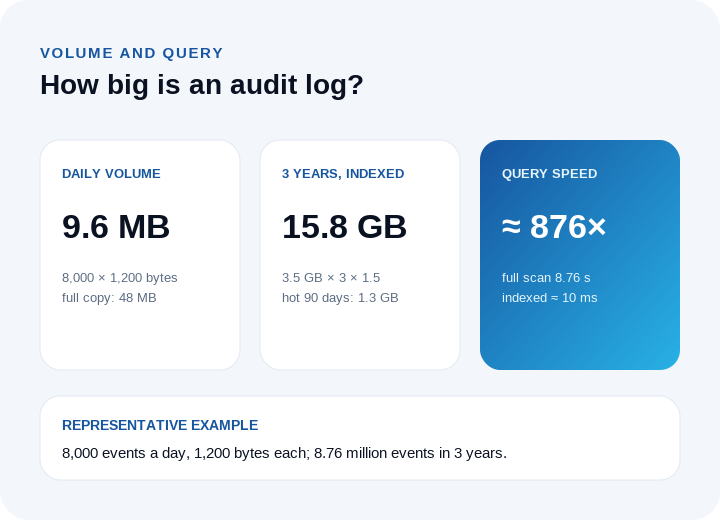
- Daily volume: 8,000 × 1,200 = 9,600,000 bytes ≈ 9.6 MB.
- Raw yearly volume: 9.6 MB × 365 = 3,504 MB ≈ 3.5 GB.
- If a full copy were stored: 6,000 bytes per event, 8,000 × 6,000 = 48 MB a day; the difference is 6,000 ÷ 1,200 = 5 times. That is 17.52 GB a year.
- Index overhead: we assume search indexes add 1.5 times the raw volume.
| Retention period (example) | Raw volume | With indexes (× 1.5) |
|---|---|---|
| 1 year | 3.504 GB | 5.256 GB |
| 3 years | 10.512 GB | 15.768 GB |
| 5 years | 17.52 GB | 26.28 GB |
| Hot tier: last 90 days | 864 MB | 1.296 GB |
Storage is not the bottleneck; keeping the last 90 days on a fast (hot) tier and older data on a cheap, slow (cold) tier is enough.
How Does an Audit Log Affect Application Performance?
A record written synchronously inside the same transaction adds a small delay to every request; a record handed to a queue almost removes that delay but requires you to manage the risk of loss. The right choice depends on the event's importance.
| Approach | Added latency (example) | Loss risk | Suitable events |
|---|---|---|---|
| Synchronous write (same transaction) | 8 ms | None; the action and its record succeed or fail together | Discounts, permissions, deletions |
| Hand to a queue (asynchronous) | 1 ms | Events can be lost if the queue or writer fails; needs retries and a durable queue | Sensitive reads, low-risk events |
| Outbox (write in the same transaction, move later) | 2 ms | None; the move may lag | Most critical events |
If an order transaction takes 120 ms, synchronous writing adds 8 ÷ 120 ≈ 6.7% and the queue adds 1 ÷ 120 ≈ 0.8%. The difference becomes visible in bulk jobs: in an import of 20,000 events, synchronous writing (6 ms per event) adds 120 seconds, or 2 minutes; through a queue (0.5 ms) the same job adds 10 seconds. The average rate is low (8,000 ÷ 86,400 ≈ 0.09 events per second); the issue is not speed but bulk jobs and consistency. Money, permission and deletion events are recorded in the same transaction as the business action; events whose loss is tolerable go to a queue.
How Do You Design Search and Queries for an Audit Log?
An audit log is read when a dispute arrives, not when it is written, so queries must be designed from the start. Four questions come up most: what happened to this object, what did this person do, what changed in this time window, and what was the effect of this request.
Four indexes are enough: (object type, object ID, time), (actor, time), (action, time) and the correlation ID.
Over three years, 8,000 × 365 × 3 = 8,760,000 events accumulate. A full scan reading 1,000,000 rows per second takes 8.76 seconds; finding an order's average of 4 events through an index takes about 10 ms. The difference is 8.76 s ÷ 0.01 s = 876 times (the timings are representative). Present results as a timeline; an auditor should be able to read the story at a glance.
How Does an Audit Log Settle a Discount Dispute?
A discount change, if recorded properly, shows within minutes who changed it, when and with what approval. In our example, order SO-48213 has a list value of ₺200,000, the sales rep's discount authority is up to 8%, and anything higher needs manager approval.
| Time (UTC) | Actor | Action | Before → after | Status |
|---|---|---|---|---|
| 09:12:44 | u-217 (sales rep) | order.discount_change | 5% → 12% (₺190,000 → ₺176,000) | Pending approval |
| 09:20:03 | u-031 (sales manager) | order.discount_approve | Threshold of 8% exceeded, reason: campaign agreement | Approved |
| 09:41:10 | system | invoice.create | Amount ₺176,000 | Succeeded |
The calculation: ₺200,000 × 0.95 = ₺190,000; ₺200,000 × 0.88 = ₺176,000; the difference is ₺14,000. Three rows end the argument: the rep made the change, the manager approved the part above the threshold, and the invoice was issued at the approved amount. Had the two actors been the same person, the record would also have exposed a segregation-of-duties violation. For approval chain design see our workflow and approval software guide, and for the scope of a dealer portal our B2B e-commerce article.
How Do You Calculate the Payback of an Audit Log?
Payback is the time saved in disputes and audit preparation, set against the investment and running cost. We did not count prevented security losses, because they are hard to estimate. The assumptions are representative.
- Disputes and reviews: 30 cases a month; assembling evidence by hand from tables takes 3 hours, with the log 0.5 hours. Saving 30 × (3 − 0.5) = 75 hours × ₺300 = ₺22,500 a month.
- Audit preparation: 2 audits a year; 8 hours instead of 40. Saving 2 × (40 − 8) = 64 hours × ₺300 = ₺19,200 a year = ₺1,600 a month.
- Gross monthly benefit: ₺22,500 + ₺1,600 = ₺24,100.
- Running cost: storage, indexes and maintenance of ₺2,100 a month.
- Monthly net: ₺24,100 − ₺2,100 = ₺22,000.
- Investment: 24 person-days × ₺9,000 = ₺216,000.
Payback is ₺216,000 ÷ ₺22,000 ≈ 9.8 months. Sensitivity: if disputes drop to 12 a month, the saving is 12 × 2.5 = 30 hours × ₺300 = ₺9,000, gross ₺10,600, net ₺8,500; payback is ₺216,000 ÷ ₺8,500 ≈ 25.4 months. If only half the benefit is realised, net is ₺11,000 and payback ≈ 19.6 months. Re-run it with your own case count.
How Is an Audit Log Project Run?
An audit log added later is always incomplete; the costliest mistake is leaving the event schema and scope to the last week. A six-step path works.
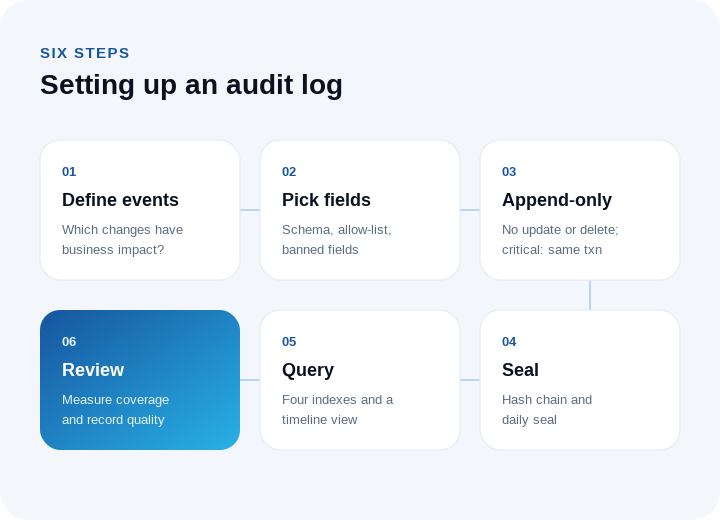
- Define events: Which change points have business consequences? List them and give each a fixed action name.
- Pick fields: Write down the schema, the allow-list and the banned fields.
- Write append-only: Restrict write rights; record critical events in the same transaction as the business action.
- Seal: Set up the hash chain and the daily seal; schedule verification.
- Query: Build indexes for the four core queries and a timeline screen.
- Review: Measure coverage and record quality regularly.
Two indicators help. Coverage: if 51 of 60 change points are logged, 51 ÷ 60 = 85%; the target is 100% for critical points. Quality: if 194 of a 200-event sample of the day's 8,000 events carry every mandatory field, 194 ÷ 200 = 97.0%; a missing field makes the record useless in a dispute. For how security is built through the whole lifecycle see our secure software development guide, and for exposed endpoints our API security article.
What Are the Common Audit Log Mistakes?
- Treating the application log as an audit log: A log that rotates and is deleted is not enough as evidence.
- Not making the reason mandatory: The "what" is known but without the "why" the dispute stays open.
- Logging secrets or full personal data: The ledger becomes the least protected leak point of the application.
- Giving the application account delete rights: Immutability exists only on paper.
- Choosing the retention period alone: Set it with legal counsel and your financial advisor.
We recommend reading: How to Build Customer Consent Management: Channel-Level Records, Double Opt-In and Sync Guide
We recommend reading: What Is a Business Rules Engine and Decision Table? Rule Management, Conflict Checks and Payback Guide
We recommend reading: How to Design Bulk Data Import from CSV and Excel: Validation, Error Report and Rollback Guide
We recommend reading: How to Design an E-Commerce Promotion and Coupon Engine: Order, Margin Floor and Abuse Prevention Guide
We recommend reading: How to Design a Loyalty Points Program: Earn Rules, Ledger, Expiry and Liability Guide
We recommend reading: How to Generate PDF Documents and Labels from Software: Templates, Page Breaks, Barcodes and Payback Guide
We recommend reading: How to Set Up a Data Archiving and Retention Policy: Data Tiers, the Archive Rule, Legal Hold and Deletion Guide
We recommend reading: How to Reconcile Online Payments: Order, Provider and Bank Matching, Net Payout and Chargeback Guide
We recommend reading: How to Set Up Sales Commission Calculation Software: Quota, Tiers, Clawbacks and Cost Guide
We recommend reading: How to Set Up Centralized Log Management: Structured Logs, Retention and Cost Guide
We recommend reading: User Account Lifecycle Management: How to Handle Joiners, Movers and Leavers
We recommend reading: What Is Process Mining? Event Logs, Variants, Conformance Checking and Payback Guide
We recommend reading: How to Set Up Data Governance: Roles, Critical Data Elements, Quality Rules and a 90-Day Plan
We recommend reading: How to Handle Data Subject Requests (Access, Correction, Deletion) in Software: Data Map, Verification and Proof Guide
We recommend reading: How to Set Up Secrets Management: Inventory, Vault, Rotation, Short-Lived Credentials and Leak Response Guide
We recommend reading: How to Integrate Electronic Signatures: E-Signature Flow, Identity Verification, Evidence and Payback Guide
Secure, Traceable Custom Software with İnovabil
At İnovabil our focus is building company-specific software from scratch. Role-based access, audit trails and secure hosting are among the registered capabilities of the business applications we develop. We recommend writing down in the requirements phase which changes will be tracked, which fields stored and for how long; for retention and personal data, work with your legal counsel.
We have built CRM, purchasing and mobile for Avcılar İnşaat; a purchasing system for İZBAN; and shipment planning and wholesale order management for Karyak. Send us a short summary of your approval and order processes and we will work out together which events should be recorded.
We recommend reading: Our software development process: step by step from analysis to launch
Frequently Asked Questions
What is an audit log and what is it for?
It is the tamper-proof record of who changed what in an application, when, why and from which value to which. It is used to settle disputes, give internal audit evidence and establish impact after security incidents.
Is an audit log the same as an application log?
No. An application log keeps technical events and errors for a short time and is usually rotated and deleted. An audit log keeps changes to business data, append-only and for long retention; its reader is an auditor or manager, not a developer.
What should never be written to an audit log?
Passwords, tokens, keys and card numbers are never written; free-text fields are masked or left out. For personal data details, consult your legal counsel.
How much space does an audit log take?
In the example, 8,000 events a day × 1,200 bytes = 9.6 MB; 3.5 GB a year and about 15.8 GB over three years with indexes. If you store a full copy, volume grows 5 times.
Does an audit log slow the application down?
In the example, synchronous writing adds about 6.7% to a 120 ms transaction and a queue adds 0.8%. Critical events are recorded in the same transaction as the business action; events whose loss is tolerable go to a queue. In bulk jobs the write mode is decisive.