

The moment you open an API to dealers, partners or customers, three questions appear: who is calling, how much may they call, and how is that usage measured and billed? API key, quota and usage plan management turns the answers into a system. Businesses that hand out one shared key learn this the hard way: a partner's faulty loop slows everything down, or nobody can say who uses what.
In this guide we cover client registration, key types and lifecycle, usage plans, how quota and rate limit work together, usage metering and billing, anomaly detection, and the payback calculation. Authentication details are in our API security guide and version migrations in our API versioning article; here we deal only with access and usage management. All figures are illustrative; they are not real prices or industry averages.
What Are API Keys, Quotas and Usage Plans?
An API key is a secret value that identifies a client and accompanies every request. A quota is the total use allowed in a period (a day, a month). A rate limit is the number of requests allowed in a short window. A usage plan bundles these limits, the scope and the price into one package: Starter, Standard, Enterprise and so on.
This structure also gives you fair sharing and a revenue model: if one of a hundred clients can consume the system alone, the other ninety-nine are punished. For flows that go from you to the client, see our webhook guide; for the general concept, our API integration article.
We recommend reading: Our integration service
Which Key Types and Client Records Do You Need?
Register the client first, then give it a key. The client record holds the client name, owner emails (at least two people), the plan, permitted scopes and the environment. The key is bound to this record, so when a key is revoked you know who is affected, and when a client moves you know which keys go with it.
| Distinction | Types | What it is for |
|---|---|---|
| Environment | Test (sandbox) and live | A test key cannot reach real data and has a low quota |
| Scope | Read, write, admin | A client that lists orders cannot delete them |
| Where it runs | Server and client side (browser, mobile) | A key in a browser is visible to everyone; keep its scope narrow |
| Ownership | Client, team, person | When a person leaves, the key passes to the team |
A scope defines which endpoints a key can reach, while a role defines your own team's authority in the admin panel; we covered role design in our role-based access control article.
How Is the Key Lifecycle Managed?
A key is an asset too, and it passes through six states. Writing down what happens in each state removes the question "is this key still valid?"
| State | What happens | Rule |
|---|---|---|
| Create | The key is generated and shown once | Only a hash is stored on the server |
| Activate | Plan and scope are attached | The first call is recorded |
| Rotate | A new key is issued, the old one works for a while | Two active keys, a 14-day overlap window |
| Suspend | The key is paused temporarily | Abnormal use or a payment problem |
| Revoke | Closed permanently | Leak, end of contract, no owner |
| Expire | Becomes invalid automatically | Test key 90 days, live key 365 days (illustrative) |
Two active keys during rotation give a seamless switch: the client puts the new key into its system, verifies it, then turns the old one off.
Issuing a key safely comes down to a few habits: show it only once, store only its hash, tag it with a prefix such as pk_live_ so it can be recognised, and never write it to any log in plain form. Storage details are in the API security article.
What If a Key Leaks?
Four steps: detect, revoke, issue a new key, review the impact. The target is at most 1 hour from detection to revocation. The rate limit makes that target visible: with a 300 requests/minute limit on the Standard plan, a leaked key can make at most 300 × 60 = 18,000 requests in an hour. If revocation takes 24 hours the ceiling is 300 × 60 × 24 = 432,000 requests, so delay multiplies the damage 24 times. In the impact review, the key's access records show what data was read; where personal data is involved, go to a legal adviser for notification duties.
How Are Usage Plans Designed?
A plan is the single table that says how much and how a client may use the API. Three illustrative tiers:
| Plan | Rate limit | Monthly quota | Concurrent | Monthly price | Per 1,000 units |
|---|---|---|---|---|---|
| Starter | 60 / min | 100,000 units | 3 | ₺1,500 | ₺15 |
| Standard | 300 / min | 1,200,000 units | 20 | ₺12,000 | ₺10 |
| Enterprise | 1,200 / min | 6,000,000 units | 60 | ₺50,000 | ₺8.33 |
Separate plans by scope as well: Starter read-only, Standard read and write, Enterprise bulk operations and dedicated support.
Do Quota and Rate Limit Fit Each Other?
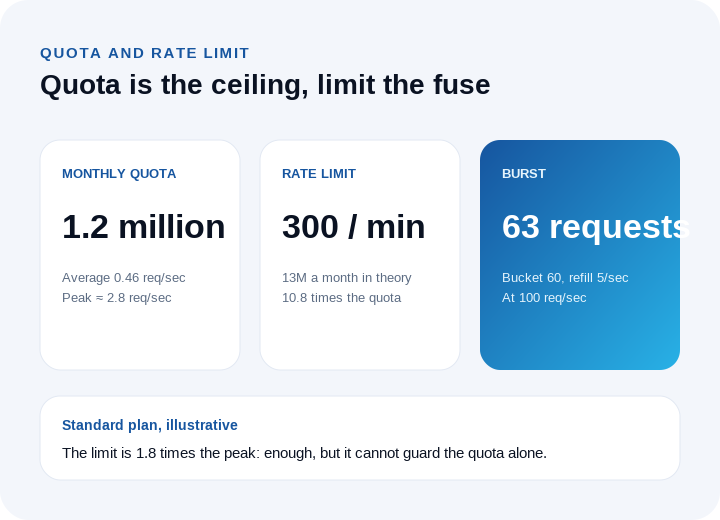
Take the Standard plan. A monthly 1.2 million units, divided across a 30-day month of 2,592,000 seconds, averages 1,200,000 ÷ 2,592,000 ≈ 0.46 requests/sec. Traffic does not flow evenly; with a peak-to-average ratio of 6, the peak is 0.46 × 6 ≈ 2.8 requests/sec, about 167 requests a minute.
A 300/min rate limit is 1.8 times the peak, leaving room for normal bursts. But if 300/min were used without a break, it would make 300 × 43,200 minutes = 12,960,000 requests a month, which is 10.8 times the quota. The result: the rate limit does not protect the quota on its own; the quota is the real ceiling and the rate limit is the fuse that cuts instantaneous load. Setting the limit at 1.5–2 times the peak is reasonable.
How Is a Burst Budget Calculated?
In a token bucket model the bucket holds 60 tokens and refills at 5 tokens per second (300/min). If a client suddenly sends 100 requests per second, the tokens available in t seconds are 60 + 5t, while requests arriving are 100t. The equality 100t = 60 + 5t gives t = 60 ÷ 95 ≈ 0.63 seconds; about 63 requests pass and the rest get 429. Once empty, the bucket takes 60 ÷ 5 = 12 seconds to refill. The bucket should be large enough for a legitimate bulk call; any larger and bursts become unlimited.
What Should Happen When the Quota Is Exceeded?
There are three behaviours, chosen per plan. With a hard limit, requests are rejected with 429 once the quota is full, and the response says when to retry. With a soft limit, use up to 110% is allowed (1,320,000 for 1,200,000) and the client is warned. On a plan that allows overage, the excess is billed at a unit price. A common practice: the first warning at 80% (960,000), the second at 100%.
Put in the response which limit was hit, when it resets and the remaining allowance; for a worked example in the docs, see our API documentation guide.
How Is Usage Measured and Billed?
Not every request costs the same. A stock lookup returns one record; a bulk export processes thousands. So use weighted units instead of request counts: a light endpoint is 1 unit, a heavy endpoint 5 units. Example: 700,000 light and 80,000 heavy requests a month come to 700,000 + 80,000 × 5 = 1,100,000 units, 91.7% of the quota. Counting requests alone would show 780,000, about 65%, and the heavy user would look cheap.
Billable usage needs three safeguards: give every request an ID to prevent double counting, define the period cut-off (the last second of the month, the time zone) clearly, and keep the raw records after the period for disputes. Example: a Standard client logged 1,390,000 units in a month, and 4,170 of them (0.3%) were repeated request IDs. Valid usage is 1,385,830 units and the overage 185,830 units; at ₺5 per 1,000 units that is 185,830 ÷ 1,000 × 5 ≈ ₺929.15, so the monthly bill is ₺12,000 + ₺929.15 = ₺12,929.15. We covered the billing logic in our subscription billing article; consult your accountant for period cut-off and revenue recording.
How Is Abnormal Usage Detected?
Compare a client against its own history instead of using a fixed threshold. If the client's 28-day daily median is 40,000 units, the hourly median is about 1,667, and 5 times that, 8,333, is the warning threshold. If a bug sends the client into an endless loop at 14 requests per second, it produces 50,400 requests an hour; the 8,333 threshold is crossed in about 595 seconds, roughly 10 minutes. With a daily threshold (5 × 40,000 = 200,000) the same loop would be caught in about 4 hours.
Build a graduated response: a warning goes to the owner by email (5 times), automatic throttling starts at a higher threshold (10 times), and a full suspension needs a human decision. Protection based on IP and session against bots is a separate subject, which we covered in our bot traffic management article.
How Are Per-Client Cost and Margin Calculated?
The plan price must cover infrastructure cost. Say a light unit costs ₺0.004 (₺4 per 1,000 units). With the quota fully used, the plans earn:
| Plan | Revenue | Cost (quota full) | Margin | Margin rate |
|---|---|---|---|---|
| Starter | ₺1,500 | ₺400 | ₺1,100 | 73.3% |
| Standard | ₺12,000 | ₺4,800 | ₺7,200 | 60.0% |
| Enterprise | ₺50,000 | ₺24,000 | ₺26,000 | 52.0% |
Can two clients fill the same quota and still cost differently? Client A made 900,000 light and 60,000 heavy requests; client B made 300,000 light and 180,000 heavy. Both used 1,200,000 units and cost the same: for A, 900,000 × 0.004 + 60,000 × 5 × 0.004 = ₺4,800; for B, 300,000 × 0.004 + 180,000 × 5 × 0.004 = ₺4,800. The request counts, 960,000 and 480,000, differ twofold, but the unit shows the true cost.
A third example shows the value of overage billing: client C used 2,400,000 units. The cost is 2,400,000 × 0.004 = ₺9,600. If the overage is not billed, the margin is ₺12,000 − ₺9,600 = ₺2,400 (20%); if the overage of 1,200,000 units × ₺5 ÷ 1,000 = ₺6,000 is billed, revenue is ₺18,000 and the margin ₺8,400 (46.7%).
How Are Plan Changes, Sandbox and Cleanup Handled?
An upgrade takes effect immediately and a downgrade at the end of the period. Example: moving from Standard to Enterprise with 20 days left in the month. The quota increase is prorated: (6,000,000 − 1,200,000) × 20 ÷ 30 = 3,200,000, so the period quota becomes 1,200,000 + 3,200,000 = 4,400,000 units, and the price difference (₺50,000 − ₺12,000) × 20 ÷ 30 ≈ ₺25,333 is billed. An immediate downgrade could push already-used quota over the new limit at once.
The test key's quota should be far below live: 1,000 requests a day is 2.5% of Standard's daily share of 1,200,000 ÷ 30 = 40,000 units.
Clean up unused keys. Send a warning to a key with no calls for 90 days, and suspend it if there is no reply. In the sample inventory, 27 of 180 active keys (15%) had been silent for 90 days, and the owner of 18 (10%) had left the company. When a partner's team changes, handing over key ownership should be a written step.
Which Metrics Should You Track?
| Metric | Example value | What it shows |
|---|---|---|
| Active keys | 180 | Size of the managed surface |
| Share of keys silent for 90 days | 27 ÷ 180 = 15% | Need for cleanup |
| Key age, 90th percentile | 410 days | Rotation lag |
| Rotation compliance | 153 ÷ 180 = 85% | Keys within the age limit (365 days) |
| Quota overage events | 9 / month | Plan mismatch |
| Leak response time | 38 min (target 60) | Incident readiness |
Keep a usage dashboard per client: daily requests, error rate, most-called endpoint and quota percentage. Offering the same view to the client as self-service (its own usage, key rotation) reduces support requests. For monitoring principles see our software monitoring article, and for capacity under load our scalability guide.
How Is Payback Calculated?
There are three benefit items. Support: 90 "my key does not work" or "is the quota full?" tickets a month × 40 min = 60 hours; if self-service and early warnings cut them by 60%, that is 36 hours × ₺300 = ₺10,800. Abuse: 2 incidents a year × ₺60,000 = ₺120,000 expected cost; a 70% reduction saves ₺84,000 a year, ₺7,000 a month. Catching unbilled overage revenue: ₺5,000 a month. Gross benefit is ₺10,800 + ₺7,000 + ₺5,000 = ₺22,800, monthly running cost (dashboards, storage) ₺4,800, net ₺18,000.
If the build is 36 person-days × ₺9,000 = ₺324,000, payback is 324,000 ÷ 18,000 = 18 months. If the benefits halve, gross is ₺11,400, net ₺6,600 and the period stretches to about 49 months, so client count and incident frequency are the key variables.
How Do You Set It Up in Six Steps?
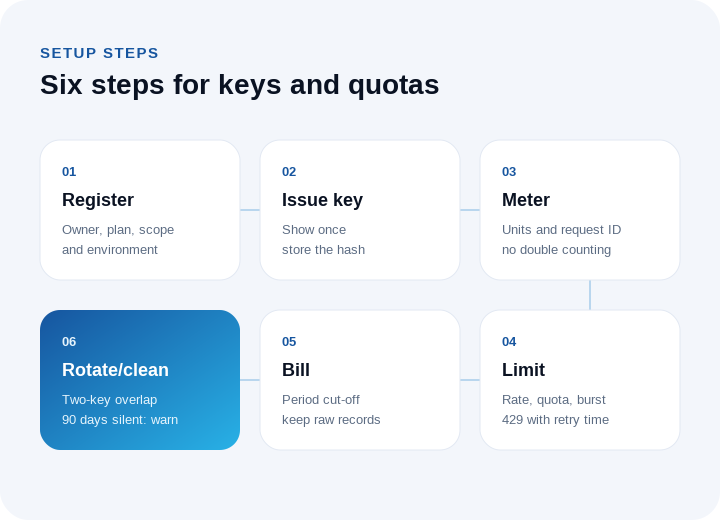
- Client registration: Open a record holding the name, at least two owners, plan, scope and environment.
- Issuing the key: Show it once, store its hash, add a prefix.
- Metering: Count with weighted units and request IDs; prevent double counting.
- Limiting: Set the rate limit at 1.5–2 times the peak and the quota per plan; add retry information to the
429response. - Billing: Define the period cut-off and keep raw records for the dispute window.
- Rotation and cleanup: Rotate with two active keys, warn on keys silent for 90 days, aim to revoke a leaked key within 1 hour.
We recommend reading: How to Price and Package a SaaS Product: Value Metric, Tiers, Discounts and Price Testing Guide
We recommend reading: What Is an API Gateway? Jobs, Added Latency, Single Point of Failure and Payback Guide
We recommend reading: How to Set Up Secrets Management: Inventory, Vault, Rotation, Short-Lived Credentials and Leak Response Guide
We recommend reading: How to Design a REST API: Resource Naming, Pagination, Error Format and Idempotency Guide
Working with İnovabil on API Access and Usage Management
At İnovabil we build company-specific software from scratch: custom software, e-commerce, CRM, ERP, web, mobile and integration. We suggest writing down, during requirements analysis, which client gets which scope on an externally exposed API and how it will be monitored with role-based authorization and audit logs; if plan, quota and billing decisions are settled before code is written, later change costs drop.
We built CRM, purchasing and mobile for Avcılar İnşaat; a purchasing system for İZBAN; logistics and shipment planning plus wholesale order management for Karyak; and warehouse management plus a complaint and support system for Sleepy. If you would like to discuss the quota and plan model in this guide for your own API, send us a short summary of your usage scenarios and we will produce a written assessment together.
We recommend reading: Our software development process: step by step from analysis to launch
Frequently Asked Questions
Is an API key the same as a token?
No. A key is a long-lived identity that recognises a client; a token is usually a short-lived session or authorization document. Many systems use both: the key identifies the client and the token grants authority to act for a user.
What is the difference between a quota and a rate limit?
A rate limit caps the number of requests in a short window (300 a minute), while a quota caps the period total (1.2 million units a month). The rate limit cuts instantaneous load; the quota decides total use and the bill. They should be designed together and consistently.
How often should keys be rotated?
There is no single right answer; the example used an illustrative 365-day lifetime for live keys. What matters most is that rotation happens without downtime using two active keys, and that it can be done immediately on a suspected leak.
Why should clients be told when the quota is exceeded?
Surprise cut-offs create the most support tickets and loss of trust. Warnings at 80% and 100%, plus remaining allowance and reset time in the response, show the client the cause and the fix (add-on pack, plan upgrade).
Why are unused keys a problem?
Because an ownerless key is watched by nobody, and if it leaks, noticing is delayed. Warning on keys with no calls for 90 days and suspending them without a reply shrinks the exposed surface.