

The dealer portal's order API works, but every developer who wants to integrate writes to you first: where do I get a key, what date format is expected, what does "422" mean? Every question is an email, and every email costs an hour. The cause is usually not the API but how it is explained. That is why how to write API documentation is not a technical nicety but a cost question: good documentation takes the integrating developer to the first successful call without ever contacting you.
In this guide we cover the document types, a complete endpoint template, the error code table, versioning and deprecation notices, the time to first call, the payback math and a six-step preparation plan. The example system is a dealer portal order API; all figures are illustrative, not measurements from any specific business.
What Is API Documentation and Who Is It For?
API documentation is the written guide that tells an integrating developer what an API does, how to call it and what to do when it returns an error.
That is why it is written like a product rather than a code commentary: the reader is defined (a dealer's developer, an ERP integrator, a mobile team), the goal is defined (send the first order through the API) and success is measurable. We explained what an API is and how it connects systems in our API integration guide; here the subject is the text in the hands of the person who builds that connection.
We recommend reading: Our integration service
What Parts Does API Documentation Consist Of?
Build five parts, each answering a separate question.
| Document type | Question it answers | Content | Updated when? |
|---|---|---|---|
| Getting-started guide | How do I make my first call? | Account and key, first request, expected response | When authentication or sign-up changes |
| Reference | What exactly does this endpoint expect? | Address, method, fields, response, errors, sample | With every endpoint change |
| Concepts and guides | In what order do I do this job? | Order lifecycle, pagination, retries, status transitions | When a business rule changes |
| Errors and limits | I got an error; what now? | Error code table, rate limit, retry advice | When a new error or limit is added |
| Changelog | What changed, and will it break my code? | Dated release notes, deprecation notices | With every release |
A reference is like a dictionary for a first-time reader: it does not show the way. If you offer event notifications, describe the signature and retry topics from our webhook guide on a page of their own.
How Do You Write Complete Documentation for One Endpoint?
Write every endpoint with the same pattern: the reader learns it once and finds the same information in the same place on every page. The template has seven sections.
- Purpose: One sentence. Example: "Creates a new order on behalf of a dealer."
- Address and method:
POST /v1/orders. - Headers and authentication: Which headers are required and which permission is needed.
- Request fields: Name, type, required or not, format and constraints.
- Successful response: Status code, body and field descriptions.
- Errors: Error codes specific to this endpoint and what to do about them.
- Working sample: A request that can be copied and run, plus a real response.
In the example, the order request carries these fields. The table is the most-read part of the reference; each row answers a question in advance.
| Field | Type | Required | Description and example |
|---|---|---|---|
dealer_code | text | Yes | The ordering dealer. Example: BYI-0142 |
items | list | Yes | At least 1, at most 50 items (illustrative limit) |
items[].product_code | text | Yes | Product code from the catalog. Example: KB-100 |
items[].quantity | integer | Yes | At least 1. Example: 20 |
delivery_date | date (YYYY-MM-DD) | No | If empty, the first available day is assigned. Example: 2026-12-03 |
Idempotency-Key (header) | text | Recommended | If the same request arrives twice, only one order is created |
Successful response: status 201, order_id, status ("received") and total. Say the sample request has two items, 20 units × ₺85 = ₺1,700 and 10 units × ₺120 = ₺1,200; the total in the response is ₺1,700 + ₺1,200 = ₺2,900.
How Should Authentication Be Explained?
The authentication explanation is the first page of the getting-started guide, because it is where readers get stuck first. Write three things clearly: where to get the key, where to put it in the request and what they will see if it is wrong.
- Getting the key: Creating an account, the difference between a sandbox key and a live key, and how many minutes it takes for the key to be ready.
- Adding it to the request: The exact header name and format, and a copyable sample (make it obvious that the key in the sample is fake).
- Failure case:
401if the key is missing,403if permission is lacking; explain the two cases separately.
A real key, password or customer data never appears in the documentation as an example. We covered the permission model itself and security decisions such as token lifetime and rate limits in our API security guide.
How Are Error Codes Documented?
Errors are the most-read page of the documentation, because readers usually arrive when something has gone wrong. For every error, write "what happened" and "what should I do" together.
| Code | Meaning | Example cause | What should the reader do? |
|---|---|---|---|
| 401 | Authentication failed | Key missing or expired | Renew the key, check the header name |
| 403 | No permission | Another dealer's order was requested | Check the key's scope |
| 409 | Conflict | The same Idempotency-Key arrived with a different body | Generate a new key or reuse the earlier response |
| 422 | Invalid field | quantity sent as 0 | Fix it using the field value in the response |
| 429 | Rate limit exceeded | More than 100 requests per minute (illustrative) | Wait for the Retry-After time, then retry |
| 500 / 503 | Server error or maintenance | Temporary failure | Retry with growing intervals; if it persists, report it with the request ID |
Keep the error body in a fixed shape too: code (a short name for machines), message (an explanation for humans), field (which field), request_id (for support) and, where possible, a solution hint. The request ID is valuable: the reader sends it, and you find the entry in the logs with one search.
How Are Versioning and Deprecation Announced?
Versioning is the promise to the reader that code written today will not break tomorrow. To keep it, first define which changes are backward compatible and which are not.
| Change | Backward compatible? | How is it announced? |
|---|---|---|
| Adding a new optional field to a response | Yes | A note in the changelog |
| Adding a new endpoint | Yes | Changelog and reference |
| Renaming a field or changing its type | No | New version (v2) and a deprecation notice |
| Requiring a new mandatory field | No | New version and a deprecation notice |
| Removing an endpoint | No | Deprecation process, then shutdown |
A breaking change arrives as a new version (/v2/orders); the old version does not close right away. An illustrative policy: at least 6 months, that is 180 days, from the deprecation notice to shutdown. The process runs like this.
- Day 0: Announcement. A deprecation warning in the changelog, by email and in a response header, with the shutdown date and a migration guide.
- Day 90: Reminder. A direct email to integrators still calling the old version.
- Day 150: Final warning. One-to-one conversations with the remaining integrators.
- Day 180: Shutdown. The old version returns a descriptive error and a migration link.
Manage the process with usage data. In the example, 40 integrators call v1 on the day of the announcement. If 22 remain on day 90, (40 − 22) ÷ 40 = 45% have migrated; if 6 remain on day 150, (40 − 6) ÷ 40 = 85% have migrated. Talking one-to-one with the remaining 6 is how you avoid surprises on shutdown day. If integrators have long release cycles or a contract commits you to a period, extend the timeline.
We recommend reading: What is the software development life cycle (SDLC)?
How Do You Make Sure Samples Actually Work?
A broken sample is the most expensive mistake in documentation: the reader first suspects their own code and only hours later realizes the sample was wrong. Do not write samples once and walk away; keep them tied to code and tests.
- Sandbox: Readers should be able to run samples without touching live data; a sandbox key should be issued at sign-up.
- Automated checks: Run every sample in the documentation against the sandbox before each release. For a testing approach, see our software testing guide.
- Single source: Generate the reference, where possible, from the API's definition in an open specification format; a hand-written copy drifts.
- Realistic data: Sample values should be meaningful (
KB-100, 20 units); no real customer data.
The measure is simple: if 10 of 12 samples work, the working-sample rate is 10 ÷ 12 = 83.3%; the target is 100%. Two broken samples mean two separate support tickets.
How Do You Shorten the Time to the First Successful Call?
The time to the first successful call is the single most honest measure of API documentation. Measure the time from opening an account to the first 201 response, with a real person and a stopwatch.
| Stage | Before (min) | After (min) | What changed? |
|---|---|---|---|
| Finding the account and key | 8 | 3 | A key-issuing step on the first page of the guide |
| Working out authentication | 10 | 3 | Header name and a copyable sample |
| Building the first request | 7 | 3 | Working sample request, sandbox |
| Resolving the first error | 5 | 1 | Error table and the solution field |
| Total | 30 | 10 | 20 min saved = 66.7% |
The totals check out: 8 + 10 + 7 + 5 = 30 min; 3 + 3 + 3 + 1 = 10 min; (30 − 10) ÷ 30 = 66.7%. These figures are illustrative; your own numbers will differ, but splitting the time into stages shows which page to improve. What shortens it most is writing the expected output after every stage.
How Is the Payback of API Documentation Calculated?
The documentation investment is measured by the drop in support tickets. Four inputs are enough: monthly ticket count, the reduction rate, time per ticket and the hourly cost. The assumptions below are illustrative.
- Monthly integration support tickets: 120; reduction thanks to the documentation: 40%.
- Average time per ticket: 45 min; blended support and developer hourly cost: ₺600.
- Initial documentation investment: 12 person-days × ₺9,000 = ₺108,000; upkeep: 1 person-day per month = ₺9,000.
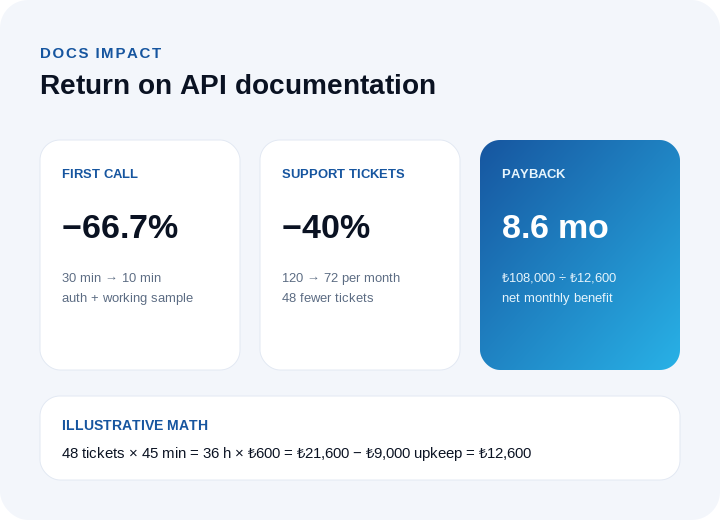
Tickets avoided: 120 × 40% = 48; remaining 120 − 48 = 72. Time saved: 48 × 45 min = 2,160 min = 36 hours. Monthly value: 36 × ₺600 = ₺21,600. After upkeep, the monthly net benefit is ₺21,600 − ₺9,000 = ₺12,600. Payback: ₺108,000 ÷ ₺12,600 ≈ 8.6 months.
Now look at sensitivity: if the reduction is only 20%, 24 tickets × 45 min = 18 hours × ₺600 = ₺10,800 is saved; after upkeep the net is ₺1,800 and payback becomes 108,000 ÷ 1,800 = 60 months. In other words, the gain depends on the documentation genuinely shortening the first call; simply "having written it" is not enough. Measure the reduction over the first three months. To record tickets consistently, our help desk software guide is useful.
How Is API Documentation Maintained?
Documentation is never written once and finished; it goes stale as the API changes, and stale documentation is worse than none. Tie maintenance to a process, not to a person.
- Update with the change: An API change is not complete without a documentation update; add an item to the code review checklist.
- Coverage measure: If 18 of 24 endpoints are fully documented against the template, coverage is 18 ÷ 24 = 75%; the target is 100%, and the gaps should be visible in a list.
- Feedback: A "Was this page helpful?" prompt and a report-an-error link on every page; review incoming reports weekly.
- Quarterly review: Every three months, scan all samples, links and release notes.
How Do You Prepare API Documentation in Six Steps?
Preparation is built backward from the reader.
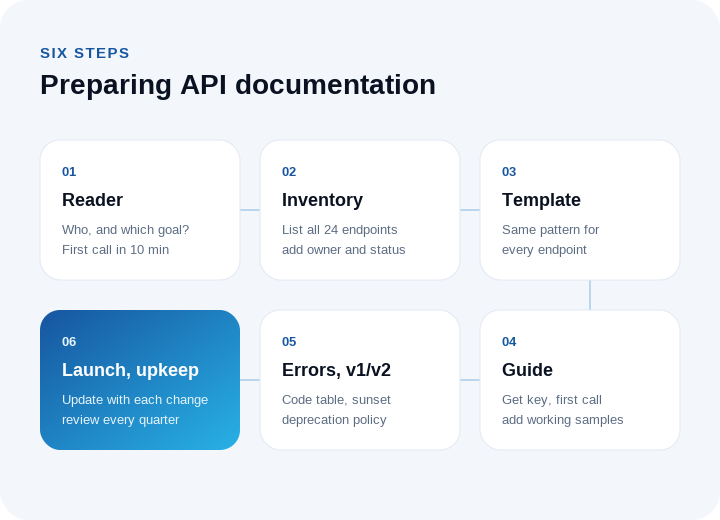
- Reader and goal: Who will integrate, and what is their first goal? Example: a dealer's developer sending the first order through the API. Write down the time-to-first-call target (for example 10 min).
- Endpoint inventory: List all endpoints and assign each an owner and a status (draft, complete).
- Template and specification: Fix the seven-section template; generate the reference from the specification.
- Getting-started guide and samples: Key issuing, first request and expected response; sandbox and working samples.
- Errors and versioning: The error code table, a fixed error body, and the version and deprecation policy.
- Launch and upkeep: Test it with a new developer and a stopwatch, open the feedback channel and run the maintenance process.
The foundation of the documentation is writing down what the API will do; we covered that in our requirements analysis guide. For the dealer portal context, see our B2B e-commerce guide.
What Are Common Mistakes in API Documentation?
- Writing only a reference: Without a getting-started guide that shows the way, the time to first call grows for first-time readers.
- Leaving broken samples: A sample that is not tested will break.
- Brushing errors off with a status code: Without a "what should I do" answer, every error becomes a support ticket.
- Making breaking changes silently: Renaming a field without notice breaks the integrator's production.
- Showing real data or keys: Use fake but realistic data in samples; for personal data, consult your legal counsel.
We recommend reading: How to estimate software development cost
We recommend reading: How to Write Software Documentation: Document Types, ADRs, Runbooks and Handover
We recommend reading: API Versioning and Backward Compatibility: Breaking Changes, Deprecation and Cost Guide
We recommend reading: How to Manage API Keys, Quotas and Usage Plans: Key Lifecycle, Rate Limits and Usage Billing Guide
We recommend reading: What Is an API Gateway? Jobs, Added Latency, Single Point of Failure and Payback Guide
Integration and API Development with İnovabil
At İnovabil our focus is building bespoke software from scratch for your company: custom software, ERP, CRM, e-commerce, web, mobile and integration. For a system that exposes an API, we suggest writing down how detailed the documentation should be, and the time-to-first-call target, at the requirements stage, so that documentation is not a task bolted on after the code is finished.
We have built CRM, purchasing and mobile for Avcılar İnşaat; a purchasing system for İZBAN; logistics and shipment planning with wholesale order management for Karyak; and warehouse management plus a complaint and support management system for Sleepy. Send us a short summary of your system, and let us define the scope together.
We recommend reading: Our software development process: step by step from analysis to launch
Frequently Asked Questions
How do you write API documentation, and where should you start?
Start from the reader and the goal: who will integrate, and what is their first goal? Then come the endpoint inventory, the seven-section template, the getting-started guide, the error table and the version policy.
What should good API documentation contain?
A getting-started guide, an endpoint reference, concepts, an error code table and a changelog. Each endpoint has a purpose, address, headers, request fields, response, errors and a working sample.
Should documentation be written by hand or generated?
Both: if field and type information is generated from the API's open specification definition, code and documentation do not drift apart; the getting-started guide, concepts and error explanations are written by hand, in the reader's language.
How long should an old API version stay open?
An illustrative policy is at least 6 months (180 days) from the notice to shutdown. If a contract states a period, follow it; track the remaining callers with usage data.
How quickly does API documentation pay for itself?
In the example, 120 monthly tickets drop by 40% and 36 hours are saved; after upkeep, a net of ₺12,600 pays back the ₺108,000 investment in about 8.6 months. If the reduction is only 20%, it takes 60 months, so measure the real ticket count over the first three months.