

The moment dealer systems, marketplace connectors and a mobile app connect to your API, it stops being only your code. It becomes other people's working business. Renaming a field to "tidy it up" or turning a number into a string is a five-minute change for you and a stopped order flow for forty clients. API versioning is how you publish such changes in a controlled way, and backward compatibility is the promise that existing clients keep working after the new version ships.
In this guide we cover which changes are breaking, the versioning methods, how semantic versioning maps to APIs, the tolerant reader principle and contract testing, the deprecation timeline, the cost of supporting old versions, the choice between a new version and extending the current one, and a six-step setup. Every number is a representative example built around a dealer portal API; none is a real cost or an industry average.
What Is API Versioning and Why Do You Need It?
API versioning means publishing every breaking change to the API contract (endpoints, fields, types, error codes, behavior) as a separate, named version. The goal is to let each client migrate on its own schedule.
Clients fall into two groups. Some you control, such as your own web interface, and you can update them the same day. Others are someone else's system: a dealer's ERP, a marketplace connector, a partner's integration. The hardest is the mobile app, because an old version on a user's phone can keep running for years and you cannot force an update. We covered the basic API concepts in our API integration guide.
We recommend reading: How to write API documentation
Which Changes Are Breaking?
A breaking change is one that stops an existing client from working unchanged after the new version. The yardstick is the client's expectation, not your code.
| Change | Breaking? | Note |
|---|---|---|
| Adding a new field to a response | Usually no | Except for clients that validate strictly |
| Adding a new endpoint | No | Existing calls are untouched |
| Adding an optional parameter | No | The default must match the old behavior |
| Adding a new value to a status field | Can be | Breaks clients that fail on unknown values |
| Removing or renaming a field | Yes | Every client reading it breaks |
| Changing a field type (number to string) | Yes | Causes parsing errors |
| Adding a required parameter | Yes | Old calls become incomplete |
| Changing the meaning of an error code | Yes | Breaks the client's retry logic |
| Changing default sort order or page size | Can be | Clients relying on the assumption get wrong results |
Look at the "usually no" row. In the example network, 5 of 40 clients are strict readers that fail when they see an unexpected field: 5 ÷ 40 = 12.5%. So the sentence "adding a field is safe" is only true if the documentation tells clients so explicitly.
What Are the API Versioning Methods?
There are four common methods, and none is perfect. Consistency matters more than the choice: do not mix two methods in the same API.
| Method | Example | Pros | Cons |
|---|---|---|---|
| Version in the path | /v2/orders | Visible; easy for caching and logs | The URL changes; the version applies to the whole resource |
| Version in a header | A custom version header or media type | URLs stay stable | Harder to try in a browser and to debug |
| Query parameter | ?api-version=2 | Easy to add | Can muddle cache keys and documentation |
| Date-based | The client pins "2026-11-01" | Small changes ship per client | You must keep every date's behavior; the load grows |
For public APIs with many clients, a version in the path is the least surprising for most teams; the log shows directly which version was called. Date-based versioning suits teams that ship frequent, small breaking changes, but it raises the testing and maintenance load.
How Does Semantic Versioning Apply to APIs?
Semantic versioning (MAJOR.MINOR.PATCH) gives the number meaning: PATCH fixes bugs, MINOR adds backward-compatible features, MAJOR introduces breaking changes. For APIs the rule is simple: only the MAJOR number appears in the path (v2), while MINOR and PATCH are tracked in the changelog.
- 2.4.1 → 2.4.2: A bug fix; the client does nothing.
- 2.4.2 → 2.5.0: A new optional field or endpoint; the client uses it if it wants.
- 2.5.0 → 3.0.0: A breaking change; a new path, a migration guide and a timeline are required.
We explained branch and tag conventions in our version control guide. The API version and the code version do not have to share a number, but the mapping should be documented.
What Are the Tolerant Reader Principle and Contract Testing?
Backward compatibility is shared work. The provider commits to avoiding breaking changes, and the consumer commits not to depend on things it does not know.
The tolerant reader principle: the client reads only the fields it needs and ignores unknown fields and unknown status values, or falls back to a safe default. Write this rule into the documentation; without it, the "adding fields is safe" promise is empty.
Contract testing: each client writes the fields and behavior it expects from the API into a contract file, and the provider verifies these files automatically on every build. Example: 12 clients have contracts. When a new "partially shipped" value is added to the status field, 3 of the 12 contracts fail: 3 ÷ 12 = 25%. The change is caught before release, before any client breaks. Putting this check into your CI/CD pipeline takes the decision out of human memory.
We recommend reading: How to secure an API
How Do You Run a Deprecation?
Retiring an old version is a process, not a date. Our documentation guide has a short example of this process; here we build a nine-month timeline as the shared scenario. At the start, 40 clients call v1.
| Month | Step | Clients still calling v1 |
|---|---|---|
| 0 | v2 ships; announcement, migration guide and sunset date published; deprecation and sunset headers added to responses | 40 |
| 1 | v2 open in the sandbox; changelog live | 36 |
| 3 | Clients still on v1 are contacted by name | 22 |
| 5 | v1 closes to new clients | 10 |
| 7 | A 2-hour brownout test | 5 |
| 8 | A longer brownout; one-to-one talks with the rest | 3 |
| 9 | The last 2 clients are migrated one by one; v1 closes and calls return "410 Gone" | 2 → 0 |
The month-end counts run 40, 36, 31, 22, 15, 10, 7, 5, 3, 2. In nine months 38 clients migrated: 38 ÷ 40 = 95%. The curve is not linear: it moves fast at first, and the last clients are the hardest. Clients whose updates depend on the end user, such as a mobile app, set the long tail; plan the sunset date together with a store release and a forced-update prompt.
How Do You Know Who Uses Which Version?
The decision to close a version must rest on measurement, not guesswork. Every request should carry a client identity (a key or a registered application name) and be logged together with the version.
- Requests and clients per version: the number of distinct clients that called v1 in the last 30 days.
- Version and last call date per client: your direct-contact list comes from here.
- v1's share of traffic: in the example, v1 falls from 1,200,000 requests a month to 18,000: 18,000 ÷ 1,200,000 = 1.5%. Even with a small traffic share, those 2 clients may run a serious workflow; decide on closing by identity, not by percentage.
Make calls without an identity visible too; anonymous traffic is what delays closing a version most.
What Does It Cost to Support Old Versions?
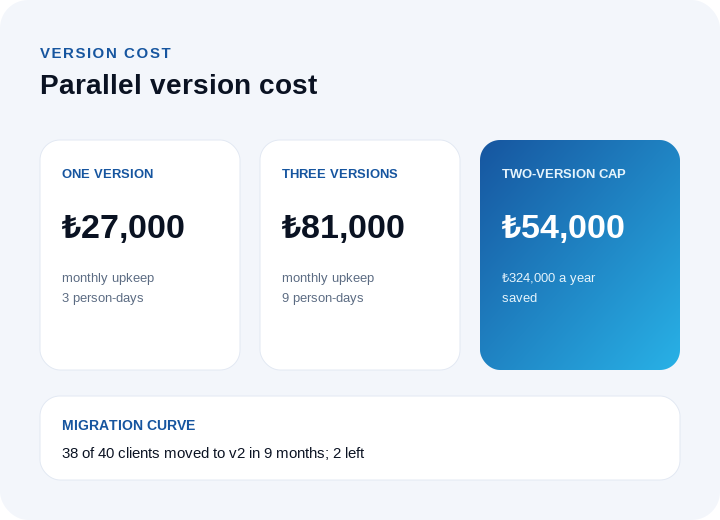
Every living version needs bug fixes, security patches, regression tests, documentation and support requests. Assumptions: 3 person-days per version per month, ₺9,000 per person-day, and a 30-minute test suite per version.
| Policy | Monthly | Yearly | Test time |
|---|---|---|---|
| One version: 3 × ₺9,000 | ₺27,000 | ₺324,000 | 30 min |
| At most two versions: 6 × ₺9,000 | ₺54,000 | ₺648,000 | 60 min |
| Three versions in parallel: 9 × ₺9,000 | ₺81,000 | ₺972,000 | 90 min |
Running three versions costs ₺972,000 − ₺324,000 = ₺648,000 more per year than running one. A cap of two versions saves ₺972,000 − ₺648,000 = ₺324,000 a year compared with three. Which version is supported should also be written into the maintenance agreement and SLA; for contractual commitments consult a legal advisor, and see our maintenance and support agreement guide for the SLA structure.
Should You Open a New Version or Extend the Current API?
Try extending first. Example change: the order amount field will move from a number to an object that carries a currency. Here is how three paths cost out for the same 40 clients.
| Path | Calculation | Cost |
|---|---|---|
A. Extend: keep the old field, add a new amount_detail | 3 person-days × ₺9,000 | ₺27,000 |
| B. Ship v2, nine months in parallel | v1 upkeep 9 × ₺27,000 = ₺243,000 + migration support 38 × 0.5 = 19 person-days = ₺171,000 | ₺414,000 |
| C. Unannounced breaking change | 4 h outage × ₺35,000 = ₺140,000 + client-side 40 × 6 h × ₺300 = ₺72,000 + emergency response 5 person-days = ₺45,000 | ₺257,000 |
B costs ₺414,000 ÷ ₺27,000 ≈ 15.3 times A; C costs about 9.5 times A. C looks cheap on paper, but it leaves out lost relationships and trust, and you pay again every time it repeats. The rule: if extension works without breaking anyone, choose A; if the resource model genuinely changes (for example an order splits into an order and a shipment), choose B. The price of extension is that the old field lingers as dead weight for a while; put it on the deprecation list too.
When Does API Versioning Infrastructure Pay for Itself?
The infrastructure means a usage-monitoring dashboard, contract tests, schema comparison and a changelog template. Assumptions: setup of 24 person-days × ₺9,000 = ₺216,000; running cost of 1.5 person-days a month = ₺13,500.
Before, there are 2 unplanned breakages a year: 2 × ₺257,000 = ₺514,000. With the infrastructure, 75% of these are prevented, leaving 0.5 incidents a year: the gain is 1.5 × ₺257,000 = ₺385,500 a year, or ₺32,125 a month. Net monthly benefit: ₺32,125 − ₺13,500 = ₺18,625. Payback: ₺216,000 ÷ ₺18,625 ≈ 11.6 months.
Now the sensitivity. If there had been only 1 incident a year before, the gain would be 0.75 × ₺257,000 = ₺192,750 a year, or ₺16,062.50 a month; net ₺2,562.50, and payback stretches to about 84.3 months. So the investment makes sense where the API really has many clients and frequent changes; an API with two clients does not need the full setup, just a written rule and basic monitoring.
How Do You Set Up API Versioning? Six Steps
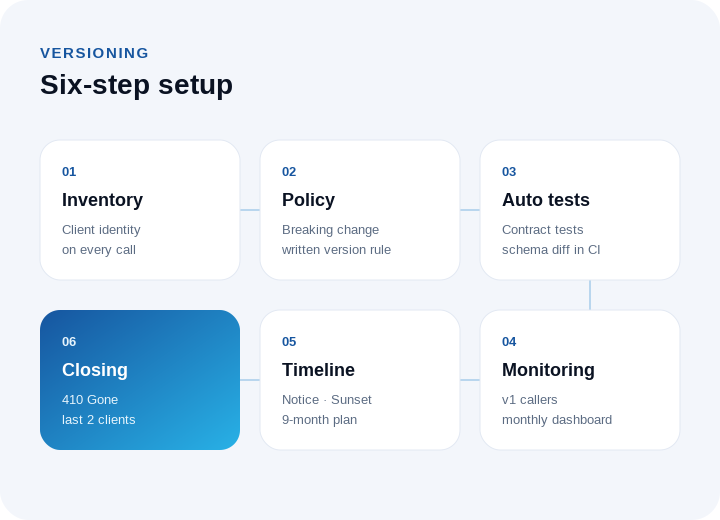
- Inventory and client identity: Record who calls which endpoint with which key; close or flag calls with no identity.
- Policy: Write down your definition of a breaking change, the versioning method and a rule such as "at most two versions".
- Automated tests: Wire schema diffs and contract tests into every build so no breaking change slips through quietly.
- Monitoring: Review the version-and-client dashboard monthly.
- Timeline and communication: For every breaking change, prepare the announcement, the migration guide, the sunset date and a direct-contact list.
- Closing and review: Run the brownout test, migrate the remaining clients one by one, close the version and feed what you learned back into the policy.
A migration guide should answer these questions for every breaking change: what changed, why, how the old and new calls look side by side, what happens on which date, and whom to contact for support. For the general documentation setup, see our software documentation guide.
What Are the Common API Versioning Mistakes?
- Opening a version for every small change: The maintenance cost grows linearly with the number of versions; try extension first.
- Giving no sunset date: A "deprecated" notice with no date moves nobody.
- Not tracking client identity: The decision to close is made without knowing who will be affected.
- Silently changing what a field means: The field name stays, the meaning shifts; this is the hardest breaking change to catch.
- Forgetting webhook and event schemas: The event payload sent to clients is also a contract; like the signing and replay protection in our webhook guide, the schema version should be written down.
- Ignoring the mobile app: An old mobile version can keep calling for years; a sunset date only means something together with a forced update.
We recommend reading: What Are Feature Flags and Gradual Rollout? Percentage Buckets, Stop Criteria and Flag Debt Guide
We recommend reading: How to Manage Mobile App Versions and Forced Updates: Version Policy, Staged Rollout and Rollback Guide
We recommend reading: How to Set Up IT Change Management and Maintenance Windows: Risk Scoring, Approval and Rollback Guide
We recommend reading: How to Manage API Keys, Quotas and Usage Plans: Key Lifecycle, Rate Limits and Usage Billing Guide
We recommend reading: What Is an API Gateway? Jobs, Added Latency, Single Point of Failure and Payback Guide
API Design and Custom Software with İnovabil
At İnovabil our focus is building custom software from scratch for your company: custom software, ERP, CRM, e-commerce, web, mobile and integration. This guide does not mean we offer an API product or a ready-made versioning service; we suggest that when an externally exposed interface is designed, the version policy, client identity and sunset timeline be written down at the requirements stage.
We built CRM, purchasing and mobile for Avcılar İnşaat; a purchasing system for İZBAN; logistics and shipment planning with wholesale order management for Karyak; and warehouse management plus a complaint and support management system for Sleepy. Send us a short note on the systems you will integrate and your number of clients, and we will draft a change and version policy together.
We recommend reading: Our software development process: from analysis to launch
Frequently Asked Questions
What is API versioning?
It is publishing the breaking changes to an API contract as separate, named versions. Clients migrate to the new version on their own schedule, and the old version keeps working until its sunset date.
What does backward compatibility mean?
It means existing clients keep working with no changes after a new version is released. Adding fields and endpoints is usually compatible; removing a field or changing its name or type breaks compatibility.
Should I put the version in the path or a header?
For public APIs with many clients, a version in the path (/v2/...) is visible and easy to debug, so most teams prefer it. Whichever you choose, stay consistent and do not mix two methods in one API.
How long should I support an old version?
It depends on your client count, how hard migration is, and slow-updating clients such as mobile apps. In the example scenario nine months was enough, but the real measure is the number of clients still calling, not the time. For a contractual support period, consult a legal advisor.
Should every change get a new version?
No. Backward-compatible additions ship in the same version and go into the changelog. A new major version is only for breaking changes that extension cannot handle; in the example, v2 cost about 15.3 times more than extending.