

"Which file was the working version?" is a question every team knows if it has ever collected folders full of copies named project_final, project_final_v2 and project_final_really. A version control system records every change made to source code, with who made it, when and why, and lets you return to any earlier state. The most widely used one today is Git.
In this guide we explain what version control is, how centralized and distributed systems differ, what commits, branches, merges and tags are, how branching strategies compare, how to reduce merge conflicts, how to write a useful commit message, how to number releases, how to roll back and trace a faulty change with binary search, how to manage repository access, the risk of leaked secrets, and why all of this matters to the company commissioning the software. The example figures are representative; they are not measurements of a specific team or an industry average.
What Is a Version Control System?
A version control system is software that stores changes to files as an ordered series of records, so you can return to any record, compare two records and merge parallel work. Each record (a commit) carries its author, its time, the changed lines and a description.
The benefits fall under four headings: history (when and why a line changed), rollback (reversing a faulty change in one step), parallel work (several people working on the same codebase without breaking each other) and release identity (knowing exactly which code produced the version running at a customer). We covered where this sits in the overall lifecycle in our software development life cycle guide.
We recommend reading: Our custom software service
What Is the Difference Between Centralized and Distributed Version Control?
In a centralized system the history lives on a single server and you must connect to it to work. In a distributed system (Git belongs here) every developer's computer holds a full copy of the history.
| Topic | Centralized system | Distributed system (Git) |
|---|---|---|
| Where the history lives | A single server | Every developer and the server |
| Offline work | Limited; saving a record needs a connection | Full; commits and branches are created locally |
| Creating a branch | Usually heavy and slow | Light and fast; an everyday habit |
| Server loss | History is gone without a server backup | Every copy carries the history, but you still need backups |
Because every copy carries the history does not mean backup is unnecessary; a team that keeps the repository in one place still has a single point of failure. For a backup plan, see our data backup guide.
What Are a Commit, a Branch, a Merge and a Tag?
Four concepts carry nearly all of the day-to-day work. Knowing each in one sentence is enough to speak the same language as the team.
| Concept | What it means | Example |
|---|---|---|
| Repository | The place where the code and its entire history live | The dealer portal repository |
| Commit | A described record of a group of changes | "Add credit limit check to order approval" |
| Branch | A line of work that splits from the main code and moves in parallel | feature/credit-limit |
| Merge | Bringing one branch's changes into another | Taking a feature branch into the main branch |
| Tag | A permanent name for a specific commit | v1.4.0 |
| Pull request | A request opened so a branch is reviewed before merging | Merge after two approvals |
The pull request stage is where code is read by someone else before it merges; we explain how to run it in our code review guide.
Which Branching Strategy Should You Choose?
Choose the simplest strategy that fits the team size and release frequency. There are three common approaches, and they share one rule: the main branch is always kept in a working state.
| Strategy | How it works | Suitable team | Watch out for |
|---|---|---|---|
| Trunk-based | Everyone contributes to the main branch through very short-lived branches (at most 1–2 days) | Small and mid-sized teams, frequent releases | Needs disciplined tests and small changes |
| Feature branch | Each feature is built on its own branch, reviewed, then merged into the main branch | The default for most teams | Conflicts grow as branches live longer |
| Release branch | A separate branch is kept for each released version, and fixes are applied there too | Products supporting several versions at once | Carrying each fix to every version adds work |
A practical start: protect the main branch (no direct changes), do every task on a short feature branch, have one person review before merging and require passing tests. To run those tests automatically, see our CI/CD guide.
What Is a Merge Conflict and How Do You Reduce Them?
When two people change the same area of the same file in different ways and try to merge, the system cannot decide which is correct and reports a conflict.
- Keep branches short: The longer a branch lives, the further it drifts from the main branch; the probability and the resolution time both rise.
- Pull main often: While working, bring the main branch into your own branch at least once a day.
- Make small commits: One task, one commit; a large mixed commit makes conflicts harder to resolve.
- Let someone who knows the code resolve it: A conflict resolved by simply "picking one" produces silent bugs; tests must run after the merge.
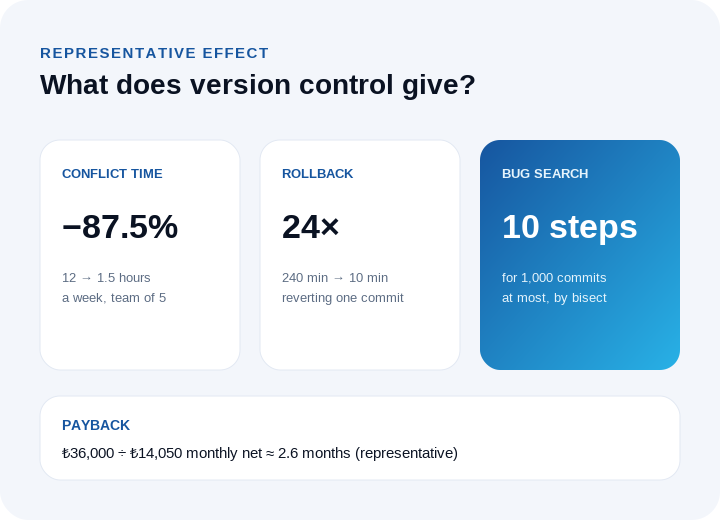
Representative calculation (team of 5): With two-week branches the team makes 20 merges a week, the conflict probability is 40% and resolution averages 90 minutes: 20 × 0.40 = 8 conflicts × 90 min = 720 min = 12 hours/week. With short daily branches it makes 60 merges a week, the probability is 10% and resolution takes 15 minutes: 60 × 0.10 = 6 conflicts × 15 min = 90 min = 1.5 hours/week. The difference is 10.5 hours; (12 − 1.5) ÷ 12 = 87.5% less. At ₺300 per hour that is ₺3,150 a week, or ₺12,600 in a four-week month.
How Do You Write a Useful Commit Message?
A good commit message answers the question "why was it done this way?" for the person who looks at that line six months later. The rule is simple: a short first line in the imperative mood and, if needed, a blank line followed by a paragraph explaining the reason.
- First line: At most 50–72 characters, saying what was done. Example: "Add credit limit check to order approval".
- Link to the task: If there is a ticket or task number, include it in the message.
- One topic: A commit holds one logical change; avoid "various fixes".
| Weak message | Strong message |
|---|---|
| fix | Fix order form crash when the delivery date is empty |
| update 2 | Add VAT-inclusive display option to the dealer price list |
| final version | Change invoice number generation to reset each year |
How Do You Number Releases with Tags and Semantic Versioning?
To know which code produced the version running at a customer, every release commit receives a tag. The most common numbering scheme is semantic versioning: three numbers in the form MAJOR.MINOR.PATCH.
| Number | When it increases | Example (from version 2.4.1) |
|---|---|---|
| PATCH | A backward-compatible bug fix | 2.4.1 → 2.4.2 |
| MINOR | A backward-compatible new feature (PATCH resets) | 2.4.1 → 2.5.0 |
| MAJOR | A backward-incompatible change (MINOR and PATCH reset) | 2.4.1 → 3.0.0 |
A tag is permanent: the v1.4.0 tag always points to the same commit.
How Do You Roll Back a Faulty Change and Find Its Source?
With version control, rolling back means making a new commit that reverses a specific commit; the history is not erased, and the team can see what was rolled back. Without it, rolling back means hunting for old copies and comparing them by hand.
If you do not know which change started the bug, use binary search (bisect): the commit range between the last working version and the broken one is halved at each step and the middle commit is tested. If it is faulty, you search the first half; if not, the second.
- For 1,000 commits: 1,000 → 500 → 250 → 125 → 63 → 32 → 16 → 8 → 4 → 2 → 1; that is at most 10 steps. Check: 29 = 512 < 1,000 ≤ 1,024 = 210, so log2(1,000) ≈ 9.97, which rounds up to 10.
- Checking one by one: In the worst case all 1,000 commits are tested.
- Time: If each test takes 3 minutes, binary search takes 10 × 3 = 30 minutes; one-by-one takes at worst 1,000 × 3 = 3,000 minutes = 50 hours.
A representative rollback calculation: without version control, finding the earlier state in folder copies and putting it back takes an average of 240 minutes; reverting one commit and running the tests takes 10 minutes: 240 ÷ 10 = 24 times faster. With 3 rollbacks a month the saving is 3 × (240 − 10) = 690 min = 11.5 hours, or ₺3,450 at ₺300 per hour. For rollback to be safe, the tests need to exist in writing too; see our software testing guide.
How Do You Manage Repository Access and Backups?
Source code is one of a company's most valuable assets; you must know who holds the repository and who can reach it. Four rules give a sufficient framework.
- Ownership: The repository should sit in the account of the company commissioning the software, or in an organization the company administers; a developer's personal account is not appropriate for this.
- Least privilege: Separate read, write and admin roles; give direct write and delete rights on the main branch only to those who need them. For role design, see our role-based access control guide.
- Backup: Back the repository up to a separate location regularly and test a restore from time to time. A developer's copy does not count as a backup, because nothing guarantees it holds every latest change.
What Happens If a Secret or Password Enters the Repository?
If a password, API key or access token is written into code or a configuration file and committed, it stays in the history forever. Deleting the file in a later commit does not erase the secret; anyone with repository access can read it from the older record.
- If a secret was committed, change it immediately: Revoking the key and issuing a new one is more reliable than cleaning the history.
- Keep secrets outside the code: Use environment variables or a separate secret store; only an example file with no real values should go in the repository.
- Automatic scanning: Run a secret-scanning check before commits and at the pull request stage.
For details on secret management and authentication, see our API security guide. For legal obligations on backups and repositories holding personal data, consult your legal counsel.
Why Does Version Control Matter for the Company Commissioning Software?
What the commissioning company is left with at the end of a custom software project is determined by version control. Source code handover and ownership are governed by the contract; version control is the technical counterpart.
- Source code handover: The code should be delivered with its history (commit records) and tags. A copy of the code without history does not let you know what was written and why.
- Auditability: What changed in which version, who changed it and when it was released can be traced from the record.
We covered which clauses belong in the contract in our guide to getting custom software developed, and the difference between source code, license and ownership in our software license article. For legal details, consult your legal counsel.
What Does Setting Up Version Control Cost and Return?
The tool itself is usually cheap; the real cost is getting the rules to stick and the team used to them. A representative calculation: 4 person-days × ₺9,000 = ₺36,000 for setup, branch and review rules, training and initial configuration; ₺2,000 a month for hosting and backup.
- Monthly gain: Conflicts ₺12,600 + rollback ₺3,450 = ₺16,050.
- Monthly net: ₺16,050 − ₺2,000 = ₺14,050.
- Payback: ₺36,000 ÷ ₺14,050 ≈ 2.6 months.
These figures are examples only; run your own calculation with your team size, conflict frequency and real hourly cost. To think through investment and cost items, see our software project cost guide.
How Do You Set Up a Version Control System?
Setup is staged and can be completed within a week. Six steps are enough.
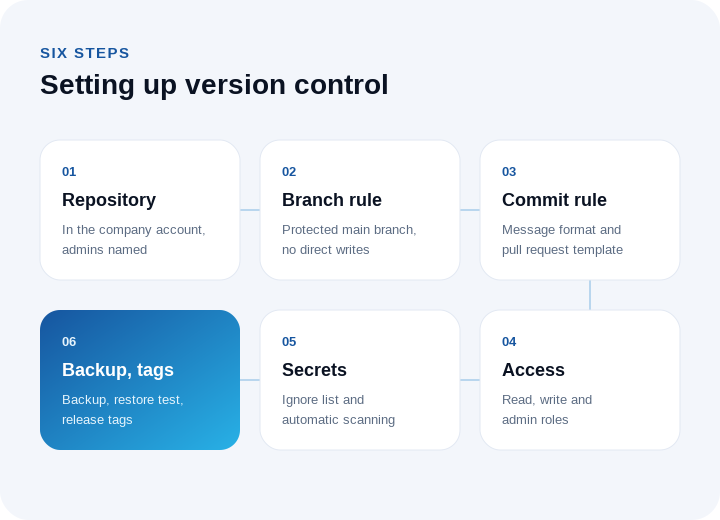
- Repository and ownership: Create the repository in the company's account and name the administrators.
- Branch rule: Choose the strategy, protect the main branch and close direct writes.
- Commit rule: Put the message format and the pull request template in writing.
- Access: Assign read, write and admin roles; define the closing step for people who leave.
- Secret protection: Write the ignore list and turn on automatic secret scanning.
- Backup and tags: Set up the backup schedule, run a first restore test and tag every release.
What Are the Common Mistakes in Version Control?
- Long-lived branches: Working for weeks apart from the main branch turns merge day into a surprise.
- Committing secrets: They stay in the history and cannot be considered removed; the key must be changed.
- Keeping the repository in a personal account: When the developer leaves, access and ownership become a problem.
We recommend reading: What is CI/CD? A guide to continuous integration, delivery and deployment
We recommend reading: What is custom software? Scope, types and cost of company-specific software
We recommend reading: How to Build a Software Development Team: Roles, Staffing, Cost and Capacity Guide
We recommend reading: How to Write Software Documentation: Document Types, ADRs, Runbooks and Handover
We recommend reading: How to Do Performance Testing: Load, Stress and Soak Tests, Targets and Reading the Results
We recommend reading: API Versioning and Backward Compatibility: Breaking Changes, Deprecation and Cost Guide
We recommend reading: What Is a Document Management System (DMS)? Versioning, Access, Search, Retention and Payback Guide
We recommend reading: How to Manage Software Environments (Dev, Test, Staging, Production): Drift, Data Flow and Cost Guide
We recommend reading: What Is Static Code Analysis and Quality Gates? Complexity, Thresholds and Findings Management Guide
Custom Software and Source Code Handover with İnovabil
At İnovabil our focus is building company-specific software from scratch: custom software, ERP, CRM, e-commerce, web, mobile and integration. We recommend settling in writing, at the requirements stage, what the commissioning company will receive in the project, how the source code will be handed over and who will hold the repository; we describe how we work on our process page.
We built CRM, purchasing and mobile for Avcılar İnşaat; a purchasing system for İZBAN; logistics and shipment planning with wholesale order management for Karyak; and warehouse management plus a complaint and support management system for Sleepy. Send us a short summary of your project and we will put the handover expectations and the working arrangement in writing together.
We recommend reading: Our software development process: step by step from analysis to release
Frequently Asked Questions
What is a version control system and what is it for?
It is a tool that records every change to source code with its author, time and description, lets you return to any earlier state and lets several people work on the same code in parallel. It speeds up bug hunting and rollback and keeps teamwork organized.
Are Git and version control the same thing?
Git is a version control system, and the most widely used distributed one. Version control is the concept; Git is one implementation of it. Every developer carries a full copy of the history on their computer.
Is it necessary for a small team too?
Yes. Even on a one-person project, history and rollback are valuable. As the team grows, reducing conflicts and organizing code handover matter even more. Setup cost is low; in the example it pays back in about 2.6 months.
How do you read semantic versioning (MAJOR.MINOR.PATCH)?
PATCH increases for a backward-compatible bug fix, MINOR for a backward-compatible new feature and MAJOR for a backward-incompatible change. From 2.4.1, a bug fix gives 2.4.2, a new feature 2.5.0 and an incompatible change 3.0.0.
What should I ask for on version control when commissioning software?
That the repository sits in your account, that the code is delivered with history and tags, that secrets are not in the repository and that access is open only to those who need it. Ownership and license details are set by contract; confirm them with your legal counsel.