

A small configuration fix on a live system can cause more trouble than a large release, because a release gets tested and watched, while a "one-minute" change is often made without telling anyone. IT change management is the discipline of making release, configuration, database and infrastructure changes in a planned, approved, announced and reversible way; a maintenance window is the pre-announced time slot in which those changes cause the least harm.
This guide covers change types, risk scoring, what a change request should contain, a lightweight approval board, how to choose and calculate a maintenance window, calendars and freeze periods, rollback triggers, post-change verification, emergency changes and the metrics that show whether it works. All example figures are illustrative; they are not data from a real business or an industry average.
What Is IT Change Management?
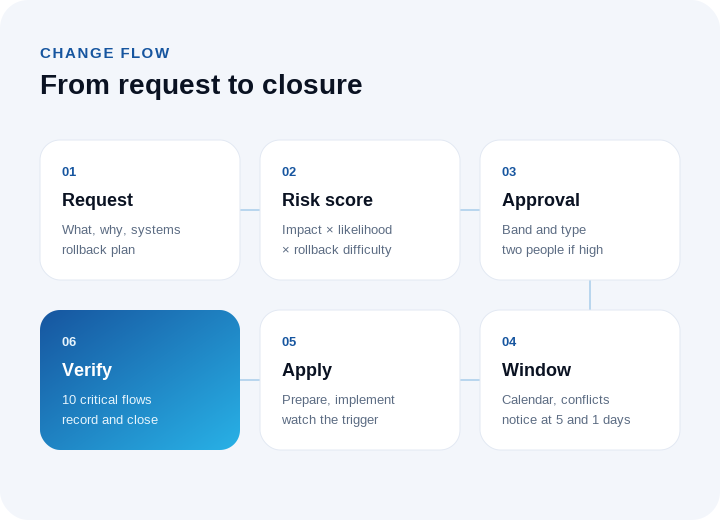
IT change management means that every change to a live environment starts with a written request, has its risk measured, is approved by the right people, announced, applied in a planned slot, verified and recorded. It is not limited to code: a configuration value, a database schema, a certificate renewal and a third-party connection key are all changes.
We described how release pipelines are automated in our CI/CD guide and what to do when something breaks in our incident management article. This article fills the space between the two: who decides, on what basis and when, before a change reaches production. Widely used service management frameworks share the same principles; here we describe a light version suited to small and mid-sized teams.
Recommended reading: Our custom software service
What Are the Types of Change?
Three types are enough: standard, normal and emergency. The distinction rests on how often the change is made and how predictable it is.
| Type | Definition | Approval path | Example |
|---|---|---|---|
| Standard | Frequent, documented steps, known risk | Pre-approved; the implementer logs it | Certificate renewal, routine configuration value |
| Normal | Plannable, needs an assessment each time | Approval according to risk score | Order screen release, integration setting |
| Emergency | Made at once to stop an outage or close a security gap | Approval afterwards, mandatory review | Fixing the configuration of a crashed service |
A standard change needs a promotion rule: a change type becomes standard after 20 consecutive successful normal runs. Why 20? A change type with a true failure rate of 6% can still succeed ten times in a row with probability 0.9410 ≈ 53.9%, so ten successes prove little. For 20 in a row, the chance of luck drops to 0.9420 ≈ 29.0%, which together with a low risk score is a reasonable threshold.
How Do You Score Change Risk?
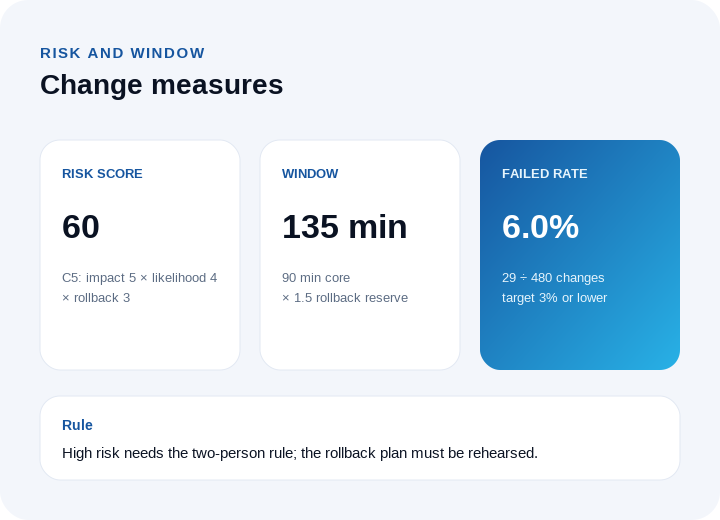
Risk score = impact (1–5) × likelihood (1–5) × rollback difficulty (1–3). The minimum is 1 and the maximum 75. Because rollback difficulty is a multiplier, a change that cannot be undone counts three times riskier at the same impact and likelihood. The bands are illustrative: 1–12 low, 13–30 medium, 31 and above high.
| Change | Impact | Likelihood | Rollback | Score | Band |
|---|---|---|---|---|---|
| C1 A label text on a screen | 1 | 1 | 1 | 1 | Low |
| C2 Report query update | 2 | 2 | 1 | 4 | Low |
| C3 New order screen release | 4 | 3 | 2 | 24 | Medium |
| C4 Payment connection key rotation | 5 | 2 | 2 | 20 | Medium |
| C5 Column type change on a large table | 5 | 4 | 3 | 60 | High |
The band sets the approval path: a low score goes through a single approver or a pre-approved route; a medium score needs one approver and a calendar check; a high score needs the two-person rule, the weekly board and a dedicated window. Scoring is not scientific; it is a tool that structures the discussion, and its main value is that everyone is asked "is this hard to undo?"
What Should a Change Request Contain?
The request should be short but complete; missing information leads either to rejection or to blind approval.
- What: a one-sentence description and the scope.
- Why: the problem solved or the expected benefit.
- Affected systems: direct and indirect dependencies.
- Test evidence: which environment, which scenarios.
- Rollback plan: steps, trigger and target time.
- Timing: the requested window and the estimated duration.
- Owners: implementer, approver and verifier.
For test environments, see our software environments guide. A high-risk request that was never tried in a staging environment should count as incomplete.
How Do You Set Up Approval and a Change Board?
The light model has two rules: for high-risk changes the implementer and the approver are different people (the two-person rule), and a short 30-minute weekly board reviews next week's high-risk items and conflicts. In other cases the approver decides alone.
The board's decision is one of three: approve, approve with conditions or defer. It asks only three questions: has the rollback plan been rehearsed, is there a calendar conflict, and are stakeholders aware? To build approval chains in software, see our workflow and approval software article.
How Do You Plan a Maintenance Window?
The window opens when workload is lowest and the team can work sensibly; its length covers verification and a rollback reserve, not only the implementation time. Take a B2B order system that receives 1,200 orders a day, distributed as follows:
| Time slot | Orders | Hourly average | Affected in a 2.25-hour window |
|---|---|---|---|
| 00:00–03:00 | 12 | 4 | 9.0 |
| 03:00–06:00 | 6 | 2 | 4.5 |
| 06:00–09:00 | 48 | 16 | 36.0 |
| 09:00–12:00 | 270 | 90 | 202.5 |
| 12:00–15:00 | 300 | 100 | 225.0 |
| 15:00–18:00 | 330 | 110 | 247.5 |
| 18:00–21:00 | 192 | 64 | 144.0 |
| 21:00–24:00 | 42 | 14 | 31.5 |
The slots add up to 12 + 6 + 48 + 270 + 300 + 330 + 192 + 42 = 1,200 orders, assuming an even spread within each slot. With an average basket of ₺900, at most 4.5 orders × ₺900 = ₺4,050 are affected in a 03:00 window, against 225 × ₺900 = ₺202,500 at midday, a 50-fold difference. The 21:00 slot (31.5 orders, ₺28,350) is kinder to the team and is often preferred. These figures are upper bounds; most orders are delayed rather than lost.
The window length is calculated like this: preparation 15 minutes, implementation 45 minutes, verification 30 minutes, a core of 90 minutes. With a 50% rollback reserve it is 90 × 1.5 = 135 minutes. The reserve must cover the rehearsed rollback time (40 minutes): 45 ≥ 40. A window that opens at 03:00 closes at 05:15; the last moment to decide on rollback is minute 135 − 40 = 95. If verification is not complete by then, you roll back without debate.
How Do You Manage the Change Calendar and Freeze Periods?
A single calendar shows all planned changes with their impact areas. Two changes that share a system conflict; applying them in the same week, or on the same night, makes the source of a fault harder to find. An example week has six changes and four systems:
| Change | Impact area | Conflicts with |
|---|---|---|
| D1 | Orders, database | D3 (database), D4 (orders) |
| D2 | Payment | None |
| D3 | Database, reporting | D1, D6 (reporting) |
| D4 | Orders, ERP | D1, D5 (ERP) |
| D5 | ERP | D4 |
| D6 | Reporting | D3 |
Six changes make 6 × 5 ÷ 2 = 15 pairs; 4 of them (D1–D3, D1–D4, D3–D6, D4–D5) share a system: 26.7%. The fix is to spread those pairs over different nights or weeks.
Freeze periods (change freeze) protect business-sensitive times such as month-end close and campaign weeks. If the last three and first two working days of every month (12 × 5 = 60 days) and three campaign weeks a year (15 working days) are frozen, 75 ÷ 252 ≈ 29.8% of working days are closed. A freeze pushes the load onto the remaining days: 480 changes mean 1.90 per day over 252 days but 2.71 per day over 177 days, a 42.4% increase. So define freezes only for truly critical days, and allow low-risk standard and emergency work during them.
How Do You Prepare a Rollback Plan?
A good rollback plan has three parts: a trigger, steps and a target time. The trigger must be numeric: instead of "if something goes wrong", use "if the error rate exceeds 2% within 10 minutes, or no order is created for 5 minutes". The target time is 40 minutes in the example, and the plan should have been rehearsed at least once in staging; an untested plan is only a hope.
A dropped column does not come back; in that case the method is roll-forward: the change is first added in a backward-compatible way and the old structure is removed later. For gradual exposure, see feature flags; for externally exposed interfaces, API versioning. Before any change that risks data loss, a fresh backup and a record of a tested restore should exist.
How Do You Verify a Change Afterwards?
The work is not done when the implementation ends; verification follows a written list. The example has 10 critical workflows at about 3 minutes each: 10 × 3 = 30 minutes, the verification time in the window calculation.
- User login
- Product search
- Add to cart
- Payment step (test transaction)
- Order creation
- Order transfer to the ERP
- Stock update
- Notification e-mail
- Opening a report
- Dealer login
After the window, error rate and latency are watched for at least one working day; for thresholds see our software monitoring guide.
How Do You Manage Emergency Changes?
An emergency change may be made without waiting for approval but may not go unrecorded. The rule: act first, record immediately, obtain approval afterwards within 24 hours at most, then hold a short review.
Take a 12-month example: 53 of 480 changes were emergencies (11.0%). 9 of the emergency changes failed (9 ÷ 53 = 17.0%), against 20 of the 427 planned ones (4.7%). Emergencies made up 11.0% of changes but produced 9 ÷ 29 = 31.0% of failures. This suggests an alarm threshold: if the emergency share exceeds 8% for two months in a row, the common causes are reviewed (missing monitoring, unstandardized maintenance, weak testing).
How Do You Turn Repeated Changes into Standard Ones?
Approval effort falls as repeated work becomes templated. Take 40 changes a month, where a normal change costs 90 minutes of preparation and approval and a standard change 15 minutes. With a 25% standard share, 30 × 90 + 10 × 15 = 2,850 minutes (47.5 hours) are spent. At 60%, it becomes 16 × 90 + 24 × 15 = 1,800 minutes (30 hours); 17.5 hours a month, or ₺5,250 at ₺300 per hour, is saved.
How Do You Notify Stakeholders?
The notification plan should be simple and fixed:
| When | Who | Content |
|---|---|---|
| 5 days before | Internal teams, dealers | Date, time range, affected function |
| 1 day before | Support and sales teams | Reminder, answers to likely questions |
| Window start | All stakeholders | Started notice |
| Window end | All stakeholders | Completed or rolled back |
A user announcement stays within three sentences: which function will be unavailable at which date and time, what can be done meanwhile, and how people will be told if it runs long.
The record acts as an audit trail: who requested, who approved, who implemented, when, and what the result was. Separating implementer from approver provides segregation of duties; for retention periods and compliance obligations, consult your legal counsel and accountant.
How Do You Measure Change Management, and What Does It Return?
Four measures are enough; example values and targets:
| Measure | Calculation | Example | Target |
|---|---|---|---|
| Failed change rate | 29 ÷ 480 | 6.0% | 3% or lower |
| Emergency change rate | 53 ÷ 480 | 11.0% | 5% or lower |
| Window overrun | 5 ÷ 36 windows | 13.9% | 5% or lower |
| Average rollback time | From the record | 40 min | 30 min or lower |
The causes of the 29 failed changes: insufficient testing 9 (31.0%), missing rollback plan 7 (24.1%), conflicts 6 (20.7%), wrong timing 4 (13.8%), unknown dependency 3 (10.3%). The top three causes explain 22 ÷ 29 = 75.9% of failures.
Payback calculation: 40 changes a month at 6% failure means 2.4 failed changes; at ₺42,000 each (outage, team effort and remediation), that is ₺100,800 a month. If the rate falls to 3%, 1.2 × ₺42,000 = ₺50,400 is saved. The higher standard share adds ₺5,250; the weekly board costs 4 weeks × 4 people × 0.5 hours = 8 person-hours × ₺300 = ₺2,400. Monthly net is ₺50,400 + ₺5,250 − ₺2,400 = ₺53,250, so a ₺180,000 setup investment (process design, templates, calendar and approval automation) ÷ ₺53,250 ≈ 3.4 months. If failures fall only to 4.5% (0.6 × ₺42,000 = ₺25,200), net is ₺28,050 and payback stretches to about 6.4 months. Recalculate with your own figures.
How Do You Set Up Change Management in Six Steps?
- Count current changes: list the last 3 months by type and result.
- Define three types and risk bands: standard, normal, emergency; the scoring formula and bands.
- Write the request template: seven fields, a mandatory rollback plan.
- Set the board and window: a weekly 30-minute board; a window chosen by hourly workload.
- Build the calendar and notices: one calendar with an impact column; notices at 5 days, 1 day, start and end.
- Measure and adjust: track the four measures monthly; grow the standard list by the promotion rule.
We recommend reading: How to Set Up a Software Bill of Materials (SBOM) and Dependency Update Management: Vulnerability Matching, Priority and Payback Guide
We recommend reading: SSL Certificate Management: How to Manage Domains, DNS and Certificates (Ownership, TTL, Renewal and Inventory Guide)
Custom Software and Process Digitalization with İnovabil
As recorded on our process page, every project goes through analysis, design, development, testing, release, and maintenance and support. In custom software we recommend writing release and maintenance expectations (window, notification, rollback) into the requirements stage; the routine in this article is a recommendation, not a separate service or a certification commitment.
We developed CRM, purchasing and mobile for Avcılar İnşaat; a purchasing system for İZBAN; logistics and shipment planning with wholesale order management for Karyak; and warehouse management plus a complaint and support management system for Sleepy. Send us a short summary of your current change routine and we will write your expectations down together. For maintenance and support scope see our maintenance agreement guide, and for major outages our disaster recovery article.
Recommended reading: Our software development process, from analysis to release
Frequently Asked Questions
What is IT change management, in short?
It is the way changes to release, configuration, database and infrastructure in a live system start with a request, are approved by risk, announced, applied in a planned slot, verified and recorded. Its aim is to cut change-related outages and make every change reversible.
How do you choose a maintenance window and calculate its length?
Look at hourly workload and pick the quietest slot that suits the team. Length = preparation + implementation + verification, plus a rollback reserve. In the example, 15 + 45 + 30 = 90 minutes, or 135 minutes with a 50% reserve.
Does a small team need a change board?
A heavy board is not needed. The two-person rule for high-risk changes and a short 30-minute weekly review are enough for most teams. Low and medium-risk items run with a single approver.
How are emergency changes managed?
Act first, open the record immediately, obtain approval within 24 hours at most and hold a short review. If the emergency rate is high (11.0% in the example), look at root causes; most teams aim for 5% or lower.
What do you do about a database change that cannot be rolled back?
Plan a roll-forward fix: add the change in a backward-compatible way first and remove the old structure later; where data loss is possible, take a fresh backup beforehand.