

The new system went live, users have settled in, yet the old one still runs on a server, its license renews every year, and nobody dares to say "let's switch it off." Decommissioning a legacy system means retiring software that a newer system has replaced, safely, without losing anything and in a way you can audit. When the migration project ends, the job is not finished; an orphaned system keeps producing both cost and security risk.
This guide explains why shutdowns get postponed, the criteria for a go decision, how to gather usage evidence, dependency discovery and the shutdown trial, deciding what happens to the data, verifying the archive, license and infrastructure cleanup, the way back, and the cost benefit. All figures are representative; they are not data from any specific company or sector.
What Is Decommissioning a Legacy System?
Decommissioning is the planned wind-down of an old system's usage, connections, data, access and infrastructure once the new system has taken over the real work. It has four outputs: users doing the work in the new system, data migrated or archived, licenses and infrastructure closed, and all of this proven.
Moving data from the old structure to the new one is a separate topic; we covered it in our data migration guide, and go-live itself in our ERP implementation guide. This article starts after the migration is done.
We recommend reading: Our custom software service
Why Do Legacy Systems Stay On, and What Does a Zombie System Cost?
Four reasons come up again and again: fear ("what if something breaks"), unknown dependencies ("we don't know who connects to it"), the "we might need it someday" thought, and lack of ownership (the team that built it has dispersed). Waiting is not free.
The yearly cost of the representative legacy system below is worked out assuming 8 person-days of patching effort, 3 person-days of security effort and a day rate of ₺9,000.
| Item | Calculation | Annual cost | Share |
|---|---|---|---|
| License and support | Fixed | ₺180,000 | 51.3% |
| Server, storage, backup | Fixed | ₺72,000 | 20.5% |
| Patching and maintenance effort | 8 × ₺9,000 | ₺72,000 | 20.5% |
| Security effort (scans, access review) | 3 × ₺9,000 | ₺27,000 | 7.7% |
| Total | ₺351,000 | 100% |
That is ₺29,250 a month and ₺1,053,000 over three years. The item missing from the table is security: an unpatched system that nobody monitors and that still sits on the network is an ideal doorway for an attacker.
Which Criteria Should the Shutdown Decision Depend On?
The decision is made through a gate, not a feeling. The gate requires all seven criteria; there is no averaging, and if one is missing the gate stays closed.
| Criterion | Threshold (representative) | Evidence |
|---|---|---|
| New system live | At least 90 days | Go-live record |
| Period closes | Two month-end closes completed in the new system | Close reports |
| Open differences | No unresolved reconciliation difference | Difference list |
| Usage | Nobody doing work in it for 30 days | Login log |
| Dependencies | No unknown connection | Dependency map |
| Archive | Verified and accessible | Sampling result |
| Contract | Notice date in the calendar | Contract summary |
In the example six criteria are met and the archive verification is missing: even at 6 of 7 the gate stays closed. Once the gap is fixed, a date is set.
How Do You Tell Whether a System Is Really Still Used?
"Nobody uses it" is not evidence. Evidence comes from the system's own records and from the network. A user survey is a supplement, not enough on its own.
| Source | What it shows | Limit |
|---|---|---|
| Login log | Who signed in and when | A login does not mean work was done |
| Query and report log | Which reports ran | Scheduled jobs need a separate look |
| Network and API log | Which systems connect to it | A job that runs once a year may not appear |
| Scheduled job list | Jobs that run automatically | Triggers outside the server are missed |
| Asking users | "Do you still use it?" | Forgotten usage |
In the example the system has 38 registered users. Only 6 signed in during the last 90 days, and 2 during the last 30. Four of those 6 only look at past reports, so an archive can meet their need. The 2 who really run work are moved to the new system.
In connection discovery the network log shows 11 connections: 9 known integrations and 2 unknown. The share of unknown connections is 2 ÷ 11 = 18.2%. These are called shadow dependencies: undocumented connections that some job nevertheless leans on. Until each finds an owner, the shutdown is postponed. We covered system inventories in our software inventory guide.
How Do You Sequence the Shutdown and Run a Shutdown Trial?
The right order goes from the easiest step to reverse to the hardest: first close the write path (the system becomes read-only), then cut connections, then restrict access, and last shut the system down.
A shutdown trial (also called a "scream test") means restricting access temporarily and seeing who complains. Duration matters: monthly or quarterly jobs only show up if the trial overlaps their period. In the example the trial is planned for 5 weeks (35 days) because it must include a month-end close. In week two a month-end export job complained, and that is how the second shadow dependency was found. The rollback plan is written in advance: access is restored in one step.
What Happens to the Data in the Old System?
No data "just disappears" or "just stays"; a decision is made for every record type. There are four options: migrated to the new system, moved to the archive, to be deleted, or legal retention (in the archive, locked).
| Decision | When | Example record type (representative) | Record types |
|---|---|---|---|
| Migrated to new system | Needed for daily work | Open orders, customer accounts | 7 |
| Moved to archive | Historical, rarely queried | Closed orders, old version records | 6 |
| Legal retention | Law or contract requires it | Invoice and contract files | 2 |
| To be deleted | No value or retention reason | Test and temporary data | 3 |
The total is 7 + 6 + 2 + 3 = 18 record types, each with a decision. We do not state retention periods: they depend on legislation and contracts, and your legal counsel and accountant set them. Tiers, legal hold and proof of deletion are detailed in our archiving and retention policy guide.
A good archive is one that opens without the old system:
- Open format: Tables in CSV or a similar open format, attachments as their own files.
- Data dictionary: The meaning, unit and date format of each field is written down.
- Attachment index: Shows which file belongs to which record.
- Checksum: Proves the archive has not been corrupted.
- Simple search and access control: Finding a record does not require opening the old system, and access is limited to authorized people.
Verification uses three tests. Record count: 1,284,000 rows in the source, 1,284,000 in the archive. Attachment count: 96,400 rows in the index, 96,400 files in the folder. Sampling: 20 random records were found in the archive and compared with the source; the result is 20 of 20. If even one fails, the archive has not passed.
How Are Reports and Audit Needs Covered?
Reports are what gets forgotten most often. An auditor or management may ask for an old period a year later. Take a report inventory: in the example the system has 64 reports. Usage logs and owner interviews show that 47 are needed (17 reports, or 26.6%, are not). Of the 47 needed, 41 can be produced in the new system (41 ÷ 47 = 87.2%), and 6 will be produced from archive data. One point to watch: the new system must return the same figures for old periods too, so old and new report outputs are compared for one period.
How Are User Communication, Licenses and Contracts Managed?
The calendar is built backward. T is shutdown day:
| Time | Action | Content |
|---|---|---|
| T−90 | Announcement | Why it is closing, what to do in the new system, how to reach the archive |
| T−30 | Read-only | Data entry stops, viewing only |
| T−7 | Final reminder | Date, support contact |
| T | Shutdown | Access and connections close |
| T+30 | Deletion | The server kept switched off is deleted |
The announcement answers these questions: what is happening, when, what is expected of me, and whom do I write to.
On licenses the real trap is auto-renewal. In the example the license renews every year on 1 September and the contract requires 60 days' notice, so the last notice date is 3 July. Miss it and another year of ₺180,000 is paid. For that reason the gate decision is taken before the notice date; if that is not possible, a short extension or a read-only license is negotiated. Notice format, return of data and deletion certificates are left to legal counsel; we summarized license models in our software license guide.
How Do You Clean Up Infrastructure and Security?
Switching off the server is not enough; every resource left behind becomes an orphan. The 15-item checklist below brings the orphan count to zero:
- Servers and virtual machines
- Databases
- Storage and file shares
- Scheduled jobs
- Domain and DNS records
- Certificates
- Monitoring and alert rules
- Backup jobs
- Service accounts
- API keys and secrets
- Network and firewall rules
- Sender email identities
- License keys and contract record
- Documentation and inventory record
- User accounts and groups
In the example the first pass completes 11 of 15 items, and 4 (an alert rule, an old service account, a firewall rule and a DNS record) turn out to have been forgotten. They are closed in the second pass. For security, what matters is revoking the credentials this system used and those issued to it; see our API security guide for the principles. The logic of closing accounts is the same as the leaver steps in our account lifecycle guide.
For a system holding personal data, evidence of deletion is kept: when, by whom, which records. How copies remaining in backups are handled, and for how long, is a question for legal counsel.
What Happens If Something Turns Out to Be Missing After the Shutdown?
This risk cannot be reduced to zero; it is managed. There are three safeguards:
- Final full backup: Taken just before shutdown, restore-tested and kept for the period in your company policy (90 days in the example, representative). For backup design see our data backup guide.
- Shut down but do not delete: The server waits switched off, with its snapshot, for 30 days. If a problem appears in this window, the system can be brought back in a few hours (planned time).
- Archive query: The "missing" data is most often in the archive; query it first.
If 30 days pass without incident, the server, snapshot and remaining resources are deleted and the inventory record is updated to "decommissioned."
Who Is Responsible for the Shutdown?
Lack of ownership is the real reason systems do not close, so responsibility is written down. A short responsibility matrix (R: does the work, A: approves, C: consulted):
| Activity | System owner | IT | Business unit | Legal and accountant |
|---|---|---|---|---|
| Shutdown decision | A | C | C | C |
| Usage and dependency evidence | C | R | C | |
| Data decision and archive | A | R | C | C |
| License and contract | A | C | R | |
| Infrastructure cleanup | C | R |
How Do You Calculate the Cost and Payback of Decommissioning?
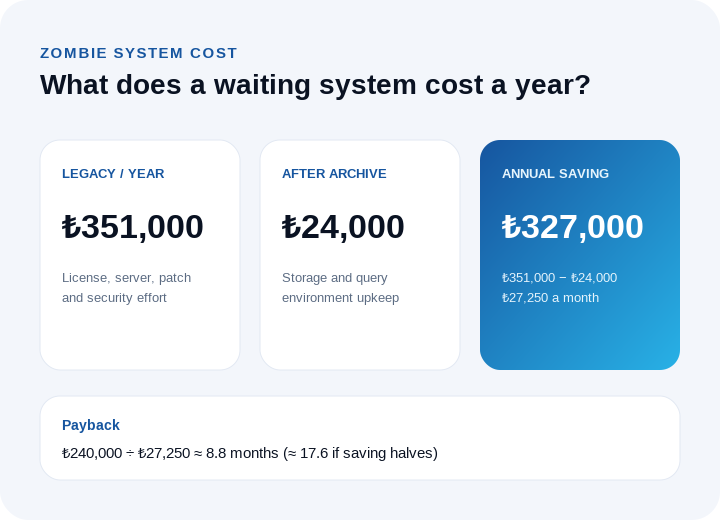
The saving is the old annual cost minus the archive cost. In the example the archive needs ₺6,000 a year for storage and 2 person-days (₺18,000) to maintain the query environment: ₺24,000. Annual saving is ₺351,000 − ₺24,000 = ₺327,000, or ₺27,250 a month.
The one-time cost of decommissioning is 22 person-days × ₺9,000 = ₺198,000 plus ₺42,000 for archive setup and verification: ₺240,000 in total. Payback is ₺240,000 ÷ ₺27,250 ≈ 8.8 months. If the saving halves (₺13,625 a month), it stretches to ≈ 17.6 months. Delaying the shutdown by 6 months gives up 6 × ₺27,250 = ₺163,500. Missing the license renewal alone costs ₺180,000.
How Is Decommissioning Measured?
| Measure | Example value | Target |
|---|---|---|
| Decommissioning completed (of 5 candidates) | 3 ÷ 5 = 60% | On plan |
| Orphan resources (after shutdown) | 4 → 0 | 0 |
| Incidents after shutdown (30 days) | 0 | 0 |
| Time to find a record in the archive | 2 min | ≤ 5 min |
| Annual cost saved | ₺327,000 | Tracked |
How Do You Decommission a Legacy System Step by Step?
- Usage evidence: Pull the login, report and job logs.
- Dependency map: Find connections and their owners from the network log.
- Data and report decisions: For each record type and report, decide to migrate, archive, delete or retain.
- Archive verification: Pass the record count, file count and sampling tests.
- Read-only and trial: Close writing and run a trial that covers a month-end.
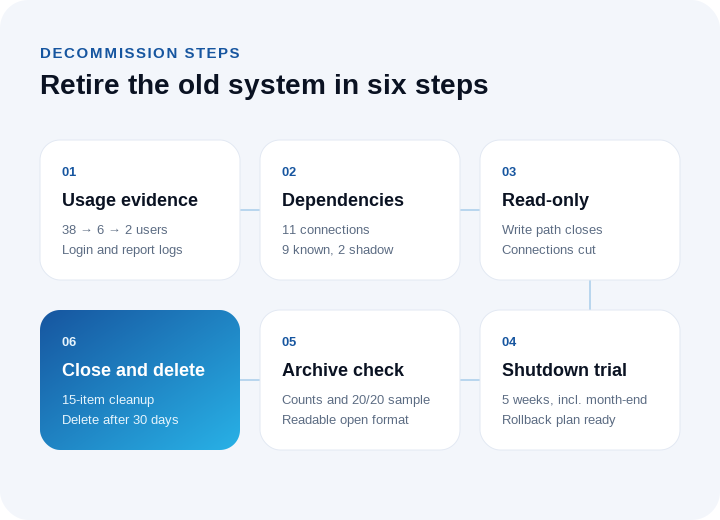
- Shut down and clean up: Take the final backup, apply the 15-item list, delete after 30 days.
What Mistakes Are Common When Decommissioning?
- Shutting down without evidence: Proceeding on the assumption that nobody uses it.
- A short trial: A single week that misses monthly and yearly jobs.
- Forgetting reports: Being unable to produce an old period when audited.
- Not verifying the archive: Mistaking an unreadable backup for an archive.
- Missing the renewal date: Paying for another year of license.
- Leaving credentials live: Keys of a closed system remaining valid.
- Leaving it ownerless: Nobody being the "A" for the shutdown.
We recommend reading: How to Do a Software Technical Due Diligence: Code and Architecture Audit, Scorecard and Decision Guide
Moving From an Old System to a New One With İnovabil
İnovabil's focus is building custom software from scratch. We developed CRM, purchasing and mobile for Avcılar İnşaat; a purchasing system for İZBAN; logistics and shipment planning with wholesale order management for Karyak; and warehouse management plus a complaint and support management system for Sleepy. When moving to a new system, we suggest settling in the requirements analysis, in writing, how the old system and its connections will be closed, as a transition and decommissioning plan; this is a suggestion, not a separate service commitment.
We recommend reading: How to close a software project and hand it over
We recommend reading: Our software development process: step by step from analysis to launch
Frequently Asked Questions
What is decommissioning a legacy system?
It is the planned wind-down of the old system's usage, connections, data, access and infrastructure after the new system has taken over the work. It is done on evidence and includes archive verification.
When can an old system be switched off?
When the new system has been live long enough, period closes are completed in it, no open differences remain, usage and dependencies are proven, and the archive is verified. The thresholds in this article are representative; set them to your own risk level.
What is a shutdown trial (scream test)?
It means temporarily restricting access and seeing who complains. To catch monthly jobs it must include a month-end, and the rollback plan is ready in advance.
Is the old system's data deleted or archived?
A separate decision is made for each record type: migrated to the new system, moved to the archive, kept under legal retention, or deleted. Retention periods are set with legal counsel and an accountant.
What if something turns out to be missing after the shutdown?
First query the archive. If necessary, the server kept switched off is brought back from its snapshot. That is why deletion happens at least 30 days after the shutdown.