

A new sales rep cannot log in on day one and borrows a colleague's account for two days. An employee promoted to sales manager keeps every permission from the old role as well. A warehouse supervisor who left months ago still has an active account. All three are symptoms of the same gap: user account lifecycle management, meaning accounts opened when people join, updated when their role changes and closed when they leave, has never been defined as a process.
This guide covers the three events (joiner, mover, leaver), the states an account passes through, why the HR record must be the single source of truth, service and external accounts, reconciling the account list against the HR list, and how to work out payback. All figures are illustrative; they are not measurements from a real company or an industry average.
What Is User Account Lifecycle Management?
It is the process that makes sure a person's accounts and permissions are opened, updated and closed on time, following the person's status in the business. Three short names are widely used for the events: joiner (someone joining), mover (someone changing role) and leaver (someone leaving).
The topic is separate from role design: our role-based access control guide explains which role gets which permission, while this article covers a person's moves between roles and their exit. For authentication, see the MFA and SSO guide.
Why Do Old Permissions Stay After an Employee Changes Role?
Because granting a new permission is someone's job, while removing the old one is nobody's. This build-up is called privilege creep.
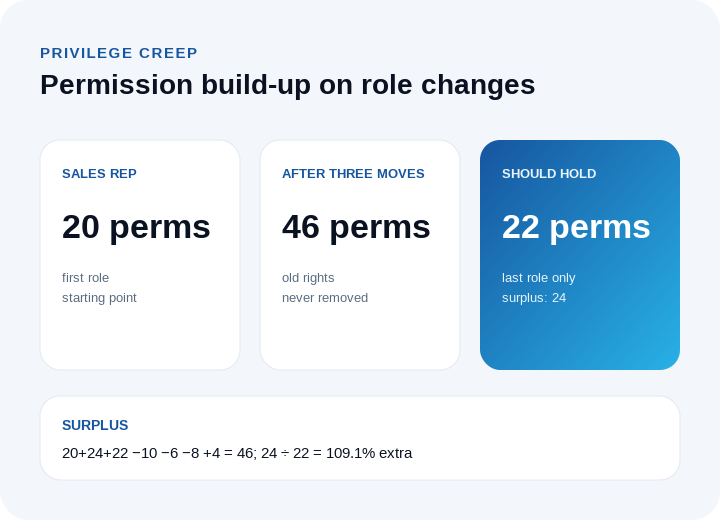
Illustrative example: an employee starts as a sales rep (20 permissions), becomes a sales manager (24 permissions), then moves sideways to a purchasing specialist (22 permissions). The rep and manager roles share 10 permissions, rep and specialist share 6, manager and specialist share 8, and all three share 4. If old permissions are never removed, the employee holds the union of the three roles:
20 + 24 + 22 − 10 − 6 − 8 + 4 = 46 permissions. What they should hold is only the last role, 22. The surplus is 46 − 22 = 24 permissions, which is 24 ÷ 22 = 109.1% extra. Part of that surplus is rights such as changing sales prices that have nothing to do with purchasing work; it increases both error risk and segregation-of-duties conflicts.
Why Should Account Opening and Closing Follow the HR Record?
Because the HR record is the only record that knows the person's status. The HR record should be the single source of truth, with accounts derived from it. The three events are defined by these fields:
- Start date: The account is prepared before this date and waits in a state where login is not possible.
- Role or department change (with an effective date): Permissions of the old role are removed on that date or when the handover window ends.
- Leaving date and time: The closing time comes from here. If employment ends immediately, closing starts the moment the record is entered.
A late HR entry is also delay: total delay is the HR recording delay plus the account closing delay, so measure the two separately. For steps and approvals, our workflow and approval software guide can help.
Which States Does an Account Pass Through?
Five states, each with a single meaning. "Disabled" and "deleted" are not the same: login is closed first, and the account is deleted or anonymised only once handover is complete and the retention period has ended.
| State | Meaning | Login | Transition rule |
|---|---|---|---|
| Prepared | Before start date, opened from a role template | No | Becomes active on the start date |
| Active | Normal use | Yes | Updated when the role changes |
| Suspended | Long leave or investigation; data stays | No | Active on return, disabled on leaving |
| Disabled | Has left; waiting for data handover | No | Deleted or anonymised after handover and the retention period |
| Deleted / anonymised | Record no longer linked to the person | No | No way back; the audit trail remains |
For retention periods and how personal data is deleted, consult your legal counsel and KVKK (Turkey's personal data protection law) requirements; this article does not suggest any period. For the audit trail, see our audit log guide.
How Is the Joiner Flow Set Up?
The goal is that the person can do their job on day one and has no excess permissions on day one. Both come from a role template.
- HR event: The start record is entered with role and department.
- Template: The minimum permission set defined for the role is selected; extra permissions are an exception and need approval.
- Preparation: The account is created in the "prepared" state at least one business day before the start.
- Activation and check: It opens on the start day and the first password reaches the person through a separate channel; at the end of the day, missing permissions are asked about and the template is updated.
Illustrative measure: of 70 joiners a year, 49 have accounts ready on day one (70.0%); with templates and advance preparation that rises to 66 (94.3%).
How Is a Role Change (Mover) Managed?
Granting the new permissions and removing the old ones happen in the same record. Most businesses do the first and forget the second.
- Difference set: Permissions in the old role but not the new one are removed; those in the new role but not the old one are added.
- Handover window: The permissions the old role needs for handover stay for an illustrative 14 days and then expire on their own; a manager can extend the window.
- Approval and record: Exception permissions are granted with the manager's approval; what was removed and when is written to the audit log.
Assume 6 permissions from the old role are needed for 14 days of handover. If they never expire, those 6 stay open for 6 × 365 = 2,190 permission-days in a year; with the window it is 6 × 14 = 84 permission-days (−96.2%). Illustrative measurement: of 40 role changes in a year, 28 (70%) left old permissions in place; with a difference set and a window that falls to 4 ÷ 40 = 10%.
In What Order Is an Account Closed When Someone Leaves?
Access is closed first, data is handed over afterwards. If the order is reversed, the person may keep using the account while handover is still going on.
- Sessions: Open sessions are ended.
- Tokens and keys: The person's access keys are revoked; for token lifetimes see our API security guide.
- Verification device: The registered multi-factor device is removed from the account.
- Privileged rights: Administrator, source code and infrastructure rights are removed first.
- Shared passwords: Passwords of shared accounts the person knew are renewed the same day.
- Data handover: Email, files and open work go to the manager or a named person.
- Disabling: The account is not deleted; the record stays until the retention period ends.
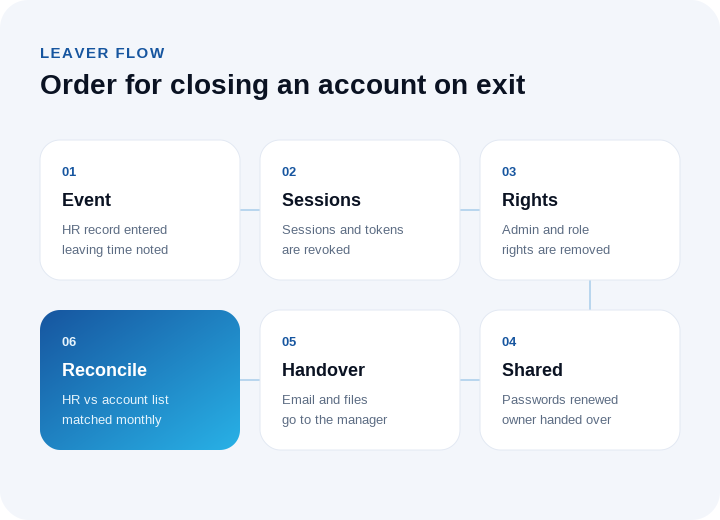
Illustrative time targets: 1 hour from the leaving time for administrator and privileged accounts, 4 hours for standard applications, 24 hours for shared passwords, and 5 business days for email and file handover.
Who Owns Service, Shared and External User Accounts?
Every account needs a named owner; an account without one falls outside the lifecycle.
- Service accounts: An owner is assigned. When the owner leaves, "service accounts they own" is a separate line on the checklist; the exit is not complete until they are handed over.
- Shared accounts: Move them to personal accounts where possible; if they must stay, renew the password whenever someone leaves.
- External users (dealers, contractors): Accounts open with an end date; under an illustrative rule they need re-approval every 90 days or they close. In the example, 16 of 60 external accounts (26.7%) were closed at re-approval.
To see who has an account in which application you first need an inventory; we covered the method in our software inventory and shadow IT guide.
How Is the Account List Reconciled With the HR List?
You link every active account to an active person in HR or to a registered owner; whatever cannot be linked is "unmatched" and gets investigated.
Illustrative example: 480 employees and 512 active accounts. 471 accounts link to an active person, so 512 − 471 = 41 accounts do not match, and 480 − 471 = 9 employees have no account (mostly new joiners and field staff).
| Unmatched account type | Count | First action |
|---|---|---|
| Former employee | 17 | Disable now, record the delay |
| Service or shared account, with owner | 8 | Confirm the owner, register it |
| Service or shared account, no owner | 6 | Assign an owner or close it |
| Expired external user | 6 | Ask for re-approval, close if none |
| Unknown or test account | 4 | Check usage, delete if unneeded |
| Total | 41 | 17 + 8 + 6 + 6 + 4 = 41 |
Accounts without a confirmed owner number 41 − 8 = 33 (33 ÷ 512 = 6.4%); total unmatched is 41 ÷ 512 = 8.0%. The target is under 1%, apart from registered exceptions. Do not close everything at once; rank by a risk score: age score (under 6 months 1, 6–24 months 2, over 24 months 3) × permission score (read 1, write 2, admin 3); accounts of former employees are multiplied by 2.
For example, a former warehouse manager's account open for 40 months scores 3 × 3 × 2 = 18; an external user with read access for 8 months scores 2 × 1 = 2. You close the 18 first.
How Much Does Automation Reduce Closing Delay?
In a manual process the delay stretches; in a process triggered by the HR event it drops to hours. There are three levels: manual (email and forms), semi-automatic (the HR event creates tasks and approvals) and fully automatic (the HR event changes the account directly). Illustrative closing delay for 60 leavers:
| Delay | Manual (count) | Automated (count) |
|---|---|---|
| Same day (0) | 18 | 45 |
| 1 day | 16 | 9 |
| 3 days | 12 | 4 |
| 7 days | 10 | 2 |
| 21 days | 4 | 0 |
| Average | 206 ÷ 60 ≈ 3.4 days | 35 ÷ 60 ≈ 0.6 days |
Open account-days fall from 206 to 35 (−83.0%). The median in the manual case is 1 day; what pulls the average up is the tail of 7 and 21 days, and the risk concentrates there, so look at the longest delay as well. For privileged accounts automation is not enough; you also need dual control: opening, permission increases and closing go through two people. In the example, 24 of the 512 accounts (4.7%) have administrator rights.
Which Measures Show the Health of the Lifecycle?
Four measures are enough, and all of them come from the HR list and the account list. Give each one an owner.
| Measure | Now (illustrative) | Target |
|---|---|---|
| Median time from leaving to closing | 1 day | 4 hours |
| Unmatched account rate | 41 ÷ 512 = 8.0% | Under 1% |
| Old permissions left after a role change | 28 ÷ 40 = 70% | 10% or less |
| Accounts ready on day one | 49 ÷ 70 = 70.0% | 90% or more |
How leave and departure records are kept in a system is covered in our leave and employee management guide.
How Is the Payback of Lifecycle Automation Calculated?
Payback is the investment divided by the sum of labour savings and risk reduction. Because the risk item depends on assumptions, show the two separately. Illustrative assumptions: 70 joiners, 40 role changes and 60 leavers a year; manual handling takes 45, 60 and 50 minutes respectively, automated handling 10, 15 and 10; staff cost ₺300 per hour.
- Manual labour: 70 × 45 + 40 × 60 + 60 × 50 = 8,550 min = 142.5 h.
- Automated labour: 70 × 10 + 40 × 15 + 60 × 10 = 1,900 min ≈ 31.7 h.
- Labour saving: 110.8 h × ₺300 = ₺33,250; if the quarterly reconciliation drops from 4 × 12 h to 4 × 3 h, add ₺10,800. Total ₺44,050.
- Risk: probability of unauthorised use per open account-day is 1 ÷ 200,000 (an assumption, not a measured statistic), incident cost ₺2,000,000. In the manual case 33 ownerless accounts stay open all year (33 × 365 = 12,045 account-days) plus 206 account-days from leavers: 12,251 × 0.000005 = 0.0613 incidents, expected loss ₺122,510. With automation ownerless accounts fall to 3 (1,095) and leavers to 35 account-days: 1,130 × 0.000005 × ₺2,000,000 = ₺11,300. The difference is ₺111,210.
Annual benefit is 44,050 + 111,210 = ₺155,260; with ₺30,000 a year running cost the net is ₺125,260, about ₺10,438 a month. An investment of ₺240,000 pays back in about 23 months. If no risk benefit is counted, the net is ₺14,050 a year and payback is about 205 months; counting half of it, about 41 months. The decision depends on risk, so recalculate the assumptions with your own data.
In Which Five Steps Is Lifecycle Management Set Up?
- Count the accounts: Reconcile accounts in every application against the HR list and classify the unmatched ones.
- Assign owners: Name an owner for every service and shared account and every application.
- Write role templates: Define the minimum permission set and the exception rule for each role.
- Tie the three events to the HR record: Start, role change and leaving dates trigger the processes.
- Set time targets and measure: 1 hour for privileged accounts, 4 hours for standard ones; calculate the four measures every month.
We recommend reading: How to Design B2B Company Accounts, Sub-Users and Purchasing Permissions: Roles, Limits and Approvals
We recommend reading: How to Decommission and Retire a Legacy System: Usage Evidence, Archive, License and Shutdown Guide
Account and Permission Management with İnovabil
At İnovabil our focus is bespoke software built from scratch for your company. Role-based permissions, audit logs and secure hosting are among our recorded capabilities in the systems we build. We recommend writing down expectations such as how accounts link to the HR record, which role opens with which permissions and in what order things close on departure during requirements analysis.
We built CRM, purchasing and mobile for Avcılar İnşaat; a purchasing system for İZBAN; logistics and shipment planning with wholesale order management for Karyak; and warehouse management with a complaint and support management system for Sleepy. This article does not claim a separate account lifecycle product. For personal data and HR legislation, consult your legal counsel.
We recommend reading: Our software development process: from analysis to launch, step by step
Frequently Asked Questions
What is user account lifecycle management?
A defined process for opening a person's accounts when they join, updating them when their role changes and closing them when they leave. The HR record is the single source of truth; accounts derive from it and are reconciled monthly.
What is privilege creep and how is it prevented?
It is when a person who changes role keeps the permissions of the old role. On a role change you calculate the difference set, old permissions expire on their own when the handover window ends, and any extension needs manager approval.
In what order is an account closed when an employee leaves?
Sessions and tokens first, then the verification device and privileged rights, then shared passwords; email and file handover and disabling the account come last.
How are service and shared accounts included in the lifecycle?
Each gets a named owner. When an owner leaves, the exit is not complete until their accounts are handed over, and a shared account's password is renewed whenever someone leaves.
When does lifecycle automation pay for itself?
About 23 months in the example; about 205 months if no risk benefit is counted, on labour alone. The decision depends on the loss probability.