

Choosing an ERP is not even half the job. Putting it into operation means moving your processes, data and habits into a new system, and most ERP projects struggle in implementation rather than in selection. How do you run an ERP implementation? You settle the scope and core processes, prepare the data, configure the system, train users, test with a pilot, make a go-live decision tied to written criteria, and get through the first weeks after launch with heavy support.
In this guide we follow a 26-week (roughly six-month) ERP implementation at a manufacturer with 50 users. All figures are representative; they do not come from a real project or an industry average.
How Does an ERP Implementation Differ From ERP Selection?
Selection answers "which ERP?", implementation answers "how will this ERP work here?". During implementation you define the processes, you verify the data and you bring the users along. For the selection process see our guide to choosing an ERP, for line-by-line cost see our ERP cost guide, and for the technical detail of moving data see our data migration guide.
We recommend reading: Our ERP software service
What Phases Does an ERP Implementation Have?
Seven: scope and process design, data preparation, installation and configuration, training, pilot, cutover and go-live, and post-launch support. The phases partly overlap.
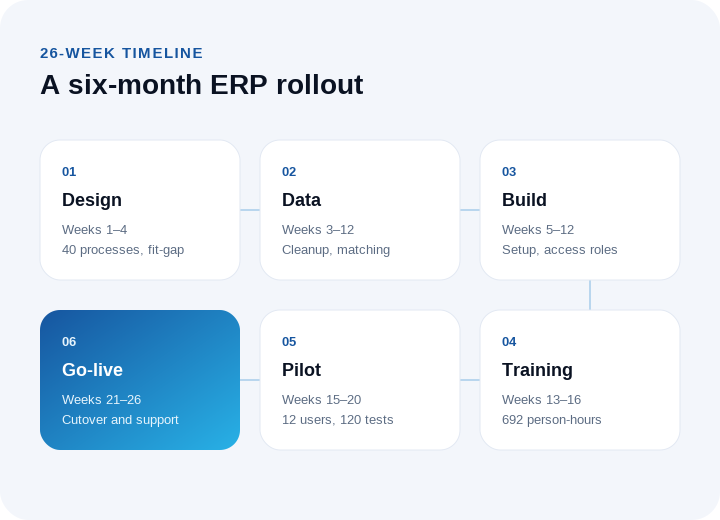
| Phase | Weeks | Length | Output |
|---|---|---|---|
| Scope and core process design | 1–4 | 4 wk | Approved process and requirements list |
| Data preparation | 3–12 | 10 wk | Cleaned and verified data |
| Installation and configuration | 5–12 | 8 wk | A working system in the test environment |
| Training | 13–16 | 4 wk | Users trained by role |
| Pilot and acceptance testing | 15–20 | 6 wk | A system proven in real work, test report |
| Cutover and go-live | 21–22 (cutover), 23 (live) | 2 wk | Live system, retired old system |
| Post-launch support | 23–26 | 4 wk | Stable operation, handover |
The total is 26 weeks, that is 26 ÷ 4.33 ≈ 6 months. If you simply add up the phase lengths you get 4 + 10 + 8 + 4 + 6 + 2 + 4 = 38 weeks; the overlap shortens the plan by 12 weeks. We describe how to build the schedule in our project plan guide.
How Do You Do Scope and Core Process Design?
First map the current processes, then decide how each will run in the new system. The most practical way is to sort every requirement into three classes (fit-gap): met by the standard product, met by configuration, or needing custom development.
In the sample company the 40 core processes and requirements split like this:
- Standard: 28 items, 28 ÷ 40 = 70%.
- Configuration: 8 items, 8 ÷ 40 = 20%.
- Custom development: 4 items, 4 ÷ 40 = 10%. At an average of 10 person-days per item and ₺9,000 per day, that is 4 × 10 = 40 person-days and 40 × ₺9,000 = ₺360,000.
The larger the custom share, the harder upgrades become, so each custom item gets the question "can we adapt the process to the standard?". For process mapping see our business process mapping guide.
Once the design is approved, the scope is frozen. Every later change becomes a written request. A practical rule: if the number of change requests exceeds 20% of the approved items (8 requests for 40 items), the scope is re-approved by the steering committee. In the example 10 requests arrived over six months: 10 ÷ 40 = 25%, the threshold was crossed; three were accepted and the rest moved to a second phase.
How Do You Prepare Data for an ERP?
Data preparation is the work most often under-budgeted and the one that causes most delays. A manufacturer prepares item cards, customer and supplier accounts (current accounts), recipes (bills of materials), stock and opening balances.
- Every data group gets an owner: the warehouse lead for stock cards, accounting for accounts.
- Clean first: duplicate records, missing fields, unused cards. Repeat trial loads in the test environment; the error rate should fall each round.
- Opening stock is verified by a physical count. See our inventory counting guide for the method.
- If you use real personal data in the test environment, consult your legal counsel about KVKK (Turkey's personal data protection law).
Field mapping and reconciliation details are in our data migration guide. The data criterion in this project is stock value reconciliation: the value in the system may deviate from the counted value by at most 0.5%.
What Should You Watch During Installation and Configuration?
Configure according to the processes approved in the design; do not bend processes to fit the configuration. Three environments are set up: development and configuration, test (acceptance) and live. Changes always move between environments in order, and nobody edits directly in live.
- Roles and permissions: Design them from the start; the person who approves cannot open the same order. See our role-based access control guide for the role model.
- Integrations: e-invoice (e-Fatura), bank and barcode reader connections are built and tested in this phase; for e-document rules consult your financial advisor (certified accountant) and the Revenue Administration (GİB) sources.
- Reports: The reports management will see on day one are defined in advance; having none sends users back to their old tools.
How Do You Plan ERP Training?
Plan training by role and calculate the total person-hours. Each role learns to do its own work in the system. Key users (representatives from each department who join the project team) get deeper training and become the first line of support after launch.
| Role | People | Hours / person | Person-hours |
|---|---|---|---|
| Sales and orders | 8 | 8 | 64 |
| Purchasing and stock | 10 | 12 | 120 |
| Production planning and shop floor | 14 | 14 | 196 |
| Accounting and finance | 8 | 16 | 128 |
| Management and reporting | 6 | 4 | 24 |
| Key users | 4 | 40 | 160 |
| Total | 50 | avg. 13.8 | 692 |
The total is 64 + 120 + 196 + 128 + 24 + 160 = 692 person-hours; 692 ÷ 8 = 86.5 person-days; the average is 692 ÷ 50 ≈ 13.8 hours. At a representative ₺300 per hour of work time, training costs the company 692 × ₺300 = ₺207,600. This amount belongs in the budget as its own line.
- Training on their own data: Seeing their own product and order in the test environment sticks better than a generic demo.
- Practical check: Whoever can do the role's three core tasks counts as "trained".
- Timing: Training is given close to the pilot period, when users will actually touch the system; training that comes too early is forgotten, so a short refresher session is added before cutover.
How Do You Run an ERP Pilot?
A pilot tests the system in real work with a small group before the whole company. In the example 12 users (12 ÷ 50 = 24%) and one product group run for six weeks; the acceptance test scenarios run in the same period.
- Real work: The pilot group does its job in the new system within the agreed scope; double entry happens only where unavoidable.
- Test scenarios: In the example 120 scenarios were written (order, purchasing, production order, shipment, invoice). See our user acceptance testing guide for writing them and for the acceptance rule.
- Defect versus request: A defect and a request (the system works correctly but we want something else) are logged separately; requests go through the scope rule.
- Period-close rehearsal: At least one month-end close is tried during the pilot; accounting catches the most problems here.
How Do You Make the Go-Live Decision?
The decision is made against criteria written at the start of the project; thresholds are not loosened later.
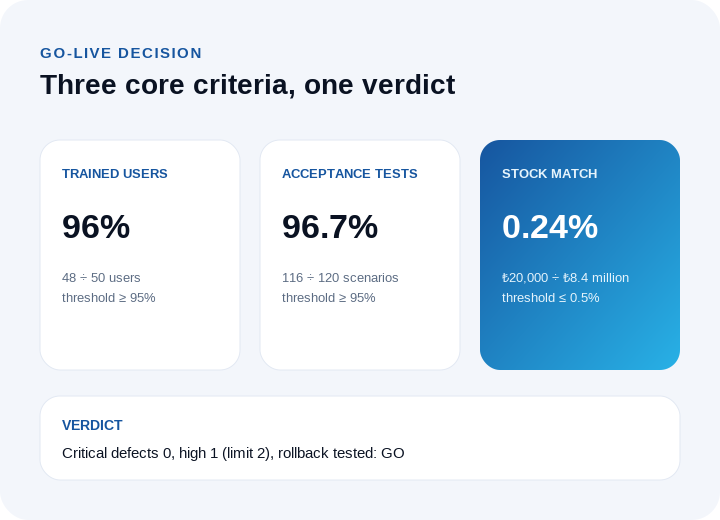
| Criterion | Threshold | Measured | Result |
|---|---|---|---|
| Users trained | ≥ 95% (50 × 0.95 = 47.5, so at least 48 people) | 48 ÷ 50 = 96.0% | Pass |
| Acceptance tests passed | ≥ 95% | 116 ÷ 120 = 96.7% | Pass |
| Open critical defects | 0 | 0 | Pass |
| Open high defects | ≤ 2 | 1 | Pass |
| Stock value reconciliation | ≤ 0.5% gap | ₺20,000 ÷ ₺8,400,000 = 0.24% | Pass |
| Period-close rehearsal | At least 1 completed | 1 | Pass |
| Rollback plan | Written and rehearsed | Yes | Pass |
All seven criteria are met, so the decision is "go". Had the trained share come out at 44 ÷ 50 = 88%, the decision would be "postpone": training 4 more people brings it to 48 ÷ 50 = 96%, and a one-week slip is cheaper than three troubled weeks. If even one mandatory criterion fails, you postpone.
For project risks see our risk management guide.
How Do You Choose a Cutover Strategy?
There are three routes: all at once, phased and parallel running.
| Strategy | How it works | Advantage | Cost |
|---|---|---|---|
| All at once | All modules go live over the cutover weekend | Shortest time; one cutover, one training wave | Risk concentrates; a fault hits every department at once |
| Phased | Go live in waves by module or site | Risk is split, each wave teaches the next | Takes longer, temporary bridges between modules |
| Parallel | Old and new systems run side by side for a while | Comparison and confidence | Double-entry workload; more sources of error |
The wave plan for the sample company: wave 1 stock, purchasing and sales (week 23); wave 2 production and costing (week 29); wave 3 finance (week 35). The last wave goes live in week 35 and support ends in week 38, so the plan stretches from 26 to 38 weeks (about nine months). Parallel running has a price too: if 20 users enter an extra 45 minutes a day, that is 20 × 0.75 = 15 hours a day; over a month (22 working days) 15 × 22 = 330 hours, and 330 × ₺300 = ₺99,000. If you choose a phased or parallel route, that cost goes into the budget.
In the example the company chose the all-at-once route because stock, purchasing and production share the same data and building bridges would have been a project of its own. If modules are independent or there are several sites, the phased route is safer.
How Do You Plan the Cutover Weekend?
Cutover is the hour-by-hour written plan for moving from the old system to the new one. In the example the window is 22 hours and every step has an owner.
- Friday 18:00–24:00 (6 h): Transactions in the old system are frozen and final balances are extracted.
- Saturday 00:00–06:00 (6 h): Data is loaded into the live system.
- 06:00–12:00 (6 h): Reconciliation: stock value, account balances, open orders.
- 12:00–16:00 (4 h): Smoke test: order, production order, shipment and invoice run end to end.
- Saturday 16:00: Final decision: go or roll back. The total is 6 + 6 + 6 + 4 = 22 hours; 40 hours of buffer remain until Monday 08:00.
The rollback plan is written down: the old system is kept read-only, and the condition for rolling back (for example, the reconciliation threshold is exceeded) is set in advance.
How Do You Manage the First 30 Days After Go-Live?
Go-live is not the end of the project, it is the start of its riskiest period. Plan heavy support for the first month and classify requests by cause.
Estimate the support load: requests = users × daily requests per person × 5 days. In the example, daily requests per person are 0.4 in week one, 0.2 in week two, 0.1 in week three and 0.06 in week four; each request takes 25 minutes on average.
| Week | Calculation | Requests | Handling time |
|---|---|---|---|
| 1 | 50 × 0.4 × 5 | 100 | 2,500 min = 41.7 h |
| 2 | 50 × 0.2 × 5 | 50 | 1,250 min = 20.8 h |
| 3 | 50 × 0.1 × 5 | 25 | 625 min = 10.4 h |
| 4 | 50 × 0.06 × 5 | 15 | 375 min = 6.25 h |
| Total | 190 | 4,750 min = 79.2 h |
Week one needs 41.7 hours, which is 1.04 times a 40-hour week for one person, so at least two people (a key user and a consultant) should be set aside for support. In week four 6.25 ÷ 40 ≈ 16% remains. The 190 requests broke down by cause as follows: usage and training gaps 95 (50.0%), permissions and roles 38 (20.0%), data errors 29 (15.3%), system defects 19 (10.0%), new requests 9 (4.7%). Because half came from training gaps, short refresher sessions were held in week two.
Month-end close is also tracked in the first month: a close that took 6 working days in the old system took 9 in the first live month (3 ÷ 6 = 50% longer); the target is to bring it down to 5 working days by month three.
What Are the Critical Success Factors in an ERP Project?
The factors that decide success are mostly managerial and human; watch four of them throughout the project.
| Factor | Strong sign | Weak sign |
|---|---|---|
| Executive sponsor | The steering committee meets every two weeks and decisions get made | The sponsor appears only at the kickoff |
| Key users | 25% of their time is set aside for the project | They help "in between other work" |
| Scope discipline | Change requests are written and tied to a threshold | Requests are verbal and keep growing |
| Criteria-based decisions | Go-live thresholds are written from the start | Fixed date, flexible criteria |
Put a number on the key users' time: 4 people × 25% × 130 working days (26 weeks × 5) = 4 × 32.5 = 130 person-days; at a representative ₺2,400 per day (₺300 × 8 hours) that is 130 × ₺2,400 = ₺312,000. This amount does not appear on the software invoice, but it belongs in the budget.
What Mistakes Are Common in ERP Implementations?
- Setting the date before the criteria: When the criteria are not met, it leads to a go-live under pressure.
- Leaving data to the last month: Cleanup takes weeks; if it starts late, the project slips.
- Cutting training and post-launch support: Requests rise and users drift back to the old tools.
We recommend reading: Our software development process: step by step from analysis to launch
We recommend reading: How to Drive Software Adoption: User Training, Champion Network, Rollout and Measurement Guide
We recommend reading: How to Decommission and Retire a Legacy System: Usage Evidence, Archive, License and Shutdown Guide
ERP and Process Software Projects with İnovabil
At İnovabil our focus is building software from scratch, tailored to your company: ERP, CRM, e-commerce, web, mobile and integration. We work in the steps of analysis, design, development, testing, release, maintenance and support, and we suggest writing the criteria-based go-live approach into the requirements phase together.
We built a warehouse management system (WMS) and a complaint and support management system for Sleepy; logistics and shipment planning with wholesale order management for Karyak; shipment planning for Bofigo; a purchasing system for İZBAN; and CRM, purchasing and mobile solutions for Avcılar İnşaat. Send us a short summary of your processes and number of users, and we will write the scope together.
Frequently Asked Questions
How long does an ERP implementation take?
It depends on scope, data condition and the share of customization. In the example, 26 weeks (about six months) were planned for a manufacturer with 50 users; with a phased go-live the same project stretches to about 38 weeks. Process and data complexity usually set the duration.
Who makes the go-live decision?
The steering committee does, and the decision rests on criteria written in advance: share of users trained, acceptance test result, open defects, data reconciliation and the rollback plan.
Is a pilot necessary in an ERP implementation?
Yes. A pilot catches defects in a small group without affecting the whole company. In the example 12 users worked in the pilot for six weeks.
Should you go live all at once or in phases?
If modules share the same data and bridging them would be a separate job, going live all at once makes more sense; if modules are independent or there are several sites, a phased go-live splits the risk but lengthens the schedule.
What should you expect in the first month after go-live?
Support requests peak in week one and fall quickly; in the example 100, 50, 25 and 15 requests came in, 190 in total. Set aside at least two people for support and classify requests by cause.