

The first version of a dealer portal is usually built on a "one person, one account" model. In B2B, though, the buyer is not a person but a company: a purchaser enters the order, a branch manager approves the amount, finance sees the invoice, and the contract price and credit limit belong to the company. A person-based account cannot carry that reality, and the result is shared passwords, copied price lists and unauthorized orders. A B2B company account keeps the buyer company as a single customer record, attaches its branches and sub-users beneath it, and lets the company's own rules decide what each user can see and do.
This guide covers the company versus user split, the company, branch and user data model, buyer-side roles, spending limits, value-based approval chains, catalog and price visibility, ERP mapping and the payback calculation. All example figures are illustrative; they are not data from a real customer or industry.
What Is a B2B Company Account and How Does It Differ from a Personal Account?
A company account is the single, lasting identity of a buyer firm in the portal. Even if a person leaves, the company's history, price list and limit stay in place. In a personal-account model that information hangs on the user, so when the user goes, the history scatters.
| Topic | Person-based account | Company account |
|---|---|---|
| Price list and limit | A separate copy per user | One record on the company |
| Order history | Tied to the user | Shared by the company, filtered by user |
| New employee | Password sharing or a new account | The admin invites and assigns a role |
| When an employee leaves | History and access get tangled | User is closed, history is kept |
| Approval and budget | None, or manual | By branch and role rules |
The difference shows in numbers too. Say the company has four fields (price list, credit limit, tax details, payment terms) and ten users. In a person-based model, 10 × 4 = 40 fields must be kept in sync by hand; in a company model the 4 fields live in one place, a reduction of 1 − 4 ÷ 40 = 90%. When the price list changes, you update one place instead of ten. The wider logic is covered in what is B2B e-commerce.
We recommend reading: Our e-commerce development service
How Do You Build the Company, Branch and User Data Model?
Three layers are enough: company, branch (location) and user. The company carries the contract and commercial terms, the branch carries the delivery address and budget, and the user carries the login identity. The user-to-branch relation is many-to-many: one purchaser can order for two branches. The link record holds three values: user, branch and the role at that branch.
| Layer | What it holds | Example |
|---|---|---|
| Company | Tax details, price list, credit limit, terms, main account admin | One account card |
| Branch | Delivery address, monthly budget, cost center, branch manager | 12 branches |
| User | Email, password and verification, linked branches | 10 users |
| Link | User, branch and role triple | 15 records |
Take a company with 12 branches and 10 users. If every user were assigned to every branch, you would need 12 × 10 = 120 pairings. In practice each user has about 1.5 branches, so only 15 link records exist, which is 15 ÷ 120 = 12.5% of the possible pairings. The role a user holds at a branch is the general role model applied to the company; the role and permission matrix itself is worked through in our role-based access control article.
The main account versus sub-account split follows from this. The main account admin manages invitations, role assignment and limit allocation for the company; sub-accounts act only in the branches and roles granted to them.
Which Roles Does the Buyer Side Need?
Roles inside the buyer company differ from the seller's own team roles. Five are enough for most companies: account admin, purchaser, approver, finance and viewer. The matrix below is illustrative; adjust it to the company and the contract.
| Permission | Admin | Purchaser | Approver | Finance | Viewer |
|---|---|---|---|---|---|
| Create orders | Yes | Yes | No | No | No |
| Approve | Yes | No | Yes | Yes | No |
| See prices | Yes | Yes | Yes | Yes | Per role setting |
| See invoices | Yes | No | No | Yes | No |
| Manage addresses | Yes | No | No | No | No |
| Add users | Yes | No | No | No | No |
Two separations matter most. The first is segregation of duties: the person who places an order cannot approve the same order. The second is splitting ordering from invoice access: everyone who sees prices and places orders does not need to see invoice and payment data. The finance role alone sees invoices, due dates and statements.
How Are Spending Limits and Budgets Defined?
Limits can be set at four levels: order amount per user, monthly total per user, monthly branch budget and item category restriction. The user limit controls single-order risk, the branch budget controls the monthly total, and the category restriction controls, for example, allowing only contracted items.
The company's credit limit is a separate concept managed on the seller side; the blocking rules are covered in our credit limit and order hold article. Here the subject is the buyer's own internal budget. The budget calculation has three items: spent, pending approval and remaining.
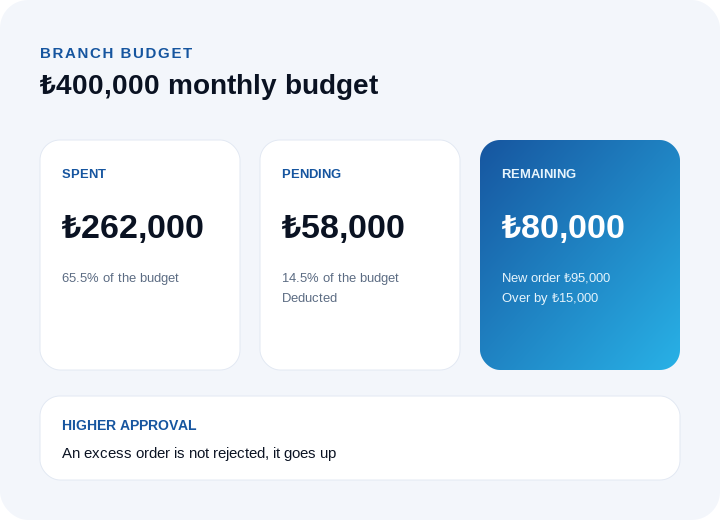
Say a branch budget is ₺400,000 per month. Spent is ₺262,000 (65.5% of the budget), orders awaiting approval total ₺58,000 (14.5%), so the remainder is 400,000 − 262,000 − 58,000 = ₺80,000. If the purchaser enters a new ₺95,000 order, the budget is exceeded by 95,000 − 80,000 = ₺15,000. The system routes the order to a higher approver instead of rejecting it, and pending approvals are deducted from the budget, otherwise orders entering approval on the same day would silently overrun it.
How Do You Design a Value-Based Approval Chain?
Sending every order to approval slows the company down; sending none removes control. A value threshold balances the two. Example rule: automatic up to ₺10,000, branch manager between ₺10,000 and ₺50,000, finance above ₺50,000. The general approval logic is covered in our workflow and approval software article; the buyer-company adaptation is what matters here.
| Amount | Approver | Orders per month | Share | Average wait |
|---|---|---|---|---|
| Up to ₺10,000 | Automatic | 840 | 70% | 0 h |
| ₺10,000 – ₺50,000 | Branch manager | 288 | 24% | 3 h |
| Above ₺50,000 | Finance | 72 | 6% | 12 h |
| Total | 1,200 | 100% | 1.44 h |
The weighted average wait is (840 × 0 + 288 × 3 + 72 × 12) ÷ 1,200 = 1,728 ÷ 1,200 = 1.44 hours. For only the 360 orders that enter approval, the average is 1,728 ÷ 360 = 4.8 hours. Without thresholds, if the first group also needed at least a 3-hour approval, the average would be (840 × 3 + 288 × 3 + 72 × 12) ÷ 1,200 = 3.54 hours; the gap is 1,200 × (3.54 − 1.44) = 2,520 order-hours per month.
The weak point of the chain is an absent approver. Say the branch manager is on leave for 8% of orders: 288 × 0.08 ≈ 23 orders wait 24 hours instead of 3, and the extra waiting is 23.04 × 21 ≈ 484 order-hours. With a delegate approver the wait falls to about 3.5 hours and the extra waiting drops to 23.04 × 0.5 ≈ 12 order-hours. Add a timeout rule as well: no reply in 8 hours goes to the delegate, none in 24 hours escalates to finance.
How Are Catalog and Price Visibility Set per User?
A company's contract price belongs to the company, but not every user needs to see it. A warehouse employee may pick items without seeing prices; only the purchaser, approver and finance do. This is defined as a price-hiding role.
The company can also build its own approved product list: only contracted items can be ordered, and the rest are hidden or require approval. The price resolution order (list, group, tier) is covered in our B2B price list article; the company account only attaches the "which price list" information to that structure.
How Do Shared Order History, Address Book and Cost Centers Work?
Order history is shared inside the company: a user sees their own orders, a branch manager sees the branch's, and the admin sees all. Frequent order lists can be shared at company level: a weekly order list built by one branch is used by the others. The quick entry and reorder screen is covered in a separate article; here, just note that the list can be shared at company level.
The address book is tied to the branch: each branch has a default delivery address, and a customer with 12 branches picks a branch instead of typing an address. Cost center and project code can be required fields for invoicing and reporting. The value is measurable: say 96 of 1,200 orders lack a purchase order number (8%). If each costs 25 minutes of invoice correction, 96 × 25 ÷ 60 = 40 hours are spent. If the field becomes mandatory and the missing rate falls to 1%, 12 orders remain, 12 × 25 ÷ 60 = 5 hours are spent, and the saving is 35 hours, 35 × ₺300 = ₺10,500 per month.
How Does the Buyer Company Manage Its Own Users?
The seller handling a request for every employee does not scale. The company admin invites users self-service, assigns roles, links branches and closes users. When an employee leaves, closing the account is the buyer's responsibility; the seller provides oversight. The general account lifecycle (joiner, mover, leaver) is covered in a separate article; the difference here is that the buyer company manages its own users.
For oversight, set an inactive-user rule: an account with no login for 90 days is reported to the company admin. In the example, 420 active companies with an average of 3.2 users each give 420 × 3.2 = 1,344 users; if 9% are inactive, about 121 accounts are reported. The verification requirement is also a company-level setting: the company admin can turn on multi-factor verification for all users; details are in our MFA and SSO article.
How Is the Company Account Mapped to ERP and CRM?
If the portal structure does not line up with ERP and CRM records, reconciliation problems begin. Write the mapping table up front.
| Portal | ERP and CRM counterpart | Sync rule |
|---|---|---|
| Company | Account card | Price list, limit, terms from ERP to portal |
| Branch | Ship-to address, cost center | Address two-way, ship-to confirmed in ERP |
| User | CRM contact record | Portal user linked to the CRM contact |
| Order | Sales order | Portal to ERP, status written back |
For the account card logic, see our customer account tracking article. When a branch closes, open orders move to another branch, history is kept and the address is made inactive. In a company merger, two company accounts move into one; users and order history are not lost, and the price list and limit are decided under the new contract.
How Are Permission Changes and Unauthorized Order Risk Managed?
Every role, limit and branch change goes into an audit log: who changed what, and when. In disputes over unauthorized orders, that log separates the parties. In the example, the unauthorized order rate is 0.4%, which is 4.8 orders out of 1,200. Say each unauthorized order costs ₺600 in cancellation and return logistics plus about 1.5 hours of handling: ₺600 + 1.5 × ₺300 = ₺1,050. That is 4.8 × 1,050 = ₺5,040 per month. If limit, approval and verification rules bring the rate to 0.1% (1.2 orders), the cost is ₺1,260 and the saving is ₺3,780.
Which Reports Does the Company Admin Need?
The admin should see spending in three cuts: branch, item category and user. The branch cut shows budget overruns; if 3 of 12 branches closed the month over budget, the overrun rate is 3 ÷ 12 = 25%. The category cut shows the share of contracted items, and the user cut surfaces unusual ordering behavior. A branch manager sees only their own branch.
Which Metrics Are Tracked and How Is Adoption Raised?
| Metric | Illustrative value | Target |
|---|---|---|
| Users per company | 3.2 | Increase |
| Average approval wait | 1.44 h | Under 2 hours |
| Unauthorized order rate | 0.4% | 0.1% |
| Budget overrun events | 3 ÷ 12 branches = 25% | Under 10% |
| Self-service user adds | 80% | Above 80% |
| Inactive users | 9% | Under 5% |
On adoption, assume single-user companies place 2.5 orders a month on average and companies with three or more users place 6.0 (illustrative). Getting the second and third user invited then turns directly into order frequency.
How Is the Payback of a Company Account Structure Calculated?
There are three savings items. First, permission requests: say 420 companies open an average of 0.5 requests a month, so 210 requests at 15 minutes each; 210 × 15 ÷ 60 = 52.5 hours, 52.5 × ₺300 = ₺15,750. With 80% self-service, only 42 requests reach the seller (₺3,150), a saving of ₺12,600 per month. Second, unauthorized orders: ₺3,780 per month. Third, missing purchase order numbers: ₺10,500 per month. Total 12,600 + 3,780 + 10,500 = ₺26,880.
Take the investment as 32 person-days × ₺9,000 = ₺288,000, with ₺3,000 per month for running and maintenance. Monthly net is 26,880 − 3,000 = ₺23,880, and payback is 288,000 ÷ 23,880 ≈ 12.1 months. If the savings halve (13,440 − 3,000 = ₺10,440), the period stretches to about 27.6 months, so the decision is sensitive to the self-service rate and to fixing missing numbers.
What Steps Does Company Account Design Follow?
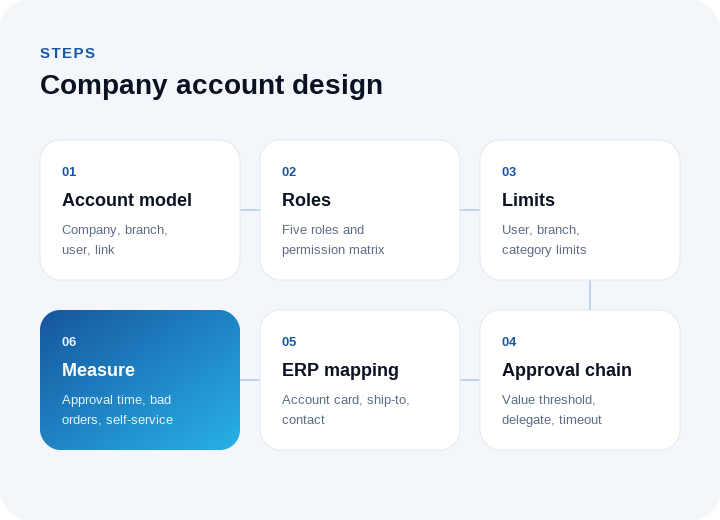
- Draw the account model: Define the company, branch and user fields and the link record.
- Define roles and permissions: Validate the five roles and the permission matrix with the company.
- Set limits: Build user, branch and category limits, with pending approvals deducted from the budget.
- Build the approval chain: Write the thresholds, the delegate and the timeout escalation.
- Map to ERP and CRM: Fix the account card, ship-to and contact mapping and the sync direction.
- Measure and improve: Track approval time, unauthorized orders and the self-service rate monthly.
B2B Portals and Company Accounts with İnovabil
At İnovabil our focus is building software from scratch, tailored to the company: custom software, e-commerce, CRM, ERP, web, mobile and integration. Our recorded capabilities include role-based access, audit logs and secure hosting; we suggest settling the company account structure on top of these, in writing, during requirements analysis.
We built CRM, purchasing and mobile for Avcılar İnşaat; a purchasing system for İZBAN; logistics and shipment planning with wholesale order management for Karyak; and warehouse management plus a complaint and support management system for Sleepy. Tell us briefly about your dealer or customer portal need and we will work out the company, branch and role structure together.
We recommend reading: Our software development process: step by step from analysis to launch
Frequently Asked Questions
What is a B2B company account?
It is an account structure that keeps the buyer firm as one customer record and attaches branches and users beneath it. The contract, price list and credit limit sit on the company; the login identity sits on the user.
Which permissions should sub-users get?
Under least privilege, only what their job needs: the purchaser gets ordering and prices, the approver gets approval, finance gets invoices. Adding users and managing addresses stay with the account admin.
How are approval thresholds decided?
Look at the monthly order value distribution. In the example, 70% of orders are under ₺10,000 and pass automatically; set your thresholds from your own distribution and the company's risk appetite.
Why are pending approvals deducted from the budget?
If they are not, orders entering approval on the same day silently overrun the budget. Spent plus pending shows the used budget, and the remainder shows what a new order can use.
Who closes the account when an employee leaves?
The first responsibility lies with the buyer company's account admin. The seller provides oversight by reporting accounts with no login for 90 days; the closed user's order history stays with the company.