

On a Friday afternoon, order entry in the dealer portal starts returning errors. The alert fires, but nobody knows who should look; three people connect to the server at once, nobody tells the dealers anything, and once the problem is fixed the question "why did it happen?" is quietly forgotten. At the next outage the same scenario repeats. Software incident management replaces that chaos with predefined roles, time targets and a learning loop for whenever business software running in production goes down or slows to a crawl.
This guide covers severity levels (SEV1–SEV4), on-call and escalation, the incident commander and roles, communication cadence, the "mitigate first, find the root cause later" principle, MTTD, MTTA and MTTR, the blameless post-mortem, action tracking, incident cost and a six-step setup. The example numbers are illustrative; they are not an industry average or any specific company's data.
What Is Software Incident Management, and How Is It Different from Monitoring?
Incident management is the process that runs from the moment an outage or serious degradation is noticed until service is back to normal and lessons are drawn. Monitoring produces the "something is wrong" signal; incident management answers what comes after it: who does what, and when.
We covered metrics and alert design in our software monitoring guide and do not repeat it here. We covered contractual response and resolution commitments in our maintenance and support agreement (SLA) article; this article is about how you meet those times internally.
How Do You Define Severity Levels (SEV1–SEV4)?
The severity level is a single label that decides how many resources an incident gets and how often people are updated. The criterion is business impact, not the type of technical fault: how many users are affected and how critical the affected function is. The thresholds below are illustrative; write your own to fit your process.
| Level | Impact criterion | Acknowledge target | Status update |
|---|---|---|---|
| SEV1 | Core function fully down or data-loss risk; all users | 5 min, 24/7 | Every 15 min |
| SEV2 | Core function partly broken; ≥ 25% of users affected | 15 min, 24/7 | Every 30 min |
| SEV3 | Secondary function broken or a workaround exists; limited users | 4 hours, business hours | During the day and at closure |
| SEV4 | Cosmetic or can-wait issue | Next business day | Via ticket |
Example: if 35% of order-entry requests fail, a core function is partly broken and the ≥ 25% threshold is exceeded, so the incident is SEV2. One rule: when in doubt, declare high and downgrade once things are clear. A high declaration costs a few people's attention; a low one costs lost minutes.
How Do You Set Up On-Call and Escalation?
On-call means the person to reach during an outage is known in advance. Escalation is who the problem moves to when the first person does not respond or is not enough.
- Primary and secondary on-call: If the primary does not answer within 5 minutes, the page automatically goes to the secondary.
- Escalation chain: The order of on-call engineer, tech lead and manager is written down; who may wake whom and when is not up for debate.
- Rest rule: Someone who handled a night-time incident gets flexibility the next day. On-call pay and working-time questions are settled with HR and your legal counsel.
On-call load calculation: with weekly rotation, team size determines how often each person is on call. In a team of 6, a person is on call 52 ÷ 6 ≈ 8.7 weeks a year. If the team shrinks to 4, it becomes 52 ÷ 4 = 13 weeks; the load rises by 13 ÷ 8.67 = 1.5×, that is 50%. For team capacity see our article on how to build a software development team.
The load that pages actually create is measured too. If 6 of 14 weekly pages need no action, the non-actionable rate is 6 ÷ 14 = 42.9%; fixing those 6 alerts brings the weekly load down to 8 pages.
Why Do You Need an Incident Commander and Roles?
The most common mistake in a major incident is everyone debugging at once while nobody coordinates. The fix is to separate roles. In a small team one person may hold several roles; only the commander does not debug.
| Role | Responsibility | What they do not do |
|---|---|---|
| Incident commander | Declares severity, assigns tasks, makes decisions, closes the incident | Debug on the server |
| Tech lead | Runs diagnosis and mitigation, brings options to the commander | Write communications |
| Communications lead | Writes and publishes internal and external status updates | Make technical decisions |
| Scribe | Keeps the timeline: when, who, what was done | Join the response |
How Do You Communicate Internally and Externally During an Incident?
Silence damages trust more than the outage does. Frequency follows severity (see the table above); saying "investigating, next update 14:50" is information even when there is nothing new.
- Internal: Open a single incident channel; diagnosis happens there, and managers and the support team get a separate summary.
- External: A status page or dealer notice: what is affected, when it was noticed, the time of the next update. No cause is guessed before it is confirmed.
When personal data is affected or a leak is suspected, notification duties fall under KVKK (Turkey's personal data protection law); leave those details to your legal counsel. For the security side, see the incident response plan section of our secure software development article; this article does not cover breach management.
Why Mitigate First and Find the Root Cause Later?
During an incident the goal is not to find the cause but to stop the impact. Root-cause research happens after the incident, with a calm head. Because users are lost every minute, the fastest safe option is tried first.
| Mitigation option | When it fits | Illustrative time |
|---|---|---|
| Roll back the latest release | The problem began right after a deploy | 10 min |
| Turn off a feature flag | The faulty feature can be isolated | 5 min |
| Add capacity or restart | Load or resource exhaustion | 15 min |
| Route traffic to a standby environment | One zone or server is fully broken | 20 min |
Example: if the effective loss per outage minute in the order flow is ₺750, getting out in 10 minutes with a rollback costs ₺7,500. If finding the root cause and shipping the patch had taken 120 minutes, it would cost ₺90,000; the difference is (120 − 10) × ₺750 = ₺82,500. For making the rollback step ready, see our CI/CD guide.
How Do You Calculate the Incident Timeline, MTTD, MTTA and MTTR?
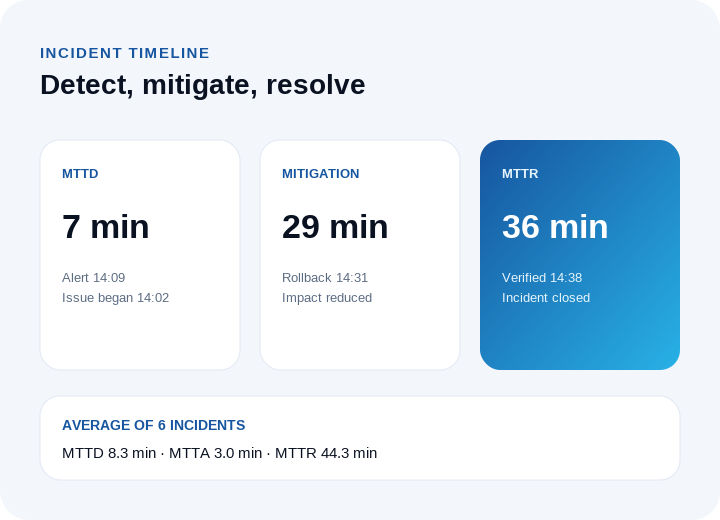
Three measures count the three phases of an incident. MTTD is the average time from when the problem starts to when the alert fires; MTTA from the alert to someone acknowledging; MTTR from the start of the problem until service is back and verified. First, the timeline of a single incident (illustrative, a dealer portal order-entry error):
- 14:02 New release deployed, problem begins.
- 14:09 Alert fires (detection: 7 min).
- 14:12 On-call acknowledges (3 min after the alert).
- 14:15 SEV2 declared, incident commander assigned.
- 14:31 Release rolled back, impact drops (29 min from start).
- 14:38 Error rate back to normal, verified, incident closed (36 min from start).
Now suppose the same system had six incidents in six months:
| Incident | Level | Detect (min) | Acknowledge (min) | Resolve (min) |
|---|---|---|---|---|
| I1 | SEV2 | 7 | 3 | 36 |
| I2 | SEV3 | 4 | 2 | 22 |
| I3 | SEV2 | 15 | 6 | 95 |
| I4 | SEV3 | 3 | 1 | 18 |
| I5 | SEV2 | 9 | 4 | 54 |
| I6 | SEV3 | 12 | 2 | 41 |
| Total | 50 | 18 | 266 | |
| Average | MTTD 8.3 min | MTTA 3.0 min | MTTR 44.3 min |
The calculation: 50 ÷ 6 = 8.3; 18 ÷ 6 = 3.0; 266 ÷ 6 = 44.3 minutes. An average alone can mislead: I3's 95 minutes pulls the value up. The median (for 18, 22, 36, 41, 54, 95: (36 + 41) ÷ 2) is 38.5 minutes; without I3 the average is (266 − 95) ÷ 5 = 34.2 minutes. Looking by level is more telling: the SEV2 average is (36 + 95 + 54) ÷ 3 = 61.7, the SEV3 average (22 + 18 + 41) ÷ 3 = 27.0 minutes. Read the measures together with the trend and the outliers.
How Much Does an Incident Cost?
Calculating cost as loss per minute makes prioritisation concrete. Illustrative assumption: the portal takes 36 orders an hour at an average order of ₺2,500; hourly revenue is 36 × ₺2,500 = ₺90,000, or ₺1,500 a minute. During an outage half of the orders come back later and half are lost; the effective loss is ₺750 a minute.
- I1 (36 min): 36 × ₺750 = ₺27,000; response labour 4 people × 1 h × ₺300 = ₺1,200; review 5 people × 1.5 h × ₺300 = ₺2,250. Total ₺30,450.
- I3 (95 min): 95 × ₺750 = ₺71,250 in lost sales alone.
- Annual: 266 minutes in six months is 532 minutes a year; 532 × ₺750 = ₺399,000. If MTTR drops from 44.3 to 30 minutes, 12 × 30 = 360 minutes, ₺270,000; the annual gain is (532 − 360) × ₺750 = ₺129,000.
This figure leaves out reputation damage and support load. To put numbers on backup and recovery targets, see the RPO and RTO calculation in our data backup guide.
What Is a Blameless Post-Mortem and How Do You Write One?
A post-mortem is the written review done after an incident closes. Being blameless means it questions the system rather than looking for a person: instead of "who did it", you ask "why did the system allow this error". The review is held within 3–5 business days of the incident.
- Summary: What happened, how many minutes, who was affected.
- Impact: Affected users, lost orders, estimated cost.
- Timeline: From the scribe's record, hour by hour.
- Detection and response: How it was noticed, what helped, what was delayed.
- Contributing factors: Not one cause but several factors.
- What went well, what went badly, what was luck: Three separate lists.
- Action items: With owner, due date and type.
What Is the 5 Whys Method and What Are Contributing Factors?
5 Whys is a method of asking "why" repeatedly to move from the surface symptom down to the process. An example chain:
- Why did order entry fail? The database connection pool filled up.
- Why did the pool fill up? A query in the new release never closed its connection.
- Why did testing not catch it? Tests were not run under load.
- Why were they not run under load? The data volume in the test environment was a tiny fraction of the real one.
- Why was it small? Nobody owned keeping test data current.
The chain should not be read as if there were a single root cause; real incidents are a combination of several factors: a release at a busy hour, a 7-minute detection delay, a manual rollback step. Each factor is a separate improvement opportunity. We covered load testing in our performance testing guide.
How Do You Track Action Items?
The value of the review lies in the actions being done. Each item gets an owner, a due date and a type; an item without an owner does not get done.
| Action | Type | Owner | Time |
|---|---|---|---|
| Fix the query that does not close its connection | Prevent | Developer | 3 days |
| Add a load test with realistic data volume | Prevent | Test lead | 14 days |
| Set up an 80% connection-pool alert | Detect | Platform team | 5 days |
| Automate rollback and write it into the runbook | Mitigate | Platform team | 10 days |
| Move release time out of busy hours | Prevent | Product owner | 7 days |
Two measures track this loop. On-time action closure rate: if 3 of 5 items finish on time, it is 3 ÷ 5 = 60%; the target is 90% or more. Repeat incident rate: if two of six incidents share a cause class with an earlier incident, it is 2 ÷ 6 = 33.3%. If the actions work and 1 of 7 incidents in the next period repeats, it falls to 1 ÷ 7 = 14.3%. This rate shows whether the post-mortem is working.
What Is a Runbook and How Does It Help Incident Management?
A runbook is a step-by-step response guide written for a specific alert or incident type: symptom, check commands, mitigation step, who to escalate to. An on-call engineer woken at night relies on the guide, not on memory. A good runbook is short and linked from the alert; after each incident the missing step is added. We covered how to prepare and keep runbooks current alongside other handover documents in our software documentation guide.
How Do You Set Up Incident Management? In Six Steps
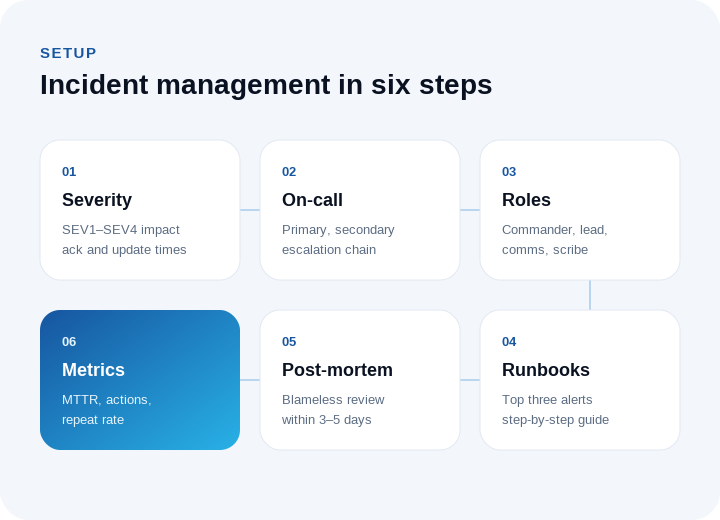
- Write down severity levels: Four levels, impact criteria, acknowledge and update times.
- Set up on-call and escalation: Primary, secondary, chain, handover.
- Prepare roles and communication templates: Commander, tech lead, communications, scribe; internal and external message templates.
- Write runbooks: Start with your three most frequent alerts.
- Set the post-mortem template and rhythm: Mandatory for every SEV1 and SEV2, within 3–5 business days.
- Measure and review: MTTD, MTTA, MTTR, action rate, repeat rate; monthly or quarterly.
After setup, run a drill with a controlled scenario so the team experiences the chain and the communication beforehand.
What Are Common Mistakes in Incident Management?
- Responding without roles: Everybody diagnoses, nobody coordinates and communication is forgotten.
- Hunting for someone to blame: Information is hidden at the next incident and the review stays superficial.
- Ignoring on-call load: In a small team, on-call frequency and needless alerts lead to burnout.
We recommend reading: What Is Penetration Testing? Types, Scope, Reports, Cost and How a Business Should Commission One
We recommend reading: What Is MFA and SSO? Multi-Factor Authentication, Single Sign-On and Password Policy Guide
We recommend reading: Disaster Recovery and Business Continuity Planning: BIA, RTO, Tiers and Drills Explained
We recommend reading: How to Manage Software Environments (Dev, Test, Staging, Production): Drift, Data Flow and Cost Guide
We recommend reading: What Are Feature Flags and Gradual Rollout? Percentage Buckets, Stop Criteria and Flag Debt Guide
We recommend reading: How to Set Up Centralized Log Management: Structured Logs, Retention and Cost Guide
We recommend reading: How to Close a Software Project and Hand It Over: Criteria, Checklist, Access Handover and Lessons Learned
We recommend reading: How to Set Up IT Change Management and Maintenance Windows: Risk Scoring, Approval and Rollback Guide
We recommend reading: How to Run Integration Operations: Error Queues, Reprocessing and Monitoring Dashboards
We recommend reading: How to Do Stakeholder Management and Communication Planning for Software Projects? Influence–Interest Matrix, RACI and Report Guide
We recommend reading: What Is Scrum? How to Run Sprint Planning, Daily Standups, Sprint Reviews and Retrospectives
Custom Software and Systems in Production with İnovabil
At İnovabil our focus is building custom software from scratch for your company: custom software, ERP, CRM, e-commerce, web, mobile and integration. How a production system is handled during an outage is an expectation that should be discussed at handover; we suggest settling it in requirements analysis together with response times and the maintenance and support scope.
We built CRM, purchasing and mobile for Avcılar İnşaat; a purchasing system for İZBAN; logistics and shipment planning with wholesale order management for Karyak; and warehouse management plus a complaint and support management system for Sleepy. Send us a short summary of your systems and we will prepare a written assessment together. This article does not promote an incident management product or service.
We recommend reading: Our software development process: step by step from analysis to launch
Frequently Asked Questions
What is software incident management, in short?
It is the process of handling outages and serious degradation in production with predefined roles, time targets and communication, and then learning from the incident. The aim is to shorten impact and prevent the same incident from repeating.
What is the difference between MTTD, MTTA and MTTR?
MTTD is the average time from the start of the problem to the alert, MTTA from the alert to someone acknowledging, and MTTR from the start until service is back and verified. Outliers can distort the average, so also look at the median and the per-level average.
Why is a blameless post-mortem important?
When people are blamed they hide information and the review stays shallow. A review that questions the system finds why the error was possible and produces lasting improvement.
Why don't we find the root cause first during an incident?
Because the loss continues every minute. A fast, safe mitigation such as a rollback or switching off a feature stops the impact; the root cause is researched calmly after the incident.
Do small teams need incident management?
Yes, but in a light form: two or three severity levels, an on-call person and a backup, a short incident channel and a one-page post-mortem template are enough. Having no rules makes decisions during an incident more expensive.