

Accounting keys in hundreds of supplier invoices by hand every month, the support team types the same answer to the same questions, and purchasing hunts for totals inside PDFs. Most of this work is reading, sorting and summarizing, which is exactly where language models can help. AI integration means adding that capability safely to the business software you already run, such as an ERP, a CRM or a portal. The real task is not calling a model; it is placing the model inside the process together with controls, permissions and human review.
In this guide we cover which jobs suit AI, the integration architecture, how confidence thresholds and human review work, the risk of wrong answers, data privacy principles, questions for choosing a provider, how to estimate cost and measure results, and a six-step rollout. The example figures are illustrative; they are not any provider's price or an industry average.
What Is AI Integration?
AI integration is connecting a language model or a machine learning capability to your business software through an API and using its output as one step of a workflow. For example, when an invoice is uploaded the model reads the supplier, the amount and the due date; the software fills those fields into a form; a rule compares them with your records; and a person approves anything uncertain.
This is a different layer from process automation. Jobs that can be written as rules are served well by classic automation; AI steps in where rules cannot be written, that is, where the input is text, documents or free-form wording. We explain the basics of automation in our business process automation guide and how systems talk to each other in our API integration guide.
We recommend reading: Our integration service
Which Jobs Is AI Suitable For?
Suitable jobs share three traits: the input is free text or a document, a wrong result is easy to spot and correct, and the volume is high enough to matter. Where exact calculation or exact rules are needed, classic software is more reliable.
| Job | Is AI suitable? | Safeguard or alternative |
|---|---|---|
| Invoice and document reading | Suitable | Confidence threshold, amount rule, human review |
| Request and email classification | Suitable | Fixed category list, uncertain ones to a person |
| Drafting replies | Suitable | A person reads before sending |
| Summarizing long text | Suitable | Source link, check critical fields |
| Knowledge base search and answers | Suitable, with sources | Answer only from documents, show the source |
| Demand and stock forecasting | Conditional | Is there enough history? Compare with a simple method |
| Price calculation, tax, discount rules | Not suitable | Rule-based software; the model does not calculate |
| Permission and approval decisions | Not suitable | Roles and rules decide |
| Exact matching (ID number, barcode) | Not suitable | Exact lookup, validation rule |
A practical test: "Would it be a problem if the same input produced two different answers?" If yes, the job belongs to a rule, not a model. A model's output is not always identical, so the model goes in front of a step that needs certainty, not in place of it.
How Do You Build a Safe AI Architecture?
Build a four-part flow: data, model, control, decision. The model is only the second part; the safety of the system is decided in the third and fourth.
- Data: Only the fields the job needs go to the model. Personal data is masked or not sent at all.
- Model: It is called with a specific task and output format (for example "supplier, amount, due date, with a confidence score per field"). Ask for structured output rather than free-form text.
- Control: The output passes through rules: is the amount a number, do the line items match the total, is the supplier registered, is the confidence above the threshold.
- Decision: A result that passes is saved as a draft; one that fails goes to a person. What actually processes the result is still your own business logic.
Technically this means your software calls the model's API and places the result in its own queue. To avoid waiting on long-running calls, event-based notification can be used; we explain the mechanism in our webhook guide. The principles in our API security guide apply as they are for protecting the calls with identity, permissions and rate limits; the model key is a secret too and is never kept in code.
How Do Confidence Thresholds and Human Review Work?
A confidence threshold is the limit above which a result becomes a draft based on the score the model gives its own output; anything below goes to a person. The threshold is the single dial that balances speed against error.
In the illustrative example, 600 invoices are processed per month and the threshold is 0.90. For one invoice the model returns: supplier "Örnek Ltd.", amount ₺8,800, confidence 0.96. Because the confidence is above the threshold, the invoice becomes an automatic draft and the accountant only does a quick check. An invoice with confidence 0.71 goes straight to a person.
| Group (threshold 0.90) | Invoices | Correct | Corrections | Accuracy |
|---|---|---|---|---|
| Above threshold: automatic draft | 510 (85%) | 498 | 12 | 97.6% |
| Below threshold: goes to a person | 90 (15%) | 60 | 30 | 66.7% |
| Total | 600 | 558 | 42 | 93% |
The calculation: 600 × 0.85 = 510; 510 − 12 = 498 and 498 ÷ 510 = 97.6%; 90 − 30 = 60 and 60 ÷ 90 = 66.7%; 498 + 60 = 558 and 558 ÷ 600 = 93%; corrections 42 ÷ 600 = 7%. Raising the threshold lowers the number of automatic drafts, sends more to people and reduces errors; lowering it does the opposite. Choose the threshold from the accuracy distribution in pilot data, not by guesswork. For high-value or hard-to-reverse work (such as payments), a person gives the final approval whatever the threshold is.
How Do You Manage the Risk of Wrong Answers (Hallucination)?
A language model can produce a fluent, confident answer even where it does not know; this is called hallucination. Wrong information is as much a design problem as a model flaw: left without a source the model guesses, tied to a source it answers with evidence.
Knowledge base search (commonly called RAG) works like this: when a question arrives, the relevant sections of your own documents (contracts, product manuals, policies) are found first, and the model writes an answer based only on those sections and shows the source. If a document in the knowledge base is out of date, the answer will be too, so each document's owner and update routine are part of the design.
- Source requirement: If no source is found, the answer should be "information not found"; no guessing.
- Rule validation: Check numeric and identifier fields with rules (line-item total, registered supplier, date range).
- Customer-facing text: Generate it as a draft and have a person read it before sending.
- Test set: Test the model regularly with 50–100 examples whose correct answers are known, and rerun it whenever the version changes.
What Should You Watch for in Data Privacy and KVKK?
Every piece of data sent to a model is data that leaves your business. So the principle is: data that is not needed is not sent, and personal data that is needed is masked where possible. For obligations, the legal basis for transfers and retention, consult your legal counsel; we do not give legal opinions here. KVKK is Turkey's personal data protection law.
- Data inventory: Write down which fields go to the model; names, ID numbers and phone numbers are not needed for most jobs.
- Masking: Replace personal fields with placeholder values before sending and put the real values back after the answer returns.
- The provider's use of data: Clarify by contract whether the data you send is used to train models and how long it is kept.
What Questions Should You Ask When Choosing a Provider?
Choose a provider by your job and your risk, not by brand awareness. Every candidate should answer the questions below in writing.
- Data: Where is my data processed, how long is it kept, is it used for training?
- Performance: What is the accuracy on my own example set? Measure your documents rather than relying on the provider's general results.
- Continuity: How are outages, latency and version changes announced? Model behavior can change with a version.
- Flexibility: How hard is it to switch models? To avoid binding the integration tightly to one provider, abstract the model call in your own layer.
- Cost: What unit is the price based on, and what are the usage limit and overage terms?
How Do You Estimate the Cost of AI Integration?
Cost has two parts: a one-time setup (integration, control rules, interface, pilot) and a variable usage fee. The variable fee moves with volume and cannot be fully known in advance, so budget it as a range and set an alert for overruns.
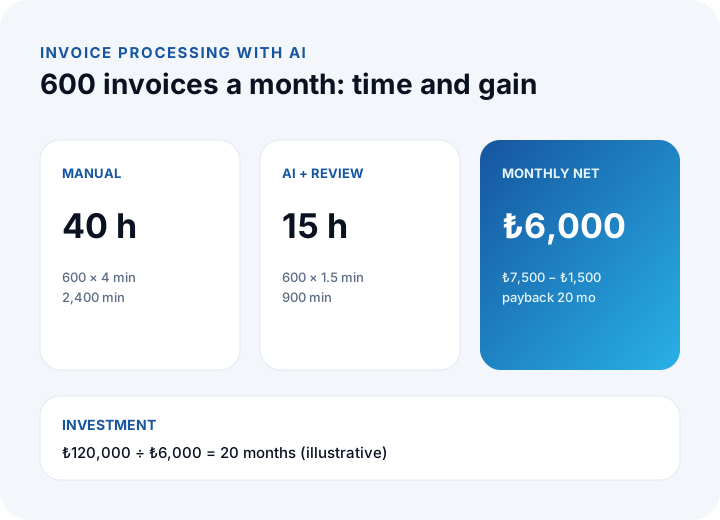
The illustrative example is 600 invoices a month. Manual handling takes 4 minutes per invoice; with AI the average falls to 1.5 minutes (a quick check of an above-threshold draft takes 1.2 minutes and one sent to a person takes 3.2 minutes: 510 × 1.2 = 612 and 90 × 3.2 = 288, a total of 900 minutes). The hourly cost is ₺300, the monthly usage cost is ₺1,500 (₺2.5 per invoice) and setup is ₺120,000.
| Item | Calculation | Result |
|---|---|---|
| Manual time | 600 × 4 min = 2,400 min | 40 h |
| Time with AI | 600 × 1.5 min = 900 min | 15 h |
| Time saved | 40 − 15 | 25 h |
| Monthly gain | 25 × ₺300 | ₺7,500 |
| Monthly usage cost | 600 × ₺2.5 | ₺1,500 |
| Monthly net | ₺7,500 − ₺1,500 | ₺6,000 |
| Payback | ₺120,000 ÷ ₺6,000 | 20 months |
To see the effect of volume, change the same assumption. Setup cost stays fixed while the gain grows with volume.
| Invoices per month | Gain | Usage | Monthly net | Payback |
|---|---|---|---|---|
| 300 | 12.5 h = ₺3,750 | ₺750 | ₺3,000 | 40 months |
| 600 | 25 h = ₺7,500 | ₺1,500 | ₺6,000 | 20 months |
| 1,200 | 50 h = ₺15,000 | ₺3,000 | ₺12,000 | 10 months |
When volume is low the payback stretches, and a simpler rule or partial automation may be enough. All figures are illustrative; plug in your own volume, time measurements and provider price. We explain the cost logic of custom builds in our custom software guide.
How Do You Measure the Success of an AI Integration?
An integration you do not measure does not improve. Three indicators are enough to start, and all are calculated from records.
- Accuracy: correct results ÷ total results. In the example, 558 ÷ 600 = 93%.
- Correction rate: results a person changed ÷ total. In the example, 42 ÷ 600 = 7%; it should fall over time, and if it rises, the model, the document type or a rule has changed.
- Time: average minutes per item. In the example, from 4 minutes to 1.5 minutes.
Add queue waiting time, the automatic draft rate (510 ÷ 600 = 85%) and the monthly usage cost. Do not watch accuracy by the average alone; breaking it down by supplier, document type or language shows where the problems cluster.
What Happens If the AI Service Fails?
A provider may not respond, may be slow, or may answer in an unexpected way. If the process cannot cope, work stops. Design the fallback path from the start.
- Timeout: Put a time limit on every call; if it is exceeded, the item falls into a "manual handling" queue.
- Retry: On a temporary error, retry a limited number of times at growing intervals; keep a transaction ID so the same invoice is not processed twice.
- Manual fallback: Work must be able to continue the old way while the model is down; AI should be an accelerator, not a requirement.
How Do You Set Up AI Integration in Six Steps?
Start small: one job, one flow, a short pilot with real data. Take a measurable step instead of a large, vague project.
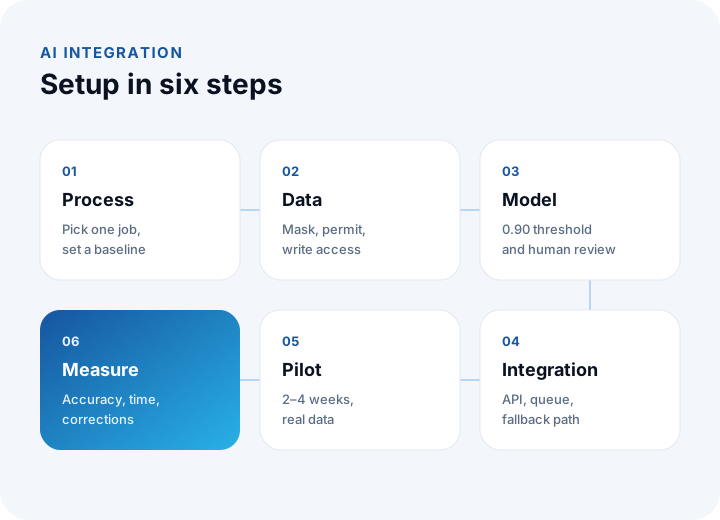
- Choose the process: Pick a job with high volume, errors that are easy to spot and measurable results; measure today's time and error count.
- Data and privacy: Write down which data goes to the model, what is masked and who has access; review it with your legal counsel.
- Model and threshold: Define the output format and the confidence threshold; measure accuracy on an example set.
- Integration: Build the API call, the queue, the control rules, the review screen and the fallback path.
- Pilot: Run it for 2–4 weeks with limited users and real data; collect the reasons for corrections.
- Measure and expand: Compare accuracy, correction rate and time with the earlier measurement; if the target holds, widen the scope; if not, adjust the threshold and prompt, or stop.
Agree on an explicit decision rule before the pilot begins. Writing it first stops you from reading the result in your own favor. We explain how to put requirements in writing in our requirements analysis guide.
Off-the-Shelf Tool or Custom Integration?
For a simple, generic job an off-the-shelf tool can be enough. Custom integration makes sense when the job needs deep connection to your workflow and data.
| Topic | Off-the-shelf tool | Custom integration |
|---|---|---|
| Setup speed | Fast | Longer |
| Fit with your workflow | Limited by the tool | Designed around your process |
| Link to existing software | Easy if a connector exists | Directly to ERP, CRM and portal |
| Control and threshold | Settings the tool provides | Your own rules and approval logic |
| Data control | The tool's rules | Masking and retention are yours |
| Cost structure | Per user or per usage | Setup and usage fee |
| Suitable case | Generic, simple, low-risk job | Core process, unique rule, sensitive data |
You can use both: an off-the-shelf tool for the generic job and a custom layer for the core process. For the decision, cost out your own process both ways. One of the places AI adds most value is on the customer side; you can find the management of support in our help desk guide, customer records and sales data in our CRM guide, and stock, purchasing and production processes in our ERP guide.
We recommend reading: What is a customer portal? Self-service scope, security and payback guide
Integration and Custom Software with İnovabil
At İnovabil our focus is building custom software from scratch for your company: custom software, ERP, CRM, e-commerce, web, mobile and integration. We suggest evaluating together, in the requirements analysis, where an AI capability fits in your process, how to integrate it, the limits of data privacy and the payback; among our recorded capabilities are role-based permissions, audit logs and secure hosting. We do not claim to have an AI product or an AI reference; we will tell you openly what an integration is worth and what it is not.
We built CRM, purchasing and mobile for Avcılar İnşaat; a purchasing system for İZBAN; logistics and shipment planning with wholesale order management for Karyak; and warehouse management plus a complaint and support management system for Sleepy. These systems show the kind of workflows an AI step can attach to. Send us a short summary of your process and data; first let us put together, in a written assessment, which job is suitable, the controls and the payback.
We recommend reading: Our software development process: step by step from analysis to launch
Frequently Asked Questions
What is AI integration and how is it done in short?
It is connecting a language model or a machine learning capability to business software through an API and using the result in a workflow. The safe route is to start with one job, add a confidence threshold and human review, protect the data and measure with a pilot.
Which business jobs is AI suitable for?
Jobs that involve free text and whose errors are easy to spot, such as document reading, classification, drafting replies, summarizing, knowledge base search and, where data is sufficient, forecasting. It is not suitable for exact calculation, permission decisions or exact matching.
How do you prevent AI from giving wrong answers?
It cannot be prevented entirely; it is managed. Tying answers to source documents, saying "information not found" when there is no source, checking numeric fields with rules, sending low-confidence results to a person and testing regularly with examples of known answers all lower the risk.
What should I do about KVKK when using AI?
Send the model only the data it needs, mask personal fields where possible and clarify the provider's retention and training-use terms by contract. For obligations and the legal basis for transfer, consult your legal counsel.
How long does an AI integration take to pay for itself?
It depends on volume. In the illustrative example, setup is ₺120,000 and monthly net gain is ₺6,000, so payback is 20 months; it falls to 10 months when volume doubles and rises to 40 months when it halves. Recalculate with your own volume and measured times.