

At nine in the morning seven trucks reach the warehouse gate at once, drivers wait without knowing their turn, the forklift crew sits idle an hour later, and in the afternoon the doors stand empty. Dock door (loading dock) appointment management means giving every inbound and outbound truck a door and a time window in advance, planning each door by its real occupancy time, and managing the waiting and the queue through measurement.
In this guide we cover why appointments are needed, how door capacity and slot counts are calculated, how to set appointment length by load type, the no-show and overbooking arithmetic, rules for early and late trucks, door assignment, the times worth measuring and the payback. The example figures are representative; they are not the average of any particular warehouse or industry.
What Is Dock Door (Loading Dock) Appointment Management?
A dock appointment is a record, made in advance, of which door a truck will use, at what time, for how long and for what load. The resource is the door and its crew; what you plan is the time the truck spends at the door.
It differs from general appointment and booking software in this way: there the calendar belongs to a person or a specialist and service time is mostly fixed. Here the resource is a door, the time varies with pallet count and load type, the appointment is usually requested by an outside carrier or supplier, and it is tied to an advance shipping notice. We described the general calendar logic in our appointment booking software guide.
We recommend reading: What is a warehouse management system (WMS)?
Why Are Appointments Needed? How Does a Queue Form Without Them?
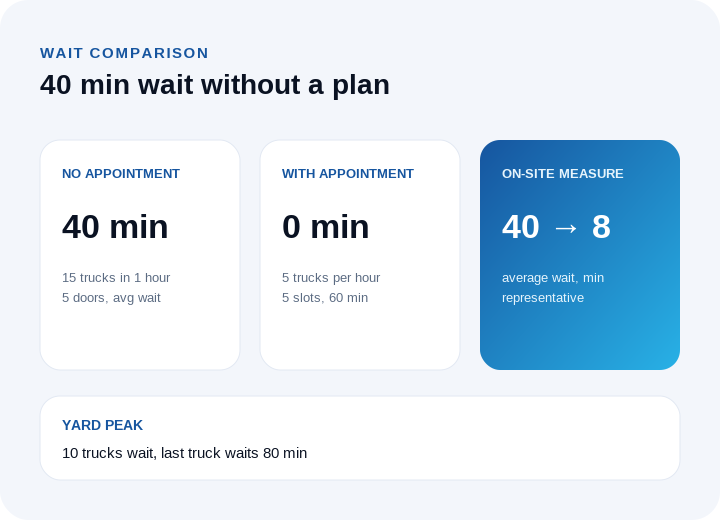
Without appointments trucks arrive by their own dispatch times rather than your door capacity, and a queue forms at the peak. A simple model shows it: five inbound doors, each truck stays 60 minutes at the door, and 15 trucks arrive four minutes apart during one peak hour.
| Trucks | Arrival (min) | Door entry (min) | Wait (min) |
|---|---|---|---|
| 1–5 | 0–16 | 0–16 | 0 |
| 6–10 | 20–36 | 60–76 | 40 |
| 11–15 | 40–56 | 120–136 | 80 |
The average wait is (0 + 40 + 80) ÷ 3 = 40 minutes, the last truck waits 80 minutes and at the final arrival ten trucks stand in the yard. Had the same 15 trucks been booked five per hour, none would wait at the gate, but trucks 6–10 would shift one hour later and trucks 11–15 two hours. So an appointment does not make the total delay vanish; it takes the waiting out of your yard, makes it predictable and lets you use the empty door hours in the rest of the day. If the daily load is 60 trucks and five doors run at 75% occupancy, the answer is spreading the peak across the day.
How Do You Calculate Door Capacity and Daily Slots?
Slots = number of doors × working hours × (60 ÷ slot length). In the example warehouse there are 8 doors, 16 working hours a day, an average unloading time of 45 minutes and a 15-minute buffer for door cleanup and paperwork; the slot length is 45 + 15 = 60 minutes, so 16 slots per door per day.
| Group | Doors | Calculation | Daily slots | Bookable (85%) | Reserve |
|---|---|---|---|---|---|
| Inbound (receiving) | 5 | 5 × 16 | 80 | 68 | 12 |
| Outbound (shipping) | 3 | 3 × 16 | 48 | 40.8 ≈ 40 | 8 |
| Total | 8 | 8 × 16 | 128 | 108 | 20 |
We do not fill every slot; roughly 15% is held in reserve for late trucks, priority loads and walk-ins. A calendar without reserve breaks at the first delay. Separating inbound and outbound doors prevents a one-directional queue when receiving peaks in the morning and shipping in the afternoon; some warehouses make one door a flexible door that changes direction by shift. Daily door occupancy: inbound 60 × 60 ÷ 4,800 = 75%, outbound 28 × 60 ÷ 2,880 = 58.3% (assuming 28 outbound trucks), overall 5,280 ÷ 7,680 = 68.75%.
How Do You Set Appointment Length by Load Type?
Length = pallet count × unloading time per pallet + setup and close-out, then add the buffer and round up to the slot step. Example: a 24-pallet truck is unloaded by two operators working together at an average of 1.5 minutes per pallet; 24 × 1.5 = 36 minutes, plus 9 minutes for docking, seal and paperwork check and departure: 45 minutes. With the 15-minute buffer, 60 minutes, which is one slot.
| Load | Calculation | Time at door | + 15 min buffer | Appointment |
|---|---|---|---|---|
| 12 pallets | 12 × 1.5 + 9 | 27 min | 42 min | 45 min |
| 24 pallets | 24 × 1.5 + 9 | 45 min | 60 min | 60 min |
| 33 pallets (full truck) | 33 × 1.5 + 9 | 58.5 min | 73.5 min | 75 min |
| 20 pallets loading (outbound) | 20 × 1.8 + 9 | 45 min | 60 min | 60 min |
These times belong to one warehouse; update them with your own measurements. Write a separate time rule for hand-stacked (non-palletized) loads, cold chain goods and shipments that need a quality check. A fixed "one hour per truck" rule leaves the door idle on small loads and produces delays on large ones. The advance shipping notice supplies pallet count and load type; for getting that information from suppliers, see the confirmation and shipping notice flow in our supplier portal guide.
How Do You Calculate No-Shows and Overbooking?
Some trucks do not come, and that means idle door hours. Overbooking means giving as many extra appointments as the expected no-shows, but too much creates a queue. In the example the no-show rate is 8%, the bookable inbound slots are 68 and the reserve is 12 slots.
With no overbooking at all, the expected empty slots are 68 × 0.08 = 5.4. The naive calculation says 68 ÷ 0.92 ≈ 74 appointments, but then the number of arriving trucks exceeds 68 on roughly half of the days. A binomial model, which assumes no-shows are independent of each other, gives this table.
| Appointments given | Expected arrivals | Expected empty slots | Probability arrivals > 68 |
|---|---|---|---|
| 68 | 62.6 | 5.4 | 0% |
| 70 | 64.4 | 3.6 | 2.1% |
| 72 | 66.2 | 1.8 | 16.3% |
| 74 | 68.1 | 0 | 45.2% |
| 76 | 69.9 | 0 | 73.8% |
72 appointments is a sensible point: empty slots fall from 5.4 to 1.8, and when there is an overflow the excess fits inside the 12 reserve slots (the probability of exceeding 80 is close to zero). The independence assumption is fragile; common causes such as bad weather or a regional closure pile no-shows onto the same day. Calculate the rate from your own history, by carrier and by weekday. Handle repeated no-shows with notifications and a written rule (for example a last hour for cancellation); any contract or penalty wording belongs to your legal counsel.
What Rules Apply to Early, Late and Priority Trucks?
The rules should be simple and written down. A suggested set: the appointment window is ±15 minutes; a truck arriving inside the window is taken to the door, a truck arriving before the window is taken if the door is free and otherwise waits, and a truck outside the window loses its slot and is placed in the first free one of the reserve slots. With a 15% reserve there are on average 5 × 0.15 = 0.75 free slots per hour, so a late truck usually finds room within an hour, but it is not guaranteed and the rule must say so.
| Priority class | Rule | Limit |
|---|---|---|
| Perishable and cold chain | Uses a reserve slot and the door nearest the cold room | Does not exceed half of the reserve slots in a day |
| Customer with a service agreement (SLA) | A slot counted back from the cut-off time is set aside | The cut-off time must be written |
| Normal | In appointment order | ±15 min window |
| Non-urgent or flexible date | Steered to quiet hours | No slots at peak hours |
If everything is given priority, priority loses its meaning; cap the percentage. When the door is busy, using a reserve slot is more controlled than pulling another truck off its door to make room. The concept of a detention fee is a charge the parties agree in a contract for a carrier waiting beyond a set time at the door; the period, amount and conditions are written with your legal counsel.
How Do You Manage Self-Service Booking, Door Assignment and the Yard?
The lowest-effort setup is for the carrier or supplier to book through their own portal. The flow: a request is opened with the advance shipping notice (order number, pallet count, load type), the system calculates the length, shows the available slots, approves automatically if it fits and routes it to a planner if it does not. A last time for changes and cancellations is set, for example four hours ahead. A request without a shipping notice is not accepted; that is the rule that keeps the duration estimate reliable.
Door assignment uses two criteria: product type and proximity to the warehouse zone. Cold goods go to the door near the cold room, fast-moving goods to the door near the fast pick zone. In the example, if the average round-trip movement per pallet falls from 90 meters to 30 meters, the difference on a 24-pallet truck is 24 × 60 = 1,440 meters; at 90 m/min that is 16 operator-minutes. We covered how shelf layout relates to this decision in our warehouse slotting guide.
Two rules are enough for the yard: open a record on arrival and issue the call-to-door order from the system. The peak number of waiting trucks (10 in the example) determines the yard size; if the yard is not enough, write a rule to redirect or postpone the truck. An appointment starts receiving; for the scanning and putaway steps that follow, see our barcode system guide.
Which Times Should You Measure at the Door?
Five timestamps are enough: arrival, door entry, unloading start, unloading end and departure. The differences between them tell you what is slow. In the example a 24-pallet truck arrives at 09:52, enters the door at 10:00, starts unloading at 10:05, finishes at 10:41 and leaves at 10:45.
| Time | Calculation | Example |
|---|---|---|
| Wait | Door entry − arrival | 8 min |
| Total time at door | Departure − door entry | 45 min |
| Unloading | End − start | 36 min |
| Setup and close-out | (Start − entry) + (departure − end) | 5 + 4 = 9 min |
The plan was 45 and the actual 45, so the variance is zero. In daily work track these indicators: average truck wait time, door occupancy, on-time arrival rate and walk-in rate. Example day: of 63 appointments, 5 did not show (5 ÷ 63 ≈ 7.9%), 58 trucks came and 2 came without an appointment, 60 in total; 51 trucks arrived within the ±15 minute window, so on-time arrival is 51 ÷ 60 = 85.0%; the walk-in rate is 2 ÷ 60 = 3.3%. Before setting a target, write the definition: "on time" means arriving inside the window, and the wait at door entry is measured separately.
How Do You Calculate the Payback of an Appointment System?
Payback = investment ÷ monthly net gain. The gain is the cost of the part of the reduced waiting that your business bears. In the example the average wait falls from 40 minutes to 8 minutes, a reduction of 32 minutes; there are 60 inbound trucks a day and 22 working days a month.
- Reduced waiting: 32 × 60 × 22 = 42,240 min = 704 hours.
- Share your business bears is 40% (the rest is the supplier's cost): 704 × 0.40 = 281.6 hours.
- Waiting cost per truck hour ₺450 (representative): 281.6 × 450 = ₺126,720.
- Monthly running cost ₺25,000: net ₺101,720.
- Investment ₺420,000: 420,000 ÷ 101,720 ≈ 4.1 months.
If the gain halves, net is 63,360 − 25,000 = ₺38,360 and payback is 420,000 ÷ 38,360 ≈ 10.9 months. The table is representative; recalculate it with your own wait measurements and settle who bears the cost of waiting. The calculation does not include the idle time of the forklift crew, sales lost to late shipments or the rise in door occupancy; these are extra benefits but are hard to estimate.
How Do You Set Up a Dock Appointment System in Six Steps?
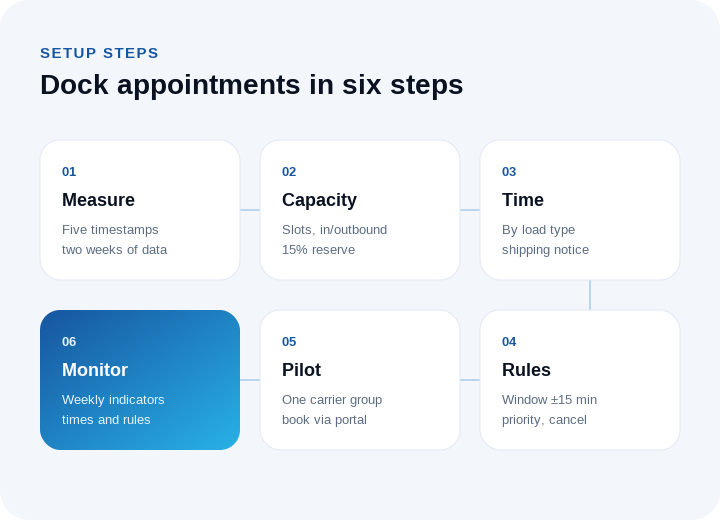
The safest order is to start small and grow by measuring. For the first two weeks only measure, then plan.
- Measure: Record the five timestamps for two weeks; today's wait and door time come out of it.
- Calculate capacity: Write the slot count, the inbound and outbound split and the 15% reserve.
- Write the time rule: Produce the time table by load type and tie it to the shipping notice.
- Set the rules: Window, late trucks, cancellation cut-off, priority classes and the overbooking margin.
- Pilot: Start with one group of carriers and have them book through the supplier portal.
- Monitor: Read the weekly indicators and update times and rules.
Common mistakes: assuming capacity without measuring, giving a fixed time, leaving no reserve, defining priorities without limit and not tying the appointment to a shipping notice. Vehicle load and route planning on the shipping side is a different subject; we covered it in our shipment planning software guide, and in a multi-warehouse setup the door plan runs separately for each warehouse (multi-warehouse inventory management).
We recommend reading: How to Manage the Goods Receiving Process: Counting, Discrepancy Rules, Tolerance and ROI
Warehouse and Shipping Processes with İnovabil
At İnovabil our focus is building software from scratch, tailored to each company; on the warehouse and logistics side we built the warehouse management system (WMS) for Sleepy, logistics and shipment planning with wholesale order management for Karyak, shipment planning for Bofigo and the prepaid cargo system for Kredili Kargo. Because door capacity, time rules and priorities change from one warehouse to another, we suggest working them out in requirements analysis with your own measurements and in writing; we do not promise a ready-made dock appointment module.
We recommend reading: Our software development process: step by step from analysis to launch
Frequently Asked Questions
What is dock door appointment management?
It means giving inbound and outbound trucks a door and a time window in advance, planning the door by its real occupancy time and measuring waiting and queues. The aim is to use door capacity evenly and cut the queue in the yard.
How is appointment length determined?
Pallet count × unloading time per pallet + setup and close-out, then the buffer and rounding to the slot step. In the example, 24 pallets, 1.5 min per pallet and 9 minutes extra make 45 minutes, and 60 minutes with the buffer.
How many extra appointments should be given for no-shows?
It depends on the rate and the number of reserve slots. In the example, with an 8% no-show rate and 12 reserve slots, 72 appointments instead of 68 is sensible; empty slots fall from 5.4 to 1.8. Calculate the rate from your own history.
Do appointments remove the queue completely?
No. Door capacity stays the same; an appointment takes the waiting out of your yard, makes it predictable and spreads the peak across the day. If capacity truly falls short, you need another door or shift.
How are detention fees and penalty clauses written?
The period, amount and conditions are set between the parties by contract; this guide is not legal advice. Write the detail with your legal counsel and keep the door timestamps as evidence.