

The phone rings at the clinic, the workshop keeps a paper diary, and the consultancy tracks its calendar in a spreadsheet. The same question comes back in every business: is this time slot really free, and who is in which room for how long? Appointment booking software (also called reservation or scheduling software) ties a block of time to the resources that deliver it (people, rooms, vehicles, devices), sells it, prevents overlaps, reminds the customer and measures the slots that stay empty. In a business that sells time, stock is not the product on the shelf; it is the free hour on the calendar.
In this guide we cover the calendar model, service duration and buffer time, how double booking is prevented, multi-resource booking, the confirmation and reminder flow, cancellation and deposit rules, no-show and fill-rate calculations, waiting lists, time zones and holiday calendars, and payback, all with worked examples. Every example figure is representative; none is an industry average.
What Is Appointment Booking Software?
Appointment booking software manages the whole process in which a customer reserves a time block on a specific resource for a specific service. It does more than store a calendar entry: it works out which times can be sold, stops two people from taking the same slot at once, sends confirmations and reminders, and applies cancellation and rescheduling rules.
The structure is the same in clinics, service centres, workshops, consultancies and meeting-room rentals: there is a service, a duration and at least one resource. A ready-made package is a fine start if it covers your work; if you need your own rules and links to the systems you already run, a custom solution is worth evaluating. We explain what custom software is in our what is custom software guide.
How Does Booking Software Differ from Field Service, Help Desk and Portal Systems?
Booking software manages the time block in which the customer arrives or connects; the other systems solve a different problem. The most common confusion is with field service: a field service team travels to the customer's address, while in a booking the customer comes to your premises.
| System | Problem it solves | Role of the calendar |
|---|---|---|
| Appointment and reservation | Linking a time block to a resource and selling it | The product itself; the free slot is what you sell |
| Field service management | Sending a technician to the customer's address | Route and work-order plan |
| Help desk | Closing incoming requests within a time target | SLA timer; no slots |
| Customer portal | Giving customers a self-service screen | Booking may be just one module |
For planning where a technician travels to the customer, see our field service management software article; for request queues, see what is help desk software.
How Is the Calendar Model Built: Resources, Service Duration and Buffer Time?
The calendar model has four parts: resource, service, working hours and buffer. Each booking combines a service, one or more resources and a start time; the system calculates the end time from the service duration.
- Resource: A specialist, room, device or vehicle. Each resource has its own working hours, leave and maintenance closures.
- Service: Name, duration, price and the resource types it needs. The duration is the time spent with the specialist.
- Buffer time: Time reserved after a booking for cleaning, record entry or preparation. The customer does not see it, but it occupies the calendar.
- Booking window: How soon and how far ahead a booking can be made (for example at least 2 hours ahead and at most 60 days ahead).
| Parameter | Representative value | Result |
|---|---|---|
| Net working time (lunch excluded) | 480 min / day | — |
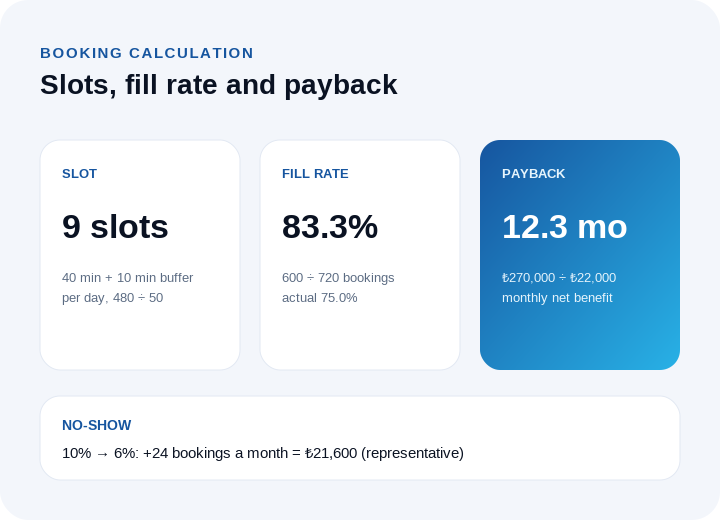
| Service duration + buffer | 40 + 10 = 50 min | 480 ÷ 50 = 9.6, so 9 slots |
| Slots without a buffer | 40 min | 480 ÷ 40 = 12 slots |
| Specialists, month | 4 specialists, 20 working days | 4 × 9 × 20 = 720 slots / month |
The buffer cuts daily slots from 12 to 9, a 25% reduction. It looks like a loss, but it stops a delay from spreading across the whole day. The ninth slot still fits because the last booking does not need a buffer: 8 × 50 + 40 = 440 min, inside 480 min.
How Is Double Booking Prevented?
Double booking means the same time range on the same resource is sold to two people. Preventing it takes two parts: an overlap rule and a booking hold (a short reservation lock).
The overlap rule: two bookings overlap if the new start is before the existing end and the new end is after the existing start. If the existing booking is 10:00–10:50 (buffer included) and the new one is 10:30–11:20, then 10:30 < 10:50 and 11:20 > 10:00, so they overlap. If the new booking is 10:50–11:40, then 10:50 < 10:50 fails, so they do not overlap.
The booking hold: the moment a customer picks a slot, the system holds it for a short time. If confirmation or payment arrives, the hold becomes a permanent booking; if not, the slot is released when the time runs out. If two customers pick the same slot at once, the first to hold it wins and the second is sent to a refreshed list. The rule must be enforced at the moment of saving, in the data layer, not only on the web screen; otherwise two requests that cannot see each other can both save the same slot.
| Hold time | Abandoned holds per day | Time blocked for nothing | Note |
|---|---|---|---|
| 3 min | 60 (30% of 200 holds) | 60 × 3 = 180 slot-min (3 h) | May be too short for a payment step |
| 5 min | 60 | 60 × 5 = 300 slot-min (5 h) | A balanced starting value |
| 10 min | 60 | 60 × 10 = 600 slot-min (10 h) | Needlessly locks slots at busy times |
Showing the customer a countdown also reduces complaints. Choose the hold time by measuring the real flow, including the payment step.
How Do Multi-Resource Booking and Capacity Work?
When a service needs more than one resource, the available times are the intersection of the resources' free slots. If an examination needs a specialist, a room and a device, the system shows only the slot where all three are free.
Representative example: the specialist's free slots are {2, 3, 5, 7}, the room's are {3, 4, 7} and the device's are {3, 7, 8}. The specialist and room intersect at {3, 7}; intersecting with the device still gives {3, 7}. The number of options falls from 4 to 2. That is why the bottleneck resource (often a single device) sets the real capacity of the calendar, and fill rate should be measured on that resource.
For group events the slot has a quota: every booking reduces the quota, and when it is full the waiting list takes over.
How Are the Online Booking, Confirmation and Reminder Flow Built?
The flow has five steps: the customer picks the service and time, the slot is held, details are entered, a confirmation is sent, and a reminder goes out before the visit. Reminders are the cheapest tool for lowering the no-show rate.
- Selection: Service, specialist (or "no preference") and date; only genuinely available slots are shown.
- Confirmation: A summary and a cancel/reschedule link are sent the moment the booking is made.
- Reminder: For example 48 hours and 2 hours before; the message carries "Confirm, Reschedule, Cancel" options.
- Unanswered booking: If no reply arrives in the set time, the team calls or the slot opens to the waiting list.
- After the visit: Attendance or no-show is marked.
The trigger logic of the reminder chain is the same as in our marketing automation article; the difference is that the message is a transactional notice, not a sales campaign. For the screen where customers see their own bookings, read our customer portal guide; for booking through chat, see what is a chatbot. Message permissions and personal data should be settled with your legal counsel, which matters even more for services that handle special-category data such as health information.
How Are Cancellation, Rescheduling and Deposit Rules Written?
A cancellation rule should be fair to the customer, enforceable by the business and shown clearly when the booking is made. Time thresholds vary by sector; the table below is representative.
| Timing | Customer right | System behaviour |
|---|---|---|
| More than 24 hours ahead | Free cancellation and rescheduling | The slot opens to the waiting list |
| Between 24 and 2 hours ahead | One reschedule; deposit is kept on cancellation | The rule is shown to the customer again |
| Under 2 hours / no-show | Deposit is retained | Marked as a no-show and added to the counter |
A deposit works like this in brief: on a ₺900 service, a ₺150 deposit is 16.7% of the fee (150 ÷ 900). With 60 no-shows a month, 60 × ₺150 = ₺9,000 is recovered, but a deposit can also lower the booking rate. So try reminders first and use a deposit only for services with a high no-show rate. The payment step needs a payment provider; refund and withdrawal rules should be set with your legal counsel and your financial advisor (certified accountant).
How Are the No-Show Rate and Fill Rate Calculated?
The no-show rate is the number of no-shows divided by the number of bookings; the fill rate is booked slots divided by total slots. Keep the two measures apart: booked fill rate shows sales, actual fill rate shows real use.
| Indicator | Calculation | Result |
|---|---|---|
| Total slots | 4 specialists × 9 slots × 20 days | 720 |
| Booked fill rate | 600 ÷ 720 | 83.3% |
| No-show rate | 60 ÷ 600 | 10% |
| Actual fill rate | (600 − 60) ÷ 720 = 540 ÷ 720 | 75.0% |
| Monthly loss from no-shows | 60 × ₺900 | ₺54,000 |
If reminders bring the no-show rate from 10% to 6%, no-shows fall from 60 to 36 (600 × 0.06). Attending customers rise by 24 and monthly revenue grows by 24 × ₺900 = ₺21,600.
How Does a Waiting List Work?
A waiting list turns a cancelled or freed slot into revenue by offering it to the next customer in line. The customer signs up for a day and time range; when a slot opens the system sends messages in order and gives the permanent booking to the first person who confirms.
In the representative example, assume 50 cancellations a month. Without a list, 20% of cancellations (10) are resold; with a list, 60% (30) are. The difference is 20 bookings, or 20 × ₺900 = ₺18,000 a month. This contribution is not included in the payback calculation below; read it separately to stay conservative.
What Do Time Zones and Holiday Calendars Require?
Store time in one standard and show it to the customer in their own zone. A booking that starts at 15:00 in Istanbul is stored as 12:00 UTC, and the system converts it for each user. Time in Turkey is fixed, but a customer abroad may live where daylight saving changes the offset during the year.
The holiday calendar should be kept per branch and per resource: the public holiday list comes from the official source and is updated every year, and religious holiday dates shift from year to year. Specialist leave, device maintenance and special closures go on the same calendar; otherwise the system keeps selling bookings for a holiday.
How Is the Payback of Booking Software Calculated?
Payback is the investment divided by the monthly net benefit. The representative example below counts the labour of phone booking, the effect of reminders on no-shows and running costs.
- Phone labour: If 70% of 600 bookings are made online, that is 420 bookings × 4 min = 1,680 min = 28 h; 28 × ₺300 = ₺8,400.
- No-show gain: 24 extra attendances × ₺900 = ₺21,600.
- Gross benefit: ₺21,600 + ₺8,400 = ₺30,000 / month.
- Running cost: messages 600 × 2 × ₺1.50 = ₺1,800; infrastructure and support ₺6,200; total ₺8,000.
- Net benefit: ₺30,000 − ₺8,000 = ₺22,000 / month.
- Investment: 30 person-days × ₺9,000 = ₺270,000.
Payback: ₺270,000 ÷ ₺22,000 ≈ 12.3 months. As a sensitivity check, if the no-show improvement is only half (12 bookings), the gain is 12 × ₺900 = ₺10,800, gross benefit ₺19,200 and net benefit ₺11,200, and the time stretches to ₺270,000 ÷ ₺11,200 ≈ 24.1 months. Measuring your own no-show rate before the decision is the step that changes the result most. For the general cost items, see our software development cost guide.
How Is a Booking System Set Up in Six Steps?
Setup starts with writing the rules, not drawing screens. Six steps keep the scope under control.
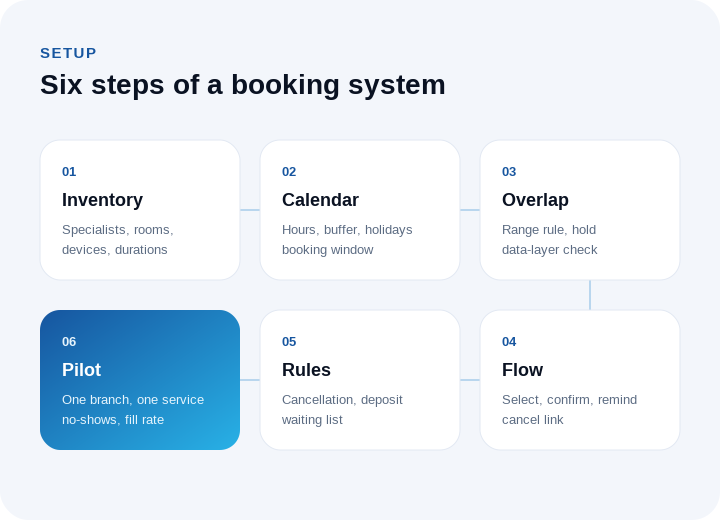
- Resource and service inventory: List specialists, rooms, devices, service durations and prices.
- Calendar rules: Write working hours, buffer time, booking window and holidays.
- Overlap and hold: Design the range rule, the hold time and the check in the data layer.
- Online flow: Build selection, confirmation and reminder messages with a cancel link.
- Cancellation and waiting rules: Write time thresholds, deposit and the waiting list.
- Pilot and measurement: Start with one branch or one service; measure no-shows, fill rate and phone load.
We explain how to turn these rules into written requirements in our requirements analysis guide. When you need links to existing CRM or accounting systems (customer record, invoice), our API integration article helps.
What Mistakes Are Common in Booking Systems?
- Forgetting the buffer: The calendar looks full, the specialist has no break, and the whole day slips.
- Checking overlap on screen but not in the data: At a busy time two customers can take the same slot.
- Not measuring no-shows: A no-show that is never marked makes the fill rate look better than it is.
- Ignoring time zones and holidays: Bookings get sold for a public holiday.
We recommend reading: What is CRM? Customer records, funnel and sales forecast guide
We recommend reading: What is workflow and approval software?
We recommend reading: How to Manage Dock Door Appointments: Slots, Queues, No-Shows and Payback Guide
We recommend reading: How to Design Business Day Calendars and SLA Time Calculation in Software: Holiday Data, Pausing and Due-Date Guide
Custom Software and Process Digitalisation with İnovabil
At İnovabil our focus is building bespoke software from scratch for your company: custom software, ERP, CRM, e-commerce, web, mobile and integrations. If your booking and reservation process does not fit a ready-made package, or needs links to the systems you already run such as customer records, invoicing and calendars, we recommend writing it rule by rule in a requirements analysis and comparing ready-made and custom options with their costs. We do not have a separate booking product; our approach is to define the process with you and build to your need.
We have built CRM, purchasing and mobile for Avcılar İnşaat; a purchasing system for İZBAN; logistics and shipment planning with wholesale order management for Karyak; and warehouse management with a complaint and support management system for Sleepy. Send us a short note on your resources, services and calendar rules, and we will first settle the scope together.
We recommend reading: Our software development process: step by step from analysis to launch
Frequently Asked Questions
What is appointment booking software?
It is software that sells a block of time by tying it to resources (people, rooms, devices), prevents overlaps, sends confirmations and reminders, and applies cancellation and rescheduling rules. It makes empty slots and the no-show rate measurable.
How is double booking prevented?
With two rules: time ranges on the same resource cannot overlap, and a slot is held for a short time the moment a customer selects it. The overlap check must run at the moment of saving in the data layer, not only on the screen.
How can the no-show rate be reduced?
First with reminders and a one-click cancel or reschedule link, then with a waiting list, and where needed with a deposit for services with a high no-show rate. In the example, a fall from 10% to 6% means 24 extra customers a month.
Why is buffer time needed?
It leaves time between bookings for cleaning, records and preparation, and stops a delay from spreading across the day. Its cost is in slot count: in the example the buffer cuts daily slots from 12 to 9.
How long does booking software take to pay back?
In the representative example the investment is ₺270,000, the monthly net benefit is ₺22,000 and payback is about 12.3 months; if the no-show improvement is only half, about 24.1 months. Recalculate with your own no-show rate and phone load.