

Purchasing sends the order by email, the supplier answers "all fine" over the phone, the delivery date is typed into a spreadsheet by hand, and the invoice arrives in yet another email. At month end nobody can see in one place which orders are confirmed, which are on the way and which are late. A supplier portal moves these exchanges onto a single externally accessible screen that suppliers sign into with their own accounts and that is connected to your own system.
In this guide we explain what a supplier portal is, how it differs from a customer portal and from EDI/API links, how order acceptance and delivery confirmation work, how advance ship notices match goods receipt, how data is isolated, how documents are managed, how performance is tracked, how to calculate payback and how to get suppliers to actually use it. The sample figures are illustrative; they are not real prices or industry averages.
What Is a Supplier Portal?
A supplier portal is an externally accessible web application where suppliers sign in with their own user accounts, see only their own purchase orders, accept orders, confirm delivery dates, enter ship notices, upload invoices and documents, and follow their own performance. It is connected to the buyer's purchasing and stock system; what the supplier enters is written to the order record, not to a spreadsheet.
The internal side of the portal, meaning requisitions, approvals and quote comparison, is a separate subject. We covered the internal steps of purchasing in our procurement software guide; here we look only at the outward-facing side that runs back and forth with the supplier.
We recommend reading: Our ERP development service
What Is the Difference Between a Supplier Portal, a Customer Portal and EDI/API?
All three exchange data with an outside party, but they differ in who they serve and how they work. A portal is for people; EDI or an API connects one system directly to another.
| Topic | Supplier portal | Customer portal | EDI / API link |
|---|---|---|---|
| User | Supplier staff | End customer or dealer | Supplier's software |
| Main job | Order confirmation, ship notice, invoice | Orders, invoices, support requests | Document and data transfer |
| Setup effort for the supplier | Low; a browser is enough | Low | High; a separate integration per supplier |
| Suitable supplier | Small and mid-sized, without their own software | — | Large, high-volume |
| Data quality | Form rules validate | Form rules validate | High if the mapping is right |
In practice the two are used together: large suppliers connect by API, small ones sign into the portal. We covered the customer-facing sibling in our customer portal guide, and system-to-system event notification in our webhook article.
How Do Order Acceptance and Delivery Confirmation Work?
The purchase order lands in the portal, the supplier accepts it or proposes a counter date, the buyer accepts the counter date, and the result is written to the order record. The aim is for every order to carry a "confirmed delivery date".
- Sent: The approved order is published to the portal and the supplier is notified.
- Seen: The status changes when the supplier opens the order; unopened orders receive reminders.
- Accepted or counter date: The supplier accepts quantity and date, or proposes a different date or a partial quantity.
- Buyer decision: The buyer accepts or rejects the counter proposal; once accepted, the confirmed date is updated.
- Shipped and received: The last two statuses are closed by the ship notice and goods receipt.
In the illustrative example 600 orders are placed each month. With email and phone, 168 orders stay unconfirmed: 168 ÷ 600 = 28%. In the portal, because an opened order is visible, silence is visible and a reminder goes out automatically after 48 hours, unconfirmed orders fall to 36: 36 ÷ 600 = 6%. The average confirmation time also drops from 36 hours to 6 hours. The thresholds (reminder at 48 hours, alert to the buyer at 72 hours) are illustrative; set them according to your own lead times.
How Do an Advance Ship Notice (ASN) and Goods Receipt Match?
An advance ship notice (ASN) is the record in which the supplier states, before the goods leave, what they are sending, how much, and in which package. Goods receipt uses it like an expected list and compares it with what arrives.
| Step | Record | Example (order of 100 units) |
|---|---|---|
| Order | Buyer's request | 100 units × ₺85 = ₺8,500 |
| Ship notice | Supplier's declaration | Two shipments: 60 + 40 = 100 units |
| Goods receipt | Actual count at the warehouse | 58 + 40 = 98 units accepted |
| Variance | Short or damaged | 2 units = 2% |
| To invoice | Accepted quantity | 98 × ₺85 = ₺8,330 |
Two differences need to be kept apart: the gap between the ship notice and receipt is the gap between the supplier's declaration and reality (2 units); the gap between order and receipt is the quantity not delivered. The details of three-way matching of order, receipt and invoice are in our procurement guide. If a carton or pallet barcode is added to the ship notice, the warehouse receives by scanning; we described that layer in our barcode system guide. For the effect on the order queue after receipt, see our order management system article.
How Is Supplier Data Isolated and Authorized?
Each supplier must see only its own records; this is the portal's most critical security rule. It must be enforced at query level, not by hiding things on screen: the system filters every request by the supplier identity in the session and rejects any attempt to reach another supplier's record.
- Object-level authorization: Changing the order number in the address must not reach another supplier's order. Test this with two separate supplier accounts before the portal goes live.
- Roles inside the supplier: Sales, shipping and accounting users of the supplier get different permissions; the person uploading the invoice does not need to see shipment entry.
- Price visibility: The buyer's internal budget, competing quotes and other suppliers' prices never appear in the portal under any condition.
- Logging and audit: Who saw and changed which record, and when, must be traceable.
- Account lifecycle: The account of a supplier employee who leaves is closed; account owners are assigned by the supplier and reviewed regularly.
We described how to design a role model in our role-based access control guide and how to protect externally exposed interfaces in our API security article. For the processing of supplier employees' personal data, carry out the KVKK (Turkey's personal data protection law) assessment with your legal counsel.
How Does Document and Certificate Management Work in the Portal?
Most documents requested from suppliers have a validity period; the portal tracks it and warns the supplier in advance. That way collecting documents does not turn into a yearly email chase.
| Document type | Validity tracking | When it expires |
|---|---|---|
| Quality certificate | Expiry date; alerts at 60, 30 and 7 days | Warning to the buyer for new orders |
| Signature circular and tax certificate | Update date | Flagged in the pre-payment checklist |
| Contract and confidentiality undertaking | Renewal date | A task opens for the purchasing owner |
| Insurance and product safety document | Policy end date | Supplier status becomes "document missing" |
In the illustrative example 150 suppliers hold an average of 3 documents: 150 × 3 = 450 documents. With manual tracking, 27 documents turn out to have expired: 27 ÷ 450 = 6%. When the portal warns the supplier at 60, 30 and 7 days before expiry, that share approaches zero; the real gain is less risk of discovering a missing document during an audit or before placing an order. Which documents are legally required varies by sector; clarify this with your legal counsel and the relevant authorities.
How Is Supplier Performance Shown in the Portal?
When performance data is also shown to the supplier, it becomes a shared yardstick instead of an argument. Two measures are a sufficient start: on-time delivery rate and acceptance rate.
- On-time delivery = shipments arriving on or before the confirmed date ÷ total shipments.
- Acceptance rate = accepted units ÷ delivered units.
- Score = 60% × on-time delivery + 40% × acceptance rate (the weights are illustrative).
| Supplier | Shipments | On time | Units | Accepted | Score |
|---|---|---|---|---|---|
| A | 100 | 94 (94.0%) | 10,000 | 9,900 (99.0%) | 96.0 |
| B | 80 | 64 (80.0%) | 8,000 | 7,760 (97.0%) | 86.8 |
| C | 70 | 63 (90.0%) | 3,500 | 3,395 (97.0%) | 92.8 |
| Total | 250 | 221 (88.4%) | 21,500 | 21,055 (97.9%) | — |
For A: 0.6 × 94 + 0.4 × 99 = 56.4 + 39.6 = 96.0; for B: 48.0 + 38.8 = 86.8; for C: 54.0 + 38.8 = 92.8. In total 221 ÷ 250 = 88.4% on time and 21,055 ÷ 21,500 ≈ 97.9% accepted. Supplier B's problem is not quality but timing; a score gives one number, but you act on its breakdown. We described how to choose indicators and keep them from being distorted in our KPI guide, and the effect on the whole chain in our supply chain management article.
How Is the Payback of a Supplier Portal Calculated?
The gain comes from two items: the correspondence time spent on order confirmation and the faster goods receipt that ship notices bring. The assumptions below are illustrative.
- 600 orders a month; confirming, chasing and keying in by email and phone takes 12 minutes per order, and 3 minutes in the portal.
- 500 shipments a month; matching at receipt takes 10 minutes without a ship notice and 4 minutes with one.
- Hourly cost ₺300; portal running cost ₺12,000 a month; development 50 person-days × ₺9,000 = ₺450,000.
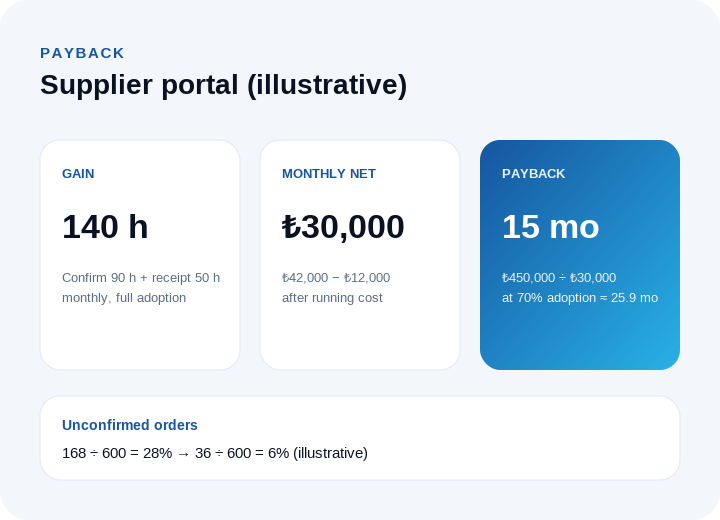
On confirmation: (12 − 3) × 600 = 5,400 min = 90 h; × ₺300 = ₺27,000. On receipt: (10 − 4) × 500 = 3,000 min = 50 h; × ₺300 = ₺15,000. Total 140 h and ₺42,000. After the running cost, the monthly net is ₺30,000; ₺450,000 ÷ ₺30,000 = 15 months. This calculation assumes every supplier uses the portal; in reality those who do not keep working the old way.
If we assume orders are spread evenly across suppliers, the gain shrinks in proportion to adoption while the running cost stays fixed:
| Adoption | Monthly gain | Monthly net (− ₺12,000) | Payback |
|---|---|---|---|
| 50% | ₺21,000 | ₺9,000 | 50.0 months |
| 70% | ₺29,400 | ₺17,400 | ≈ 25.9 months |
| 90% | ₺37,800 | ₺25,800 | ≈ 17.4 months |
| 100% | ₺42,000 | ₺30,000 | 15.0 months |
When adoption falls from 100% to 70%, payback stretches from 15 months to about 25.9. That is why the real investment is as much in onboarding as in software. For a real decision, plug in your own order volume, time measurements and adoption target; the other cost items of a software project are in our software development cost guide.
How Do You Get Suppliers to Use the Portal?
If the portal looks like extra work to the supplier it will not be used; it has to give them something too. In the illustrative example 105 of 150 suppliers are active at the end of day 90: 105 ÷ 150 = 70%. Active means having answered at least one order through the portal in the last 30 days.
- Value for the supplier: Seeing invoice status and payment due dates in the portal removes the "where is my invoice" phone calls.
- Easy entry: A browser is enough, with no installation; the first sign-in works through a single link and a short guide.
- Start in waves: Begin with the few suppliers that account for most of the order volume, solve the problems there, then widen.
- A clear rule: If confirmation does not come through the portal, the order counts as unconfirmed; but inform suppliers and allow a transition period before enforcing it.
- A fallback path: For small suppliers who cannot use the portal, appoint someone to key emails into it.
How Is a Supplier Portal Set Up in Six Steps?
The six-step order tests the riskiest decisions, data isolation and adoption, early.
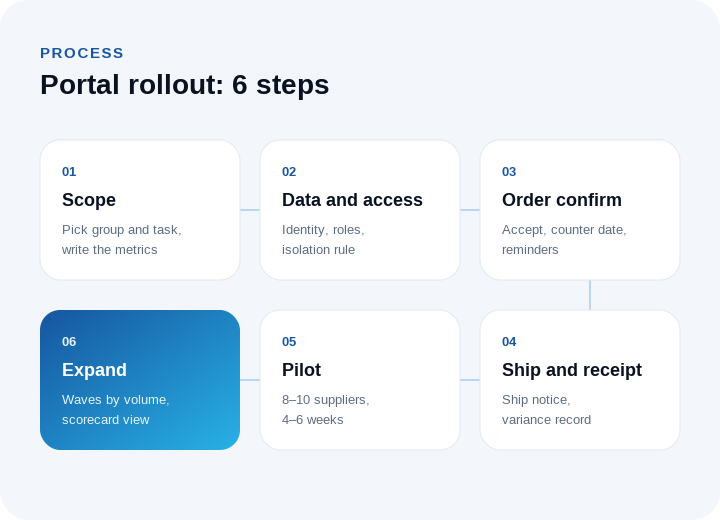
- Scope: Write down first which supplier group and which task (confirmation, shipping, invoice) you start with, and decide the metrics to measure.
- Data and access: Supplier identity, roles, the isolation rule and the document list are defined.
- Order confirmation: The send, accept, counter-date and reminder flow is built and connected both ways to the purchasing system.
- Ship and receipt: The ship notice, goods receipt matching and variance record are added.
- Pilot: Run it with 8–10 suppliers on real orders for 4–6 weeks; measure the unconfirmed-order rate and the time taken.
- Expansion: Roll out in waves by volume, then switch on the scorecard view and document alerts.
What Are Common Supplier Portal Mistakes?
- Not testing isolation: If another supplier's order can be reached by changing the address, the portal must not open at all.
- Offering the supplier nothing: A portal that only creates work for the buyer does not get used.
- Opening everything at once: Moving to 150 suppliers without a pilot grows the support load out of control.
- Not linking it to the internal system: If a date entered in the portal is not written to the order record, you have created a second spreadsheet.
- Skipping document alerts: Storing documents without watching their expiry misses the portal's easiest win.
- Reducing performance to one number: Talking to a supplier without the score breakdown turns into an argument.
We recommend reading: What is procurement software? From request to payment, process and payback guide
We recommend reading: What Is Workflow and Approval Software? Approval Chains, Thresholds, Delegation and Payback Guide
We recommend reading: What Is Leave and Employee Management Software? Self-Service Portal, Leave Balance and Payback Guide
We recommend reading: How to Manage Subcontract Manufacturing: Material Shipments, Scrap, Reconciliation and Subcontractor Performance
We recommend reading: How to Manage Supplier Risk: Segmentation, Risk Scoring, Single-Source Dependency and Expected Loss Guide
We recommend reading: What Is Dropshipping and How Do You Run It? Supplier Feeds, Unit Economics and Automation
We recommend reading: How to Calculate Available to Promise (ATP) and Delivery Dates: A Guide to CTP, Capacity and On-Time Promising
We recommend reading: What Is EDI? Electronic Data Interchange, Document Flow, Mapping and Payback Guide
We recommend reading: How to Manage Dock Door Appointments: Slots, Queues, No-Shows and Payback Guide
We recommend reading: What Is Vendor-Managed Inventory (VMI)? Min–Max Levels, Replenishment Proposals and Payback Guide
We recommend reading: How to Manage the Goods Receiving Process: Counting, Discrepancy Rules, Tolerance and ROI
Supplier and Procurement Solutions with İnovabil
At İnovabil our focus is building software from scratch, specific to each company: custom software, ERP, CRM, e-commerce, web, mobile and integration. We do not claim to have a ready-made supplier portal product; we take the supplier portal need together with your purchasing process and existing systems in requirements analysis and put the scope in writing.
We built a purchasing system for İZBAN, CRM, purchasing and mobile for Avcılar İnşaat, and logistics and shipment planning with wholesale order management for Karyak. Send us a short summary of your supplier count, order volume and how you confirm orders today, and we will define the scope together.
We recommend reading: Our software development process: step by step from analysis to launch
Frequently Asked Questions
What is a supplier portal and what is it for?
It is an externally accessible web application where suppliers sign in with their own accounts, accept orders, confirm delivery dates, enter ship notices and invoices, and follow their performance. It gathers correspondence into one record and reduces unconfirmed orders.
What is the difference between a supplier portal and an EDI or API link?
A portal is for people, used through a browser and suited to small suppliers. EDI or an API connects the supplier's software directly to yours; it makes sense for large, high-volume suppliers but needs a separate integration for each. Most businesses use both together.
Can a supplier see another supplier's data?
They must not. The system should filter every request by the supplier identity in the session and reject access to any other record. Test this before launch by changing the address with two separate supplier accounts.
How long does a supplier portal take to pay back?
In the illustrative example, with 600 orders and 500 shipments a month, the monthly net gain is ₺30,000, the investment ₺450,000 and payback 15 months. If only 70% of suppliers use it, the period rises to about 25.9 months. Recalculate with your own figures.
What if suppliers do not use the portal?
First open the screens that help the supplier (invoice and payment status), start with high-volume suppliers and allow a transition period. For those who cannot use it, appoint someone to key emails into the portal; inform suppliers before you enforce any rule.