

You do not write most of the code in a business application. Login, tables, reports and encryption all come from ready-made libraries, and those libraries have libraries of their own. When a serious flaw is announced in a widely used component, the first question is simple: "Which of our products use which version of this component?" A software bill of materials (SBOM) is how you keep that answer ready in advance.
In this guide we explain what an SBOM is, the difference between direct and transitive dependencies, matching components against known vulnerabilities, prioritisation, an update policy, handling unmaintained components and a payback calculation. It is a defensive guide and contains no attack methods. Every figure is representative, not a measurement of any ecosystem or industry.
What Is an SBOM (Software Bill of Materials)?
An SBOM is a machine-readable list of the components a piece of software contains and the versions of each, much like the ingredients list on a food package. It is data for tools to process, not a document for people to read. That is why it should be an output generated automatically during the build, not a hand-written table; a hand-maintained list goes stale after the first release.
The inventory in this article is the list of what is inside the software. The enterprise application inventory, which shows which applications the company uses, is a separate subject; we covered it in our software inventory and shadow IT guide. A typical SBOM record contains these fields:
| Field | What it contains | What it is for |
|---|---|---|
| Component name and version | The library name and exact version number | The main key for matching against vulnerability databases |
| Source (supplier) | The repository and publisher it came from | Spotting a package from an unexpected source |
| Licence | The component's licence family | Compliance check before distribution |
| Hash value | The file's fingerprint | Verifying the package was not altered in transit |
| Dependency relationship | Which component calls which | Finding the path a vulnerability came through |
| Generation time | Which build it came from | Mapping which version is live |
What Is the Difference Between Direct and Transitive Dependencies?
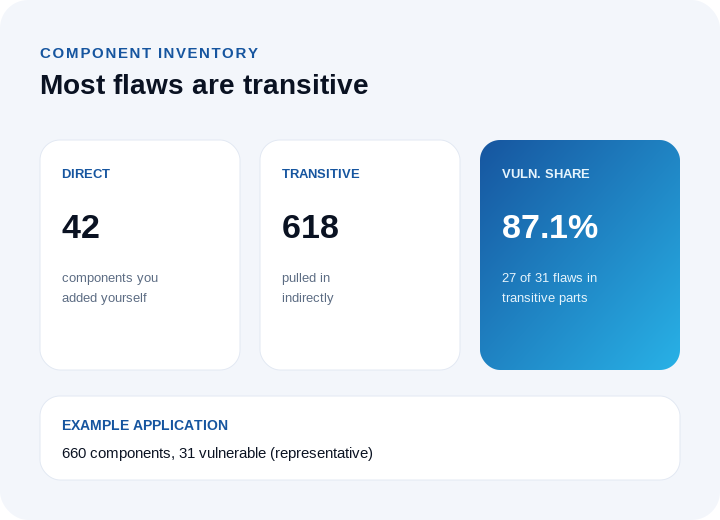
A direct dependency is a component you add to your project yourself. A transitive dependency is one that component needs and you never chose. In our example dealer portal application (representative) there are 42 direct dependencies; with the transitive ones the total is 660 components: 42 + 618. Each direct dependency therefore brings in an average of 618 ÷ 42 ≈ 14.7 indirect components.
In the same application the scan finds 31 vulnerable components, only 4 of them direct and 27 transitive: 27 ÷ 31 ≈ 87.1% of the vulnerabilities sit where your own list does not show them. To close a transitive vulnerability you often have to update the direct component that brought it in, which is why the relationship field is the most valuable part of an SBOM.
How Is an SBOM Generated and Where Is It Stored?
Generating an SBOM is a step in the build pipeline, not a separate project. During the build, the exact versions resolved by the package manager are read and written to a file in a standard format. For how to build the pipeline, see our CI/CD guide. Three rules keep it reliable:
- Generate it with every release: every build that goes live produces its own SBOM; "last month's list" does not describe today's production.
- Store it with the release: the SBOM is kept in the same place and for the same period as that release's other outputs. In the example, 24 releases a year × 330 KB ≈ 7.7 MB; storage is no excuse.
- Measure coverage: if 11 of 14 products have an SBOM, coverage is 11 ÷ 14 ≈ 78.6%. The target is 100%.
When a customer or auditor asks for a component list, you hand over the same output.
How Does Matching Against Known Vulnerabilities Work?
Every component and version in the SBOM is compared with publicly known vulnerability records. Each record has an identifier and usually a severity score on a 0–10 scale; the score says how dangerous a flaw could technically be, not how dangerous it is for you. Prioritisation fills the gap between the two.
Matching is not perfect: matching by component name sometimes produces false positives. In the example, 9 of the 31 matches, or 29.0%, turned out to be "not affected" because the code path is not used. Instead of closing them silently, write each one as a not-affected statement: which vulnerability, why it does not affect us, who decided. Because a component may start using that code path later, give the statement a review date 90 days out.
In What Order Should We Fix Vulnerabilities?
A severity score alone does not set the order. Ask four questions: how severe is it, is the affected code path actually running, is the component exposed to the internet, and is there a known exploit? Whether a fix exists does not change the order but the action: if there is no fix, you apply a temporary mitigation. For the dependency scanning and severity × exposure logic, see our secure software development guide; here we go deeper into inventory and updates.
A simple scoring table: severity gives 3 for critical, 2 for high, 1 for medium; +2 if the code path is used; +2 if internet-facing; +2 if a known exploit exists. The maximum is 9. Six example vulnerabilities (representative):
| Vuln. | Severity | Code path | Internet-facing | Exploit | Score |
|---|---|---|---|---|---|
| A | Critical (3) | Yes (+2) | Yes (+2) | Yes (+2) | 9 |
| E | Medium (1) | Yes (+2) | Yes (+2) | Yes (+2) | 7 |
| C | High (2) | Yes (+2) | Yes (+2) | No (0) | 6 |
| D | High (2) | Yes (+2) | Internal (0) | Yes (+2) | 6 |
| B | Critical (3) | No (0) | Yes (+2) | No (0) | 5 |
| F | Medium (1) | No (0) | Internal (0) | No (0) | 1 |
The order is A (9), E (7), C and D (6), B (5), F (1). B, which looks critical, comes fifth because it sits on an unused code path; E, which looks medium, comes second because it is on a running path and has a known exploit. C and D tie; the one with a published fix (C) is patched first, and for D you apply a temporary mitigation (restrict access, switch the feature off). Records like B are tracked with their rationale.
How Do You Set Fix Targets and Measures?
Prioritisation without targets becomes a wish written as "at the first opportunity". Set internal targets by severity. The periods below are an internal example; they are not a legal requirement or an industry standard, so adjust them to your own risk.
| Severity | Internal target | Vulnerabilities | Closed within target | Rate |
|---|---|---|---|---|
| Critical | 7 days | 3 | 3 | 100.0% |
| High | 30 days | 7 | 6 | 85.7% |
| Medium | 90 days | 14 | 10 | 71.4% |
| Total | - | 24 | 19 | 79.2% |
The overall rate is 19 ÷ 24 ≈ 79.2%. The average age is the vulnerability-days total, 3 × 4 + 7 × 21 + 14 × 58 = 971, divided by 24, ≈ 40.5 days. A single average can hide critical vulnerabilities; report them separately by severity.
Should Dependencies Be Updated Continuously or Periodically?
There are two extremes: update in small steps all the time, or do one large update a year. In periodic updating the gap between versions grows and breaking changes pile up; in continuous updating every step is small, and if something breaks the culprit is obvious.
Example: with weekly automated update proposals, 30 merge requests a month × 12 min of review = 360 min = 6 hours; 72 hours a year. Updating the same components once a year in bulk takes 120 hours in the example (including accumulated breaking changes and one large test round). The difference is 48 hours; at ₺300 an hour that is ₺14,400 a year. The condition is comprehensive automated tests; see our software testing guide for that and our change management guide for release discipline.
Two rules make updating predictable:
- Lock file and pinning: versions are pinned to exact numbers so the same source gives the same result in every build. A "fetch the latest automatically" setting can change tomorrow what works today.
- Emergency patch route: define a separate fast route for critical vulnerabilities that still passes tests; for the order of environments, see our software environments guide.
What Can Be Done Against Untrusted Package Sources?
Adding a component means taking someone else's code into your product. On the defensive side two risks are worth knowing: look-alike packages whose names closely resemble a real one, and confusion when the same name exists in both a private and a public repository. The defences are conceptual and cheap:
- Company proxy repository: packages are pulled from a single company-run repository.
- Allow list: a new component is added after a short review: is the name right, who publishes it, how many maintainers does it have, is it really needed?
- Hash verification: if the hash in the lock file does not match the downloaded file, the build stops.
- Narrow permissions: the build pipeline can reach only the secrets it needs; see our API security guide for the principle.
How Do You Manage Unmaintained Components?
A component that has not been updated for years may be left without a patch at the next vulnerability. Use three indicators: age of the last release, number of maintainers and responses to open issues. Scoring: 2 if the last release is over 2 years old, 1 if 1–2 years; 2 for a single maintainer, 1 for two; +1 if questions in the last 90 days went unanswered.
| Component | Last release | Maintainers | Responses | Score | Decision |
|---|---|---|---|---|---|
| P | 3 years ago (2) | 1 (2) | Unanswered (+1) | 5 | Alternative or in-house plan |
| R | 2.5 years ago (2) | 2 (1) | Unanswered (+1) | 4 | Watch closely, write a plan |
| Q | 14 months ago (1) | 3 (0) | Answered (0) | 1 | Routine monitoring |
A score of 4 or more calls for a decision: switch to a sturdier alternative, fork the component and maintain it yourself, or bring the small part you need into your own code. The decision depends on how critical the component is to the product; at low criticality a written "watch" decision is also legitimate.
Where Does Licence Compliance Fit in This Picture?
The licence field in the SBOM gives a second benefit. Licences fall broadly into two families: permissive ones place relatively few conditions on distribution, while the copyleft family may require derived work to be shared under the same terms. The effect depends on whether you distribute the software to customers or only run it on your own servers; this is a legal assessment, so leave it to your legal counsel. The cost and ownership side of licences is in our software licence guide. The SBOM's job is to keep the answer to "which component under which licence" ready.
How Does Impact Analysis Speed Up When a New Vulnerability Is Announced?
The most visible gain of an SBOM shows up during an incident. Without one, every product team is asked and build files are opened one by one: in the example 14 products × 2 hours = 28 hours, about 3.5 working days. If SBOMs can be queried in one central place, the same answer takes 20 minutes (1,680 min ÷ 20 = 84 times faster). The query shows the affected version in 6 of the 14 products (6 ÷ 14 ≈ 42.9%); the team focuses only on those six.
For monitoring and incident processes, see our guides on software monitoring and incident management; for testing component weaknesses, see our penetration testing guide.
How Do You Set Up the Process and Ownership?
Without ownership, alerts pile up. The product team is responsible for keeping its own components current, and the security side for the policy (targets, scoring table, exception rule); a weekly 30-minute triage scores new vulnerabilities and chases the late ones. Third-party service dependencies (for example a SaaS) are separate lines on the same list; your provider's flaw is your risk.
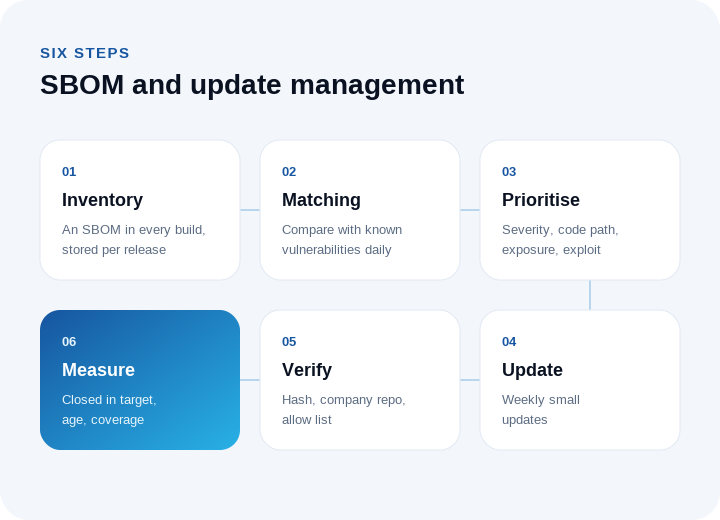
Six steps are enough to set it up:
- Inventory: generate an SBOM in every build and store it with the release.
- Matching: compare the SBOM with known vulnerability records every day.
- Prioritisation: apply the four-question score; write not-affected statements with their rationale.
- Update: merge weekly automated update proposals backed by comprehensive tests.
- Verification: verify sources with hashes, a company repository and an allow list.
- Measurement: report the six indicators below monthly.
Which Measures Should You Track?
| Indicator | Example value |
|---|---|
| Vulnerable components | 31 / 660 (4.7%) |
| Average vulnerability age | ≈ 40.5 days |
| Closed within target | 19 ÷ 24 = 79.2% |
| Up-to-date components | 561 ÷ 660 = 85.0% |
| SBOM coverage | 11 ÷ 14 = 78.6% |
| Impact analysis time | 20 min (before: 3.5 working days) |
Indicators are for improvement; if they are used to punish, teams hide vulnerabilities. Set process goals such as "closed-within-target rate should rise" rather than "vulnerability count should be zero".
How Are Cost and Payback Calculated?
Representative annual calculation: in the current setup the bulk update takes 120 hours; 120 vulnerability tasks × 3 hours = 360 hours; impact analysis in two incidents 2 × 28 = 56 hours; total 536 hours. In the new setup: continuous updating 72 hours; 120 × 1.2 = 144 hours; impact analysis 2 × 20 min ≈ 0.7 hours; weekly triage 52 × 0.5 = 26 hours; total ≈ 242.7 hours.
- Effort saved: 536 − 242.7 ≈ 293.3 hours.
- In money: 293.3 × ₺300 ≈ ₺88,000 a year.
- Running cost: repository and tool fees plus upkeep are assumed at ₺12,000 a year; net gain ₺76,000 a year ≈ ₺6,333 a month.
- Setup investment: ₺120,000. Payback = 120,000 ÷ 6,333 ≈ 19 months.
- Sensitivity: if the effort saving halves, the net is ₺32,000 a year and payback is about 45 months.
The calculation counts only effort saved; the cost of a prevented exploit, customer trust and audit convenience are left out. Recalculate with your own figures.
We recommend reading: What is a software licence?
We recommend reading: How to Set Up Secrets Management: Inventory, Vault, Rotation, Short-Lived Credentials and Leak Response Guide
Secure and Sustainable Software with İnovabil
At İnovabil our focus is custom software built from scratch for your company: custom software, ERP, CRM, e-commerce, web, mobile and integration. We include capabilities such as role-based access, audit logs and secure hosting in the design, and we recommend that component inventory and update expectations be written down at the requirements stage. This is not a ready-made SBOM product or a certification promise.
We built CRM, purchasing and mobile for Avcılar İnşaat; a purchasing system for İZBAN; logistics and shipment planning with wholesale order management for Karyak; and warehouse management with a complaint and support management system for Sleepy. See our process page and send us a short summary of your application's maintenance needs.
Frequently Asked Questions
What is an SBOM and what is it for?
It is a machine-readable list of the components a piece of software contains and their versions. It lets you find the affected products within minutes when a new vulnerability is announced and check licence compliance.
What are direct and transitive dependencies?
You add a direct dependency yourself; a transitive dependency is a component it uses. In the example application 42 direct components bring in 618 transitive ones, and 27 of the 31 vulnerabilities are in transitive components.
Should every vulnerability be fixed immediately?
No. Severity, use of the code path, internet exposure and a known exploit are assessed together. A vulnerability on an unused code path can be tracked with a reasoned statement that has a review date.
How often should dependencies be updated?
Small, frequent updates are usually safer because they do not pile up breaking changes; in the example weekly updates take 72 hours a year against 120 for a bulk update. The precondition is comprehensive automated tests.
What should be done about open source licence compliance?
Produce the list from the SBOM's licence field and assess it with your legal counsel according to how you distribute the software. This article is not legal advice.