

When you arrive in the morning, stock counts should already reflect yesterday's movements, invoices should be issued, and the sales report should be in your inbox. If nobody did that by hand, a job that ran overnight almost certainly did. Batch processing means handling many records in groups at set intervals rather than one by one, and scheduled jobs are the mechanism that ties those runs to the clock. It looks simple, but it gets expensive when the job outgrows its window, crashes at 3 a.m., or runs twice.
In this guide we cover how batch differs from real-time processing, how scheduling expressions work, the window-fit calculation, chunks and checkpoints, protection against re-runs, overlap locks, the critical path, alert thresholds, the time zone trap, and the payback calculation. All example figures are representative; they are not measurements from a real system or industry averages.
What Is Batch Processing?
Batch processing is collecting records for a while and processing them together in one planned run. Invoicing the day's orders overnight, applying stock movements to the master record in bulk, and calculating the month-end report are typical examples. It suits work that is high in volume, sensitive to consistency, and not needed instantly; actions with a customer waiting, such as payment approval or a stock reservation, are real-time. The price is delay: data stays stale until the next run.
| Topic | Batch | Micro-batch | Real-time |
|---|---|---|---|
| Frequency | Once or a few times a day | Every 1–15 minutes | On every event |
| Average wait | ≈ 12 hours for a daily run | ≈ 2.5 minutes for a 5-minute run | Seconds |
| Load shape | Heavy inside the window | Steady, moderate | Continuous |
| Complexity | Low to medium | Medium | High |
| After a failure | Restarting the run is enough | The next interval recovers | Compensation per event |
| Typical job | Invoicing, period reports | Stock sync | Payment approval |
The average wait assumes an event lands at a random moment between two runs: half the interval. For flows that react the moment an event happens, see our message queue guide, and for the case where an outside system calls you, our webhook guide. For the reporting side, see our data warehouse guide.
We recommend reading: Our integration services
How Do Scheduled Jobs Work?
A scheduled job is one that a job scheduler starts according to a rule. In most systems the rule is a five-field expression: minute, hour, day of month, month, and day of week; an asterisk means "every". 0 1 * * * means every day at 01:00, */15 * * * * every 15 minutes, and 0 8 * * 1-5 weekdays at 08:00.
Three traps apply. Variable dates such as "the last day of the month" cannot be written in one expression; "last business day" needs a calendar table that knows holidays. Everyone picks midnight, so 00:00 gets crowded; moving the job to an awkward minute like 01:07 reduces contention on shared resources. And the scheduler itself can crash; monitor it too.
Does the Nightly Job Fit the Batch Window?
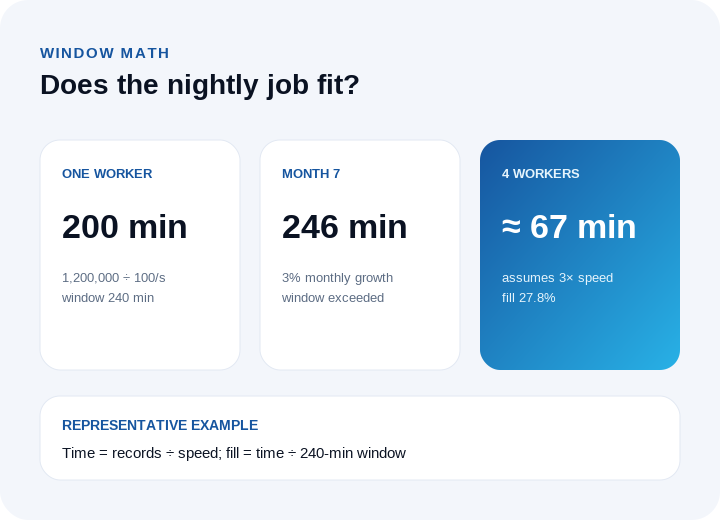
The batch window is the interval in which the job can run without disturbing the system. The fit calculation: duration = record count ÷ processing speed. In our representative example, a stock reconciliation job processes 1,200,000 records at 100 records per second: 12,000 seconds = 200 minutes. The window is 01:00–05:00, or 240 minutes; fill is 83.3%. If the record count grows 3% a month, compounded, and the job scales linearly, duration becomes 200 × 1.03m.
| Month | One worker | Window fill | 4 workers (≈ 3× speed) | Window fill |
|---|---|---|---|---|
| 0 | 200.0 min | 83.3% | 66.7 min | 27.8% |
| 6 | 238.8 min | 99.5% | 79.6 min | 33.2% |
| 7 | 246.0 min | 102.5% | 82.0 min | 34.2% |
| 12 | 285.2 min | 118.8% | 95.1 min | 39.6% |
With one worker the window is exceeded in month seven: ln(240 ÷ 200) ÷ ln(1.03) ≈ 6.2. If four workers deliver only 3× speed (shared resources become the bottleneck), duration drops to about 67 minutes and the window lasts roughly 43 months at the same growth. Jobs that sort grow faster than the record count; verify the curve by measuring, not guessing.
How Do You Choose Chunk Size and Checkpoints?
Splitting the job into chunks and recording progress at the end of each chunk is the foundation of restartability. The question: if the job fails at record 700,000, do you start over from the beginning?
Without checkpoints, yes. Up to the failure, 7,000 seconds have been spent; starting over costs another 12,000 seconds: 19,000 seconds = 316.7 minutes, so a job starting at 01:00 finishes at 06:16 and overruns the window by 76.7 minutes. With chunks of 10,000 records, 69 chunks (690,000 records) count as done and only the failing 70th chunk is reprocessed: 7,000 + 100 + 5,000 = 12,100 seconds = 201.7 minutes. The difference is 115 minutes, and the job fits the window.
The smaller the chunk, the smaller the loss, but every checkpoint has a cost. Assume 0.5 seconds as a representative figure.
| Chunk (records) | Chunks | Checkpoint overhead | Total time | Worst loss per failure |
|---|---|---|---|---|
| 100 | 12,000 | 6,000 s | 300 min | 1 s |
| 1,000 | 1,200 | 600 s | 210 min | 10 s |
| 10,000 | 120 | 60 s | 201 min | 100 s |
| 100,000 | 12 | 6 s | 200.1 min | 1,000 s (16.7 min) |
Total time is 12,000 seconds of processing plus checkpoint overhead. A 100-record chunk does not fit the window; with 100,000 records, a single failure costs 16.7 minutes. In this example 1,000–10,000 is the sensible range; choose the real value by measuring.
What Happens If a Job Runs Twice? Idempotent Jobs
An idempotent job leaves the same result no matter how many times it runs with the same input. Restarts, manual repeats, and scheduler mistakes all run a job a second time. Example: a job that issues 8,000 invoices a day crashes at invoice 5,000 and is restarted from the beginning. An unprotected job issues those 5,000 again; by the end of the day there are 13,000 invoices instead of 8,000 (62.5% too many). A protected job skips the completed ones and issues only the remaining 3,000.
- Job key: Store "has this run finished" under the job name and business date.
- Unique constraint: Enforce a key such as order number and period at the data layer; the second write is rejected.
- Write the result: Writing "this movement's result is this stock value" instead of "reduce stock by 3" yields the same value on a repeat.
What Happens When the Same Job Overlaps Itself? Overlap Locks
If a job takes longer than expected, the next scheduled start arrives before the previous run finishes. With a 15-minute interval and a 4-minute normal duration there is no problem; but if one day the job takes 50 minutes, four instances started at minutes 0, 15, 30 and 45 run at once (⌈50 ÷ 15⌉ = 4) and touch the same records.
The fix is a lock taken at the start of each run: if the lock is held, the new instance is either skipped or queued. In a job that syncs state every 15 minutes, skipping is enough, because the next run picks up current data; for invoicing, which must happen once per date, queueing is needed.
A lock can also be orphaned: if the job crashes it cannot release the lock, and every later run is skipped. Give the lock a lifetime and ask the job to renew it regularly. For a job that normally takes 4 minutes, a 12-minute lock lifetime and a 1-minute renewal interval would work; if renewal stops, the lock expires and the job counts as "dead".
How Do You Calculate Duration When Jobs Depend on Each Other? The Critical Path
A nightly run is often a dependency network: invoicing cannot start before data is pulled, and the report waits for both the stock and invoice jobs. This structure is a directed acyclic graph (DAG). Total time is not the sum of the jobs but the length of the longest dependent chain. In the example, stock reconciliation is the parallelized 67-minute version.
| Job | Duration (min) | Depends on | Start → end | Slack |
|---|---|---|---|---|
| A: Pull data | 25 | — | 0 → 25 | 0 (critical) |
| B: Stock reconciliation | 67 | A | 25 → 92 | 0 (critical) |
| C: Create invoices | 40 | A | 25 → 65 | 27 |
| D: Send invoices | 30 | C | 65 → 95 | 32 |
| E: Sales report | 35 | B and C | 92 → 127 | 0 (critical) |
| F: Report distribution | 10 | D and E | 127 → 137 | 0 (critical) |
The jobs sum to 207 minutes, but the critical path A → B → E → F = 25 + 67 + 35 + 10 = 137 minutes; a chain starting at 01:00 ends at 03:17. Slack is how long a job can slip without lengthening the chain. Speeding up a job with slack does not change the total; shortening D gains nothing. Gains on the critical path are limited too: cut B to 50 minutes and the chain drops to 120; cut it to 30 and the new critical path A → C → E → F = 110 minutes, so 37 minutes of effort buys only 27 minutes.
The failure direction matters as well: if B crashes, E and F must not run, while C and D can continue. The most dangerous outcome is a downstream job running silently on stale data when upstream failed; the report looks "successful" but carries yesterday's numbers. Make downstream jobs conditional on upstream success.
How Do You Detect Failed, Slow, and Dead Jobs?
The worst failure is the one nobody hears about. A job that never starts raises no error, so "alert on error" is not enough; four failure types need four signals.
| Failure type | Signal | Example threshold |
|---|---|---|
| Failed job | Ended with an error | Alert on every error |
| Slow job | Duration above expected | Expected × 1.5; for B, 67 × 1.5 ≈ 100 min |
| Dead or never-started job | No start or heartbeat signal | No signal 10 min after start time |
| Silent success (empty run) | Record count outside band | 8,000 expected ±30%: outside 5,600–10,400 |
Compute the expected duration from the average of the last 14 runs. If B took 82 minutes one night, that is 82 ÷ 67 ≈ 1.22 times expected, so no alert is needed; if it took 105 minutes, that is 1.57 times and should alert. The silent success check is especially important: when a source table empties, a job can process zero records and finish "successfully". An alert needs an owner and an on-call routine; we covered both in our software monitoring and incident management guides.
How Do Time Zones and Daylight Saving Break Jobs?
Scheduling uses clock time, but local time sometimes repeats or skips. Even if local time is fixed in Türkiye, this reaches you when you work with partners, marketplaces, or server regions in countries that observe daylight saving. On the spring-forward day an hour never happens; a job scheduled for 02:30 may not run that day. On the fall-back day the same hour happens twice, so the job may start twice, and idempotency plus locking help here. That day is 23 or 25 hours long, so window math and end-of-day calculations that assume "every 24 hours" go wrong.
The fix: store timestamps in a single universal format, run the scheduler in a fixed time zone, and carry the business date (which day the work belongs to) in its own field, separate from the run time.
How Do You Run a Batch Processing Project?
Nightly jobs get added with a "we'll look at it later" attitude. Six steps prevent that.
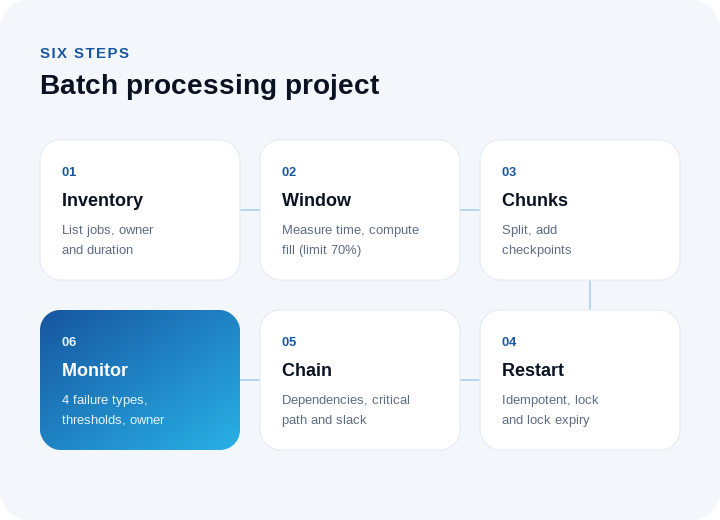
- Inventory: List the jobs: name, owner, frequency, duration, dependencies, who to call on failure.
- Window: Measure duration, compute fill, and flag anything above 70%.
- Chunks: Split long jobs into chunks and checkpoints.
- Restart: Make the job idempotent, add a lock and a lock lifetime, and try a restart deliberately once.
- Chain: Write down dependencies, compute the critical path, and make downstream jobs conditional on upstream success.
- Monitoring: Define signals and thresholds for the four failure types and tie the alert to an owner.
It also matters to keep the schedule rule and the code under version control and pass changes through an automated pipeline; our CI/CD guide completes this.
How Quickly Does a Scheduled Job Pay for Itself?
Representative assumptions: a team spends 40 minutes a day on stock transfers, 60 on bulk invoicing, and 35 on compiling reports; 22 working days a month, an hourly cost of ₺300; 5 errors a month from manual work each need 1.5 hours to fix. Running cost (monitoring and maintenance) is ₺3,000 a month; development is 24 person-days × ₺9,000 = ₺216,000.
Manual work: (40 + 60 + 35) × 22 = 2,970 minutes = 49.5 hours × ₺300 = ₺14,850. Manual error fixing: 5 × 1.5 × ₺300 = ₺2,250. Gross gain is ₺17,100; after running cost, the monthly net is ₺14,100. Payback: ₺216,000 ÷ ₺14,100 ≈ 15.3 months. If only half the gain materializes, net is ₺17,100 × 0.5 − ₺3,000 = ₺5,550 and payback stretches to about 38.9 months. A job without monitoring and restart design hands the time it saved back as night-time firefighting.
We recommend reading: Our software development process: step by step from analysis to launch
We recommend reading: What Is EDI? Electronic Data Interchange, Document Flow, Mapping and Payback Guide
We recommend reading: How to Design Bulk Data Import from CSV and Excel: Validation, Error Report and Rollback Guide
We recommend reading: How to Generate PDF Documents and Labels from Software: Templates, Page Breaks, Barcodes and Payback Guide
We recommend reading: What Is Event-Driven Architecture? Event Types, Outbox, Replay and Payback Guide
We recommend reading: How to Run Integration Operations: Error Queues, Reprocessing and Monitoring Dashboards
We recommend reading: How to Ensure Data Pipeline Reliability and Data Observability: Freshness, Volume, Tests and Payback Guide
Batch Processing and Integration Design with İnovabil
At İnovabil our focus is building bespoke software from scratch: custom software, ERP, CRM, e-commerce, web, mobile, and integration. We do not offer batch processing and scheduled job design as a separate service; but we recommend turning questions such as which jobs run overnight, what the window is, where to resume after a failure, and who gets alerted into written expectations during requirements analysis.
We built CRM, purchasing, and mobile for Avcılar İnşaat; a purchasing system for İZBAN; logistics and shipment planning with wholesale order management for Karyak; and warehouse management plus a complaint and support management system for Sleepy. Send us a short summary of your processes and transaction volume, and let's put together a written scope together.
Frequently Asked Questions
What is batch processing, in short?
It is collecting many records and processing them in groups in one planned run. Overnight invoicing, stock reconciliation, and period reports are typical examples; the result waits until the run finishes.
What is the difference between batch and real-time processing?
Batch runs at set intervals and data stays stale until the next run; real-time processes every event immediately. Shorten the interval and you get micro-batch. The choice depends on the delay you can accept.
If a nightly job crashes, do I have to start over?
Without checkpoints, yes. If the job is split into chunks and progress is saved after each, only the failing chunk is repeated. In the example, a failure at record 700,000 costs 316.7 minutes when restarting from scratch and 201.7 minutes with checkpoints.
Why do idempotent jobs matter?
Restarts and manual repeats can run a job a second time. An idempotent job leaves the same result for the same input, so no duplicate invoices or double stock deductions appear. A job key, a unique constraint, and writing the result achieve this.
How do I know a scheduled job did not run?
An error alert alone is not enough. Set an alarm if no heartbeat arrives within a set time after the start, and alert as well when duration exceeds 1.5 times the expectation or the processed record count falls outside the normal band.