

An hour before the board meeting, the sales director asks for revenue by dealer and region for the last three years. The report runs on the order system's own database, takes forty seconds, and the dealers entering orders at that moment notice the screen slowing down. When the result arrives, it differs from finance's figure by thirty thousand lira. This is not a software bug; it is the classic symptom of a missing data warehouse: the same place is being used both to run the day-to-day business and to analyze it.
In this guide we answer what a data warehouse is, how it differs from a database and a data lake, why it is kept apart from the transaction system, how a star schema is built, how ETL differs from ELT, how to decide on data quality and refresh frequency, what a worked sizing and timing example looks like, what it costs and how fast it pays back, a six-step setup and when you do not need a warehouse at all. All example figures are representative; they are not the performance of a specific product or an industry average.
What Is a Data Warehouse?
A data warehouse is a database designed only for reading and analysis, in which data pulled from a company's order, stock, invoice and customer systems is stored in one place, with consistent definitions and with its history. Nothing is written back to the source systems; the warehouse does not replace them, it is fed by them.
There are two ways of working, and the difference matters. OLTP (transaction-oriented) systems write individual records quickly: saving an order, reducing a stock level. OLAP (analysis-oriented) systems read and total large numbers of records: summing three years of revenue by region. When the two compete inside the same database, both usually lose. The warehouse separates the second job from the first and forms the ground for business intelligence (BI) dashboards.
We recommend reading: Our business intelligence and reporting service
What Is the Difference Between a Database, a Data Warehouse and a Data Lake?
All three store data, but they answer different questions: the database serves "what is happening now", the warehouse "what happened and why", and the lake "what could we extract later from the raw data we hold".
| Topic | Transaction database | Data warehouse | Data lake |
|---|---|---|---|
| Purpose | Run daily operations | Reporting and analysis | Store raw data, exploration |
| Data | Current, detailed | Cleaned, with history | Raw; tables, files, text |
| Typical operation | Many short writes | Few long reads | Flexible reads and processing |
| Schema | Defined when writing | Defined when loading | Defined when reading |
| User | Application and staff | Manager, analyst, dashboard | Data scientist, engineer |
| Risk | Report load slows operations | Setup and loading effort | Disorder can build up |
Most mid-sized companies need a small, well-designed warehouse rather than a lake. We covered the differences between database families in our guide to choosing a database.
How Does a Data Warehouse Separate Reporting Load From the Transaction System?
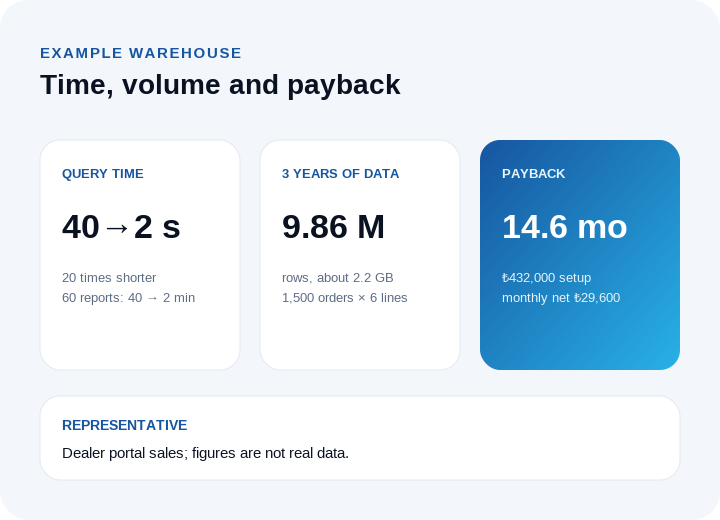
The warehouse takes heavy queries off the transaction database and runs them on itself, so the user entering an order never feels a report running. Let us make it concrete. Suppose the dealer portal receives 1,500 orders a day and each order has 6 lines on average: 1,500 × 6 = 9,000 lines a day, 9,000 × 365 = 3,285,000 lines a year and 9,855,000 lines in three years.
In the portal's transaction database, a three-year revenue report by dealer and region takes 40 seconds because the data has to be joined across nine tables. Managers run 60 reports of this kind during the day. In the transaction database that is 60 × 40 s = 2,400 s, or 40 minutes of heavy query load, and while a report runs, saving one order takes 1.8 s instead of 0.3 s (representative; 1.8 ÷ 0.3 = 6 times). In the warehouse the same report returns in 2 seconds in pre-summarized form: 60 × 2 s = 120 s, or 2 minutes, with zero load on the transaction system. Report time shrinks by 40 ÷ 2 = 20 times.
Most of this speed-up comes not from volume but from the warehouse's model: the tables are joined and totaled in advance.
What Is a Star Schema and How Is a Warehouse Modeled?
A star schema keeps the measured event (the fact table) in the middle and the information that describes it (the dimension tables) around it; it gets its name from the star-like shape. The fact table carries numeric measures and the keys that link to dimensions; the dimension tables answer "who, what, where, when".
| Table | Type | Contents (dealer portal example) | Example size |
|---|---|---|---|
| Sales line | Fact | Quantity, amount, discount; dimension keys | 9,855,000 rows (3 years) |
| Date | Dimension | Day, week, month, quarter, year | 1,095 days |
| Dealer | Dimension | Dealer code, name, region, tier | 500 dealers |
| Product | Dimension | Product code, name, category, brand | 4,000 products |
| Region | Dimension | Region name, sales manager | 12 regions |
In this model the question "revenue by month and region" joins the fact table to the date and region dimensions and sums it, which needs far fewer joins than the nine-table transaction schema. Fix the grain up front: decide what one row of the fact table represents, an order or an order line. For the definition of the indicators themselves, see our KPI guide.
ETL or ELT: How Is Data Loaded Into the Warehouse?
Both move source data into the warehouse; the difference is where the transformation happens. In ETL, data is first extracted, transformed in an intermediate layer and then loaded. In ELT, it is loaded first and transformed inside the warehouse itself.
| Topic | ETL | ELT |
|---|---|---|
| Where transformation happens | Intermediate layer, before loading | Inside the warehouse, after loading |
| Raw data | Usually does not enter the warehouse | Stays in the warehouse as a raw layer |
| Strength | Clean data on entry, masking personal data before loading | Speed, flexibility, recalculating after a rule change |
| Fits when | Few sources, stable rules | Many sources, rules that change often |
With either route, access to the source is usually built on the existing applications' API integration layer or on read access to the database. For how personal data fields may be stored in a warehouse, consult your legal advisor.
How Do You Ensure Data Quality and a Single Source of Truth?
A warehouse becomes a "single source of truth" only if it cleans the data and ties it to one definition; copying alone just multiplies the source's errors. Let us illustrate two typical problems.
- Duplicate records: The portal, ERP and CRM together hold 520 dealer records, but there are really 500 dealers. That is 20 duplicates, or 20 ÷ 520 ≈ 3.8%. If they are not cleaned, one dealer's revenue is split across two records and the dealer ranking comes out wrong. The fix is to keep a single dealer key in the warehouse and map the source codes to it.
- Definition difference: The sales report shows ₺8,420,000 and the finance report shows ₺8,390,000; the gap is ₺30,000. The cause is that the sales report counts 12 cancelled orders: 12 × ₺2,500 = ₺30,000. In the warehouse "revenue" is defined by a single rule (cancellations excluded) and every dashboard uses that definition.
Quality checks should be part of the loading pipeline: does the row count match the source, does the amount total reconcile, are mandatory fields filled? A load that fails the checks is not published, and the owner gets a notification. The reconciliation logic from our data migration guide, comparing records and balances, works here unchanged.
How Often Should a Data Warehouse Be Refreshed?
Refresh frequency answers the question "how fresh does this data need to be"; more often is not automatically better, because frequency brings cost and operating load.
| Frequency | Lag | Suitable use | Cost and load |
|---|---|---|---|
| Daily (overnight) | Up to 24 hours | Monthly and weekly management reports, dealer performance | Low |
| Hourly | Up to 1 hour | Intraday sales dashboard, stock view | Medium |
| Near real time | Minutes | Operations screen, oversell alert | High; needs an event-based flow |
The big difference is between full loading and incremental loading. In the example, a full load moves all 9,855,000 rows again each time; an incremental load moves only that day's 9,000 rows. 9,855,000 ÷ 9,000 = 1,095 times fewer rows. At a loading speed of 5,000 rows/s, a full load takes 9,855,000 ÷ 5,000 = 1,971 s ≈ 33 minutes and an incremental load takes 9,000 ÷ 5,000 = 1.8 s (representative; validation steps are added on top). Incremental loading requires that the source has a reliable "last modified" field or similar tracking. For near-real-time needs, the source system has to emit change events.
How Does the Size of a Data Warehouse Grow?
The size of the warehouse is set by the row count of the fact table and the row width. Take a row at 150 bytes on average, plus 50% extra for indexes and summary tables. Three years of data: 9,855,000 × 150 bytes = 1,478,250,000 bytes ≈ 1.48 GB; with the 50% allowance, 1.48 × 1.5 ≈ 2.2 GB. Yearly growth: 3,285,000 × 150 × 1.5 ≈ 0.74 GB. In five years that is 16,425,000 rows and about 3.7 GB.
This volume is small for a modern database. So in this example it is not storage but separation, multi-source joining and a single definition that justify the warehouse.
How Are the Cost and Payback of a Data Warehouse Calculated?
Cost consists of setup effort, annual running cost and infrastructure; benefit is the value of time spent and of fixing wrong figures. The assumptions are representative: setup 40 person-days × 1.2 uncertainty allowance = 48 person-days; daily rate ₺9,000; maintenance 15% a year; infrastructure ₺48,000 a year; hourly cost ₺300.
| Item | Calculation | Amount |
|---|---|---|
| Setup | 48 person-days × ₺9,000 | ₺432,000 |
| Annual maintenance | ₺432,000 × 15% | ₺64,800 |
| Annual infrastructure | Fixed | ₺48,000 |
| Monthly running cost | (₺64,800 + ₺48,000) ÷ 12 | ₺9,400 |
| Report preparation saving | 20 reports × 6 h × ₺300 | ₺36,000/month |
| Reconciliation saving | 10 h × ₺300 | ₺3,000/month |
| Monthly net benefit | ₺39,000 − ₺9,400 | ₺29,600 |
Payback time is the initial investment divided by the monthly net benefit: ₺432,000 ÷ ₺29,600 ≈ 14.6 months. The net gain over three years is ₺29,600 × 36 − ₺432,000 = ₺633,600. If the benefit estimate turns out 30% too high, the gross benefit is ₺39,000 × 0.7 = ₺27,300, the monthly net is ₺17,900 and payback becomes ₺432,000 ÷ ₺17,900 ≈ 24.1 months. So the decision is sensitive to the estimate; recalculate with your own report counts and hourly cost. For the general logic of cost items, see our software project cost guide.
How Is a Data Warehouse Set Up in Six Steps?
Projects that try to collect all the data at once stall; starting with a single business question and expanding is safer.
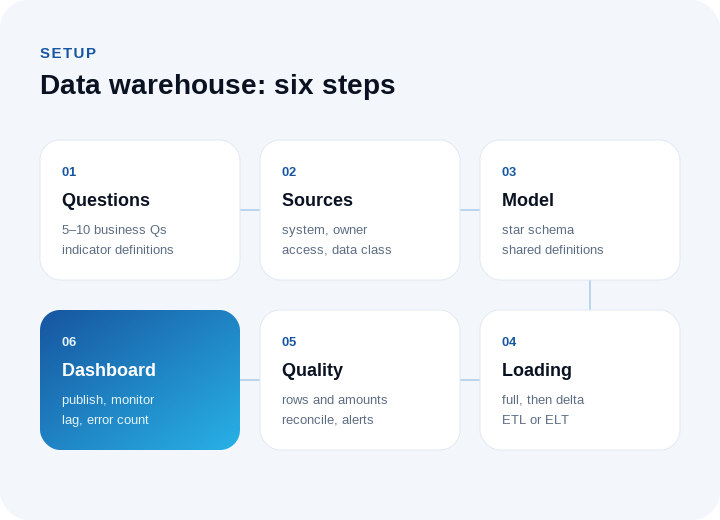
- Write down the business questions: The five or ten questions the dashboards must answer, and their indicator definitions.
- Inventory the sources: Which system holds which data, who owns it, how it is read; access rights and data class.
- Draw the model: The grain of the fact table, the dimensions and shared definitions (revenue, active dealer).
- Build the loading pipeline: A first full load, then an incremental flow; the ETL or ELT decision.
- Check the quality: Row and amount reconciliation, duplicate rules, error notification.
- Dashboards and monitoring: Publish the dashboard; monitor load time, lag and error count.
A single sales warehouse and three or four dashboards are enough for the first release. Write down backup and restore from the start; the warehouse is a system too. The RPO and RTO definitions in our data backup guide help with the method.
When Do You Not Need a Data Warehouse?
Not every company needs a warehouse, and an unnecessary one is one more system to operate. The table below summarizes when the need arises.
| Situation | Warehouse needed? | Lighter alternative |
|---|---|---|
| One system, a few fixed reports | No | The system's own reports |
| One system, heavy reports slow work down | Often no | Read replica, indexes and summary tables |
| Several systems, inconsistent figures | Yes | — |
| History gets deleted in the sources | Yes | — |
| Managers decide with dashboards | Often yes | Single-source dashboard first |
A practical rule: if figures do not agree across sources or reports slow down operations, consider a warehouse; otherwise first improve the existing reports and indexes.
What Mistakes Are Common With Data Warehouses?
- Starting without questions: If it is not clear what will be answered, the warehouse becomes a store where everything is collected and nothing can be found.
- Skipping quality checks: Loading without reconciliation just carries inconsistent figures into the warehouse.
- Not writing down definitions: Definitions such as "revenue" and "active dealer" should be written in one place, together with their owner.
- Leaving the warehouse without an owner: If nobody watches load errors, the dashboard silently starts showing old data.
We recommend reading: What is B2B e-commerce? Dealer portal, pricing and setup guide
We recommend reading: What Is RFM Analysis?
We recommend reading: How to Do Demand Forecasting: Moving Average, Exponential Smoothing, Seasonality and Error Metrics Guide
We recommend reading: What Is Multi-Company ERP? Intercompany Transactions, Eliminations and Consolidation Guide
We recommend reading: What Is Master Data Management (MDM)? Duplicate Records, Golden Record and Data Quality Guide
We recommend reading: How to Design Dashboards and Data Visualization: Chart Choice, Truncated Axes, Color and Payback Guide
We recommend reading: How to Improve Database Indexing and Query Performance: An Index, N+1 and Slow Query Guide
We recommend reading: What Is Data Masking and Anonymization? Test Data, Pseudonyms, k-Anonymity and Payback Guide
We recommend reading: How to Set Up Self-Service Reporting: Semantic Layer, Certified Data, Access Control and Payback
We recommend reading: How to Set Up a Data Archiving and Retention Policy: Data Tiers, the Archive Rule, Legal Hold and Deletion Guide
We recommend reading: How to Set Up Data Governance: Roles, Critical Data Elements, Quality Rules and a 90-Day Plan
We recommend reading: How to Ensure Data Pipeline Reliability and Data Observability: Freshness, Volume, Tests and Payback Guide
Data, Reporting and Custom Software With İnovabil
At İnovabil our focus is building software from scratch, specific to your company: custom software, ERP, CRM, e-commerce, web, mobile and integration; business intelligence and reporting are part of our service range too. We suggest settling the need for a data warehouse in the analysis phase, by writing down the sources, indicator definitions and refresh frequency. Whether it is really needed is tested against the criteria in the table at that stage.
We have developed CRM, purchasing and mobile for Avcılar İnşaat; a purchasing system for İZBAN; logistics and shipment planning with wholesale order management for Karyak; and warehouse management plus a complaint and support management system for Sleepy. If you are dealing with inconsistent figures across several systems or slowing reports, send us your sources and the five questions you need answered most; let us assess together whether a warehouse is needed.
We recommend reading: Our software development process: step by step from analysis to launch
Frequently Asked Questions
What is a data warehouse, in short, and what is it for?
It is an analysis database in which data taken from several systems is cleaned and stored with one definition and its history. It stops reports from slowing down the transaction system and makes sure everyone looks at the same figure.
What is the difference between a data warehouse and a database?
A transaction database is designed to write and read the current record quickly. A data warehouse is designed to read and total many records, keep history and combine several sources; it does not replace the source systems, it is fed by them.
What is the difference between a data warehouse and a data lake?
A warehouse stores cleaned, modeled data and is meant for reporting. A lake stores raw data as it is and the schema is decided when reading. For mid-sized companies, a small, well-designed warehouse is usually enough to start with.
What is the difference between ETL and ELT?
In ETL, data is transformed in an intermediate layer and then loaded; in ELT it is loaded into the warehouse first and transformed inside it. ELT suits frequently changing rules or a wish to keep raw data; ETL suits few sources and stable rules.
When is a data warehouse unnecessary?
If you use a single system, reports are fast and figures are consistent. For slow reports in a single system, lighter fixes such as a read replica and indexes exist. If figures are inconsistent across several sources or history is being lost, a warehouse makes sense.