

Under one holding, a manufacturing, a sales and a services company operate as separate legal entities, each keeping its books in its own program. At month end the spreadsheets are stitched together to see the group's position, and the companies match the invoices they issued to each other by hand. Multi-company ERP is a way to run several legal entities in a single ERP, hold shared data once, and record intercompany transactions on both sides automatically. The idea this article leads to is consolidation: presenting the group's companies as one whole, with the transactions they made among themselves taken out.
In this guide we cover single versus separate ERP, shared data, intercompany sales and reconciliation, consolidated reporting through eliminations, currency translation, access isolation, the shared service center, cost and payback, and a six-step setup. All sample figures are illustrative. Tax, financial reporting standards and statutory consolidation details belong to your financial advisor (certified accountant) and independent auditor; here we explain only the logic.
What Is Multi-Company ERP?
Multi-company ERP is a setup in which several legal entities work in separate ledgers on one application and database. Each company has its own account balances, invoices, stock and tax records, while master data such as products, customers and suppliers can be held once at group level. We explained what ERP is and its modules in our what is ERP guide.
It should not be confused with multi-tenant architecture, where a software provider serves independent customers on the same application. In multi-company ERP the companies belong to the same group, trade with each other and are reported together.
We recommend reading: Our ERP development service
Single ERP or a Separate ERP per Company?
If the companies share similar products and trade with each other often, a single ERP usually takes less effort; if they are in unrelated sectors, in different countries or about to be sold, separate systems can make sense.
| Topic | Single ERP (multi-company) | Separate ERP per company |
|---|---|---|
| Shared data | Products and customers held once | Re-entered in every system |
| Intercompany transactions | The counter-entry is created automatically | Entered by hand on both sides |
| Consolidated report | Comes out of the system | Merged by hand in spreadsheets |
| Access management | Company-level roles; needs care | Natural isolation inside each system |
| Removing or selling a company | Separating the data takes extra work | Handed over as it is |
| Different sector needs | One product may not fit all | Each company picks what suits it |
| Single point of failure | An outage affects the whole group | An outage stays within one company |
Here is the three-year cost difference with an illustrative example: four companies, 60 users in total, a greenfield setup, and a licence of ₺1,200 per user per month. The month-end manual merge takes 40 hours with separate systems and 8 hours in a single ERP; an hour costs ₺300.
| Item (36 months) | Single ERP | Four separate ERPs |
|---|---|---|
| Licences: 60 × ₺1,200 × 36 | ₺2,592,000 | ₺2,592,000 |
| Setup | ₺450,000 + 4 × ₺60,000 = ₺690,000 | 4 × ₺450,000 = ₺1,800,000 |
| Administration and maintenance | ₺150,000 × 3 = ₺450,000 | 4 × ₺100,000 × 3 = ₺1,200,000 |
| Manual consolidation | 8 h × ₺300 × 36 = ₺86,400 | 40 h × ₺300 × 36 = ₺432,000 |
| Total | ₺3,818,400 | ₺6,024,000 |
The gap is ₺6,024,000 − ₺3,818,400 = ₺2,205,600, so the separate systems cost 36.6% more (2,205,600 ÷ 6,024,000). It comes from setup and administration being repeated four times. Recalculate the items with your own quotes. For the total-cost-of-ownership logic, see our ERP cost guide.
Which Data Should Be Shared and Which Company-Specific?
Data that means the same thing across companies is shared; data with legal and financial consequences stays with the company. Sharing everything breaks isolation, separating everything brings back double entry.
| Data | Suggested structure | Why |
|---|---|---|
| Product card | Shared; price and cost per company | The same product may sell differently in each company |
| Customer / supplier identity | Shared identity; terms, limit, balance per company | An address is updated once, the debt relationship sits with the company |
| Chart of accounts | Shared core; company-specific sub-accounts | Consolidation needs matching codes |
| Warehouse and stock | Per company | Stock belongs to one legal entity |
| Invoices, ledger, tax | Per company | The statutory obligation belongs to the company |
| User identity | Shared; access per company | One person can work in several companies |
The gain from a shared customer card is measurable: 100 shared-customer changes a month take 100 × 4 × 3 min = 1,200 min = 20 hours across four separate systems, and 100 × 3 = 300 min = 5 hours on a shared card. The difference is 15 hours (illustrative).
How Do Intercompany Sales and Transfers Work?
An intercompany sale is one group company selling goods or services to another. The seller books a sale and a receivable, the buyer books a purchase and a payable; the value of multi-company ERP is that one document produces entries on both sides.
- Order: The buying company places the order with the selling company in the system.
- Shipment and invoice: The seller's stock drops, an invoice is issued and a receivable arises.
- Counter-entry: On the buyer's side the purchase and payable open automatically through the document link.
- Goods receipt: Stock is received into the buyer's warehouse; the "in transit" state is tracked between shipment and receipt.
- Intercompany account: Each company keeps a separate intercompany receivable and payable account in the other's name.
The transfer price is the price inside the group; it affects profit distribution and tax outcomes, so it should be tied to a written policy and checked with your financial advisor. In our example company A (a manufacturer) sells goods that cost ₺600,000 to company B (a distributor) for ₺800,000. A's margin on the sale is (800,000 − 600,000) ÷ 800,000 = 25%.
We recommend reading: What is role-based access control (RBAC)? Role design and least privilege guide
How Are Intercompany Balances Reconciled?
Reconciliation confirms that A's receivable from B equals B's payable to A; because both entries come from the same document, the difference should normally be zero.
In the example A invoiced B ₺800,000. B paid ₺500,000; the payment left B's bank but had not reached A's account by period end, so A saw only ₺480,000 of receipts.
| Line | A (receivable) | B (payable) |
|---|---|---|
| Invoice | ₺800,000 | ₺800,000 |
| Payment / receipt | ₺480,000 | ₺500,000 |
| Balance | ₺320,000 | ₺300,000 |
| Difference | ₺20,000 (payment in transit) | |
The difference is ₺20,000 and its cause is the payment in transit. Once A records it, the receivable falls to ₺300,000 and the two balances match. Common causes of differences are exchange rates, posting-date shifts, returns and invoices not yet issued. The system should list open differences, and the month-end close should not finish until the difference is cleared.
How Are Eliminations and the Consolidated Report Prepared?
A consolidated report is obtained by adding up company figures and taking out intercompany transactions. Without the removal the same goods are counted twice: A's sale and B's external sale are, for the group, a single trade.
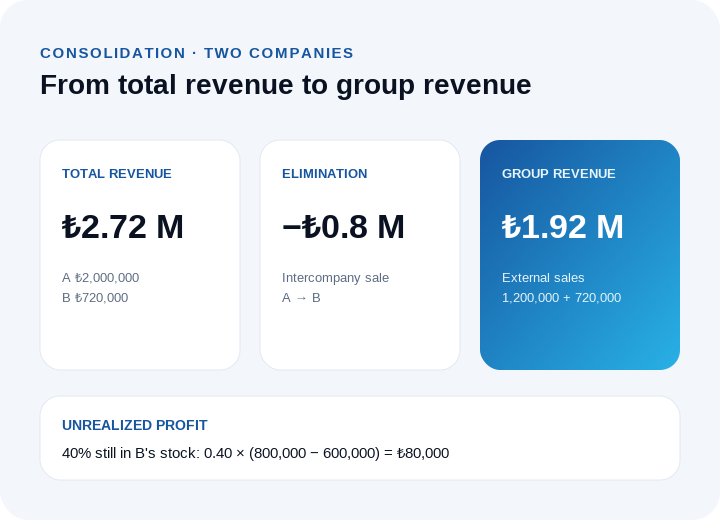
Let us finish the example. Company A's external sales are ₺1,200,000 with a cost of ₺780,000. Its sale to B is ₺800,000 at a cost of ₺600,000. B sells 60% of what it bought to outsiders for ₺720,000; the remaining 40% sits in stock. B's cost for the part sold is 0.60 × 800,000 = ₺480,000.
| Item | A | B | Sum | Elimination | Consolidated |
|---|---|---|---|---|---|
| Sales revenue | ₺2,000,000 | ₺720,000 | ₺2,720,000 | −₺800,000 | ₺1,920,000 |
| Cost of sales | ₺1,380,000 | ₺480,000 | ₺1,860,000 | −₺720,000 | ₺1,140,000 |
| Gross profit | ₺620,000 | ₺240,000 | ₺860,000 | −₺80,000 | ₺780,000 |
| Stock at B (bought from A) | — | ₺320,000 | ₺320,000 | −₺80,000 | ₺240,000 |
Let us verify the arithmetic:
- Revenue: A's ₺2,000,000 is ₺1,200,000 external plus ₺800,000 intercompany. 2,720,000 − 800,000 = ₺1,920,000 (= 1,200,000 + 720,000).
- Cost: 1,860,000 − 800,000 (intercompany purchase) = 1,060,000; adding the unrealized profit of 80,000 gives 1,140,000. Direct check: 780,000 + 0.60 × 600,000 = ₺1,140,000.
- Unrealized profit: for the 40% in B's stock, A's profit is 0.40 × (800,000 − 600,000) = ₺80,000. The group has not sold these goods outside yet, so stock is written down to cost: 0.40 × 600,000 = ₺240,000.
- Gross profit: 1,920,000 − 1,140,000 = ₺780,000; the gap to the sum is 860,000 − 780,000 = ₺80,000.
The tax effect of unrealized profit and the form of statutory consolidated statements belong to your financial advisor and independent auditor. The ERP's job is to apply eliminations automatically from document links and keep them traceable. If you also need a separate store for analysis, our data warehouse guide is a complement.
How Do Currency and Translation Work?
If a group company keeps books in another currency, its figures are translated into the reporting currency before consolidation. The general logic: income and expenses are translated at the period's average rate, balance sheet items at the closing rate, and the difference accumulates separately in equity. Which rate applies to which item is set by the standards and the auditor.
Illustrative example: a foreign company's net assets are €100,000 with no movement in the period; the opening rate is 34 and the closing rate 36 (not current rates). At opening 100,000 × 34 = ₺3,400,000, at closing 100,000 × 36 = ₺3,600,000. The ₺200,000 between them comes from the exchange rate, not from the company's performance, and is tracked as a translation difference. This needs a dated rate table.
How Are Access and Per-Company Data Isolation Set Up?
A user can work in several companies, but access to any company's data should never be the default. Access is granted along three dimensions: user, company and role. Company separation should be enforced at query level; a screen filter alone can leak data.
Example: of 60 users, 48 work in one company and 12 work in the shared service center and reach four companies. With company-level assignment the total number of access records is 48 + 12 × 4 = 96. Opening all four companies to every user would mean 60 × 4 = 240 records; the difference (240 − 96) ÷ 240 = 60%, and unnecessary data access falls by the same proportion. For role design see our role-based access control guide. Sharing personal data between companies is a matter for your legal counsel.
How Does a Shared Service Center Work?
A shared service center brings support work such as accounting, HR or IT into one unit and provides it to the companies as a service. The ERP passes the cost on with an allocation key; the entry is recorded as an intercompany service invoice and is eliminated in consolidation.
Example: the center costs ₺240,000 a month and the key is headcount. The four companies have 40, 30, 20 and 10 employees, 100 in total.
| Company | Employees | Share | Monthly charge |
|---|---|---|---|
| A | 40 | 40% | ₺96,000 |
| B | 30 | 30% | ₺72,000 |
| C | 20 | 20% | ₺48,000 |
| D | 10 | 10% | ₺24,000 |
| Total | 100 | 100% | ₺240,000 |
96,000 + 72,000 + 48,000 + 24,000 = 240,000; the allocation closes exactly. The key should be written down and reviewed once a year; the tax treatment of these charges is for your financial advisor.
How Is the Payback of Multi-Company ERP Calculated?
If you run four separate systems and move to a single ERP, payback = initial investment ÷ monthly net benefit. Illustrative monthly workload: manual consolidation 40 hours (after: 8), shared-card changes across four systems 20 hours (5), intercompany double entry 60 × 10 min = 10 hours (0), reconciliation-difference research 6 hours (1). That is 40 + 20 + 10 + 6 = 76 hours, and afterwards 8 + 5 + 0 + 1 = 14 hours.
The time saved is 76 − 14 = 62 hours; at ₺300 an hour, ₺18,600 a month. Company and access administration in the multi-company setup costs an extra 12 hours (₺3,600); the monthly net benefit is 18,600 − 3,600 = ₺15,000. With a migration and data-merge investment of ₺540,000 the payback is 540,000 ÷ 15,000 = 36 months; if the benefit halves (₺7,500) it is 72 months. The calculation rests on time savings alone. For merging data, see our data migration guide.
We recommend reading: How to choose an ERP? Process map, criteria and demo scenarios
How Is a Multi-Company ERP Set Up?
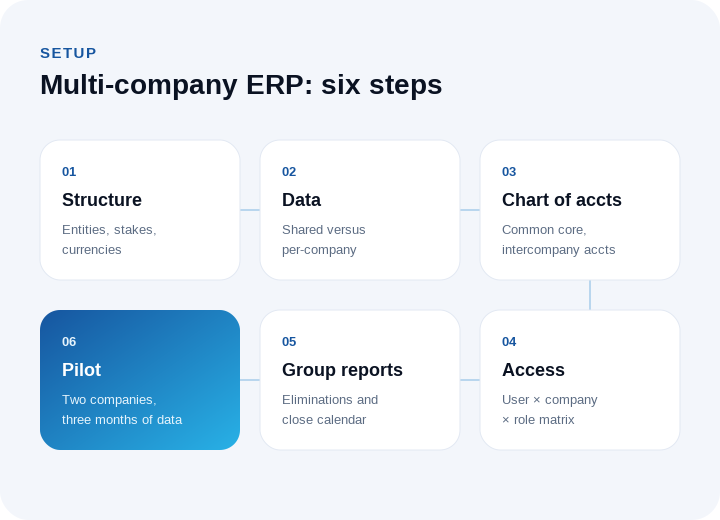
Splitting the setup into six steps reduces risk; the most expensive decisions are the first two.
- Draw the company structure: Write down the companies, ownership stakes, currencies and the intercompany trade flow.
- Decide shared versus per-company data: Adapt the data table to your group.
- Set the chart of accounts and intercompany rules: A common core chart, intercompany accounts, transfer pricing and elimination rules.
- Design access: A user, company and role matrix.
- Define group reports and the close calendar: Which day each company closes and when reconciliation happens.
- Pilot with two companies: Go live with two companies and three months of data, clear the reconciliation differences, then add the others.
For phased go-live and cut-over criteria, our ERP implementation guide helps.
What Are Common Mistakes in Multi-Company ERP?
- Leaving charts of accounts incompatible: With different codes every line is mapped by hand in consolidation.
- Forgetting unrealized profit: Consolidated profit looks higher than it is.
- Ignoring company exit: The data of a company that may be sold must be easy to separate.
We recommend reading: What Is Multi-Currency and Exchange Difference Management? Realized vs Unrealized FX Gains, Revaluation and Matching Guide
Multi-Company and Custom ERP with İnovabil
At İnovabil our focus is custom software built from scratch for your company: custom software, ERP, CRM, e-commerce, web, mobile and integration. For a multi-company setup we decide together whether an off-the-shelf product will do or custom development is needed, after your company structure and intercompany flows are written down in requirements analysis; we do not claim to have a ready multi-company product.
We built CRM, purchasing and mobile for Avcılar İnşaat; a purchasing system for İZBAN; logistics and shipment planning with wholesale order management for Karyak; and warehouse management plus a complaint and support management system for Sleepy. Send a short summary of your company structure and we will compare the single-ERP and separate-system options with their costs.
We recommend reading: Our software development process: step by step from analysis to launch
Frequently Asked Questions
What is multi-company ERP?
A setup in which several legal entities run in one ERP with separate ledgers but a shared data standard and intercompany posting rules. It makes group-level consolidated reporting easier.
What is consolidation, and why are eliminations needed?
Consolidation presents the group's figures as one whole. An intercompany sale shows up on both sides; elimination removes it. In the example total revenue is ₺2,720,000 while consolidated revenue is ₺1,920,000.
What is unrealized profit?
When one group company sells goods to another at a profit and the buyer still holds them in stock, the group has not yet earned that profit. In the example it is ₺80,000.
Is a separate ERP per company better?
It can be when the companies are in different sectors or countries or about to be sold. With shared data, frequent intercompany trade and a need for group reports, a single ERP usually takes less effort. In the example the three-year gap is ₺2,205,600; recalculate with your own figures.
Do tax and statutory consolidated reporting come out of the ERP?
The ERP prepares the data and the elimination entries; the statutory format, standards and tax results are the responsibility of your financial advisor and independent auditor. The calculations here are illustrative examples of the logic.