

A dealer has put a price list into a spreadsheet, the warehouse team has typed up a stock count, the sales team has prepared a customer list. All of them want the same thing: upload the file and get it into the system in a few minutes. Bulk data import from CSV and Excel delivers that, but when it is designed badly it quietly corrupts thousands of records. A good design does not trust the file: it checks every row, shows the result before anything is written, and can undo an upload that went wrong.
This guide covers how to build an import flow for the product, price, customer and stock files your users upload: the flow itself, format traps, validation, the error report, the partial-accept decision, duplicate-upload protection, the update key, chunked processing, rollback and metrics. A one-off move from one system to another is a different topic; we covered it in our data migration guide. All example figures are representative; they are not measurements of a real product or industry averages.
How Does Bulk Data Import from CSV and Excel Work?
The flow has five steps and each step produces an output. The file is never written straight into the tables; it is first loaded into a staging area, checked there, and moved into the real records only after the user approves.
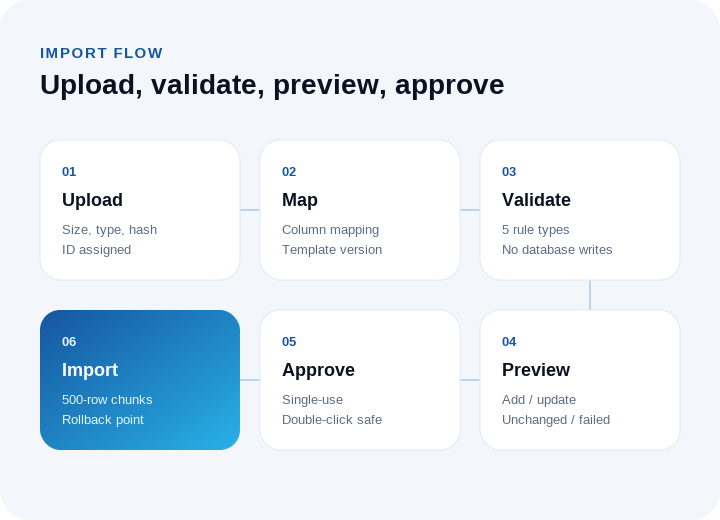
| Step | What happens | Output |
|---|---|---|
| 1. Upload | Size, type and file hash are checked | Import ID |
| 2. Map | File columns are linked to system fields | Column mapping |
| 3. Validate | Every row is checked; nothing is written | Valid and failed rows |
| 4. Preview | Counts of rows to add, update, leave unchanged, and failed | Impact summary |
| 5. Approve and import | Records are written in chunks | Result report, rollback point |
When users see "2,500 new, 2,280 updates, 6,800 unchanged, 420 failed", they notice a wrong file before it is imported.
How Do You Design the Template and Column Mapping?
Giving users a downloadable template and linking columns through an explicit mapping reduces errors more than anything else. The template holds the expected headers, a sample row and the rule for each field (required or not, type, range).
- Versioned template: A file that arrives with an older template is read with that version's rules.
- Header suggestions: If "Sale Price" arrives instead of "Price", the system suggests a match and the user confirms; the mapping is remembered for the next upload.
Why Do Encoding, Delimiters and Number Formats Cause Trouble?
A file that looks identical is read differently depending on the computer's settings. In Turkey the decimal separator is a comma, so the CSV field delimiter often becomes a semicolon; files from other countries do the opposite. The fix is an explicit setting, not a guess: encoding, delimiter, decimal separator and date format are shown in the template and can be changed.
| Trap | What happens | Safeguard |
|---|---|---|
| Character encoding | Saved in an old code page, accented letters turn into garbage | Expect UTF-8; warn on broken characters |
| Field delimiter | A wrong choice turns each row into a single column | Suggest from the first line, show it to the user |
| Decimal and thousands separator | Turkish 1.234,56 and English 1,234.56 get mixed up | Make it a template setting; do not guess |
| Leading zeros | Barcodes and phone numbers become numbers and lose their zeros | Read identifier fields as text |
| Date format | 03/04/2026 can be 3 April or 4 March | Fix the format, preferably 2026-04-03 |
| Invisible whitespace | A trailing space makes the same code look different | Trim text fields |
A price cell reading "1.250" is 1,250 liras under the Turkish rule and 1.25 under the decimal-point rule. The difference is 1,250 ÷ 1.25 = 1,000 times, and nothing warns you. Dates are just as ambiguous: days with a day number of 12 or less where the day differs from the month number add up to 12 × 12 − 12 = 132 per year; 132 ÷ 365 ≈ 36.2%. A third of random dates could be read backwards. The answer is to enforce one format and treat inconsistent rows as errors.
We recommend reading: How to move from Excel to software
Which Rules Should Row-Level Validation Include?
Validation checks every row with five kinds of rules, and all of them run before anything is written to the database.
| Rule type | Question | Example |
|---|---|---|
| Required field | Is it empty? | Product code and price cannot be empty |
| Type and format | Is it the expected type? | Price is a number, date is a valid date |
| Range | Is it within sensible limits? | Price above 0, stock not negative |
| Uniqueness | Is it repeated in the file or the system? | The same product code appears only once |
| Reference | Does the record it points to exist? | Category code is defined in the system |
Asking the database about every row for reference checks is slow; load lists such as categories and units into memory once and check rows against them. Uniqueness inside the file works the same way, with codes held in a set. The key principle is that validation collects all errors; stopping at the first error forces the user into a fix-and-upload loop. For more complex conditions, see our post on business rules engines.
How Do You Build the Error Report?
A good report does not say "your file is invalid"; it says which row and which column failed and why, and it can be downloaded. Each record carries four fields: row number, column name, value found and a clear message.
- The row number must match what the user sees: If the header is row 1, the first data row is row 2 in Excel; the report uses Excel numbering.
- The message should state the fix: "Price must be a number above 0; value found: -5."
- The error file downloads in the original layout: Failed rows come back with an extra "error" column, so the user fixes only those and uploads again.
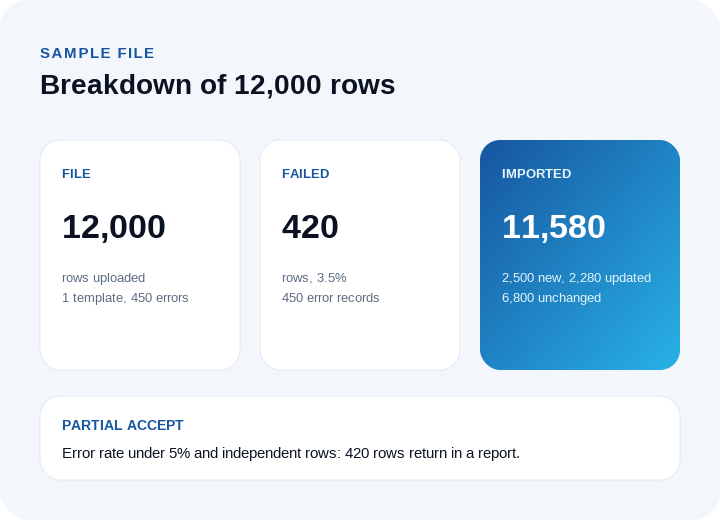
Example: a 12,000-row product file produces 450 errors: required field 180, type 96, range 54, uniqueness 42, reference 78; 180 + 96 + 54 + 42 + 78 = 450. Thirty rows have two errors each, so failed rows are 450 − 30 = 420 and the row error rate is 420 ÷ 12,000 = 3.5%. The top two causes account for (180 + 96) ÷ 450 = 61.3% of errors; fixing them first does most of the work.
All-or-Nothing or Partial Accept?
Importing the valid rows while others fail is a business decision. If rows are independent, partial accept is fast; if they depend on each other, all-or-nothing is safer.
| Situation | Approach | Why |
|---|---|---|
| Independent rows (product or customer list) | Partial accept, failures go to a report | One row does not affect another |
| Linked rows (order header and its lines) | All-or-nothing | A half order creates inconsistent data |
| Files that must reconcile (counts, balances) | All-or-nothing | A missing row breaks the total |
| File above the error threshold | Reject and ask for a new file | High chance of a wrong file or template |
A practical rule: if rows are independent and the error rate is below 5%, offer partial accept; above that, assume the file is wrong and reject it. The 5% threshold is representative. In the example the rate is 3.5%, so 11,580 rows are imported and 420 return in a report; tell the user plainly: "420 rows were not imported."
What Happens If the Same File Is Uploaded Twice?
A user clicks the approve button twice, or uploads the same file again a week later. A file that writes absolute values (prices) gives the same result the second time; a file that writes increments (stock receipts) doubles the effect.
Example: a 2,000-row stock receipt adds 20 units per row and is processed twice. Stock inflates by 2,000 × 20 = 40,000 units; at a unit cost of ₺45, inventory looks ₺1,800,000 too high (40,000 × ₺45).
- File hash: The hash is stored with the user and template; if the same hash was imported before, the system warns and asks for confirmation.
- Single-use approval: An import ID can be approved once; a second click returns the same result.
- Row reference: In increment files, every row carries a unique movement number; the same number is never written twice.
- Absolute values: Where possible write "stock = 120"; "+20" is open to double uploads.
How Do You Choose the Upsert Key?
A key decides whether a row is a new record or an update. It should be a unique, stable field such as a product code, customer number or barcode; names and e-mail addresses can change, so they make poor keys.
- Add if missing, update if present: One file carries both new and changed rows.
- Unchanged rows are not written: If no field differs, nothing is written; the audit log does not bloat.
- Blank cells: "Keep the current value" and "clear the value" are different. Keeping is the default; clearing needs an explicit marker.
In the representative file, the 11,580 valid rows split into 2,500 additions, 2,280 updates and 6,800 unchanged; 2,500 + 2,280 + 6,800 = 11,580. Only 4,780 rows are written; 6,800 ÷ 11,580 ≈ 58.7% of the write work disappears. For price list resolution order, see managing B2B price lists; for keeping product data in a single source, see product information management.
How Are Large Files Processed in Chunks?
Processing in a single request leads to timeouts and memory problems. The fix is to limit file size and split the work into background chunks.
- Size limit: At an average of 220 bytes per row, 12,000 rows ≈ 2,640,000 bytes (2.6 MB). With a 5 MB limit, at most 5,000,000 ÷ 220 ≈ 22,700 rows are accepted; a larger file is rejected in the first step.
- Streaming read and chunked write: The file is read row by row and each chunk is written in its own transaction.
At 8 ms per row write, 12,000 rows take 96 seconds; with a 30-second request timeout it cannot finish in one request. With 500-row chunks that is 12,000 ÷ 500 = 24 chunks of 500 × 8 ms = 4 seconds each. The total is the same, but the work runs in the background and the user sees progress such as "9 of 24 chunks done". For scheduled jobs, see our batch processing post; the difference here is that the user starts the job.
How Do You Roll Back a Bad Import?
Rollback works when every import has an ID and you can find the changes made under it. Added records carry the import ID, and the old values of updated fields are stored under the same ID. On rollback, added records are deleted and updated ones return to their old values.
- Records changed afterwards: Restoring a record that someone edited by hand after the import creates a new error, so these records are listed separately. In the example, if 140 of the 2,280 updates were changed afterwards (≈ 6.1%), rollback restores 2,140 records and leaves 140 to a person.
- Time limit: Define a rollback window (for example 7 days); after that a fix is an ordinary update.
Rollback does not replace backups; for system-wide recovery, see the data backup guide.
Permissions, Audit Log and Export Safety
Because an import changes thousands of records in one click, its permission is granted separately from editing; uploading prices and uploading customer lists sit in different roles (role-based access control). Each import writes one line to the audit log: who, when, which file and template version, how many rows were added, updated and rejected (audit log design). File type and size are limited, the file is never executed on the server, and cell contents are never interpreted as commands; for broader layers, see our API security guide.
Exports need a defence too: if text from a user starts with "=", "+", "-" or "@", a spreadsheet program may treat it as a formula. Prefixing such text cells with an apostrophe, or marking the cell as text, closes the risk. Apply it only to text fields, so that a numeric -50 stays intact.
How Do You Measure Import Success?
Three measures show how well the flow serves users, and all come from the import records.
| Measure | Formula | Example (40 files) |
|---|---|---|
| First-attempt acceptance | Files clean on first upload ÷ total files | 14 ÷ 40 = 35.0% |
| Row error rate | Failed rows ÷ total rows | 420 ÷ 12,000 = 3.5% |
| Average uploads per file | Total uploads ÷ files | (14 × 1 + 18 × 2 + 8 × 3) ÷ 40 = 1.85 |
The most frequent error type shows where the template misleads people; add an explanation there.
How Do You Calculate the Payback of Bulk Import?
The gain is the end of manual entry. The assumptions are representative: 4 files a month, 3,000 rows each (12,000 rows); manual entry takes 1.2 minutes per row; an hour costs ₺300.
- Manual entry: 12,000 × 1.2 = 14,400 min = 240 hours.
- With import: per file 30 min preparation + 20 min upload and approval + error fixing (3,000 × 3.5% = 105 rows × 2 min = 210 min) = 260 min; four files take 1,040 min ≈ 17.3 hours.
- Gain: (240 − 17.33) × ₺300 = ₺66,800 a month.
- Investment and maintenance: 36 person-days × ₺9,000 = ₺324,000; maintenance at 15% a year is ₺48,600, or ₺4,050 a month.
- Payback: ₺324,000 ÷ (₺66,800 − ₺4,050) = ₺324,000 ÷ ₺62,750 ≈ 5.2 months.
If the gain halves, net benefit is ₺33,400 − ₺4,050 = ₺29,350 and payback stretches to about 11.0 months. When volume is low, the investment does not pay back this quickly; a simple template with validation may be enough.
We recommend reading: How to Set Up Address Data Quality and Address Validation: Standardization, Match Score and Payback Guide
We recommend reading: How to Design a B2B Quick Order Screen and Reorder Flow: Line Entry, Case-Pack Rules and Payback Guide
We recommend reading: How to Design and Validate Forms in Business Applications: Fields, Error Messages, Drafts and Payback Guide
Bulk Import with İnovabil
At İnovabil our focus is building custom software from scratch for your company: custom software, ERP, CRM, e-commerce, web, mobile and integration. Which files will be uploaded, who uploads them and what happens to a failed row should be written down during requirements analysis.
We built CRM, purchasing and mobile for Avcılar İnşaat; a purchasing system for İZBAN; logistics and shipment planning with wholesale order management for Karyak; and warehouse management plus a complaint and support management system for Sleepy. Send us a short summary of which data you upload from files; in analysis we will define the template, validation and rollback needs together. For files that contain personal data, KVKK (Turkey's personal data protection law) obligations should be assessed separately with your legal counsel.
We recommend reading: What is API integration?
We recommend reading: Our software development process: step by step from analysis to launch
Frequently Asked Questions
What is bulk data import from CSV and Excel?
It means loading the product, price, customer or stock rows in a user's file into the application in bulk. In a safe design the file is checked in a staging area first, the result is previewed, and writing happens only after approval.
Which errors appear most often in an import?
Empty required fields, number and date format confusion, duplicate codes, and reference errors such as a category or unit that does not exist in the system. In the example, the top two causes make up about 61% of errors.
Should a file be imported when some rows have errors?
If rows are independent and the error rate is low, partial accept works and the failed rows go into a report. For linked files such as orders, or files that must reconcile, all-or-nothing is safer.
What happens if the same file is uploaded twice by mistake?
Without protection, records are processed twice, especially in files that write increments. A file hash check, single-use approval and a row reference prevent this; write absolute values where you can.
Can a wrong import be rolled back?
Yes, if every import has an ID that marks added records and stores the old values of updated ones. Records edited by hand afterwards are not rolled back automatically; they are listed separately.